GenAI Analytics
Gen AI Analytics - AI Intent Insights
Overview
Intent Insights is a GenAI-powered analytics feature that uses GenAI to help you understand what users are asking your chatbot, how often those queries occur, and how effectively your bot is handling them.
It enables you to:
- Identify the top user intents.
- Track answered vs unanswered intents
- Understand query frequency trends
- Measure the quality of bot responses over time
Intent Insights is available as an Early Access (Beta) feature and will continue to improve as we refine the analytics models.
Where to Find Intent Insights
In the Console UI: Bot → Analytics → GenAI Analytics → Intent Insights
If the GenAI Analytics section does not exist for your version or bot, it will be created automatically when the feature is enabled.
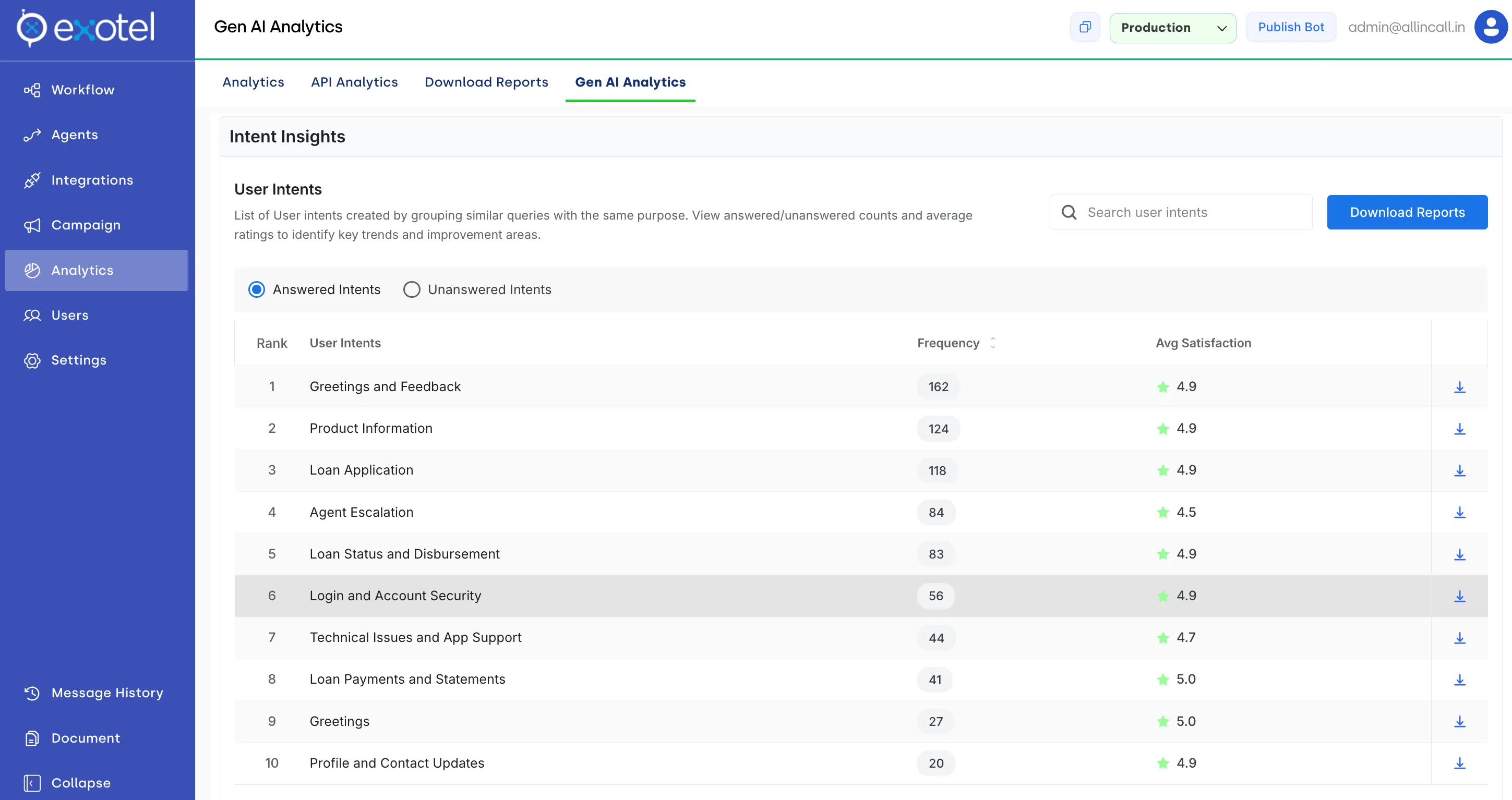
What You’ll See in Intent Insights
Top Intent Insights
This section provides an intent-level view of user queries handled by your bot.
For each query, you can see:
- User Intent - Grouped representation of similar user queries.
- Frequency - Number of times the intent occurred.
- Answered / Unanswered - The user's query mapped to the Answered or Unanswered section based on how the bot handled it.
- Average Satisfaction Score (1 to 5)
You can:
- Sort intents by frequency
- Identify high-impact unanswered intents
- Track performance trends over time
- Search for specific intent or questions
Reports
Intent Insights supports two downloadable reports:
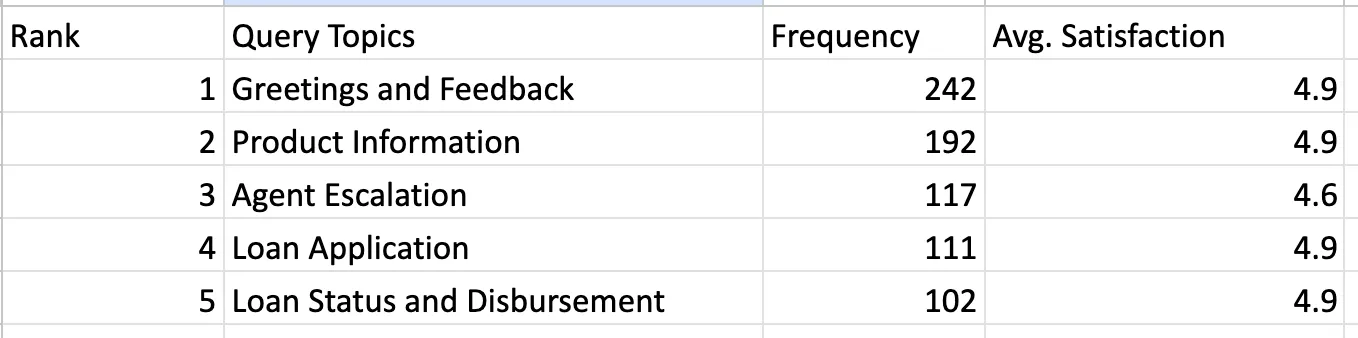
Overall Summary Report
- Contains all query intents (answered and unanswered)
- Includes frequency and average satisfaction score
- Reflects exactly what is shown in the table for the selected date range
Intent-Level Report
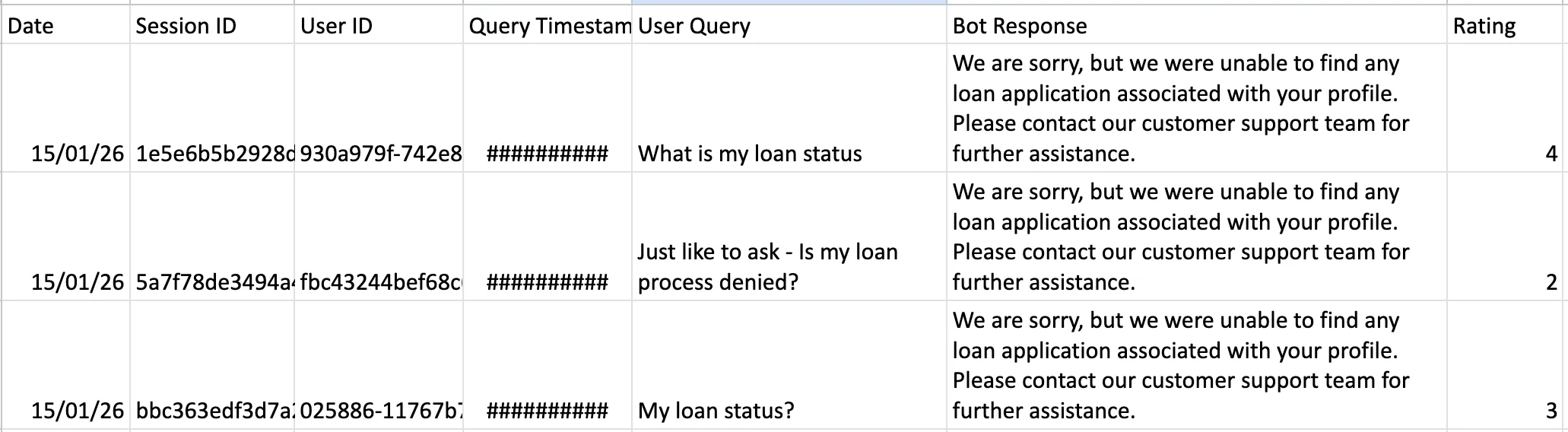
- Available for individual intents that are created in the Analytics.
- The Report includes:
- Actual user queries
- Bot responses
- Timestamps
- Ratings
- Useful for deep analysis and training improvements
- Sample Report:
Note: The reports need to be downloaded separately for Answered & Unanswered Intents, and the data depends on the Data range filter.
Key Definitions
Answered Query
- A query is marked as Answered when the chatbot understands the user’s intent and handles it independently using its configured flows, knowledge, or reasoning without transferring the conversation to a live agent.
Unanswered Query
- A query is marked as Unanswered when the chatbot cannot handle the user’s intent on its own.
- This may happen due to missing training, incorrect or fallback responses, or when the conversation is transferred to a live agent.
- An unanswered query does not always mean a poor experience, it indicates human or system dependency.
Frequency
- Frequency shows how many times a particular query topic was raised by users during the selected time period.
- Similar queries are grouped together to provide a clear view of common user needs.
Average Satisfaction Score
- The Average Satisfaction Score represents how well the chatbot handled a query intent, rated from 1 to 5 across sessions.
- This score reflects response quality and relevance, regardless of whether the user's query was answered or unanswered.
How Intent Insights Works (In Simple Terms)
- Intent Insights runs after a chat session ends (no real-time processing).
- Conversations are analyzed using GenAI to:
- Group similar queries into Intents
- Classify them as Answered or Unanswered
- Assign a quality rating (1 to 5)
This process does not impact live bot performance.
Supported Bot Types
Intent Insights works across all available chatbot configurations, depending on the enablement of the feature in the bot's setup.
Feature Availability & Enablement
- Intent Insights is available as Early Access (Beta) for selected customers.
- It can be enabled at the bot level and not enabled by default.
- Data starts populating from the date of enablement onwards.
- To enable this feature, please contact your Account Manager or Product Team.
Note: Enabling Intent Insights may incur additional costs based on your setup.
Known Limitations (Beta)
- Insight's accuracy will improve over time as models and prompts are refined.
- Analytics are post-session (not real-time).
- The feature does not auto-train the bot, manual improvements are required.
Downloading and reading Intent Insights reports
Where to find it. Open the bot, go to Analytics, then the Gen AI Analytics tab (or the Gen AI Analytics button on the Analytics page). Intent Insights lists User Intents, which are groups of similar queries with the same purpose.
The table.
Column | Meaning |
|---|---|
Rank | Position by frequency in the selected date range |
User Intents | A GenAI-created label for a group of similar queries. It is not an intent you configured in the bot |
Frequency | How many queries fell into the group. Click the column to sort |
Avg Satisfaction | Average rating from 1 to 5 for how well the bot handled the group |
Use the Answered Intents and Unanswered Intents options above the table to switch lists, and the search box to find an intent or question.
Two ways to download.
- Overall report: click Download Reports at the top right. It exports the intents in the table for the selected date range [with columns Rank, User Intent, Frequency, Avg Satisfaction, and a status column: confirm]. Answered and Unanswered are downloaded separately.
- Intent-level report: click the download icon at the end of an intent's row. It exports every query in that intent.
Intent-level report columns.
Column | Meaning |
|---|---|
Date | Day of the query |
Session ID | One chat session. Rows sharing a Session ID are one conversation, so read them in order |
User ID | Anonymous user identifier |
Query Timestamp | Time of the query. If it shows as ####, widen the column |
User Query | What the user typed, as sent |
Bot Response | What the bot replied. Tags such as bold markers are display formatting |
Rating | GenAI quality rating from 1 to 5 for that response |
How to read the reports.
- Sort the Unanswered list by Frequency to find the biggest coverage gaps.
- In the Answered list, look for high-frequency intents with a score below about 4: the bot answers but not well.
- Download the intent-level report and read the queries with ratings below 4. Group them by Session ID to see whether the user had to repeat or clarify.
- Add training questions, an FAQ or a flow for the gaps, then compare the same date range next week.
- Watch Avg Satisfaction over time rather than a single day.
Best Practices
- Review high frequency unanswered intents weekly by downloading the individual Intent-Level Report for the low rating Intents.
- Understand the type and way the queries are asked by the users and train them on the bot.
- See the cases where the bot does not have an answer for the frequently asked queries, and add them to the flows or FAQs.
- Check for any anomaly in the patterns in a sudden bump in the spike, negative rating for a previously working flow, and fix them -
- This may be due to unhandled edgecases on the bot flows.
- API issues - Delays, Timeouts, etc.
- Any changes done in the existing flows.
- Track satisfaction score trends to measure improvement on the bot.
Frequently Asked Questions
Does this affect live bot performance? No. All analysis happens after the session ends.
Can short answers still receive high scores? Yes. Ratings are based on correctness and relevance, not response length.
Does this replace existing analytics? No. Intent Insights complements your existing analytics.