Chatbot Billable Sessions
Overview
Billable Sessions is a usage metric now available on the platform to provide visibility into chatbot interactions at a session level.
This feature enables users to:
- View total billable sessions per bot
- Track session-level interaction data
- Access detailed breakdowns via message history and exports
What is a Billable Session?
A Billable Session is a unit of interaction that begins with a user-initiated message and represents an active engagement between the user and the chatbot.
It groups all interactions within a defined activity window into a single session, which is used for tracking and billing purposes.
Definition and Rules
A new Billable Session is created when any of the following conditions occur:
- Inactivity Timeout
- A new session is created if there is 15 minutes of inactivity from the user.
- Conversation Restart
- A new session is triggered when the interaction is restarted, such as:
- Page reload or refresh
- App reload
- Reopening the chatbot
- Live Chat Closure
- When a live chat is:
- Marked as resolved by the agent
- Ended by the user
This is considered the end of a session, and any new interaction will start a new billable session.
Outbound Campaign Behavior (WhatsApp)
- An outbound campaign message without any user response is not counted as a billable session.
- A billable session is created only when the user replies, and:
- The bot responds with a flow
- Or even a default/fallback message
Conversation ID vs Billable Session ID
Conversation ID
- Previously referred to as Session ID, now renamed to Conversation ID on the console, represents a continuous conversation thread.
- Logic remains unchanged: Valid for 1 day but differs for channels.
- Website, Android & iOS: The conversation ends at the night at 12:00 AM IST for every chat.
- Example: Conversation for the Chat initiated at - Day 1, 10:00 AM will end at Day 1, 11:59:59 AM. It can consist of multiple Billable session in this single Conversation.
- WhatsApp: The conversation is active for net 24H from when the first message was sent by the user.
- Example: Conversation for the Chat initiated at Day 1, 3:00PM will end at Day 2, 2:59:59 PM. It can consist of multiple Billable session in this single Conversation.
Billable Session ID
- Represents a individual billing unit.
- Group interactions based on activity windows and defined triggers inside a conversation.
Relationship
- A single Conversation ID can contain multiple Billable Sessions
- Billable Sessions are subsets within a conversation, split based on inactivity or restart conditions
Key Concepts
Concept | Description |
|---|---|
Conversation ID | Tracks the overall conversation thread (1-day window) |
Billable Session ID | Tracks chargeable interaction windows within a conversation |
Session Trigger | Events that create a new billable session (timeout, restart, chat closure) |
How It Works (Examples)
Example 1: Continuous Interaction
Time | Action |
|---|---|
10:00 | User sends message |
10:05 | User continues interaction |
10:05 | Bot responds |
10:30 | User continues interaction |
Result:
- 1 Conversation ID
- 1 Billable Session
Example 2: Inactivity Split
Time | Action |
|---|---|
10:00 | User sends message |
10:10 | Interaction continues |
10:30 | User sends new message |
Result:
- 1 Conversation ID
- 2 Billable Sessions (due to >15 min inactivity)
Example 3: Page Refresh
Time | Action |
|---|---|
10:00 | User starts interaction |
10:05 | User refreshes the page |
10:06 | User sends a new message |
Result:
- 1 Conversation ID
- 2 Billable Sessions (restart triggered)
Example 4: Campaign Interaction
Scenario | Result |
|---|---|
Campaign sent, no reply | No session |
User replies to campaign | Session starts |
Bot responds | Billable session counted |
Example 5: Live Chat Closure
Time | Action |
|---|---|
10:00 | User starts chat |
10:05 | Agent joins |
10:20 | Chat resolved |
10:21 | User sends a message |
Result:
- 1 Conversation ID
- 2 Billable Sessions (closure triggered)
Where Can You See Billable Sessions?
- Analytics Dashboard
- Open Chatbot > Analytics > Combined Analytics > On the Usage Bar
- View total Billable Sessions
- Available at the bot level for the selected date range
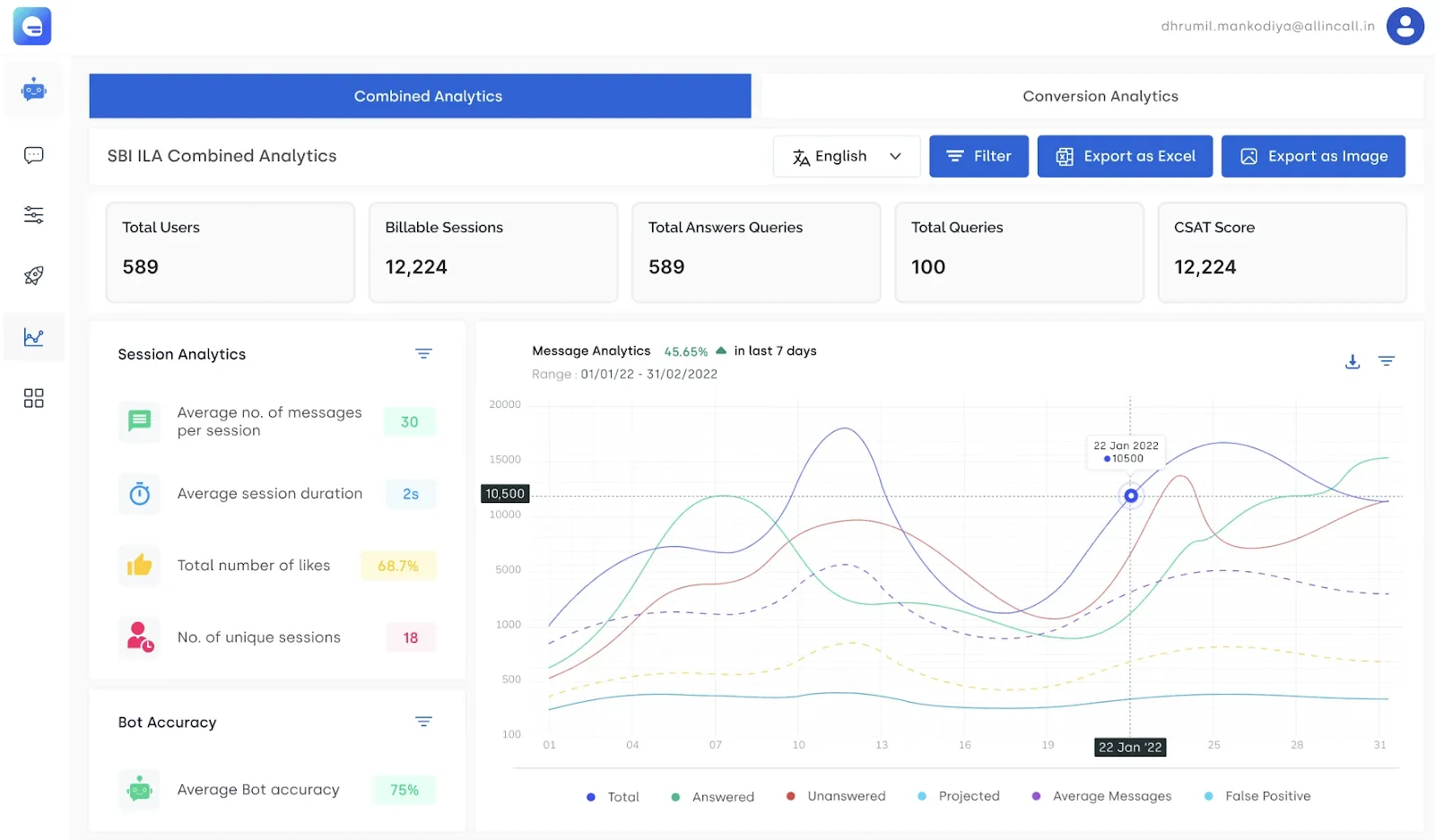
- Message Histoy
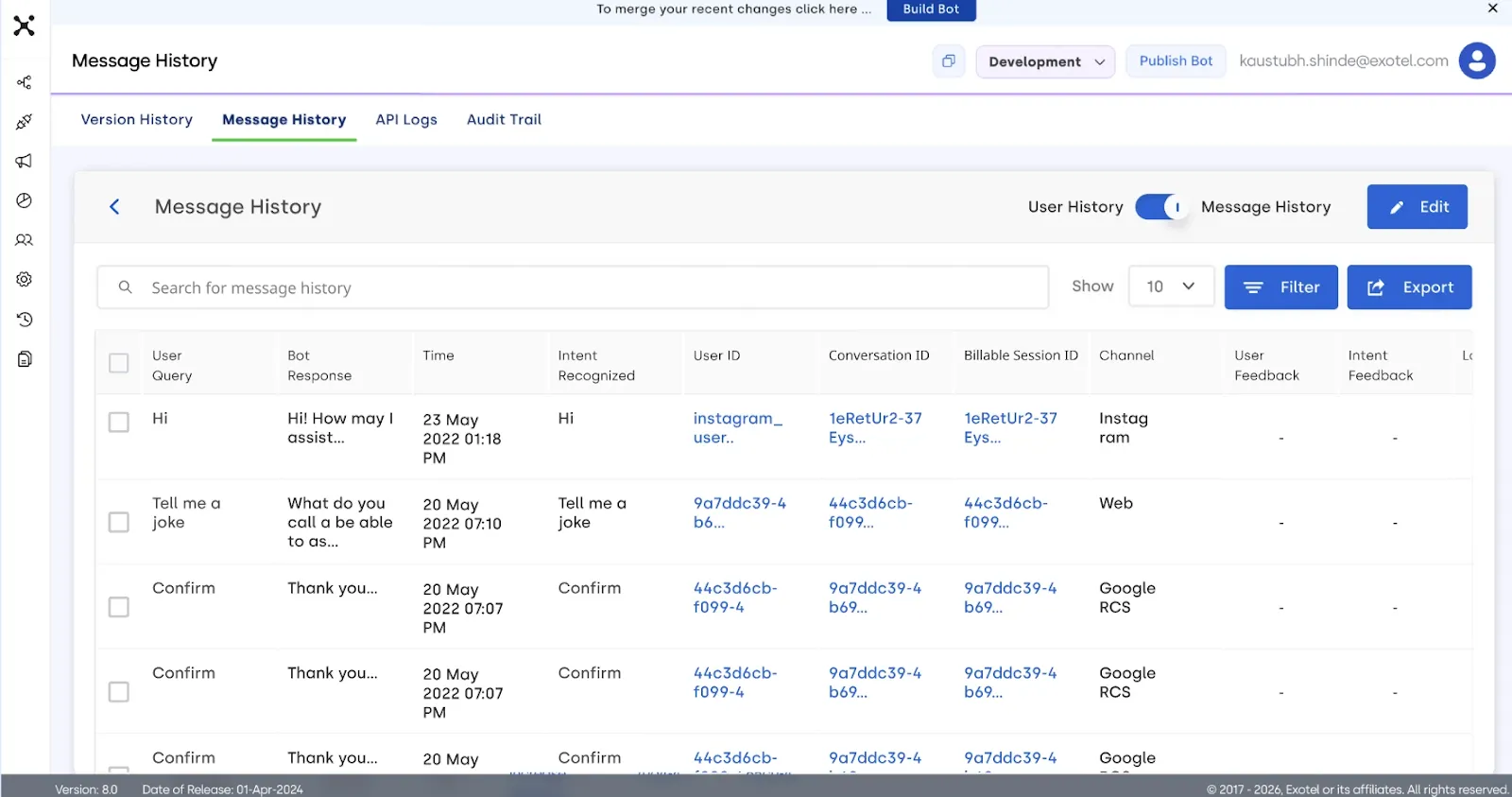
User Chat History
Go to Chatbot > Message History from LHS > Switch to Message History > See the User chat table
Enhanced with:
- Conversation ID (renamed)
- Billable Session ID (new)
This allows:
- Tracking of user interactions
- Identification of session grouping
Export Reports
- Downloadable message history reports include:
- Conversation ID
- Billable Session ID
- Chat-level data