Smart Flow Assist (GenAI for NLP)
Turn Your Existing Bots into AI-Powered, Human-Like Experiences with a Single Switch
Chatbots were built to follow structured flows, but Users were not.
People type in sentences. They ask questions mid-flow. They change their minds. They provide details in conversational formats. Traditional NLP bots struggle in these situations, often repeating the same question or breaking the flow entirely.
That’s exactly why we built Smart Flow Assist.
What is Smart Flow Assist?
Smart Flow Assist is an AI-powered enhancement that upgrades your existing NLP bots into contextual, conversational assistants without rebuilding your flows.
It works across all text-based input fields, including:
- Name
- Phone
- PAN
- Aadhaar
- Custom validations
- And other structured inputs
- Buttons - Quick Reply, Confirmation, & Choices (live by Mid-March)
It intelligently understands user responses, corrects recoverable errors, handles objections, and keeps conversations moving while preserving your existing validations, APIs, and routing logic, and still lets NLP control the flow.
No migration. No redesign. No change in business logic. Just smarter conversations.
How Smart Flow Assist Works
At every step where user input is expected, your bot already has:
- A question message
- A validation logic (regex / API / custom processor)
- A next-step rule
When traditional NLP fails to interpret an input, Smart Flow Assist steps in.
It uses:
- The bot’s message: The question or message asked by the bot on the current step.
- The user’s response: The user's message provided to the Bot's message.
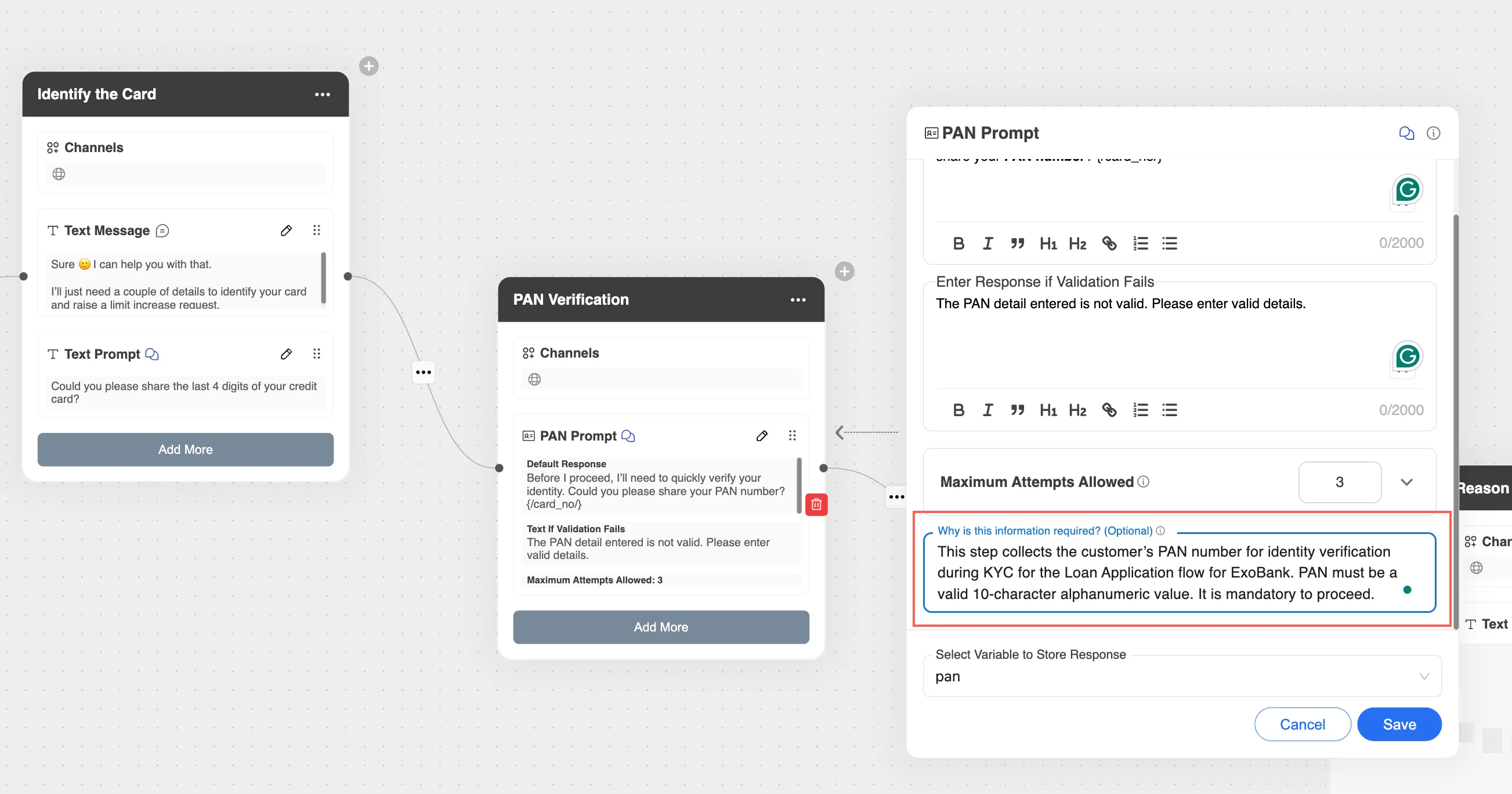
- Why is this information required?: A Node Description, which is a text input field to be provided while building the bot flows, which has details about what the input is, why it’s needed, and how it’s validated.
The AI then determines whether the input is:
- A recoverable, valid entry (e.g., phone in sentence format, or manually entered entry of a Button text)
- A clarification or objection, or a lost user.
- A context switch to another flow, storing the context, and resuming back
- Or truly invalid
It corrects, explains, routes, or resumes without breaking the journey.
Your deterministic logic remains the primary layer. Smart Flow Assist acts as an intelligent recovery layer.
Before vs After: Real Examples
Example 1: Phone Number Collection
Before
- Bot: “Please enter your phone number with country code.”
- User: “My number is 9876543210.”
- Bot: “Invalid input. Please enter a valid phone number.”
After
- Bot: “Please enter your phone number with country code.”
- User: “My number is 9876543210.”-
- AI extracts the number, applies the default country rule, and continues the flow.
No friction. No repetition.
Example 2: Objection Mid-KYC
Before
- Bot: “Please enter your PAN.”
- User: “Why do you need this?”
- Bot: Repeats the same question or fails.
After
- Bot: “Please enter your PAN.”
- User: “Why do you need this?”
- AI uses configured explanation and responds: “We require PAN for identity verification as part of regulatory compliance.”
- Then continues the flow.
Example 3: Context Switch
Before
- User in Credit Card flow types: “I want to apply for a loan instead.”
- Bot: Invalid input, and ask the same credit flow question.
After
- AI detects context switch.
- Confirms to the user that they are leaving the flow and routing to the Loan flow - " I am pausing the current Credit Card Application flow. Please provide your Loan requirement?"
- If the user returns, resumes exactly where they left off.
Feature Walkthrough Video
What Has Improved?
Smart Flow Assist enables:
- Intelligent entity extraction from conversational inputs or mistakes.
- Graceful objection handling or user questions about the flows.
- Mid-flow topic switching by acknowledging it to the user.
- Resume from paused journeys by preserving the past details of the session.
- Fewer hard validation failures.
- Reduced drop-offs.
All without modifying your existing flow logic.
Benefits
- Higher completion rates & reduced abandonment.
- More human-like conversations inside the NLP flows.
- Better handling of real-world user behavior.
- No bot rebuild or migration required.
- Instant AI upgrade with a single toggle.
It transforms rigid NLP bots into contextual assistants.
Reporting & Visibility
Smart Flow Assist also comes with built-in reporting.
You can track:
- Total AI interventions
- AI vs NLP handling split
- Valid inputs recovered by AI
- Objections Resolved
- Context switches handled
- Step-level assistance insights
This gives business teams measurable proof of AI-driven improvement and how they can improve the existing NLP bots.
Availability & Limitations
- Currently available for all text-based input fields on the v8 console on bots.exotel.com for a trial period.
- Customer bot rollout is in progress for v8 & v7
- Interactive components (Buttons and Choices) are being launched by March.
- Supported across:
- Web
- Android
- iOS
Limitations:
- Does not override business logic or API validation.
- Does not change flow routing rules.
- Acts only as an intelligent assist layer.
How to Use Smart Flow Assist Effectively
The most important step is configuring the Why is this information required? (Node Description) field properly.
- For every input step, provide a short 2-3 line explanation that covers:
- What is this step for and for which use case or flow?
- What information is being collected?
- Why is it required?
- Any validation rules that apply?
- Keep it concise and clear.
- The better the description, the better the AI performs.
- Example:
- “This step collects the customer’s PAN number for identity verification during KYC for the Loan Application flow for ExoBank. PAN must be a valid 10-character alphanumeric value. It is mandatory to proceed.”
The Bigger Picture
- Smart Flow Assist doesn’t replace your NLP engine. It enhances it.
- It bridges the gap between structured automation and real human conversation.
- With one switch, your bots become smarter, contextual, and more resilient, ready to handle how users actually behave.
NLP vs ExoMind vs GenAI — when to use each
Smart Flow Assist upgrades the NLP layer of your bot, but your chatbot platform supports more than one response mode, and you can combine them in a single bot. This overview consolidates what each response mode does and when to use it, so you can choose the right engine for your use case.
Your chatbot platform supports multiple response modes:
- NLP (Natural Language Processing) - Default mode for predefined, intent-based workflows. Handles intent-based queries, that is, when the bot already knows the possible user intents and has pre-defined responses or workflows mapped to those nodes.
- ExoMind (ExoInsights) - AI-driven module using Retrieval-Augmented Generation (RAG) to understand, fetch, and answer from trained documents or websites.
- GenAI Bot (Bot Mandate) - Pure Generative AI bot using an LLM-driven architecture to create dynamic, free-flow conversations or connect with ExoMind sources based on the prompt provided.
You can allow an NLP bot to have GenAI flows or vice versa, which allows both structured flows and AI-driven responses for FAQ in a single bot.
When to use NLP
Use NLP for rule-based and intent-driven flows for both static and dynamic use cases, where the intent detection is based on the pre-trained keyword matching. It can be used in all cases, such as basic workflow, FAQs, User data collection flow, or having multiple API integrations.
- Use Case Examples: "Apply for Loan", "Check Balance", "Track Order".
- Availability: It is available by default in all bots.
- Setup: Available by default on all bots. Manage intents and flows directly from the Bot Builder - Manage Intents section.
When to use ExoMind (ExoInsights)
Use ExoMind when you want your bot to answer from your own knowledge sources. ExoMind is a Retrieval-Augmented Generation (RAG) service that enhances your chatbot's intelligence by enabling it to search, understand, and respond using data from your own documents or websites. It acts as an AI-powered knowledge layer that works alongside your chatbot's traditional NLP system.
- When it works: If enabled on a bot, it works when there is no NLP flow or NLP fails to identify an intent available in the bot.
- Key features: Train multiple data sources (PDFs and website URLs); optionally show source links in answers; configure custom system prompts for improved contextual responses.
- Availability: Available on all the bots, needs to be enabled.
- How to enable: See Enabling and Configuring ExoMind, or reach out to your respective Account Managers or raise it to our support team ([email protected]) for any issues. For usage, see the ExoMind - Exo Insights Documentation.
When to use GenAI (Bot Mandate / AI Agent)
Use GenAI when you want free-flow, AI-driven conversations rather than predefined journeys. The Gen AI Bot, also referred to as the AI Agent, is an advanced AI-driven chatbot that uses LLMs instead of traditional NLP for understanding user queries and its intent and responding to user queries. It allows your chatbot to move beyond predefined intent-based journeys and instead generate natural, context-aware, and dynamic responses using AI.
The Gen AI bot requires a detailed prompt followed up with configurations for which response model to use:
- ExoMind (upload PDFs or URL) - Bot will respond from these sources only.
- API - A Customer's API can be integrated with a sample request response to extract a dynamic response.
- Internet - Bot will respond from the information available on the Internet.
It works on a two-tier hierarchy, one Delegator (parent) and multiple Goals (children). The Delegator acts as the central brain and determines the correct "Goal" (sub-agent) for the user's query. Each Goal is a child node that defines specific objectives, responses, and prompts, and can connect to ExoMind for factual answers, to the internet for open responses, or to the API for customer-specific dynamic data.
- How to enable: Raise a request to [email protected] with the subject "Enable GenAI for <bot_name> - <customer name>", and add your Account Managers in cc.
- How to use: See Create a Gen AI Bot.
How NLP, ExoMind, and GenAI work together
When your chatbot has ExoMind or GenAI enabled with NLP flows, the system automatically manages how user queries are routed between different response engines. This switch is a default behavior that ensures your chatbot can handle both structured (NLP-based) and unstructured (AI-driven) conversations seamlessly. It is an NLP first bot. Every user query follows a decision flow managed by the system in real time:
- NLP check (first priority): The chatbot first tries to match the query against its predefined NLP intents. If a matching node is found, the corresponding flow or journey runs as usual. This is typically used for transactional or rule-based use cases (e.g., Apply for Loan, Check Order Status).
- LLM Intent Engine (fallback): If no NLP match is found, the system runs the query via the LLM Intent Engine to use the LLM-based model for understanding user intent in natural language. If recognized, it triggers the corresponding intent flow; if not, it falls back to the Bot Mandate.
- Bot Mandate: If ExoMind is configured, it retrieves the most relevant chunks from trained data (documents or websites). If ExoMind is not configured, the response is generated directly by the GenAI model based on its prompt setup or internet-enabled configuration.
When both are active, NLP takes priority; GenAI only responds if NLP fails to detect an intent. If ExoMind is not connected, GenAI may generate open-ended or hallucinated responses.
Choosing the right bot type
Feature | NLP | ExoMind | GenAI (Bot Mandate) | NLP + GenAI Switch |
|---|---|---|---|---|
Use Case | Structured, transactional | Knowledge-based FAQs | Free-flow AI conversation | Hybrid |
Data Source | Predefined intents | Trained docs/websites | Prompts, LLM, optionally ExoMind | Both |
Setup | Default | Enable in Settings | Request via Help | Request via Help |
Cost | Included | Additional | Additional | Additional |
Example | "Apply for a Loan" | "What is loan eligibility?" | "Summarize my savings plan." | Mixed flow |