Exotel SIP Trunking – Quick Start
This guide helps you make your first outbound and inbound call using Exotel SIP Trunking.
By the end of this guide, you will:
- Make outbound calls from your SIP system to PSTN
- Receive inbound calls from PSTN to your SIP system
Prerequisites
- Create or use Exotel account
- Completed KYC
- At least one Exophone (DID)
- SIP system (PBX / SBC / Contact Center) with:
- Public static IP/Credentials
- SIP over TLS or TCP enabled
You will need:
- API Key
- API Token
- Account SID
Step 1: Create SIP Trunk
Create a logical SIP trunk.
curl -s -X POST "https://<api_key>:<api_token>@<subdomain>/v2/accounts/<account_sid>/trunks" \
  -H "Content-Type: application/json" \
  -d '{
    "trunk_name": "my_trunk",
    "nso_code": "ANY-ANY",
    "domain_name": "<account_sid>.pstn.exotel.com"
  }'
Save the trunk_sid.
Step 2: Map Phone Number to Trunk
Associate your Exophone (DID) with the trunk.
curl -s -X POST "https://<api_key>:<api_token>@<subdomain>/v2/accounts/<account_sid>/trunks/<trunk_sid>/phone-numbers" \
  -H "Content-Type: application/json" \
  -d '{
    "phone_number": "+919876543210"
}'- Default mode is pstn
- Save the numeric id from the response
Step 3(a): Map ACL for Outbound SIP(Whitelist IPs)
This is required for Outbound/Termination SIP - allowing your system to send calls through the trunk.
Use only when your Voice AI provider gives a single static egress IP that you must allow. Repeat the call for each distinct static IP (no CIDR ranges on trunk, or you have a dedicated call server).
Required for:
- Outbound calls
- SIP authentication
- IP-based inbound destinations
curl -s -X POST "https://<api_key>:<api_token>@<subdomain>/v2/accounts/<account_sid>/trunks/<trunk_sid>/whitelisted-ips" \
  -H "Content-Type: application/json" \
  -d '{
    "ip": "<your_public_ip>",
    "mask": 32
  }'
Step 3(b): Create SIP digest credentials (outbound auth)
POST /v2/accounts/{ACCOUNT_SID}/trunks/{TRUNK_SID}/credentials
curl -s -X POST \
  "https://${API_KEY}:${API_TOKEN}@${SUBDOMAIN}/v2/accounts/${ACCOUNT_SID}/trunks/${TRUNK_SID}/credentials" \
  -H "Content-Type: application/json" \
  -d '{
    "user_name": "SIP_USER",
    "password": "SIP_PASS",
    "friendly_name": "voice_ai_platform"
  }'
Step 4: Map Destination URI for Inbound SIP (Mandatory)
Configures where incoming calls should be routed. This is required for Inbound/Origination calls - routing calls from the telephone network to your system.
This defines the network endpoint of the trunk.
Using IP
(IP must be whitelisted in Step 3)
curl -s -X POST "https://<api_key>:<api_token>@<subdomain>/v2/accounts/<account_sid>/trunks/<trunk_sid>/destination-uris" \
-H "Content-Type: application/json" \
  -d '{
    "destinations": [
      {
        "destination": "<your_public_ip>:5061;transport=<tls/tcp>"
      }
    ]
  }'
Using FQDN
(No IP whitelist required)
curl -s -X POST "https://<api_key>:<api_token>@<subdomain>/v2/accounts/<account_sid>/trunks/<trunk_sid>/destination-uris" \
  -H "Content-Type: application/json" \
  -d '{
    "destinations": [
      {
        "destination": "sip.yourcompany.com:5061;transport=<tls/tcp>"
      }
    ]
  }'
Step 5: Create Flow for Inbound Calls
Inbound calls are routed through Exotel Flow.
- Go to App Bazaar https://my.in.exotel.com/apps
- Create a new Flow
- Add Connect Applet
- In Dial Whom, enter:
6.
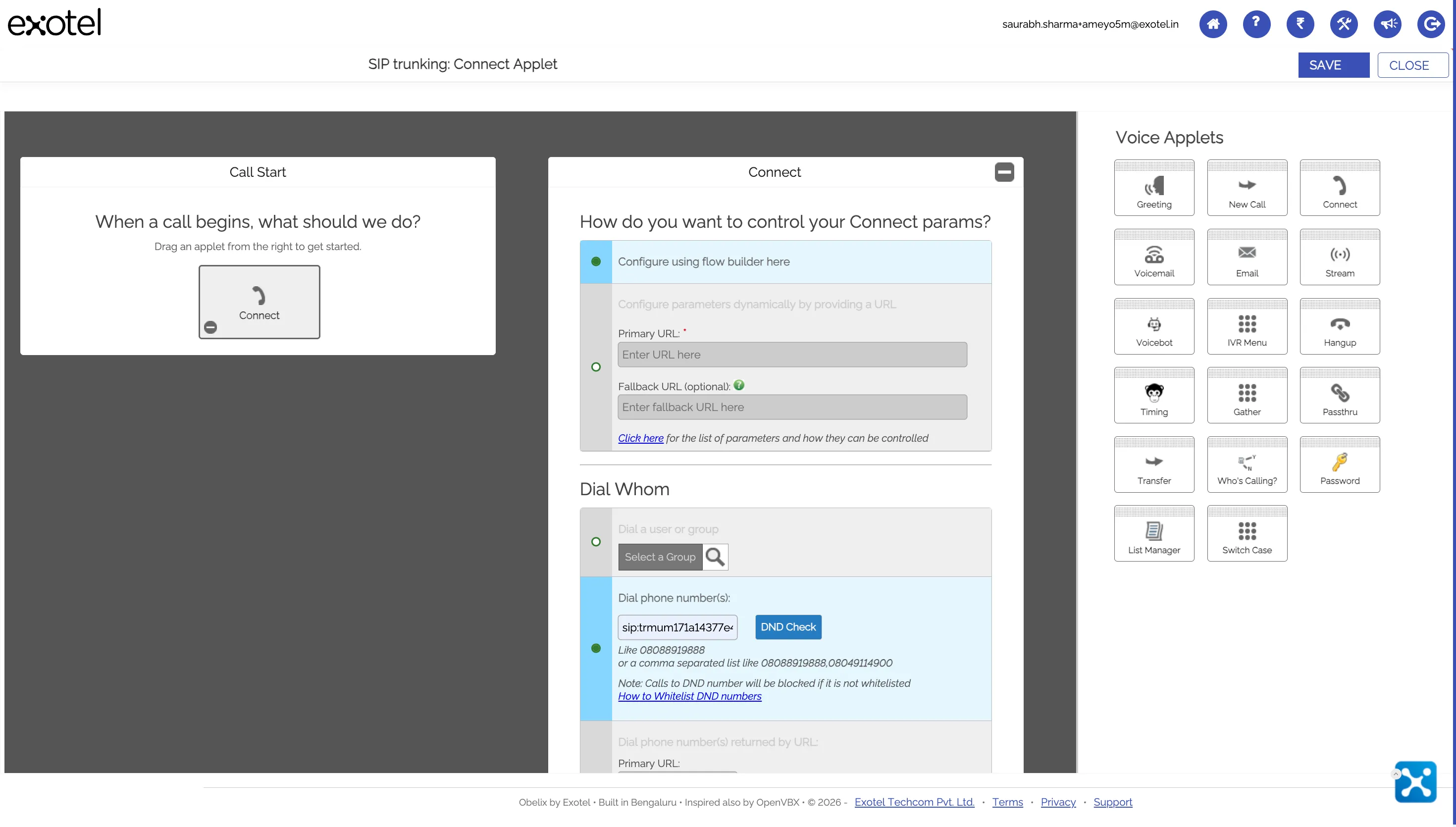
This connects the Flow to your SIP Trunk.
Step 6: Map DID to Flow
Bind the Exophone (DID) to the Flow.
- Go to Exophone Manager https://my.in.exotel.com/numbers
- Select your number or purchase
- Set Exopone to the Flow created above
Inbound call path is now:
PSTN → Exotel → DID→ Flow(Connect Applet)→ SIP Trunk → Destination URI → Your SIP system
Step 7: Configure SIP System
Setting | Value |
|---|---|
SIP Domain | <account_sid>.pstn.exotel.com |
Port | 443 (TLS) or 5070 (TCP) |
Transport | TCP or TLS |
Authentication | IP-based |
Ensure RTP ports (UDP 10000–40000) are open.
Step 8: Test Calls
Outbound
- Dial any PSTN number from your SIP system
Inbound
- Call your Exophone from a mobile phone
If both succeed, setup is complete.
Flow Mode Clarification (Important)
Flow Type | Phone Number Mode |
|---|---|
Connect Applet (sip:<trunk_sid>) | pstn |
Voicebot / other App Bazaar applets | flow |
Destination URI is required in all cases.