Omni Toolbar
Overview
The Omni Toolbar is Exotel’s unified agent workspace that embeds directly into customer CRMs or internal tools to handle voice, chat, WhatsApp, and future channels from a single, consistent interface.
From a customer’s point of view, the Omni Toolbar:
- Replaces fragmented CTI and channel-specific widgets
- Preserves context across channels
- Reduces agent training and handling time
- Acts as the single control surface for all interactions
If you’ve previously used the Generic Toolbar Integration, think of Omni Toolbar as:
The same CTI foundation, evolved for omnichannel, scale, and future extensibility.
Who Should Use Omni Toolbar
The Omni Toolbar is designed for:
- Customers embedding Exotel into CRMs.
- Customers building custom agent desktops
- Customers migrating from voice-only CTI to omnichannel
- Enterprises that want one integration instead of per-channel integrations
If your agents switch tabs, windows, or tools to manage calls, chats, and WhatsApp today — Omni Toolbar is meant for you.
Core Capabilities
- Embeds as a floating or docked toolbar inside your application
- Manages agent login, presence, and state
- Handles inbound and outbound interactions
- Supports voice, chat, WhatsApp (channel-aware UI)
- Triggers screen pops and contextual actions
- Maintains interaction lifecycle events
- Supports future extensibility without reintegration
Setup for CRM Integration (Iframe Model)
The Ameyo Omni Web Toolbar is designed to be embedded within an iframe on the third-party CRM's web page.
- Iframe Container: The third-party CRM must have a <div> element with the ID ameyoIframeDiv to contain the toolbar iframe. Sample URL :- https://<yourECCDomainName>/omniapp/toolbar/index.html
Currently, we support a minimum size equivalent to the iPhone SE dimensions i.e., 375 (width) × 667 (height).
- Initialization Script: The integration requires importing the SDK JavaScript file and initializing the SDK with the crm context:JavaScript
- Omni Toolbar is embedded into your application UI
- It runs independently but communicates via defined events
- Your application remains the source of truth for navigation and data
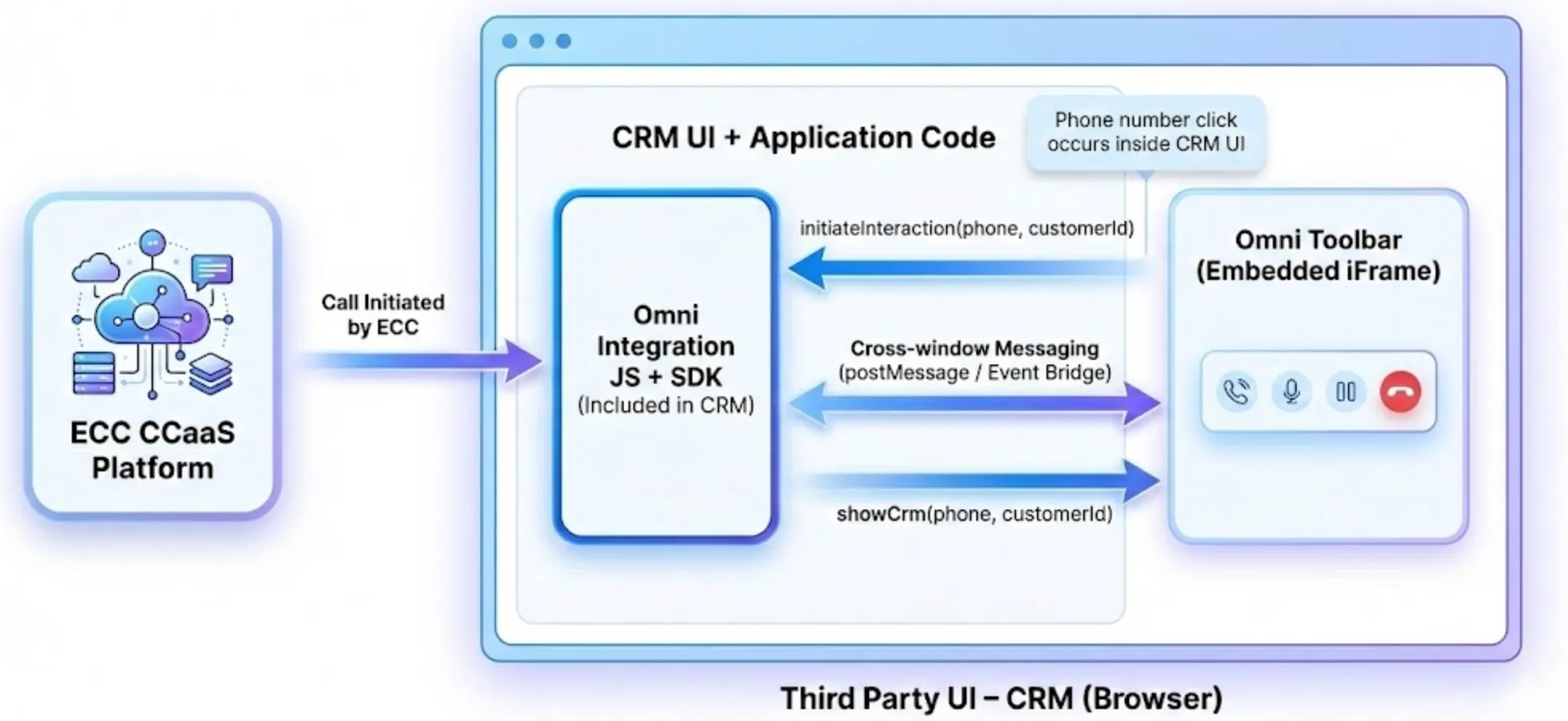
Event-Driven Interaction Model
Omni Toolbar communicates via events, not tight coupling.
Typical lifecycle:
- Toolbar initializes
- Agent logs in
- Interaction arrives (call/chat/WhatsApp)
- Toolbar emits interaction event
- Host app reacts (screen pop, fetch data)
- Agent completes interaction
- Toolbar emits wrap-up event
This model keeps integrations stable even as channels evolve.
Screenshots of a sample integration and how events are passed
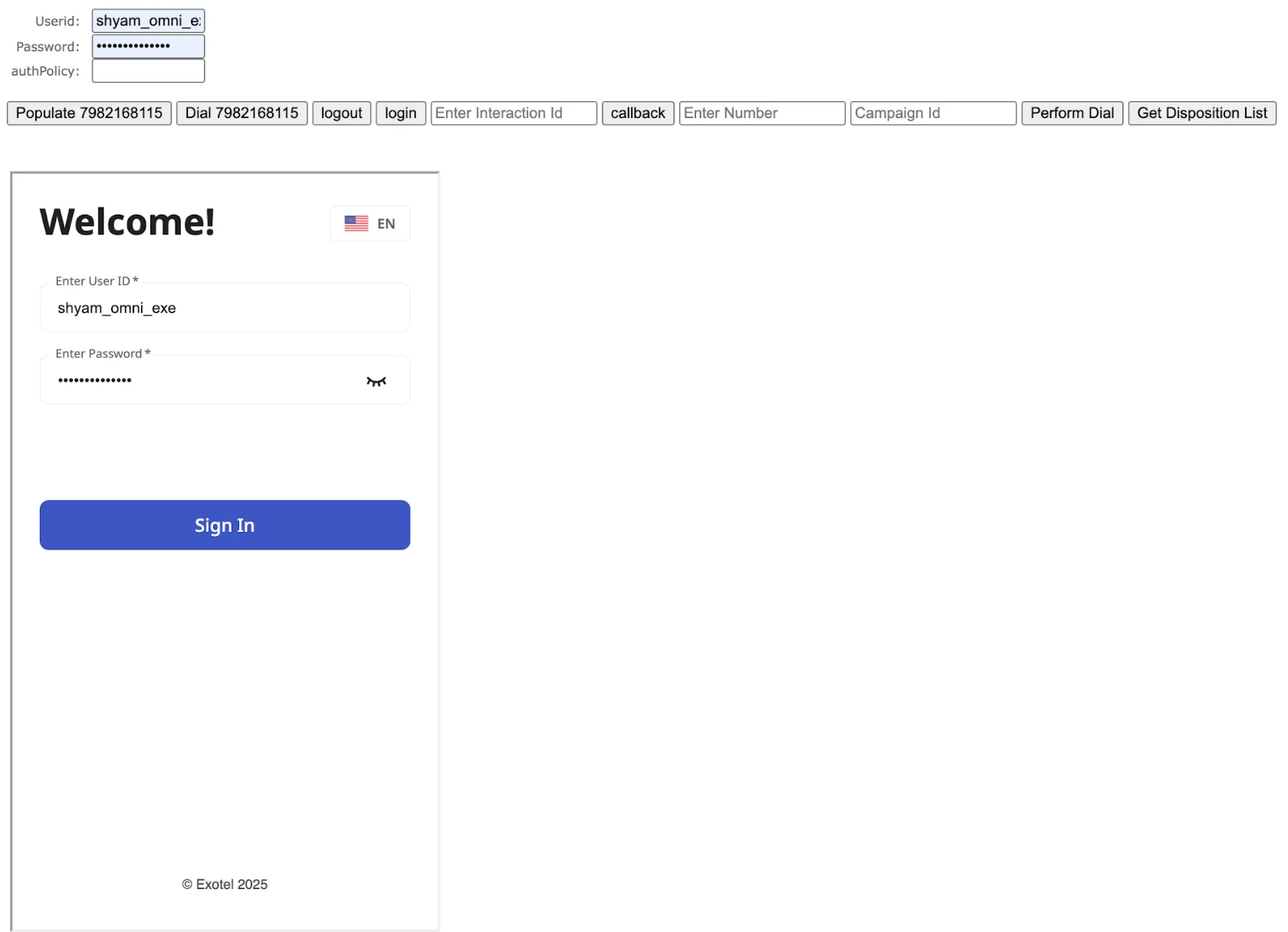
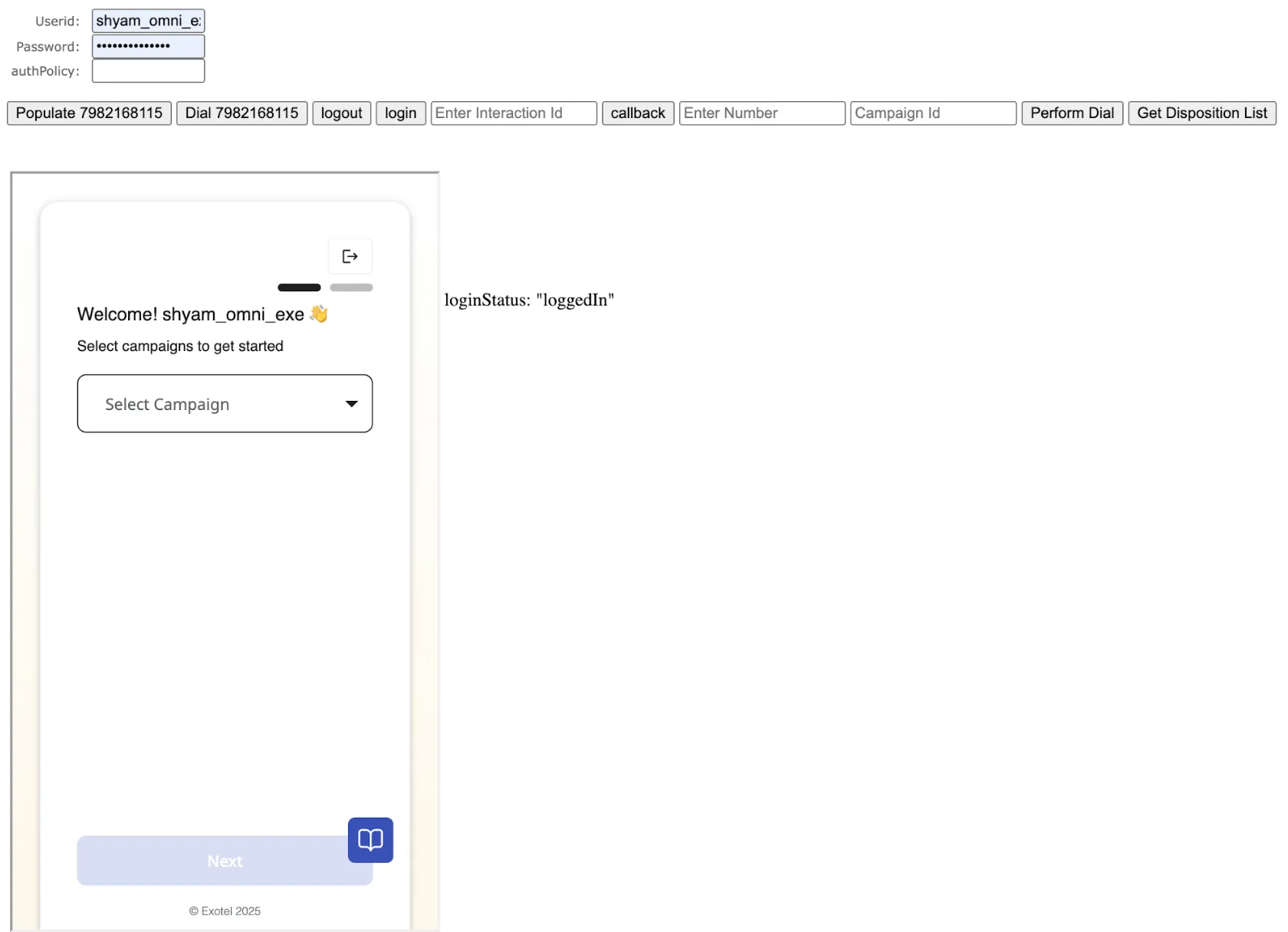
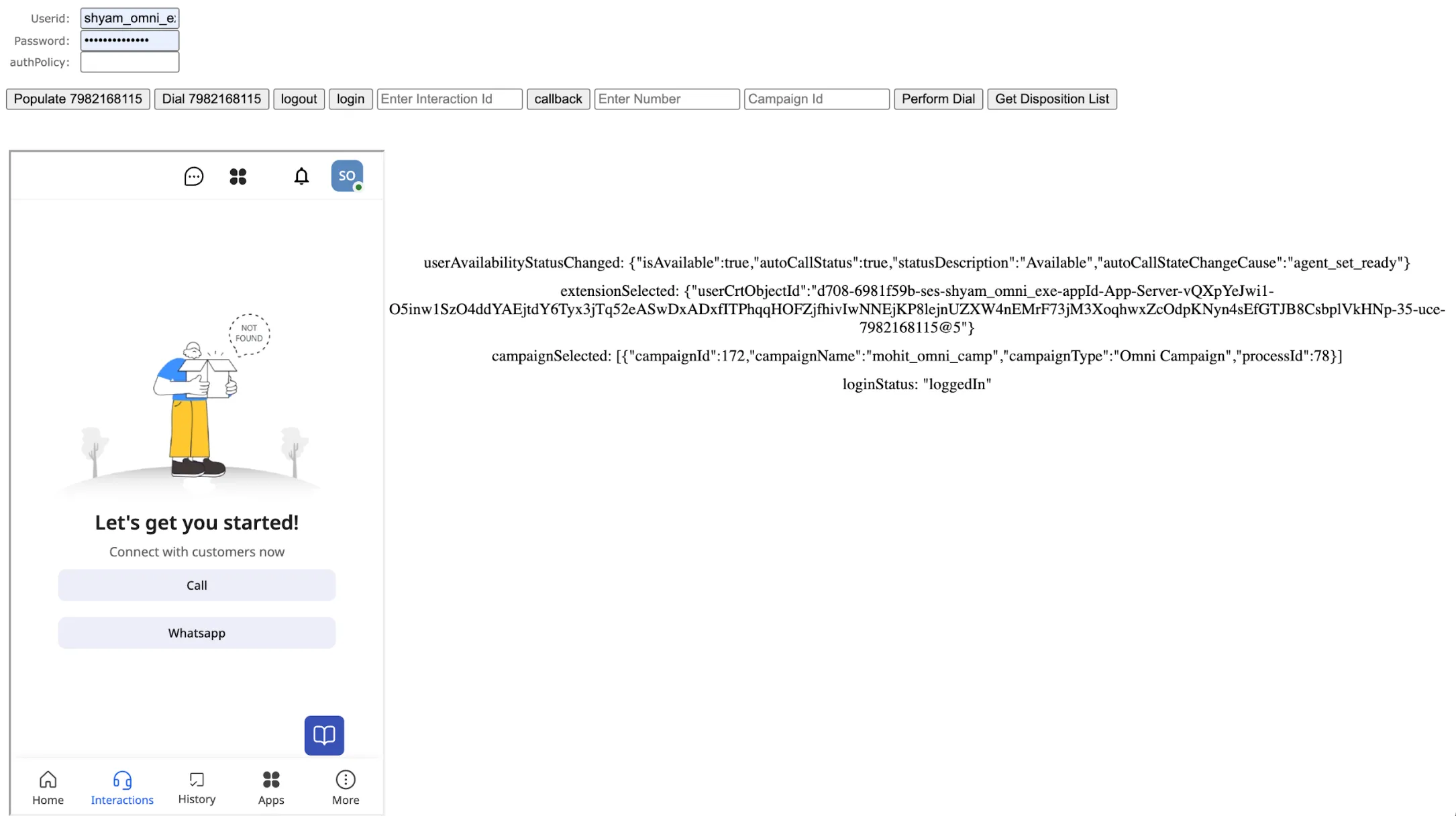
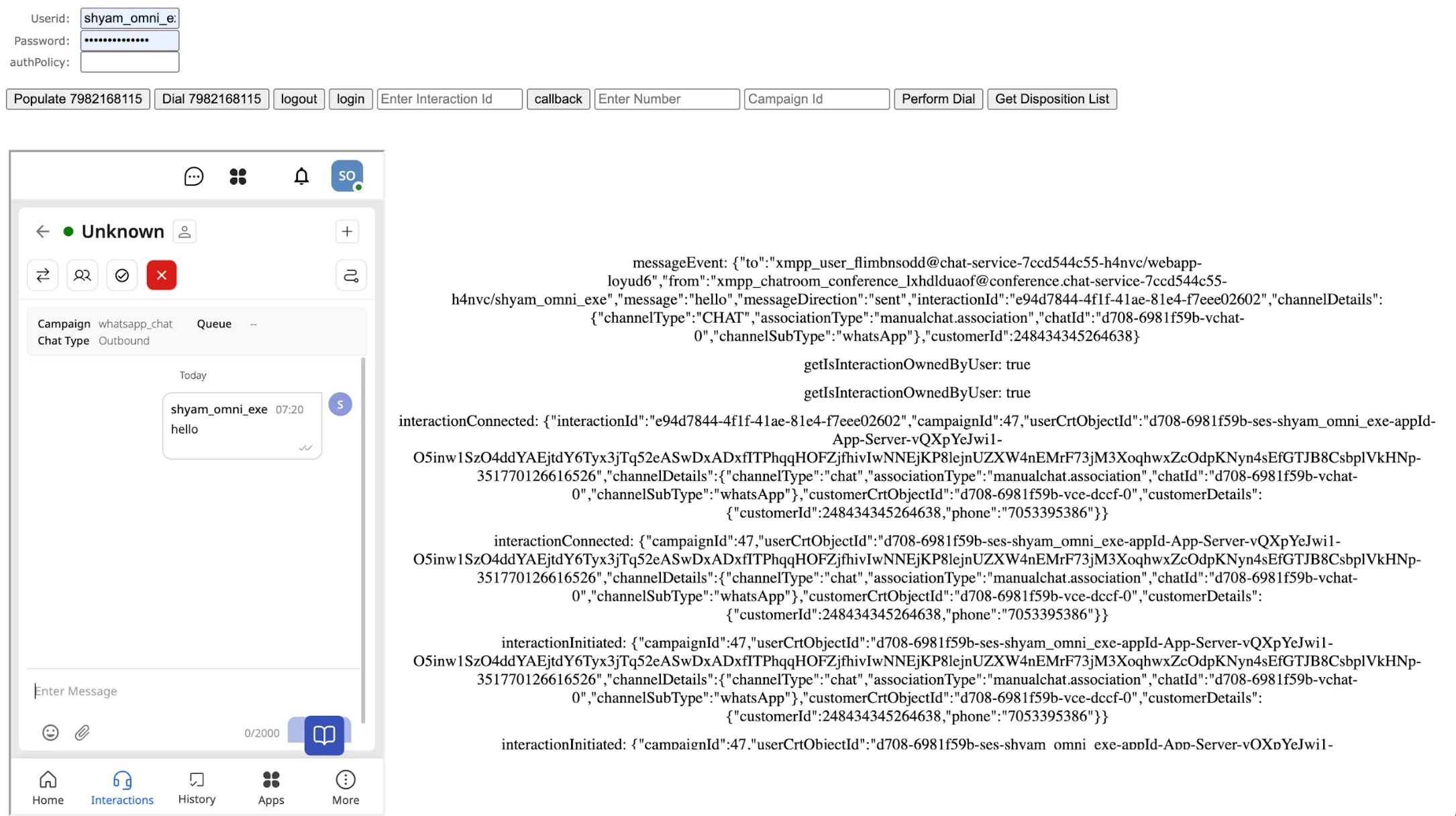
Core Integration Usecases & SDK Mapping
The following table maps the actions required for standard Generic Toolbar Integration to the Omni SDK APIs and Events:
Generic Toolbar Action | SDK Interaction Flow | Omni SDK API / Event | Category |
|---|---|---|---|
CRM to Ameyo (e.g., Single Sign-On) | The CRM system initiates a request to authenticate and log in the agent into the Omni Toolbar. | login / forceLogin | Session Management |
CRM to Ameyo (e.g., Click-to-Dial) | The CRM initiates an action (e.g., clicking a phone number) to start a new outbound interaction. | initiateInteraction | Interaction Management |
Ameyo to CRM (e.g., Screen Pop) | The Ameyo platform (on call arrival or connection) sends a real-time notification to the CRM to fetch and display customer details. | showCrm (Event) | CRM & Record Handling |
CRM to Ameyo (e.g., Call Disposition) | The CRM collects wrap-up data and sends it back to the Omni Toolbar to officially end the interaction in the Ameyo system. | disposeInteraction | Interaction Management |
Initialise SDK
API Name | Params | Description | Sample Response |
|---|---|---|---|
initialize | config = { context: string (“crm” ) origin: string instanceId: string (default is ameyoIframe) } | To initialise the SDK | -- |
setBaseUrl | url: string | | -- |
getBaseUrl | no params required | | -- |
onLoadHandler | isLoaded: boolean | To inform the toolbar/UI that the App/CRM is loaded | -- |
Session and Authentication APIs
Session
SSO in Ameyo requires the user ID to be the same in both Ameyo and the CRM. The CRM calls the login API.
API Name | Params | Description | Sample response |
|---|---|---|---|
login | username: string password: string authPolicy: string (optional) | Login a user | Result Successfully Logged In |
forceLogin | username: string password: string authPolicy: string (optional) | ForceLogin a user | Result Successfully Logged In |
getSelectedExtension | no params required | Get extension data while extension selection or while change selection | { callContextId: phone: "1234567890" } |
logout | no params required | Logout user | Result Logout successful |
getCurrentUser | no params required | Get current logged in user data | { "userId": "executive", "userType": "Executive", "userName": "executive" } |
getSelectedCampaigns | no params required | Get campaign data while campaign selection or while changing campaign | [ { "campaignId": 47, "campaignName": "whatsapp_chat", "campaignType": "Omni Campaign", "processId": 5 } ] |
getAgentSession | no params required | Get all agent session data | { "userId": "executive", "userType": "Executive", "terminalInfo": null, "userName": "executive", "breakStatuses": [ "Coffee-break", "Dinner-Break", "Lunch-Break" ], "readStatuses": [ "Available" ], "campaignInfos": [ { "campaignName": "whatsapp_chat", "campaignId": 47, "campaignType": "Omni Campaign", "dialTimeOut": 30, "blendGroupId": null, "defaultWorking": false, "primaryCampaign": false, "processId": 5, "wrapTimeout": 10, "acwConnected": 30, "acwNotConnected": 30, "isAcwConnectedEnabled": false, "localIVRInfos": [], "campaignTPVBean": { "campaignId": 47, "tpvName": [], "tpvPhone": [] }, "acwConnectedEnabled": false } ], "telephonyChannel": null, "knowledgeBaseURL": "https://www.ameyo.com/", "pingInterval": 20000, "pingNotificationTimeout": 60000, "sessoinTimeout": 180000, "commandTimeout": 20000, "maxPhoneLengthAllowed": 20, "transferConfiguration": null, "conferConfiguration": null, "maxNumberOfCharactersToDisplayInCampaign": 999, "preContextId": null, "prePhone": null, "maskedPrivileges": [], "defaultReady": false, "addCustomerToDial": true, "dialPhoneEnable": true, "allowInternalChat": true, "allowLocalIVR": true, "allowSuccessiveCalls": true, "overrideSelfCallBack": true, "shouldHoldBeforeConfer": false, "shouldUnholdBeforeTransfer": false, "holdAllOnConferEnable": false, "shouldAllowTransferToAssignedCampaignsOnly": false, "shouldDisableOnVrDown": true, "allowScreenRecord": false, "autoSelectSingleAssignedCampaign": true, "webUrl": "http://www.ameyosuite.com", "campaignMaskedPrivilegeMap": { "campaignId_127": [], "campaignId_47": [], "campaignId_172": [] }, "viewPrivileges": null, "loginProperties": {}, "preferences": {}, "srsIp": "localhost", "srsPort": "8889", "agentBreakTimeThreshold": "", } |
Session Events
Event Name | Description | Sample Response |
|---|---|---|
loginStatus | Gets the data for login status of the user | Login status event received Successfully logged in |
userAvailabilityStatusChanged | Gets the data for change in user availability | User availability status changed: { "isAvailable": true, "autoCallStatus": true, "statusDescription": "Available", "autoCallStateChangeCause": "agent_set_ready" } |
campaignSelected | Gets the selected campaign details, including campaign id and name | Campaign selected: [{ "campaignId": 172, "campaignName": "mohit_omni_camp", "campaignType": "Omni Campaign", "processId": 78 }] |
extensionSelected | Gets the selected extension details, including extension id and name | Extension selected: { "userCrtObjectId": "d279-6874b064-ses-executive-appId-App-Server-WBOSWo8hqn-mGaqeOT4CAaxYr1nqW1FaKjcL0gztSuLcfl3ZcCBXM3O2ut6iumdbSoeke0EOosCaaRlWZHdbaGlflgOqKnznhg0RLVX86n0YdVM2mEotM7hp2M1hx7C-6-uce-16" } |
Interaction and Call Management APIs
These APIs cover the telephony operations initiated from the CRM (e.g., Click-to-Dial) or the subsequent call management functions.
Dialing and Interaction APIs
API Name | Params | Description | Sample response |
|---|---|---|---|
initiateInteraction | channelType: string (“voice” | “chat”) channelDetails: { phone: string (optional) name: string (optional) appId: string (optional) [key: string]: any } campaignId: number customerId: number (optional) searchables: string[] (optional) interactionRelationId?: string (optional) channelSubType: string (optional) additionalInfo: any (optional) | Initiates an interaction | { "result": "success", "reason": "success" } |
disposeInteraction | channelType: string (“voice” | “chat”) interactionId: string dispositionCodeId: number notes: string (optional) additionalParams: { callbackTime: string phone: string isSelfCallback: boolean } (optional) callback time example: "2025-07-06T09:56:40+0530" (ISO 8601) | Disposes an interaction | Result ok |
disposeAndInitiateNewInteraction This API is for voice only | interactionId: string dispositionCodeId: number phone: string notes: string (optional) | Disposes and initiates a new interaction | Result ok |
getAllLiveInteractionsForAgent | no params required | Fetches the details of all live interactions of the agent | [ { "data": { "id": "f57fe43b-bd7a-4c31-8498-5724ee2507", "title": null, "customer_id": -1, "last_assigned_user_id": "anshika_agent", "last_assigned_user_name": "anshika_agent", "contact_center_id": 5, "process_id": 78, "last_campaign_id": 172, "last_campaign_name": "mohit_omni_camp", "last_queue_id": 134, "last_queue_name": "dev_queue", "last_disposition": null, "interaction_media_id": "d764-6879fb2e-vchat-70", "channel_name": "CHAT", "sub_channel": "WebChat", "direction": "INCOMING", "date_added": "2025-07-18T11:13:36.753+00:00", "date_modified": "2025-07-18T11:13:37.116+00:00", "date_disposed": null, "interaction_relation_id": "f57fe43b-bd7a-4c31-8498-5724ee2507", "status": "OPEN", "reopen_count": 0, "last_reopen_time": null, "first_assigned_date": "2025-07-18T11:13:37.085+00:00", "last_assigned_date": "2025-07-18T11:13:37.085+00:00", "linked_objects": [], "channel_data": null, "related_interactions": null, "linked_connector_id": 23, "last_application_instance_id": "App-Server-fWG2MYiupg", "additional_info": { "XMPP_METADATA": { "users": [ { "id": "anshika_agent", "name": "anshika_agent", "xmppId": "xmpp_user_4qlt4tvgcb@chat-service-7ccd544c55-h4nvc" } ], "customer": { "name": "test", "xmppId": "xmpp_customer_conference_j6tncvidns" }, "xmppChatRoomId": "xmpp_chatroom_conference_jpmxwvgq34@conference.chat-service-7ccd544c55-h4nvc" }, "CHAT_CUSTOMER_CRT_OBJECT_ID": "d764-6879fb2e-dccf-37" } }, "http_code": 200, "error_data": null } ] |
getCurrentInteraction | no params requires | Fetches the details of the interaction that the agent is currently on | { "data": { "id": "87b41b89-8a79-44dd-a8d1-2ba7882507", "title": null, "customer_id": 735076692678909, "customer_name": "anshika", "last_assigned_user_id": "anshika_agent", "last_assigned_user_name": "anshika_agent", "contact_center_id": 5, "process_id": 78, "last_campaign_id": 172, "last_campaign_name": "mohit_omni_camp", "last_queue_id": 0, "last_disposition": null, "interaction_media_id": "d764-6879fb2e-vcall-105", "channel_name": "VOICE", "sub_channel": null, "direction": "OUTGOING", "date_added": "2025-07-18T11:12:34.898+00:00", "date_modified": "2025-07-18T11:13:04.457+00:00", "date_disposed": null, "interaction_relation_id": "87b41b89-8a79-44dd-a8d1-2ba7882507", "status": "OPEN", "reopen_count": 0, "last_reopen_time": null, "first_assigned_date": "2025-07-18T11:12:34.898+00:00", "last_assigned_date": "2025-07-18T11:13:04.457+00:00", "linked_objects": [], "channel_data": null, "related_interactions": null, "linked_connector_id": 23, "last_application_instance_id": "App-Server-fWG2MYiupg", "additional_info": { "VOICE_CUSTOMER_CRT_OBJECT_ID": "d764-6879fb2e-vce-91" } }, "http_code": 200, "error_data": null } |
getIsInteractionOwnedByUser | no params required | Will get the ownership status of the interaction, for example, in case of confer, the call lands on agent A and then agent B is added in conference, if we check ownership status at agent B it will show false. | TRUE |
Interaction Lifecycle Events
These events are crucial for synchronizing the state of a call between the Ameyo toolbar and the external CRM:
interactionInitiated | Gets the data for the interaction, the channel, the user and the customer for which the interaction has been initiated | Integration interactionInitiated event received { "interactionId": "cd787e9a-fac0-4f1e-b823-a998532507", "campaignId": 172, "userCrtObjectId": "d279-6874b064-ses-executive-appId-App-Server-WBOSWo8hqn-s0qX4novCTO6XZ1JkT54lF7ZKZsX8YysJYDp3iQlNfZLUXCG22OIMkuD4l7coVcm70oA5lKbvMNuAm2tWloo0cVUU79WCCCIhDGFsSKQmgc1M2RkHa5y-53-uce-1234567890@5", "channelDetails": { "channelType": "voice", "associationType": "manualdial.association", "callId": "d279-6874b064-vcall-20" }, "customerCrtObjectId": "d279-6874b064-vce-6", "customerDetails": { "customerId": 735076692678909, "name": "anshika", "phone": "1234567890" } } |
|---|---|---|
callRinging | Fetches information about the call, the user and the customer to whom it was made while the call is in ringing state | callRinging event received { "interactionId": "7ea1bd1b-5983-4f23-970a-0d99642507", "campaignId": 172, "queueId": null, "userCrtObjectId": "d279-6874b064-ses-executive-appId-App-Server-WBOSWo8hqn-rrtuxJxpN7ecoIjPtfSj2ubCbmGbWT4PfcAuG03kNDQFXKjfbL7GX0DHRQduSlvEYA7vA4AzPQhlTSSmX8Z6fNw44P8Iwuk5bdjknZL4WXi0cLjIyj8J-78-uce-1234567890@5", "channelDetails": { "channelType": "voice", "associationType": "manualdial.association", "callId": "d279-6874b064-vcall-35" }, "customerCrtObjectId": "d279-6874b064-vce-19", "customerDetails": { "customerId": 735076692678909, "name": "anshika", "phone": "1234567890" } } |
interactionConnected | Gets the data for the interaction, the channel, the user, and the customer to which the interaction is connected to | interactionConnected event received { "interactionId": "c15a278d-66ff-47ed-a0c0-cba5492507", "campaignId": 172, "userCrtObjectId": "d279-6874b064-ses-executive-appId-App-Server-WBOSWo8hqn-s0qX4novCTO6XZ1JkT54lF7ZKZsX8YysJYDp3iQlNfZLUXCG22OIMkuD4l7coVcm70oA5lKbvMNuAm2tWloo0cVUU79WCCCIhDGFsSKQmgc1M2RkHa5y-53-uce-1234567890@5", "channelDetails": { "channelType": "voice", "associationType": "manualdial.association", "callId": "d279-6874b064-vcall-21" }, "customerCrtObjectId": "d279-6874b064-vce-7", "customerDetails": { "customerId": 735076692678909, "name": "anshika", "phone": "1234567890" } } |
interactionDisconnected | Gets the data for the interaction, the channel, the user, and the customer from which the interaction is disconnected | interactionDisconnected event received { "interactionId": "cd787e9a-fac0-4f1e-b823-a998532507", "campaignId": 172, "userCrtObjectId": "d279-6874b064-ses-executive-appId-App-Server-WBOSWo8hqn-s0qX4novCTO6XZ1JkT54lF7ZKZsX8YysJYDp3iQlNfZLUXCG22OIMkuD4l7coVcm70oA5lKbvMNuAm2tWloo0cVUU79WCCCIhDGFsSKQmgc1M2RkHa5y-53-uce-1234567890@5", "channelDetails": { "channelType": "voice", "associationType": "manualdial.association", "callId": "d279-6874b064-vcall-20" }, "customerCrtObjectId": "d279-6874b064-vce-6", "customerDetails": { "customerId": 735076692678909, "name": "anshika", "phone": "1234567890" } } |
interactionDisposed | Gets the data for the interaction, the channel, the user, and the customer for which the interaction is disposed along with the disposition details of the interaction | interactionDisposed event received { "interactionId": "c15a278d-66ff-47ed-a0c0-cba5492507", "campaignId": 172, "userCrtObjectId": "d279-6874b064-ses-executive-appId-App-Server-WBOSWo8hqn-s0qX4novCTO6XZ1JkT54lF7ZKZsX8YysJYDp3iQlNfZLUXCG22OIMkuD4l7coVcm70oA5lKbvMNuAm2tWloo0cVUU79WCCCIhDGFsSKQmgc1M2RkHa5y-53-uce-1234567890@5", "channelDetails": { "channelType": "VOICE", "associationType": "manualdial.association", "callId": "d279-6874b064-vcall-21" }, "dispositionDetails": { "dispositionClass": "Closed", "dispositionCode": 588, "callNotes": "" } } |
interactionEnded | Gets the data for the interaction, the channel, the user, and the customer for which the interaction is ended | interactionEnded event received { "campaignId": 172, "userCrtObjectId": "d279-6874b064-ses-executive-appId-App-Server-WBOSWo8hqn-s0qX4novCTO6XZ1JkT54lF7ZKZsX8YysJYDp3iQlNfZLUXCG22OIMkuD4l7coVcm70oA5lKbvMNuAm2tWloo0cVUU79WCCCIhDGFsSKQmgc1M2RkHa5y-53-uce-1234567890@5", "channelDetails": { "channelType": "voice" }, "customerCrtObjectId": "d279-6874b064-vce-6", "customerDetails": {} } |
customerLinkedToInteraction | Gets the data for the interaction and the channel to which the customer is linked to along with the linked customer details | interactionLinked event received { "interactionId": "cd787e9a-fac0-4f1e-b823-a998532507", "campaignId": 172, "userCrtObjectId": "d279-6874b064-ses-executive-appId-App-Server-WBOSWo8hqn-s0qX4novCTO6XZ1JkT54lF7ZKZsX8YysJYDp3iQlNfZLUXCG22OIMkuD4l7coVcm70oA5lKbvMNuAm2tWloo0cVUU79WCCCIhDGFsSKQmgc1M2RkHa5y-53-uce-1234567890@5", "channelDetails": { "channelType": "voice", "associationType": "manualdial.association", "callId": "d279-6874b064-vcall-20" }, "customerCrtObjectId": "d279-6874b064-vce-6", "customerDetails": { "customerId": 735076692678909, "name": "anshika", "phone": "1234567890" } } |
customerUnlinkedToInteraction | Gets the data for the interaction and the channel from which the customer is unlinked from along with the unlinked customer details | { "interactionId": "83937022-6ddd-4194-9395-4bc7c72507", "campaignId": 172, "queueId": null, "userCrtObjectId": "d279-68786f8d-ses-executive-appId-App-Server-pHnEm4nGW4-IpuUJTau5NwCQc4keOWJiogD6JtHDZlfvqD2gi4lwtBk5ApW5T8ULxL8dVwFUi6AZVOB5hxY4ITuO1VT80k9aYcExjpcgpVwOY8w6qpq5VGullWInaS7-940-uce-1234567890@5", "channelDetails": { "channelType": "VOICE", "associationType": "manualdial.association", "callId": "d279-68786f8d-vcall-362" }, "customerCrtObjectId": "d279-68786f8d-vce-329", "customerDetails": { "customerId": null, "name": null, "phone": "1234567890" } } |
interactionTransferred | Gets the data for the interaction, the user and the channel for which the interaction has been transferred along with the transfer details | interactionTransferred event received { "interactionId": "c15a278d-66ff-47ed-a0c0-cba5492507", "transferType": "transferToUser", "transferContextId": "moh5", "channelType": "VOICE", "channelDetails": { "callId": "d279-6874b064-vcall-21", "crtObjectId": "d279-6874b064-ses-moh5-appId-App-Server-WBOSWo8hqn-mbns0GzYPxAjBULswJQoTSNn7likTcaj8qmjqxrzBvwaL2lisgAw70A48bvDjlbDsj4PZNpo40HUAKxF5Zd4wa7keO8V0dcN2STUW1vqMt6wHA5DuXd0-22-uce-moh5cRJkUZ5Z@6", "memberCrtObjectId": "d279-6874b064-ses-executive-appId-App-Server-WBOSWo8hqn-s0qX4novCTO6XZ1JkT54lF7ZKZsX8YysJYDp3iQlNfZLUXCG22OIMkuD4l7coVcm70oA5lKbvMNuAm2tWloo0cVUU79WCCCIhDGFsSKQmgc1M2RkHa5y-53-uce-1234567890@5" }, "campaignId": 172 } |
interactionConferred | Gets the data for the interaction, the user and the channel for which the interaction has been conferred along with the confer details | Interaction conferred { "interactionId": "0c431e04-e78d-454b-a0ec-bc2aa72507", "conferedType": "conferToPhone", "status": "initialized", "conferedContextId": "8368941654", "channelType": "VOICE", "channelDetails": { "callId": "d279-6874b064-vcall-23", "crtObjectId": "d279-6874b064-vce-11", "memberCrtObjectId": "d279-6874b064-ses-executive-appId-App-Server-WBOSWo8hqn-s0qX4novCTO6XZ1JkT54lF7ZKZsX8YysJYDp3iQlNfZLUXCG22OIMkuD4l7coVcm70oA5lKbvMNuAm2tWloo0cVUU79WCCCIhDGFsSKQmgc1M2RkHa5y-53-uce-1234567890@5" }, "campaignId": 172 } |
getIsInteractionOwnedByUser | Automatically checks ownership status for current interaction, ie, interaction on which agent’s screen is | FALSE |
CRM & Record Handling
Screen Pop and Customer Information
The Screen Pop functionality is a core use case, where the CRM displays customer information upon a call's arrival or initiation.
API Name | Params | Description | Sample response |
|---|---|---|---|
setRecordInfoForInteraction | interactionId: string recordId: string recordType: string recordName: string additionalInfo: any (optional) | Stores the resolved customer details for the current interaction | { "data": "{\"crtObjectId\":\"d279-68786f8d-vce-49\",\"info\":{\"recordId\":\"1\",\"recordName\":\"recordName\",\"recordType\":\"contact\"},\"campaignContextId\":172,\"actionType\":\"Add or Update\"}" } |
showMultipleRecordsForInteraction | interactionId: string, recordsInfo: CRMRecordInfo[] CRMRecordInfo = { recordId: string, recordType: string, recordName: string, additionalInfo: any(optional) } | Displays all identified customers and their associated information on the user interface during a live interaction. | //customer info will be displayed on UI |
showMultipleRecordsForPreview | phone: string, recordsInfo: CRMRecordInfo[] CRMRecordInfo = { recordId: string, recordType: string, recordName: string, additionalInfo: any(optional) } | Displays all customers and their associated information when customer details are previewed for a given phone number. | //customer info will be displayed on UI |
sendCurrentCRMRecordOpened | CRMRecordInfo = { recordId: string, recordType: string, recordName: string, additionalInfo: any(optional) } | sends currently opened object information to UI | //displays currently opened object's info on UI |
getAllContacts | connectorId: string, objectId: string | Fetches all contacts for a connector Id and object Id | [ [ { "field": "Id", "value": "003dL000000Pun1QAC", "type": "id" }, { "field": "FirstName", "value": "Jack", "type": "string" }, { "field": "LastName", "value": "Rogers", "type": "string" }, { "field": "Phone", "value": "(336) 222-7000", "type": "phone" }, { "field": "OtherPhone", "value": null, "type": "phone" } ], [ { "field": "Id", "value": "003dL000000Pun3QAC", "type": "id" }, { "field": "FirstName", "value": "Andy", "type": "string" }, { "field": "LastName", "value": "Young", "type": "string" }, { "field": "Phone", "value": "(785) 241-6200", "type": "phone" }, { "field": "OtherPhone", "value": null, "type": "phone" } ] ] |
getAllCases | connectorId: string, objectId: string | Fetches all cases for a connector Id and object Id | [ [ { "field": "Id", "value": "500dL000001oNEhQAM", "type": "id" }, { "field": "Subject", "value": "Performance inadequate for second consecutive week", "type": "string" }, { "field": "Description", "value": null, "type": "textarea" } ], [ { "field": "Id", "value": "500dL000001oNEiQAM", "type": "id" }, { "field": "Subject", "value": "Starting generator after electrical failure", "type": "string" }, { "field": "Description", "value": null, "type": "textarea" } ] ] |
createCase | objectType: string, data: any, connectorId: string | Creates a new case | -- |
updateObject | objectType: string, data: any, connectorId: string, objectId: string | Updates the attached object | -- |
searchCase | connectorId: string, objectType: string, search: string, searchField: string, limit: number, offset: number | Searches the case based on fields | [ [ { "field": "Id", "value": "500dL000001oNEhQAM", "type": "id" }, { "field": "Subject", "value": "Performance inadequate for second consecutive week", "type": "string" }, { "field": "Description", "value": null, "type": "textarea" } ] ] |
sendDataToCRM | contextData: any | Sends data from the app to CRM | //shows whatever data is sent in the API |
sendDataToApp | contextData: any | Sends data from CRM to app | //shows whatever data is sent in the API |
CRM events
Event Name | Description | Sample Response |
|---|---|---|
showCrm | Gets the configured CRM data along with the interaction, user and customer details | showCrm event received { "interactionId": "cd787e9a-fac0-4f1e-b823-a998532507", "userId": "executive", "campaignId": 172, "queueId": null, "userCrtObjectId": "d279-6874b064-ses-executive-appId-App-Server-WBOSWo8hqn-s0qX4novCTO6XZ1JkT54lF7ZKZsX8YysJYDp3iQlNfZLUXCG22OIMkuD4l7coVcm70oA5lKbvMNuAm2tWloo0cVUU79WCCCIhDGFsSKQmgc1M2RkHa5y-53-uce-1234567890@5", "channelDetails": { "channelType": "VOICE", "associationType": "manualdial.association", "callId": "d279-6874b064-vcall-20" }, "customerCrtObjectId": "d279-6874b064-vce-6", "customerDetails": { "customerId": 735076692678909, "name": "anshika", "phone": "1234567890" } } |
openRecord | Opens the record on the CRM | -- |
onAttachButtonClick | Links current interaction with CRM customer | -- |
onUnAttachButtonClick | Unlinks current interaction with CRM customer | -- |
onCreateButtonClick | To create object on CRM | -- |
getCurrentCRMRecordOpened | Fetches current CRM record | -- |
handlePreview | Searches customer on CRM on preview click | -- |
handleInteractionDisposed | Sends interaction disposition related information to CRM for activity dumping | -- |
receiveDataFromApp | CRM receives data from app | //data sent from app is seen in CRM |
receiveDataFromCRM | App receives data from CRM | //data sent from CRM is shown in App |
Disposition Code Retrieval
The CRM can retrieve the two-level disposition codes (Disposition Class and Disposition Code) from Ameyo to display a custom disposition screen.
API Name | Params | Description | Sample response |
|---|---|---|---|
getDispositionCodesWithDispositionClass | campaignId : number | Gets the disposition class and corresponding codes for a given campaignId | [ { "classId": 588, "className": "Status", "dispositionCodeBean": [ { "dispositionCodeId": 1344, "dispositionCodeName": "Open" }, { "dispositionCodeId": 1345, "dispositionCodeName": "Closed" }, { "dispositionCodeId": 820, "dispositionCodeName": "New" } ] } ] |
Get Configurations
API Name | Params | Description | Sample response |
|---|---|---|---|
getOmniCrmObjectConfiguration | no params required | Gets the details of all the objects for the crm | [ { "id": 33, "crm_connector_id": 23, "object_type": "Case", "objects_metadata": { "Case": { "is_visible": true, "field_metadata": [ { "field_name": "Id", "label": "Case ID", "crm_field_type": "String", "field_type": "id", "should_show_on_preview": true, "is_required_in_object_creation": false, "is_searchable": true, "standard_field_name": "", "priority": 1, "should_hide_on_object_creation": true, "complex_fields": null, "required_in_object_creation": false, "searchable": true }, { "field_name": "Subject", "label": "Subject", "crm_field_type": "String", "field_type": "string", "should_show_on_preview": true, "is_required_in_object_creation": true, "is_searchable": true, "standard_field_name": "", "priority": 2, "should_hide_on_object_creation": false, "complex_fields": null, "required_in_object_creation": true, "searchable": true }, { "field_name": "Description", "label": "Description", "crm_field_type": "String", "field_type": "textarea", "should_show_on_preview": true, "is_required_in_object_creation": false, "is_searchable": false, "standard_field_name": "", "priority": 3, "should_hide_on_object_creation": false, "complex_fields": null, "required_in_object_creation": false, "searchable": false } ], "visible": true } }, "date_added": "2024-08-13T10:48:33.862+00:00", "date_modified": "2024-08-13T10:48:33.862+00:00", "ref": 1, "version": 1 } ] |
getOmniCrmConfiguration | no params required | Fetches the details of the crm configuration | { "crm_connector_id": 23, "process_id": 78, "crm_type": "salesforce", "crm_domain": "https://exotel88-dev-ed.develop.my.salesforce.com", "crm_version": "", "syncing_enabled": false, "syncing_mode": "PERIODIC", "record_syncing_interval": 3600000, "record_syncing_complete": true, "batch_size": 1000, "max_number_of_distinct_recordings": 3, "date_added": "2024-08-13T10:46:39.613+00:00", "date_modified": "2025-01-15T10:30:53.334+00:00", "ref": 1, "version": 5 } |
getPhoneNumberForSearch | no params required | Fetches the customer phone that is added on the start interaction screen | //will get the phone number entered |
getPrimaryColumnName | no params required | Fetches the primary column name | "id" |
HTTP Communication
API Name | Params | Description | Sample Response |
|---|---|---|---|
invokeECCApi | microservice: Microservices url: string method: string (“get” | “post” | “put” | “delete”) queryParams: Record<string, any> (optional) data: Record<string, any> | FormData (optional) isMultipart: boolean (optional) url is api path here Microservices{ APPSERVER = 'appserver', CMS = 'cms', CFS = 'cfs', DATA_ENGINE = 'data-engine', CALLBACK_SERVER = 'callback-server', CUSTOMER_MANAGER = 'customer-manager', CHAT_SERVICE = 'chat-service', INTERACTION_SERVICE = 'interaction-service', CHAT_BOSCH_SERVICE = 'chat-bosch-service' } | This API is used to invoke appserver/cms/cfs/data-engine/callback-server/customer-manager/ chat-service/interaction-service/chat-bosch-service | {"searchables": ["id","first_name","phone1"] } //this is a sample response from one Appserver API |
invokeThirdPartyApi | url: string method: string (“get” | “post” | “put” | “delete” | “patch”) headers: Record<string, string> (optional) queryParams: Record<string, any> (optional) data: Record<string, any> | FormData (optional) isMultipart: boolean (optional) | This API is used to invoke any third party API | { "status": 200, "data": { "page": 2, "per_page": 6, "total": 12, "total_pages": 2, "data": [ { "id": 7, "email": "[email protected]", "first_name": "Michael", "last_name": "Lawson", "avatar": "https://reqres.in/img/faces/7-image.jpg" } ], "support": { "url": "https://contentcaddy.io?utm_source=reqres&utm_medium=json&utm_campaign=referral", "text": "Tired of writing endless social media content? Let Content Caddy generate it for you." } }, "statusText": "" |
UI Methods
API Name | Params | Description | Sample Response |
|---|---|---|---|
setLoginInfo | username: string token: string | Populates login info on UI | //data will be visible on login screen UI |
populateChannelDetailsForNewInteraction | channelType: string channelSubType: string channelDetails: { campaignId: string appName: string phone: string name: string } | Populates the details to set details to start an interaction | //data will be visible on the start interaction screen on UI |
setExtensionInfo | callcontextId: number phone: string | Populates the extension info on the select extension and the change extension screen | //data will be visible on the select/change extension screen on UI |
triggerToastNotification | message: string variant: string ('success' | 'error' | 'warning' | 'info') | Triggers a toast notification for the user | //A toast notification will be visible on user screen |
triggerDesktopNotification | notificationType: string notificationSubtype: string subject: string message: string | Triggers a desktop notification for the user | //A desktop notification will be visible on user screen |
UI Events
Event Name | Description | Sample Response |
|---|---|---|
windowVisibilityChanged | Checks if the current window is visible or not | { isWindowVisible: true } |
sendLifecycleEvent | Gets details like app is focused or not, loaded or not, when it is registered | "focused" |
receiveData | Receives data from other apps | //Can see whatever is sent from the other app |
Notification Events
Event Name | Description | Sample Response |
|---|---|---|
notification | Triggers all the details regarding a bell notification including notification severity, type and message | Notification { "notificationId": "d279-6874b064-notify-2441", "displayMessage": "Call missed!! Customer Name: anshika Contact Number: 01234567890 Missed Call Time: Mon Jul 14 14:01:45 IST 2025", "severity": 2, "type": "application.notification.type", "subType": "notification.missed.call.type", "specificInfo": { "contextId": 52, "context": "MISSED_CALL", "campaignId": 172, "customerId": 735076692678909, "name": "anshika", "contact": "01234567890", "dateAdded": "2025-07-14 14:01:45.899", "phoneInfo": { "phone": "01234567890", "displayPhone": "01234567890" }, "additionalParams": { "notificationId": "d279-6874b064-notify-2441", "context": "MISSED_CALL" } }, "consolidationCount": 0, "dateAdded": "2025-07-14T08:31:48.925Z" } |
Internal Communication
For custom logic and data synchronization between the embedded toolbar app and the main CRM page:
Srore Apps Data
API Name | Params | Description | Sample Response |
|---|---|---|---|
get | key: string | Gets the value of a key from the local storage | Result "qwerty" |
set | key: string value: string | Sets the key and it’s corresponding value in the local storage | Result successfully set store item //the key can be checked in local storage |
delete | key: string | Deletes a key from the local storage | Result successfully deleted store item //the key will now be removed from the local storage |
AppInstance
API Name | Params | Description | Sample Response |
|---|---|---|---|
getAllInfo | appId: string | Fetches information for all loaded apps | |
getInfo | instanceId: string | Fetches information for app based on instanceId | |
sendDataToApp | instanceId: string, contextData: any | Sends data from one app to the other app based on instanceId | //shows data sent in contextData |
Events
Event Name | Description | Sample Response |
|---|---|---|
receiveData | Receives data from other apps | //Can see whatever is sent from the other app |
Error Handling
The SDK provides explicit error codes to aid in debugging integration issues.
Error Type | Error Code | Description |
|---|---|---|
TIMEOUT | 1000 | Request took too long and timed out. |
REQUIRED_FIELD_MISSING | 2001 | A mandatory field (e.g., phone in initiateInteraction) was not provided. |
HTTP_ERROR | 3000 | An HTTP-related issue occurred (e.g., 404, 500). |
DATA_NOT_FOUND | 4000 | Requested data could not be located or does not exist. |
INVALID_ORIGIN | 1003 | Request came from an unauthorized or untrusted source. |