Integration Guide
Introduction
ExotelVoice flutter SDK enables you to add the voip calling feature into your app. This document outlines the integration steps. The library supports only peer to peer 2-way calls. Multi-party conferencing use cases are not supported.
Licensing
Create a trial account in Exotel. To enable voip calling in the trial account, contact exotel support. Once Exotel support enables the voip capability in the account , a VOIP Exophone will be created as shown below and available in the account under the Exophones section.
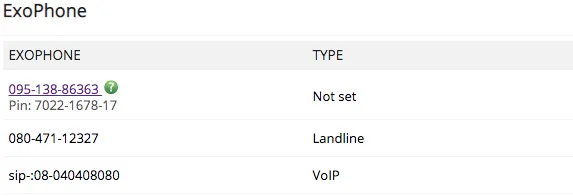
SIP Exophones discussed later in the section refers to Exophones of Voip type as shown above.
NOTE :- SIP and VOIP are used interchangeably in the document
Flutter SDK Integration
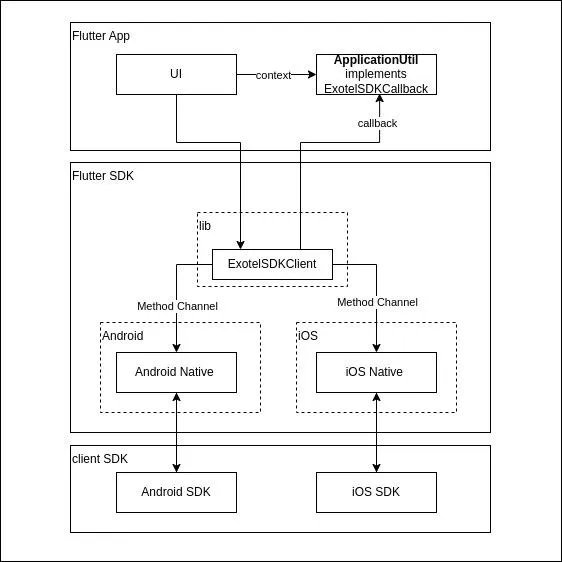
SDK Architecture
Getting Started
Software Package
- SDK (tar.gz file) includes android , ios, lib directories
- integration guide
- sample app for reference
Add SDK to your project
- download the SDK from GitHub - exotel/exotel-voip-sdk-flutter
- untar SDK
tar -xzvf flutter-sdk.tar.gz
- copy the following directories in your flutter app
- flutter-sdk/android
- flutter-sdk/ios
- flutter-sdk/lib
- add native sdk
- to android directory
- go to android directory and run
make deps
it will download and add the aar file(exotel-voice-release.aar) at <flutter path>/android/exotel-voice-sdk/ Note: you might need to change EXOTEL_SDK_VERSION in Makefile to get latest version
- to ios directory
- go to ios directory and run
make deps
it will download and add the aar file(ExotelVoice.xcframework) at <flutter path>/ios/ Note: you might need to change EXOTEL_SDK_VERSION in Makefile to get latest version
SDK File structure
After extracting the sdk , it contains the following directories
- android : android native code that has integrated exotel android sdk.
- app/src/main/java/com/exotel/voice_sample
- MainActivity.java : register the flutter engine and create instance of ExotelSDKChannel.
- ExotelSDKChannel.java : it is android channel interface class which communicate with flutter via Method Channel.
- VoiceAppService.java : this class is communicating with android sdk as per Android SDK Integrationintegration guide.
- ios : ios native code that has integrated exotel ios sdk.
- Runner/AppDelegate.swift : register the flutter engine and create instance of ExotelSDKChannel
- Runner/Translator
- ExotelSDKChannel.swift :it is ios channel interface class which communicate with flutter via Method Channel. it is also communicating with ios sdk as per ios Integration GuideiOS integration guide.
- lib : contains flutter dart files
- exotelSDK
- ExotelVoiceClientFactory.dart: it is factory class of SDK which provide ExotelVoiceClient using method getExotelVoiceClient().
- ExotelVoiceClient.java: it Exotel Voice Client interface which exposes SDK APIs.
- ExotelSDKClient.dart : it is SDK’s implementation class which has implemented ExotelVoiceClient. it is also flutter channel interface class which communicate with android and ios via Method Channel.
- ExotelSDKCallaback.dart: it is SDK Callback or Observer interface that must be implement by your flutter app to handle callbacks from ExotelSDKClient.
- MethodChannelInvokeMethod.dart: it contains the Channel Method strings which is used to invoke native method of android/ios from flutter.
- Service
- PushNotificationService.dart : sample push notification class.
Dependency
- add following dependecny in pubspec.yaml of your flutter project
- Add permission handling dependency.
permission_handler: ^11.3.0
- Add firebase dependency.
firebase_messaging: ^14.7.20
Permissions
- flutter : how to request permission
- Android android native code must add following permission in AndroidManifest.xml
- iOS add following depedencies in your Info.plist
The permission_handler plugin use macros to control whether a permission is enabled.
You must list the permission you want to use in your application: Add the following to your Podfile file:
please refer permission_handler | Flutter package to know in detail about permission handling.
SDK Initialization
Exotel Flutter SDK provide a interface class ExotelVoiceClient that exposes initialize api to inialize the SDK(Android/iOS).
Parameter | Description |
|---|---|
hostname | https://miles.apac-sg.exotel.in/v2 |
subscriberName | Param “subscriber_name” returned as part of the Subscriber management API to create a subscriber. |
displayName | Subscriber name. |
accountSid | Account SID param from API settings page in the Exotel Dashboard. |
subscriberToken | can be gotten from the API in the `Get Subscriber Token` section in the Subscriber Management API document. In the subscriberToken, both the refresh token and access token are base64 encoded. Subscriber token format example: { "refresh_token":"eyJhbGciOiJIUzI1NiIsInR5cCI6IkpXVCJ9.eyJpc3MiOiJleG90ZWwiLCJzdWIiOiJBcmNoaXQiLCJpYXQiOjE1NzY2NDc5OTksImV4cCI6MTU3Njc0Nzk5OSwiY2xpZW50X2lkIjoiNUUwNTg2NUUifQ.Hc3umVfFlKIPiJ8R9kcP9o9hE9he51le08rO22u7eqs","access_token":"eyJhbGciOiJIUzI1NiIsInR5cCI6IkpXVCJ9.eyJpc3MiOiJleG90ZWwiLCJzdWIiOiJBcmNoaXQiLCJpYXQiOjE1NzY2NDc5OTksImV4cCI6MTU3Njc0Nzk5OSwic2NvcGUiOiJ2b2ljZSIsImNsaWVudF9pZCI6IjVFMDU4NjVFIn0.uQd_aHGBIT4XqTPfl-567dmjQrKlmLtPag0KpGB2QMA"} |
Note:
- Copying manually generated subscriber token has issues. Best way is to make API calls in source code and pass them by converting to jobject to the exotelVoiceClient.initialize();
- Pass the proper device ID to the login api to avoid invalid refresh token error. Device_id is the actual device id in which the app is running using below sample code.
In Above code,
- first you need to get the ExotelSDKClient instance
- register the Method Handler to handle the callback from android/iOS native module
- set the callback so that ExotelSDKClient can send callback to UI for some events like onLoggedInSuccess, onLoggedInFailure. Here it is assumed that ApplicationUtil must implement ExotelSDKCallback
- call the login api with required fields userId : sub Internal working for initialize api
- invoking Method "initialize" via MethodChannel with required arguments
- on Method "initialize" , Android/iOS native method handler will initialize the android/iOS library as mentioned in Android SDK Integrationandroid integration guide.
When login is successful,
- client SDK will send callback onInitializationSuccess()
- Android/iOS native method handler will then invoke flutter Method "inialize-result"
- on flutter Method "inialize-result", ExotelSDKClient will check status and then send onInitializationSuccess() callback.
When login is fail,
- client SDK will send callback onInitializationFailure()/onAuthenticationFailure()
- Android/iOS native method handler will then invoke flutter Method "inialize-result"
- on flutter Method "inialize-result", ExotelSDKClient will check status and then send onInitializationFailure()/onAuthenticationFailure() callback.
Stopping SDK
To de-initialize the sdk, ExotelVoiceClient exposes stop api to de-initialize the SDK.
when sdk gets de-initialized,
- client SDK will send callback onDeinitialized()
- Android/iOS native method handler will then invoke flutter Method "on-deinitialized"
- on flutter Method "on-deinitialized", ExotelSDKClient will check status and then send on-deinitialized() callback
Managing Calls
After successful initialization, the library is ready to handle calls. Dialing-out calls or receiving incoming calls is managed through same class ExotelSDKClient.
Make Outbound Calls
To make outgoing calls, Provide from username and dial to number in dial() API of ExotelSDKClient Interface to make outgoing calls.
exotelVoiceClient.dial(dialTo,message);
Param | Mandatory | Description |
|---|---|---|
dialTo | Yes | ExotelVoice library always routes the call via SIP Exophone configured for your account. SIP Exophones are different from the PSTN / Mobile Exophones. They can be identified using sip: prefix. Contact exotel support to enable SIP Exophone in your account. Similar to the number masking workflow, the application backend must maintain the call context between caller and callee. On receiving the call at SIP Exophone, the exotel platform will request the callee details from the application backend to bridge the call. Refer section Dial Whom Endpoint for details. |
message | No | The string that will be passed here will be sent to the DialWhom Endpoint under the “CustomField” param. All alphanumeric characters are allowed along with comma `,` colon `:` and all kinds of brackets - {}()[] |
In Above Code,
- ExotelSDKClient will invoke "dial" method
- on Method "dial" , Android/iOS native method handler will dial the exophone and set the destination number as call context of current user.
When destination user is getting dialed,
- client SDK will send callback onCallRinging()
- Android/iOS native method handler will then invoke flutter Method "on-call-ringing"
- on flutter Method "on-call-ringing", ExotelSDKClient will check status and then send onCallRinging() callback.
When destination user has accepted the call,
- client SDK will send callback onCallEstablished()
- Android/iOS native method handler will then invoke flutter Method "on-call-established"
- on flutter Method "on-call-established", ExotelSDKClient will check status and then send onCallEstablished() callback.
Receive Incoming Calls
The Mobile application receives incoming call data in Push Notification sent by your application backend. Refer section Push Notification Endpoint for details.
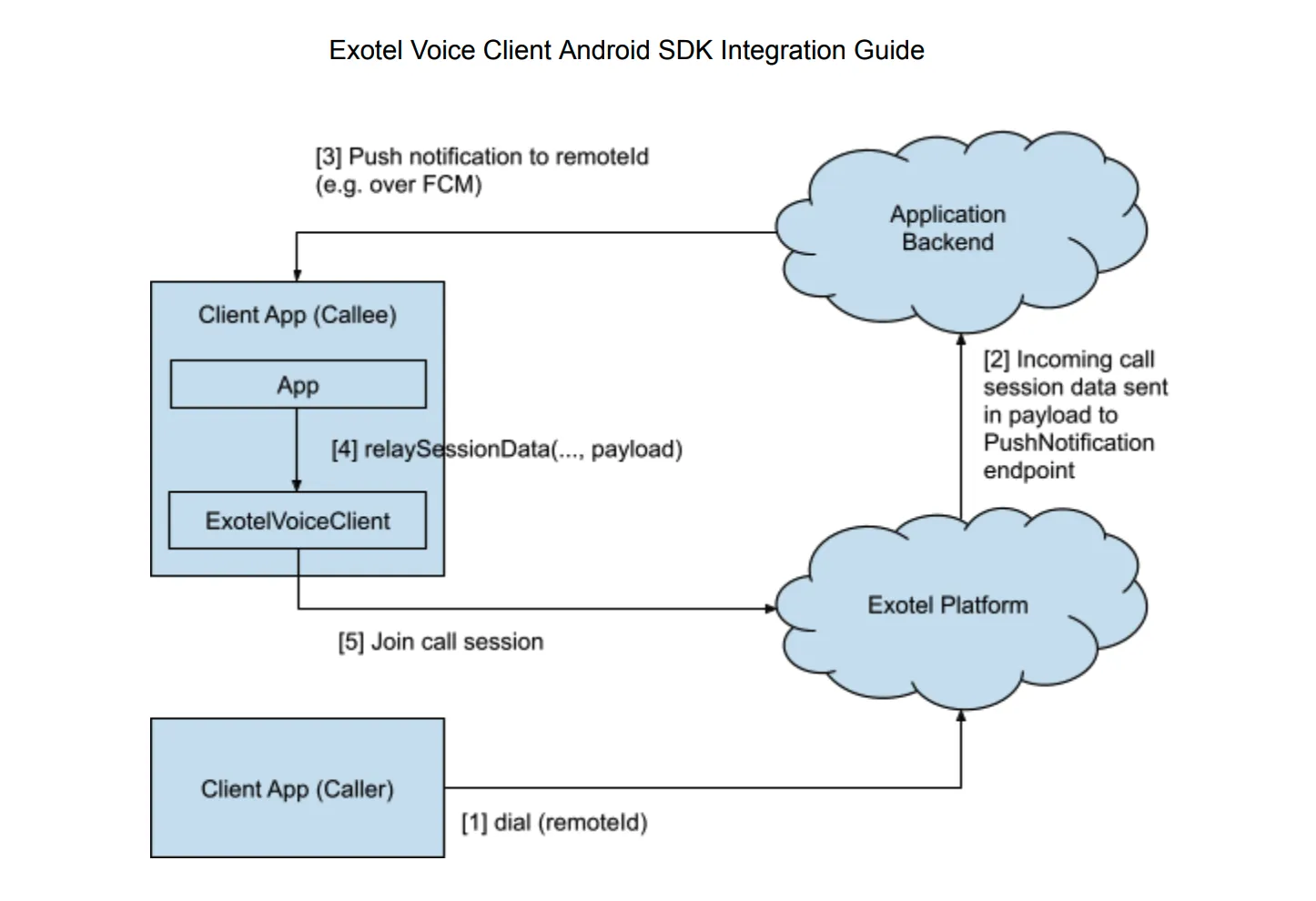
To Receive Push Notification from Push Notification Server, FirebaseMessaging must be initialized and subscribed for firebase message. refer Following PushNotificationService class which is provided as part of sdk.
The sample application uses Firebase Cloud Messaging to push call data to the device. Once received at the mobile app, it is sent to ExotleClientSDK through relaySessionData API.
in Above code,
- you must inialize the PushNotificationService class
- when push notification comes, data will be relayed to ExotelSDKClient using relayFirebaseMessagingData()
- ExotelSDKClient will invoke "relay-session-data" Method.
- on Method "relay-session-data", Android/iOS native method handler will relay data to client SDK. which will be processes by client SDK and client SDK send callback onIncomingCall().
- Android/iOS native method handler will then invoke flutter Method "on-incoming-call"
- on flutter Method "on-incoming-call", ExotelSDKClient will send callback onCallIncoming() .
Hangup
The application can call hangup() API on the call object to decline an incoming call or reject ongoing call.
exotelVoiceClient.hangup();
in Above code,
- ExotelSDKClient will invoke "hangup" Method.
- on Method "hangup", Android/iOS native method handler will decline and terminate the call.
when call is successfully rejected,
- client SDK will send callback onCallEnded()
- Android/iOS native method handler will then invoke flutter Method "on-call-ended".
- on flutter Method "on-call-ended", ExotelSDKClient will check call status and then send onCallEnded() callback.
Audio Management
Before the call begins, Exotel’s SDK checks the current audio output mode and sets the audio route accordingly. By default, it is in the earpiece mode. For example, If a wired headset is plugged in, audio will get routed via wired headset.
Speaker phone mode can be enabled and disabled using ExotelSDKClient object APIs.
Bluetooth mode can be enabled and disabled using ExotelSDKClient object APIs. This will only work when any bluetooth device is connected to the phone.
Local mic can be muted and unmuted during in-call using ExotelSDKClient object APIs.
Reporting Problems
The voice client library logs are stored in the application internal storage. Any issue along with the logs can be reported by app to Exotel using uploadLogs() API of ExotelSDKClient .
The API triggers onUploadLogSuccess() or onUpLoadLogFailure() callback based on the success or failure of the operation.
Reporting Call Quality Feedback
Call quality can be queried from the user and reported to the exotel platform at the end of the call.
The rating is a quality score that can take values 1 to 5.
5 | Excellent quality. No issues. |
|---|---|
4 | Good quality. Negligible issues. |
3 | Average quality. Minor audio noise. |
2 | Bad quality. Frequent choppy audio or high audio delay. |
1 | Terrible. Unable to communicate. Call drop, No-audio or one-way audio. |
The call issue is a descriptive explanation of the issue.
|
|
|---|---|
NO_ISSUE | No issues observed |
BACKGROUND_NOISE | Low audio clarity due to noisy audio |
CHOPPY_AUDIO | Frequent breaks in audio or garbling in audio |
HIGH_LATENCY | Significant delay in audio |
NO_AUDIO | No audio received from far user |
ECHO | Echo during the call |
Platform Integration
Customer API Endpoints
Exotel provides full control to customers to implement call routing business logic. For this, customers need to host the following HTTP endpoints to handle callbacks from Exotel platform.
Dial Whom Endpoint
Host a HTTP endpoint which will be queried by the Exotel platform to get to the destination user.
Method: GET
Request URL (Example): https://company.com/v1/accounts/exotel/dialtonumber
Note: This URL needs to be provided to Exotel or configured in the connect applet.
Request Body:
- CallSid - unique call identifier
- CallFrom - caller username
- CallTo - exophone
Expected Response:
On success, the API should return with response code 200 OK. The response body should be a string of type sip:<remoteId>. “sip:” tag is needed to hint the exotel platform to connect calls over voip. At present, SIP and PSTN intermixing is not supported. Any other response is treated as failure. remoteId is the username with which the call destination subscriber was registered with Exotel platform.
Example:
Request
GET /v1/accounts/exotelip2ipcalling1/dialtonumber?CallSid=743ddcf5a0552050bc37b6d0ff9613bn&CallFrom=sip:Alice&CallTo=sip:08040408080&CallStatus=ringing&Direction=incoming&Created=Sat,+23+Nov+2019+22:00:37&DialCallDuration=0&StartTime=2019-11-23+22:00:37&EndTime=1970-01-01+05:30:00&CallType=call-attempt&DialWhomNumber=&flow_id=249196&tenant_id=113828&From=sip:Alice&To=sip:08040408080&CurrentTime=2019-11-23+22:00:37
Response
{
    "fetch_after_attempt": false,
    "destination": {
        "numbers": [
            "sip:1234567890"
        ]
    },
    "outgoing_phone_number": "08080808080",
    "record": false,
    "recording_channels": "dual",
    "max_ringing_duration": 30,
    "max_conversation_duration": 3600,
    "request_id": "2e48100e6b474714b1a64bfa9f5b7a55",
    "method": "GET",
    "http_code": 200,
    "code": null,
    "error_data": null,
    "status": null
}
Push Notification Endpoint
Exotel implements registration-less dialing where a user need not periodically register with SIP registrar for receiving incoming calls. Instead the call details are pushed to the device as push notification using which call can be established. This method is beneficial as calls will reach the user even when the app is not in foreground or swipe killed. It saves battery since it does not need to keep persistent voip connection when idle.
Exotel will provide call data as payload & payloadVersion to your push notification endpoint that needs to be pushed to the client device from your application backend.
Refer section Receive Incoming Call for handling of push notification payload.
Note - Headers are not supported in the notify endpoints.
Method: POST
Request URL (Example): https://<your_api_key>:<your_api_token>@company.com/v1/accounts/<accountsid>/pushtoclient
Note: This URL needs to be configured in Exotel platform
Request Body:
- subscriberName - Name with which subscriber registered with Exotel platform
- payload - call data which should be passed to the client SDK
- payloadVersion - version of payload scheme
Expected Response:
On success, the API should return with response code 200 OK. Any other response is treated as failure.
Exotel API Endpoints
Subscriber Management
Customers can manage their subscribers in the Exotel platform using the APIs listed “Subscriber-Management-API” document.
For clients to be able to use voip calling features they need to be added as subscribers under your account. There are two ways in which your client registration with Exotel account happens,
- Pre-provisioning The customer pre-configures the client accounts even before the app is installed by the client. Refer to the “Subscriber-Management-API” document for details on creating client accounts.
- Dynamic provisioning A client account is created after the app is installed by the user and signs-up with the application backend. Refer to Authentication and Authorization for workflow details. Once client provisioning happens, clients can be managed using Subscriber Management APIs.
Authentication and Authorization
Access to the exotel platform by ExotelVoice is authenticated using a set of bearer tokens - subscriber_token. The Application backend must obtain these tokens from the exotel platform and provide them to the client on request. Refer to the “Subscriber-Management-API” document for details.
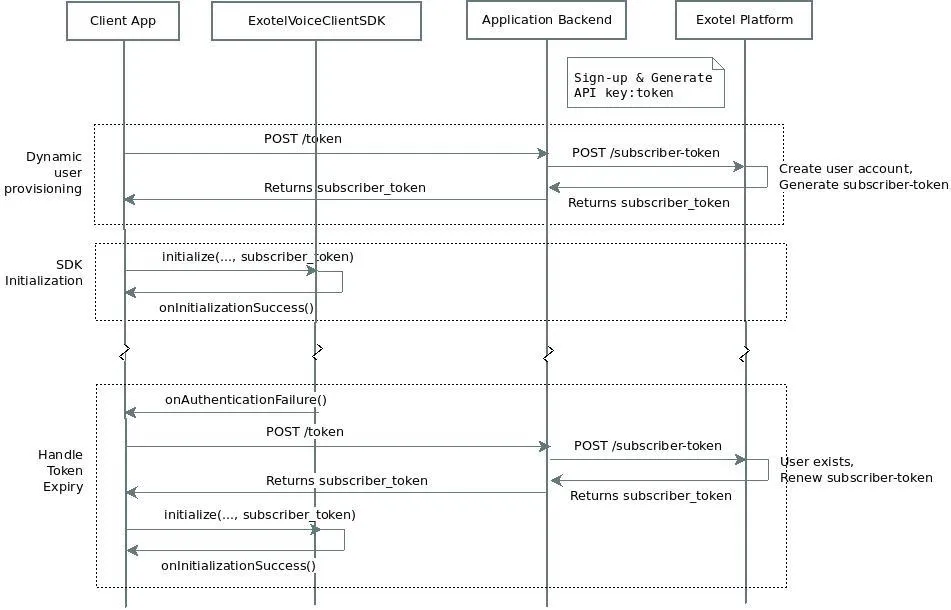
On receiving the onAuthenticationFailure event, the application should request a new subscriber_token from its backend and reinitialize the SDK as shown in section Initialize Library. Contact Exotel support if you get onAuthenticationFailure even after token renewal.
onAuthenticationError() event provides following error types:
- AUTHENTICATION_INVALID_TOKEN - token parameters are invalid
- AUTHENTICATION_EXPIRED_TOKEN - token expired