Metadata of a phone number
The number metadata API provides the following metadata of a given number:
- Telecom Circle
- Human readable Telecom Circle name
- Number type
- Operator (Carrier) that the number belongs to
- Whether the number is under DND or not
If all you want is to see/read the details of a phone number, use our Phone number details page
Request Format:

https://<your_api_key>:<your_api_token><subdomain>/v1/Accounts/<your_sid>/Numbers/~number~
- Replace <your_api_key> and <your_api_token> with the API key and token created by you.
- Replace <your_sid> with your “Account sid”
- Replace <subdomain>with the region of your account
- <subdomain> of Singapore cluster is api.exotel.com
- <subdomain> of Mumbai cluster is api.in.exotel.com
<your_api_key> , <your_api_token> and <your_sid>onExotel Dashboard
Example:https://roopit:[email protected]/v1/Accounts/roopit/Numbers/9916766748
Response:
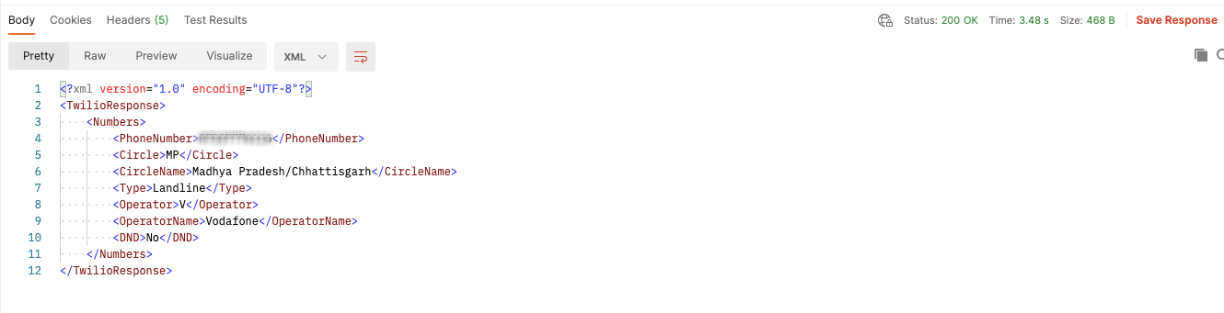
The response comes back in XML
Parameter Name | VALUE |
|---|---|
PhoneNumber | Reformatted phone number string |
Circle | Two-character telecom circle code. |
CircleName | The human-readable string of the Circle code. Ex: Haryana Telecom Circle (excludes Faridabad, Gurgaon & Panchkula) |
Type | 'Mobile' or 'Landline' |
Operator & OperatorName | "AC" => "Aircel","A" => "Airtel","AL" => "Allianz","B" => "BSNL","D" => "Dishnet","E" => "Etisalat","H" => "HFCL","I" => "Idea","LO" => "Loop","MT" => "MTNL","P" => "Ping","R" => "Reliance","S" => "Sistema","ST" => "S Tel","T" => "Tata","U" => "Unitech","VI" => "Videocon","V" => "Vodafone" |
DND | 'Yes' 'No' 'Unavailable' |
Example:
Please note the DND status fetched using the mentioned API may not be accurate as the DND statuses are not published as per recent updates by TRAI.