Introduction and Glossary
Introduction
ExotelVoice library enables you to add the voip calling feature into your app. This document outlines the integration steps. The library supports only peer to peer 2-way calls. Multi-party conferencing use cases are not supported.
Section 4 describes integration steps for ExotelVoice Android SDK. Section 5.1 describes the webhooks that should be supported in your application backend for number-masking workflow. Section 5.2.1 describes subscribers provisioning in the Exotel platform.
Licensing
Create a trial account in Exotel. To enable voip calling in the trial account, contact exotel support. Once Exotel support enables the voip capability in the account , a VOIP Exophone will be created as shown below and available in the account under the Exophones section .
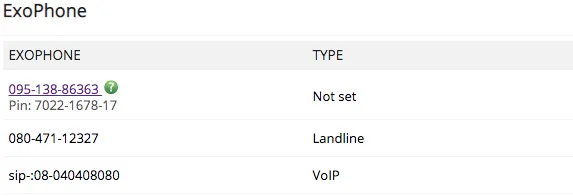
SIP Exophones discussed later in the section refers to Exophones of Voip type as shown above.
NOTE :- SIP and VOIP are used interchangeably in the document
Glossary
Terminology | Description |
|---|---|
App | Mobile application |
Application Backend | Customer backend service for the application |
Client | User / Subscriber / Client signing up to use the mobile app |
Customer | Exotel’s customer licensing the SDK |
Voip | Voice over IP |