Enable Auto Disposition Recommendation and AI Disposition Notes in AI Assist
AI Assist can help your agents finish wrap-up faster by automatically recommending a disposition and writing the disposition note for them at the end of every voice call. This guide shows you exactly how to turn it on for any AI Assistant you have already created, what it looks like for your agents, and the few conditions you need to be aware of.
Who this is for
This guide is for anyone who manages AI Assistants on Exotel — typically an admin or supervisor — and wants to enable AI-assisted wrap-up for their contact center agents.
What the feature does
Once you enable it, at the end of every voice call AI Assist will:
- Recommend a Primary Disposition (and a Sub-Disposition, if one is configured) from your existing disposition taxonomy.
- Generate a structured Disposition Note from the call transcript, covering the customer's issue, the resolution, and any next steps.
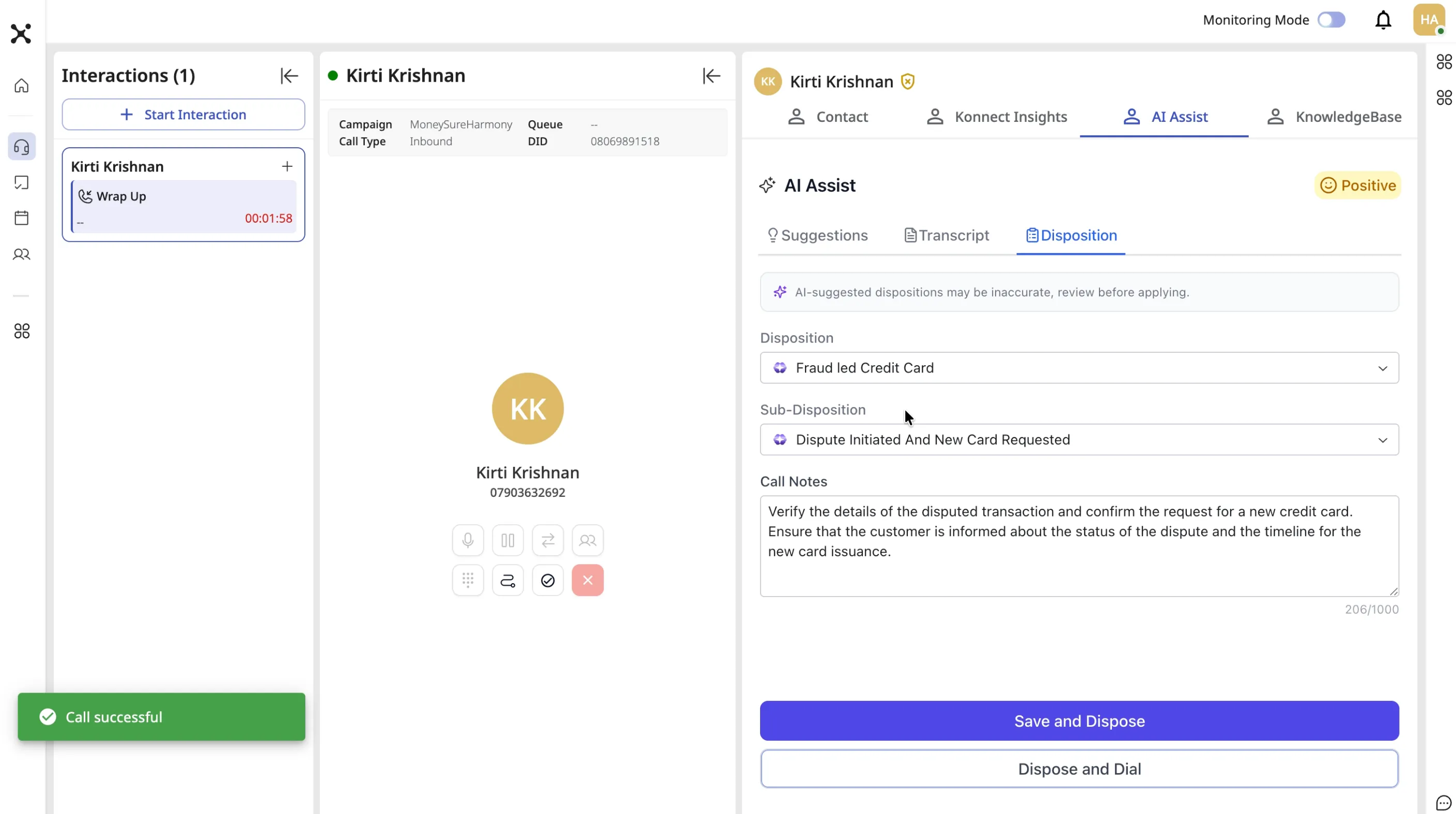
Both the recommendation and the note appear inside the AI Assist panel in the agent desktop. The agent can accept them as-is, change the disposition, or (if you allow it) edit the note before submitting wrap-up. Agents always stay in control — AI Assist never blocks them from disposing a call.
Supported platforms
This feature is available on:
- Exotel Contact Centre (Ameyo) 6x Legs (6x leg-based ECC deployments)
- Exotel Contact Centre (Ameyo) 6.0
Before you begin
Make sure the following are in place. Without these, the feature will either not show up in configuration or will silently not produce suggestions.
- You are on Exotel Contact Centre (Ameyo) 6x Legs or Exotel Contact Centre (Ameyo) 6.0.
- AI Assist is enabled for your account and you already have (or are creating) an AI Assistant.
- Your disposition taxonomy (Primary dispositions, and Sub-dispositions if you use them) is already configured in Exotel Contact Centre (Ameyo) for the campaign the agents are working on. AI Assist can only recommend dispositions that already exist in your taxonomy — it will never invent new ones.
- Agents are using the AI Assist panel inside the Exotel Contact Centre (Ameyo) agent desktop (embedded via the Omni SDK in Exotel Contact Centre (Ameyo) 6.0, or in the 6x Legs agent toolbar).
- Your AI Assistant is attached to the relevant voice flow so that calls actually stream to it.
Note on Live Transcript: You do not need Live Transcript to be ON. If Live Transcript is turned off, the live transcription simply isn't displayed to the agent in the AI Assist panel, but the AI will still receive the audio, generate a transcript in the background, and produce the disposition recommendation and note at the end of the call.
How to enable the feature on an AI Assistant
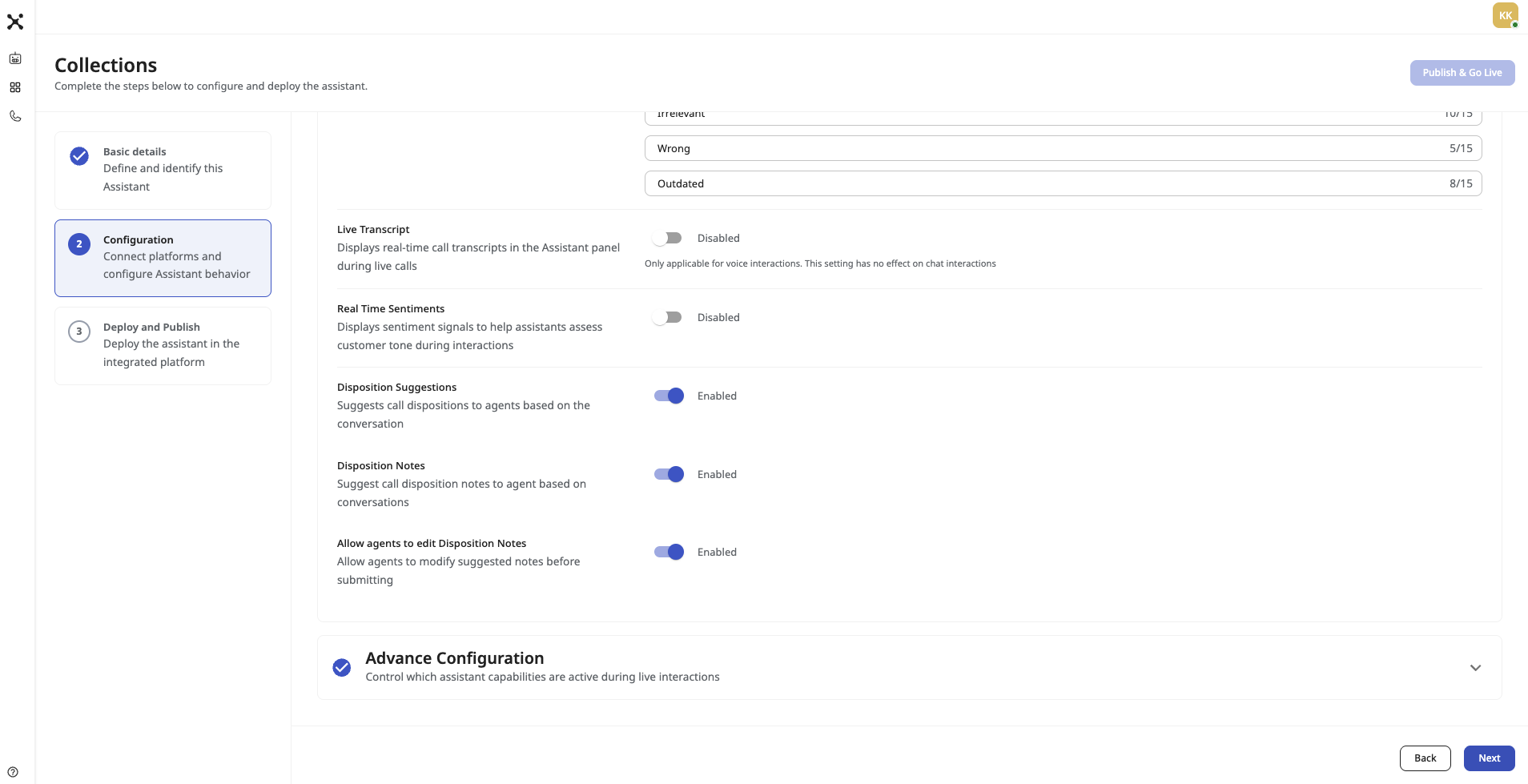
Disposition configuration is done while creating or editing an AI Assistant — it lives inside the assistant itself, not in a separate admin area.
Step 1 — Open your AI Assistant
Log in to Exotel and go to AI Assist → Assistants. Either click Create New Assistant to create one from scratch, or open an existing assistant and click Edit.
Step 2 — Go to the Disposition section
Inside the assistant creation / edit screen, scroll to the Disposition section. This section is visible only when the assistant is configured for a supported platform (Exotel Contact Centre (Ameyo) 6x Legs or 6.0) and voice channel.
Step 3 — Turn on the toggles you want
You will see the following settings:
- Enable Disposition Recommendation — when ON, the AI will auto-suggest a Primary Disposition (and Sub-Disposition if your taxonomy has one) at the end of every call.
- Enable Disposition Notes Generation — when ON, the AI will generate a structured wrap-up note from the call transcript and pre-fill it in the Notes field.
- Allow Agent to Edit AI Notes — ON by default. If you turn this OFF, the AI-generated note will be shown as read-only and the agent will not be able to modify it before submitting.
You can turn these on independently. Common setups:
- Both ON — fully assisted wrap-up (most common).
- Recommendation ON, Notes OFF — AI picks the disposition, agent writes notes manually.
- Recommendation OFF, Notes ON — AI writes notes, agent picks the disposition manually.
Step 4 — Save and publish the assistant
Save the assistant. Changes take effect for the next call that runs through this assistant — there is nothing additional to deploy.
Step 5 — Do a test call
Place a test voice call on a campaign that uses this assistant, let the agent end the call normally, and confirm on the wrap-up screen that the disposition is pre-selected and the notes field is pre-filled.
How it appears in the Agent Desktop
How agents access it
Agents do not need to do anything special to access the feature. It is part of the AI Assist panel that is already embedded in their Exotel Contact Centre (Ameyo) agent desktop:
During a live call the panel shows the usual AI Assist tabs (Live Transcript, Suggestions, etc.). The disposition recommendation and notes only appear in the disposition tab once the call has ended.
What the agent sees at wrap-up
As soon as the call ends and the interaction enters the wrap-up state:
- The Primary Disposition field gets auto-populated with the AI-recommended value.
- If your taxonomy has sub-dispositions, the Sub-Disposition is auto-populated too.
- The Notes field is pre-filled with a structured AI note covering Issue, Resolution, and Next Steps.
- The AI-generated content is visually marked so the agent knows it came from AI.
The agent can then:
- Accept everything and click submit.
- Change the primary or sub-disposition before submitting (AI suggestions are never locked).
- Edit the note, if "Allow Agent to Edit AI Notes" is ON.
Submission rules are unchanged: disposition remains mandatory, notes remain optional (unless your campaign already enforces notes).