User Login & Single Sign-On (SSO)
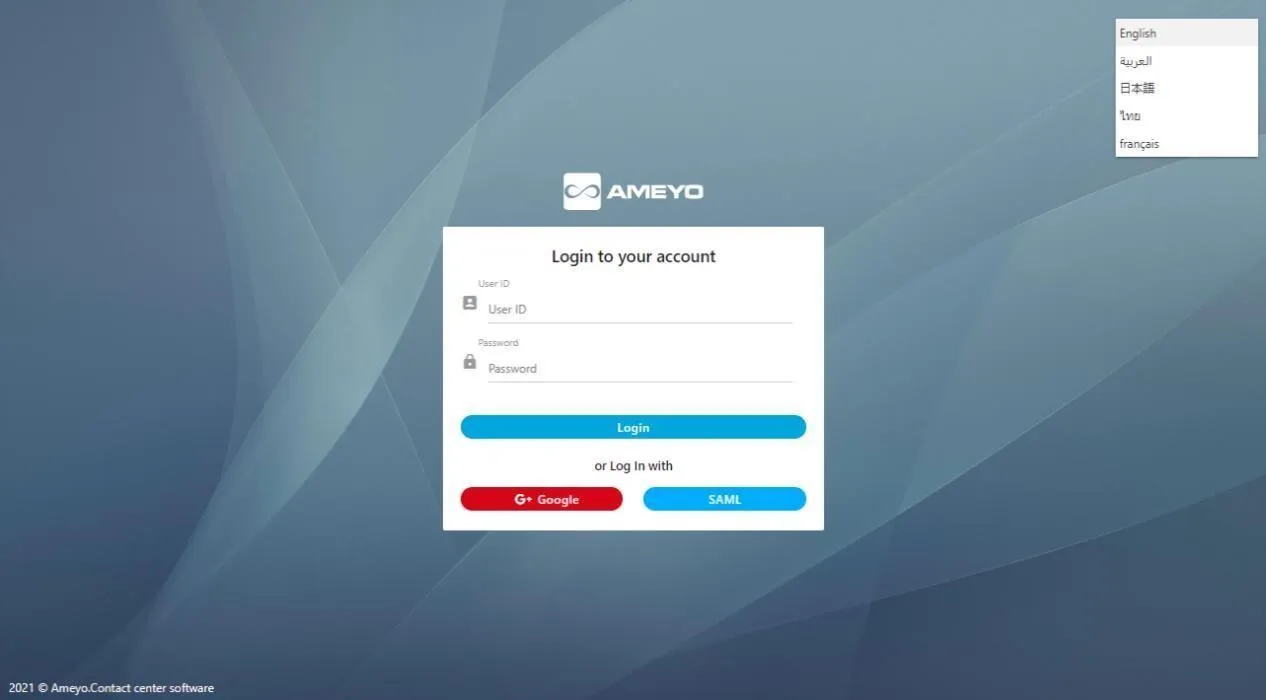
The Login Page provides the gateway to the platform's web-based interface, offering privileges to manage a single tenant, its campaigns, users, and call managers. The page supports standard credential-based login as well as enhanced security and convenience features like Single Sign-On (SSO) via SAML and Google integration.
How It Works
The Login Page supports multiple methods for accessing the console:
Login Method | How It Works | Nature |
|---|---|---|
Normal Login | The user enters their platform User ID and Password, then clicks Login. Password strength and expiry follow your password policies (see Password Policy). For LDAP-authenticated environments, a configurable timeout (default 5 seconds) applies to the authentication request. | Standard |
Login with SAML | The user clicks SAML and is sent to the organization’s Identity Provider (IdP). After corporate sign-in, the IdP and the platform exchange trust using SAML 2.0 assertions. Common IdP examples customers use include Microsoft AD FS, Okta, Keycloak, and other SAML-capable providers—configuration is still SAML, not a separate product-specific “Okta button.” | Licensable (SSO) |
Login with Google | The user clicks Google (or G - Google on some builds) and signs in with Google Workspace (formerly G Suite). The tenant must allow your Google domain so only authorized staff can complete login. | Licensable (SSO) |
Public cloud note (capacity planning): On Ameyo public cloud, SAML logins are documented with a practical ceiling on consecutive SAML sessions (on the order of hundreds). For very high concurrent interactive logins, operations teams may prefer OAuth-based authentication paths documented for cloud—confirm current limits with your Exotel or platform account team. This does not add a third branded button on the classic web login; it is an architecture / scale choice for cloud deployments.
Use Cases
- Enterprise Security: A large corporation implements SSO (SAML) to enforce its strict corporate password policies and multi-factor authentication across all applications, including the contact center platform.
- Streamlined User Access: An agent logs into their company computer and can immediately access the agent console (or another platform) via SSO without needing to enter their credentials a second time.
- Centralized User Management: When an employee leaves the company, an IT administrator simply deactivates their single corporate account in the IDP, which automatically revokes their access to the platform via SAML.
Benefits
- Improved Security: Centralizes user authentication, making it easier for the business to enforce strong corporate password policies and manage access centrally.
- Enhanced User Experience: Simplifies the login process for users (Administrators and Agents), saving time and reducing the frustration of managing multiple passwords.
- Reduced Administrative Overhead: Streamlines the user onboarding and offboarding process by linking access control to a single corporate identity.
Language Selection
The Login Page also allows the user to set their preferred language before logging in.
- The user selects the desired language from the drop-down menu provided at the top right corner of the screen.
- By default, English is selected as the platform's language.
- Available languages include: English, French, Thai, Arabic, Japanese, Deutsch, and Turkish.
Limitations
- Identity Provider Outage: If the central Identity Provider (IDP) used for SAML or Google login experiences an outage, users will be unable to log in to the platform using the SSO method.
- Licensable Features: The SAML and Google login options are Licensable features, requiring specific configuration and agreement.
LDAP Authentication
For deployments using LDAP (Active Directory or other LDAP directories) for credential verification, the platform performs an LDAP bind on each login attempt. Starting from version 4.13.9, a configurable authentication timeout (default 5 seconds) is applied to LDAP bind requests, preventing slow or unresponsive directory servers from blocking login flows indefinitely. Improved logging captures LDAP authentication failures and timeout events for easier troubleshooting.
Session behaviour (after login)
Once authentication succeeds, the platform keeps a session open for your user until you log out, the session expires from inactivity, or an administrator or policy ends it (for example when another login is not allowed and you choose to take over an existing seat). If you see a force login or maximum sessions style message, follow the on-screen options or contact your administrator—limits are applied per deployment.
Related topics
- Password Policy — Local password rules (simple, complex, enforce, substring/identity policy) used with normal login and password changes.
- Logout from Ameyo — Steps for agents to leave the application cleanly.
- Administrator Login — Console login for tenant administrators.
- Supervisor Login — Supervisor web login.
- Login - Logout — Reporting view for login and logout activity.