Administration & Configuration
Target Audience:
System Administrators, QA Leads
Description:
The core setup guide. This page holds all the foundational tasks required to make the CQA platform operational before daily QA work begins.
4. Administration & Configuration
This section is designed for Administrators and QA Leads. It covers the foundational setup required to make the CQA platform operational: defining your data structure (Metadata), creating scoring rubrics (Quality Profiles), and automating the workflow (Assignment Rules).
4.1. Metadata Management
Goal: Define the "vocabulary" the system uses to understand your calls. Metadata consists of the tags attached to a recording (e.g., Agent ID, Campaign Name, Talk Time) which drive filtering, reporting, and automation.
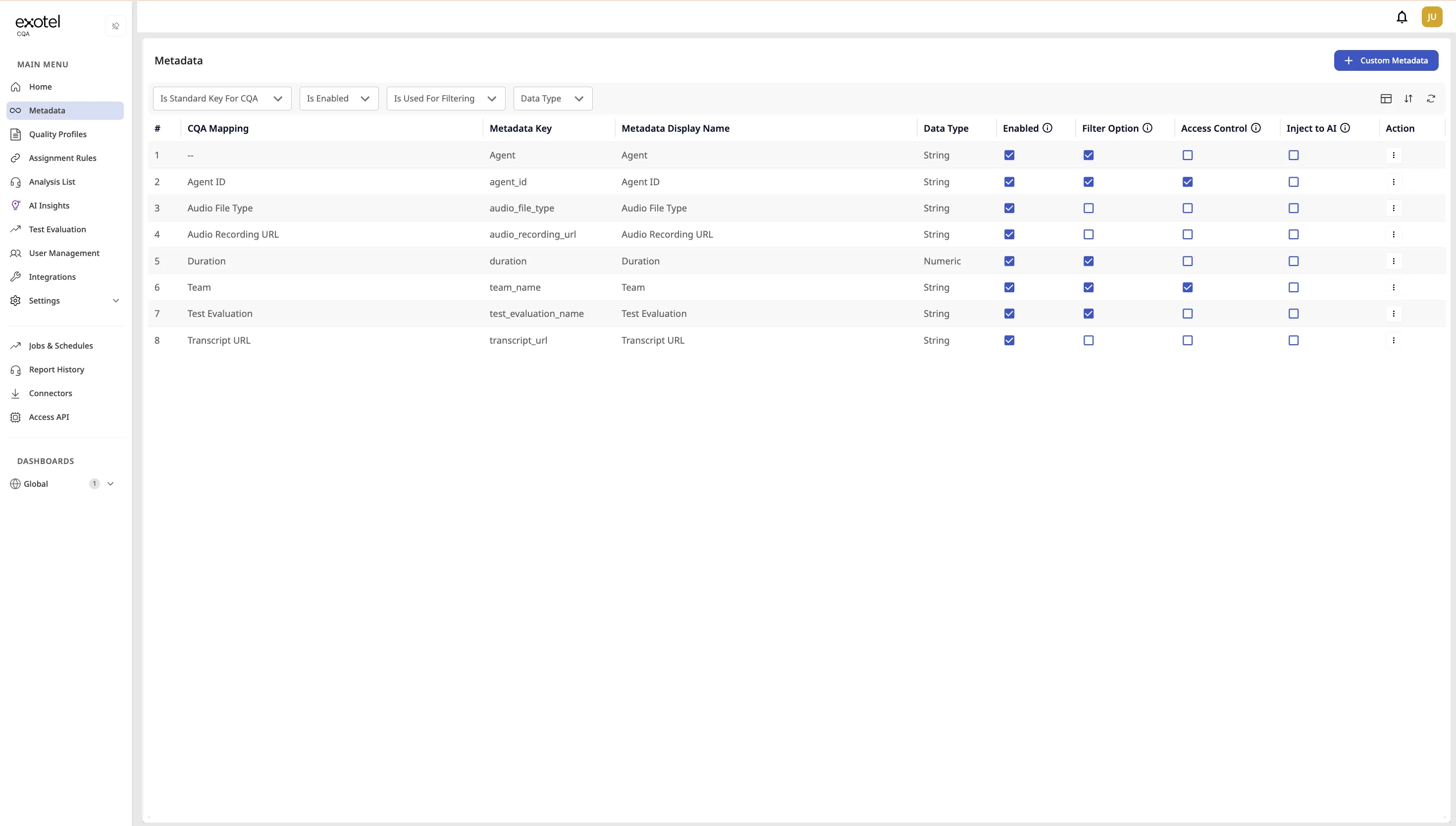
4.1.1. Accessing Metadata
Navigate to Metadata in the sidebar. You will see a list of all data keys currently ingested by the system.
4.1.2. Configuring Fields
Admins can customize how each metadata field behaves using the following options:
- Enable/Disable: Toggle the "Enabled" checkbox.
- Effect: Enabled fields are visible throughout the platform. Disabled fields are hidden entirely from dashboards and reports .
- Set as Filter: Check the "Filter Option" box.
- Effect: This field will now appear as a selectable dropdown in the Assignment Rules and Analysis List, allowing users to slice data by this attribute (e.g., "Show me calls from North Region") .
- Access Control: Check the "Access Control" box.
- Effect: This restricts data visibility based on user roles. For example, if "Region" is set for access control, a supervisor assigned to "Region A" will not see data for "Region B" .
- Inject to AI: Check the "Inject to AI" box.
- Effect: CQA includes this field's value as additional context for the AI when analyzing the call/transcript. Metadata from all ingestion sources (ECC, Platform, S3, SFTP, Excel, Ingress API) can be injected. Up to 20 fields per tenant may have Inject to AI enabled; values longer than 20 characters are truncated for AI context.
Note: Inject to AI is not available on the Metadata page by default. Contact your CSM to enable this capability for your tenant before the option can be used.
4.1.3. CQA Mapping (Renaming Fields)
Sometimes, the technical name of a field (e.g., program_id) is not intuitive for business users.
- Action: Click the Edit icon next to a field.
- Display Name: Enter a user-friendly name (e.g., "Campaign").
- Result: Users will see "Campaign" in reports and filters, while the system continues to read program_id in the background.
4.2. Building Quality Profiles (Scorecards)
Goal: Create the structured rubric used to evaluate agent performance. A Quality Profile represents a specific scorecard (e.g., "Sales Audit" or "Customer Service Review").
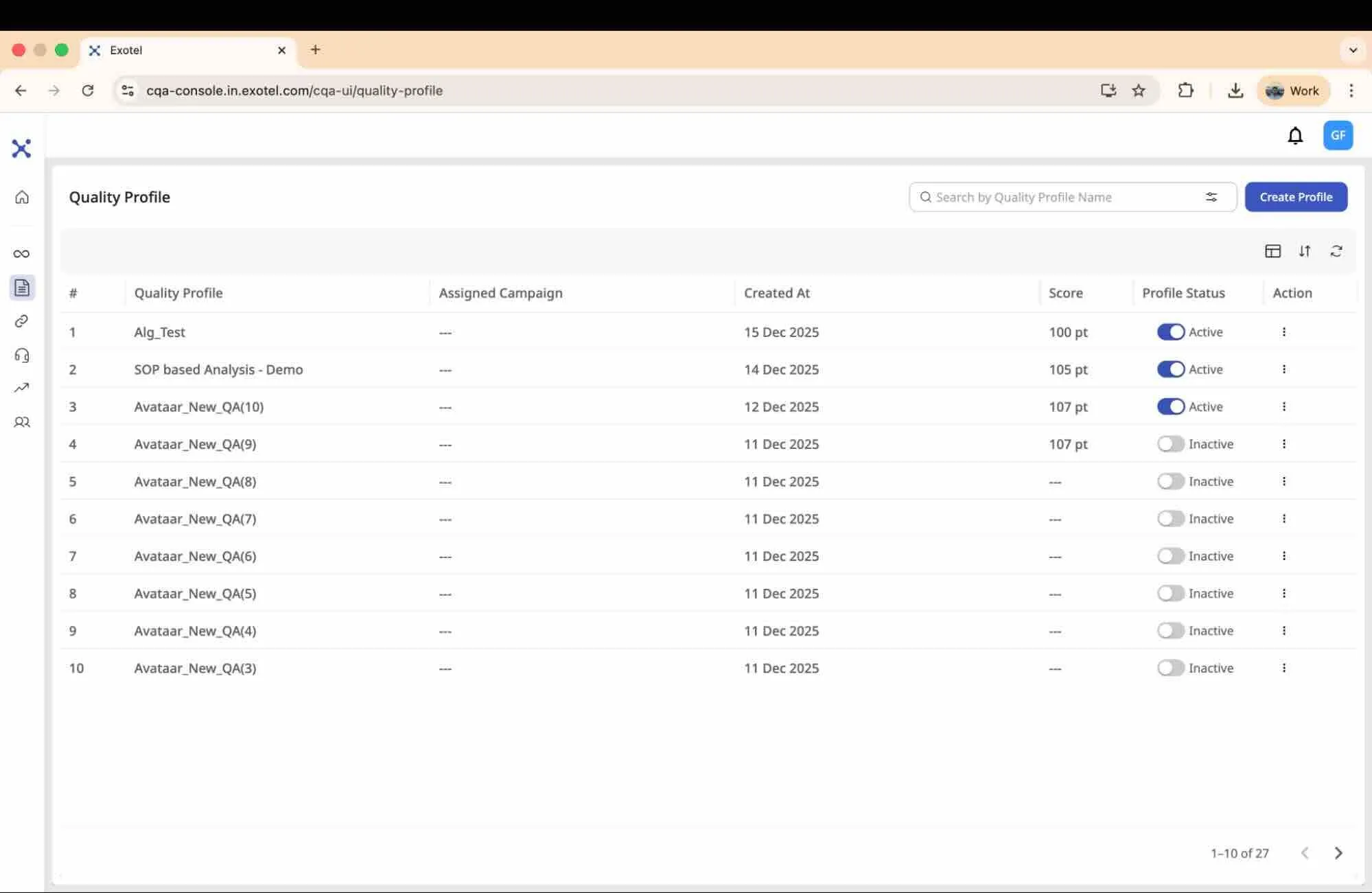
There are three ways to build a profile: Manually (good for small edits or simple profiles) or via Excel Upload (recommended for bulk creation), or using AI-Assisted Creation (recommended when starting from scratch — the AI generates a complete profile from your business context and sample calls).
4.2.1. Method A: Manual Creation
Use this method to build a profile from scratch directly in the UI.
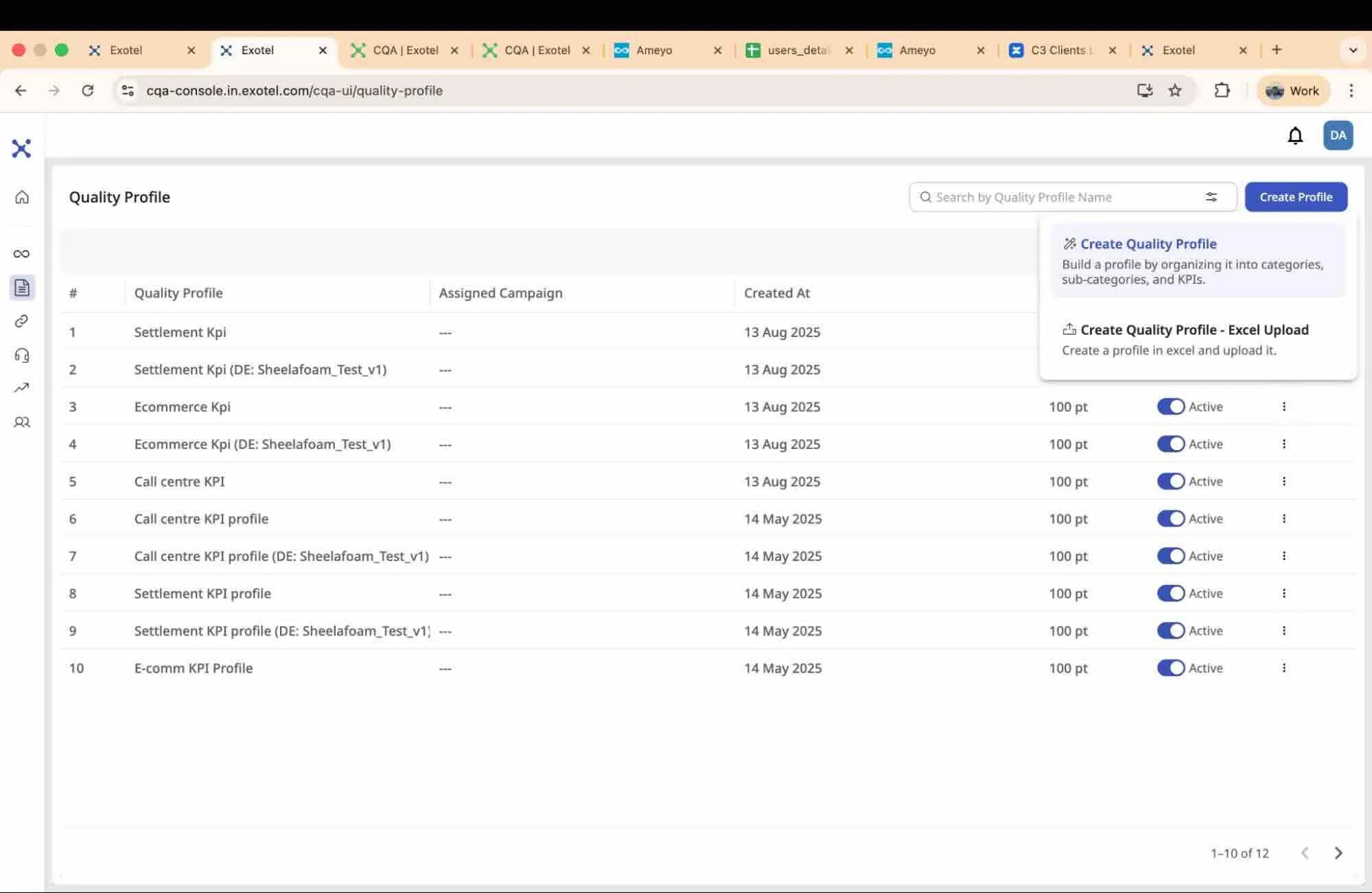
- Navigate to Quality Profiles and click Create Profile, and click Create Quality Profile.
- Profile Details: Enter a Name (e.g., "Inbound Support") and a Description.
- Topics (optional, used by Smarter Assignment):
- Topics power topic-based matching when you use Smart Assignment in Assignment Rules.
- Add up to 10 selection topics that describe when this profile should apply (e.g., "Insurance Enquiry", "EMI Collection").
- Type a topic and press Enter to add it.
- Use Generate Topics for AI suggestions based on the profile name and description, then click a suggestion to add it.
- Create Structure (Categories):
- Click Add Category to create a high-level section (e.g., "Opening & Closing").
- Inside the category, click Add Sub-category to create a focused group (e.g., "Greeting").
- Add KPIs (Questions):
- Inside a sub-category, click Add KPI.
- KPI Title: Enter a short name (e.g., "Warm Welcome") that will appear in reports.
- KPI Input Type: Select one of the following:
- Yes/No: A binary choice (e.g., Did they verify the address?). You can assign points for 'Yes' (e.g., 5) and 'No' (e.g., 0).
- Selection: A multiple-choice question. Define scenarios (e.g., "Option A: Mentioned both tax and amount," "Option B: Mentioned only amount"). The AI selects the best match .
- Rating: A 1-5 scale for subjective measures.
- Text: A data extractor KPI that specifies what data to be extracted from the conversation (e.g., “What are the competitor products mentioned by the customer”).
- Criticality: Set the criticality level to automatically zero out the score for the entire category, sub-category or the quality profile, regardless of other passing KPIs.
- KPI Question: Enter the full, detailed prompt for the AI (e.g., "Did the agent introduce themselves by name?").
- Allow Scoring: Enable/Disable scoring for the KPI. Note that the scoring will be disabled automatically for KPI input type of Text.
- Save: Click Save Profile.
4.2.2. Method B: Excel Upload (Bulk Creation)
Use this method to create large, complex profiles offline and upload them instantly.
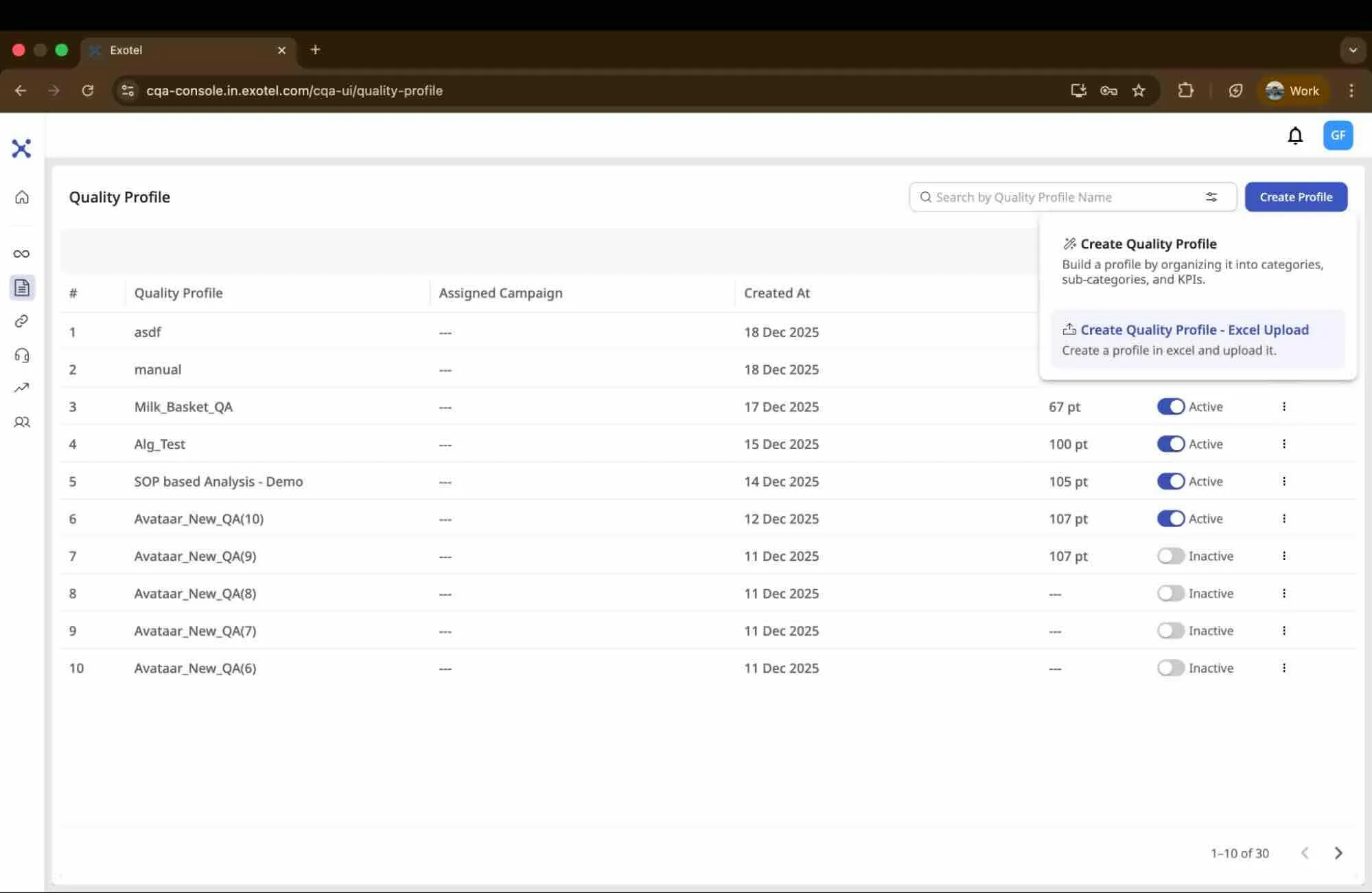
1. Download the Template
- Navigate to Quality Profiles and click Create Profile, and click Create Quality Profile - Excel Upload.
- Click on Download our Sample Excel
2. Fill the Excel Template
- Category & Sub-category: Define your sections here (e.g., "Soft Skills" -> "Empathy").
- KPI: A short identifier for reports (e.g., "Politeness").
- KPI Question: The detailed instruction for the AI.
- KPI Type: Specify "Yes/No," "Selection,", "Rating", or “Text”.
- KPI Option Label: Specify the expected options to be displayed as outcomes.
- KPI Option Weightage:
- For Yes/No: You will see one row for "Yes" and one row for "No." Assign points to each (e.g., Yes = 5, No = 0).
- For Selection: Create one row for every possible option/answer.
- For Rating: Mention the range between which the rating has to be applied.
- Criticality: Mark specific KPIs as "Critical" by specifying the criticality level as "Category" or “SubCategory” or “Profile” in the designated column if applicable.
3. Upload and Validate
- Return to the Quality Profiles page.
- Select Upload Excel.
- Choose your filled file. The system will validate the structure and create the profile.
- You can now open the profile in the UI to make any final tweaks before activating it.
Note: You can also Download an existing profile to make edits in Excel, then re-upload it to update the version.
4.2.3. Method C: AI-Assisted Creation
Use this method when starting from scratch and you want the AI to generate a complete Quality Profile based on your business context and real call data. Instead of manually defining every KPI, you walk through a guided wizard that collects your requirements and sample interactions, then the AI produces a structured scorecard — categories, sub-categories, and KPIs — ready for review and activation.
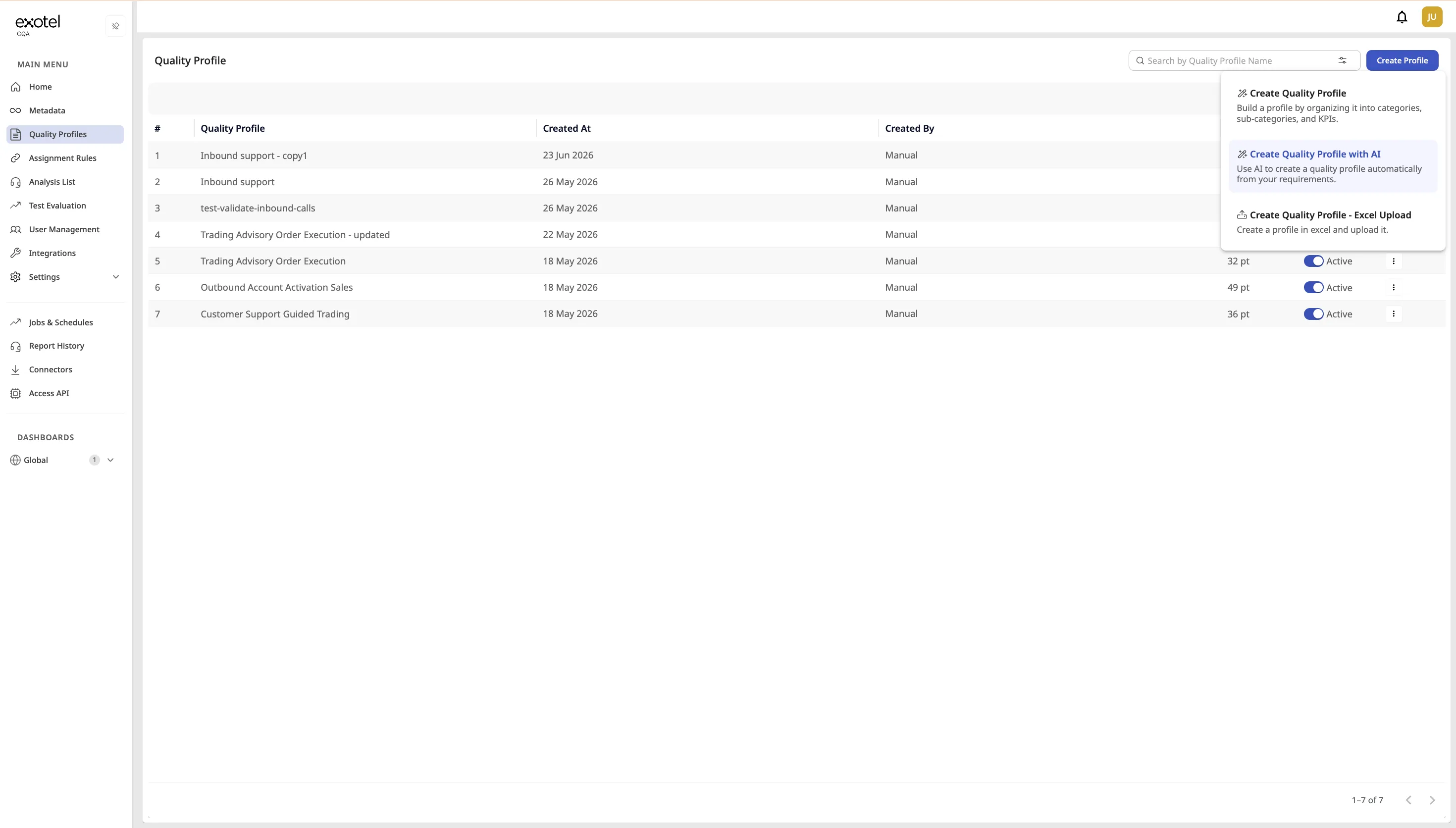
Note: AI-Assisted creation requires enablement by the Exotel delivery team. Contact your Customer Success Manager to activate this capability for your tenant.
- Navigate to Quality Profiles and click Create Profile, then select 'Create Quality Profile with AI'.
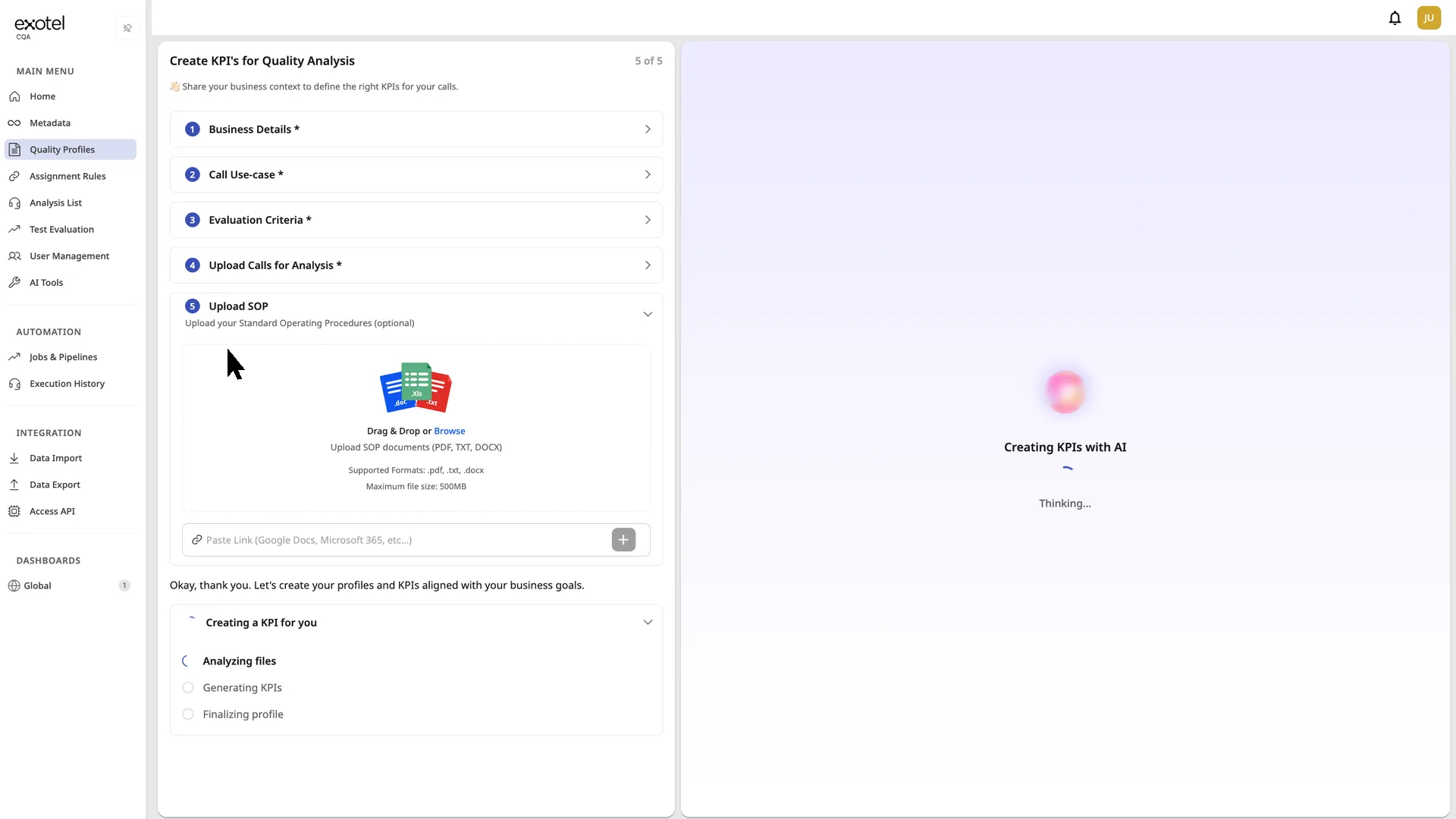
- The wizard opens with five steps:Step 1 — Business Details Describe your business, industry, and the customers you serve. This gives the AI context to generate KPIs tailored to your specific domain (e.g., banking, insurance, e-commerce support). Step 2 — Call Use-case Describe the type of calls to be evaluated. For example: "Inbound support calls aimed at product clarity and first-call resolution." This tells the AI what scenarios the generated KPIs should optimize for. Step 3 — Evaluation Criteria Specify what you want to focus on when evaluating these calls. Mention any critical KPIs like script adherence, compliance checks, or customer satisfaction. The AI prioritizes these in the generated profile. Step 4 — Upload Calls for Analysis Drag and drop sample call recordings or transcripts. The AI analyzes these actual conversations to understand your interaction patterns and generate more accurate KPIs. Supported formats: MP3, WAV (audio); TXT, PDF, DOC (text). You can upload up to 50 files. Step 5 — Upload SOP (Optional) Upload your Standard Operating Procedures as PDF, text, or doc files, or paste a link to Google Docs or Microsoft 365. The AI uses these to align the generated KPIs with your documented processes and compliance requirements. This step is optional — skip it if you do not have SOPs available.
- Click Generate to start. The AI analyzes your uploaded files, cross-references your business context and SOPs, and builds the profile. Processing typically takes 1-2 minutes depending on the number of files uploaded.
- Review the generated profile. The AI produces a complete structure with categories (e.g., Compliance, Communication Quality, Customer Engagement), sub-categories, and individual KPIs with scoring types and weightages.
- Edit as needed — adjust KPI questions, change scoring types, modify weightages, add or remove KPIs. The generated output is a starting point that you have full control over.
- Click Save when satisfied. The profile is immediately available for use with Assignment Rules.
4.3. Assignment Rules (Automation)
Goal: Automate the quality assurance process by linking specific calls to specific Quality Profile(s).
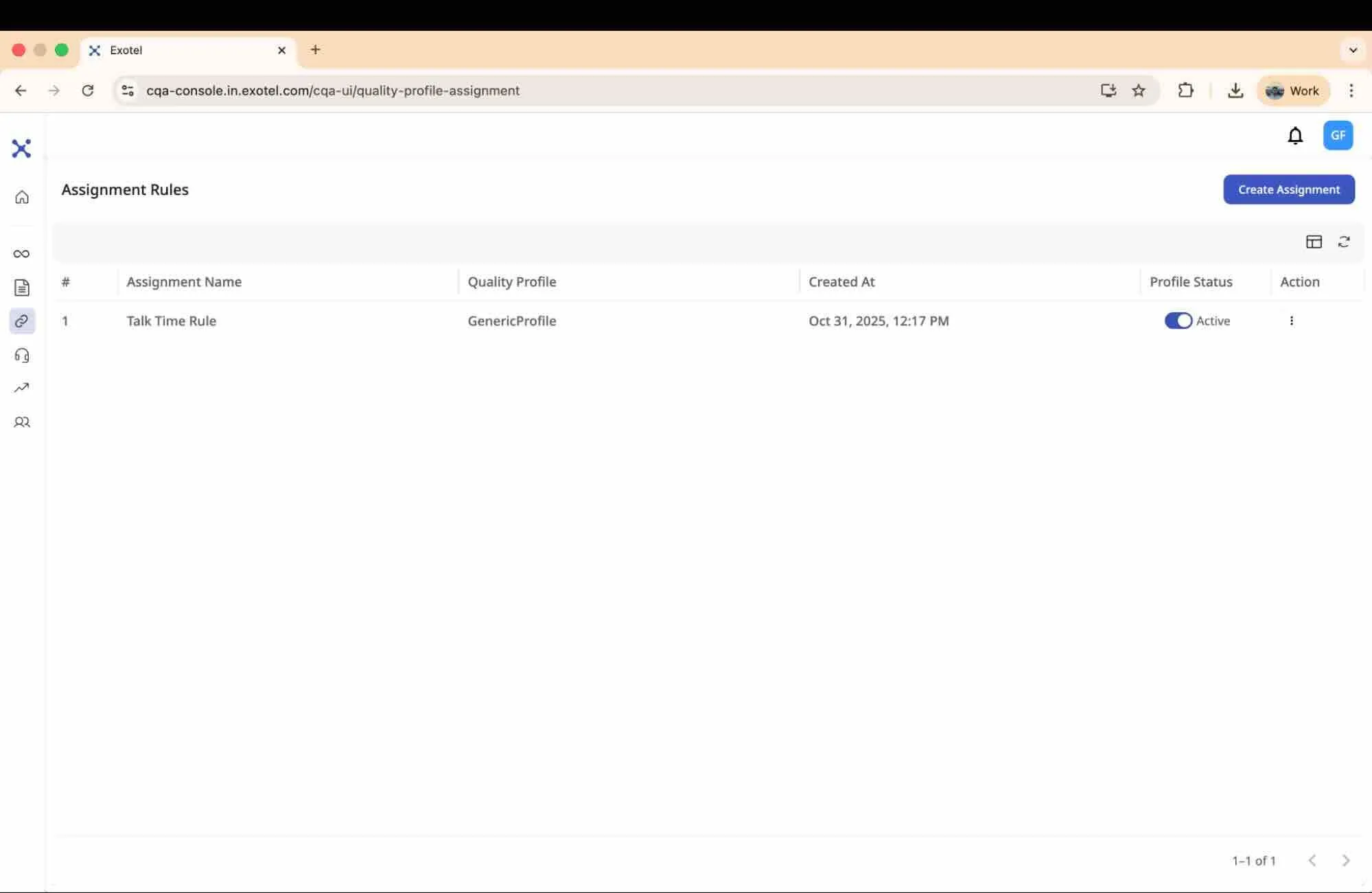
CQA supports two assignment types:
Type | When to use | How profiles are chosen |
|---|---|---|
Rule-Based Assignment | Fixed routing by metadata | You select one/more Quality Profile; matching calls always use that profile(s) and gets analyzed. |
Smart Assignment | Topic-based routing (Smarter Assignment) | You select candidate Quality Profile(s); the system matches call content to profile Topics, and can score a call against all the matching Quality profile(s). |
4.3.1. How it Works
Instead of manually selecting calls to audit, you create Assignment Rules. As recordings stream into the platform:
Multiple Rules Matching the Same Interaction:
The system evaluates all active assignment rules for every incoming recording — not just the first match. Before analysis begins, it collects the Quality Profiles assigned by all matching rules into a distinct set. One analysis runs per unique Quality Profile in that set.
Situation | Example | Result |
|---|---|---|
One rule matches and assigns one profile. | Rule A matches a call and assigns Quality Profile 1. | One analysis runs (Quality Profile 1). |
One rule matches and assigns multiple profiles. | Rule A matches a call and assigns Quality Profile 1 and Quality Profile 2. | Two analyses run (one per profile). |
Multiple rules match and assign different profiles. | Rule A matches and assigns Quality Profile 1. Rule B also matches and assigns Quality Profile 2. | Two analyses run (one per distinct profile). |
Multiple rules match and assign the same profile. | Rule A matches and assigns Quality Profile 1. Rule B also matches and assigns Quality Profile 1. | One analysis runs (Quality Profile 1 — deduplicated). |
Configuration tips:
- Use overlapping rules when you intentionally want one interaction evaluated under multiple profiles (e.g., a Compliance profile and a Coaching profile).
- If you want only one analysis per interaction, design your rules so matched conditions resolve to a single distinct profile.
4.3.2. Creating a Rule-based Assignment
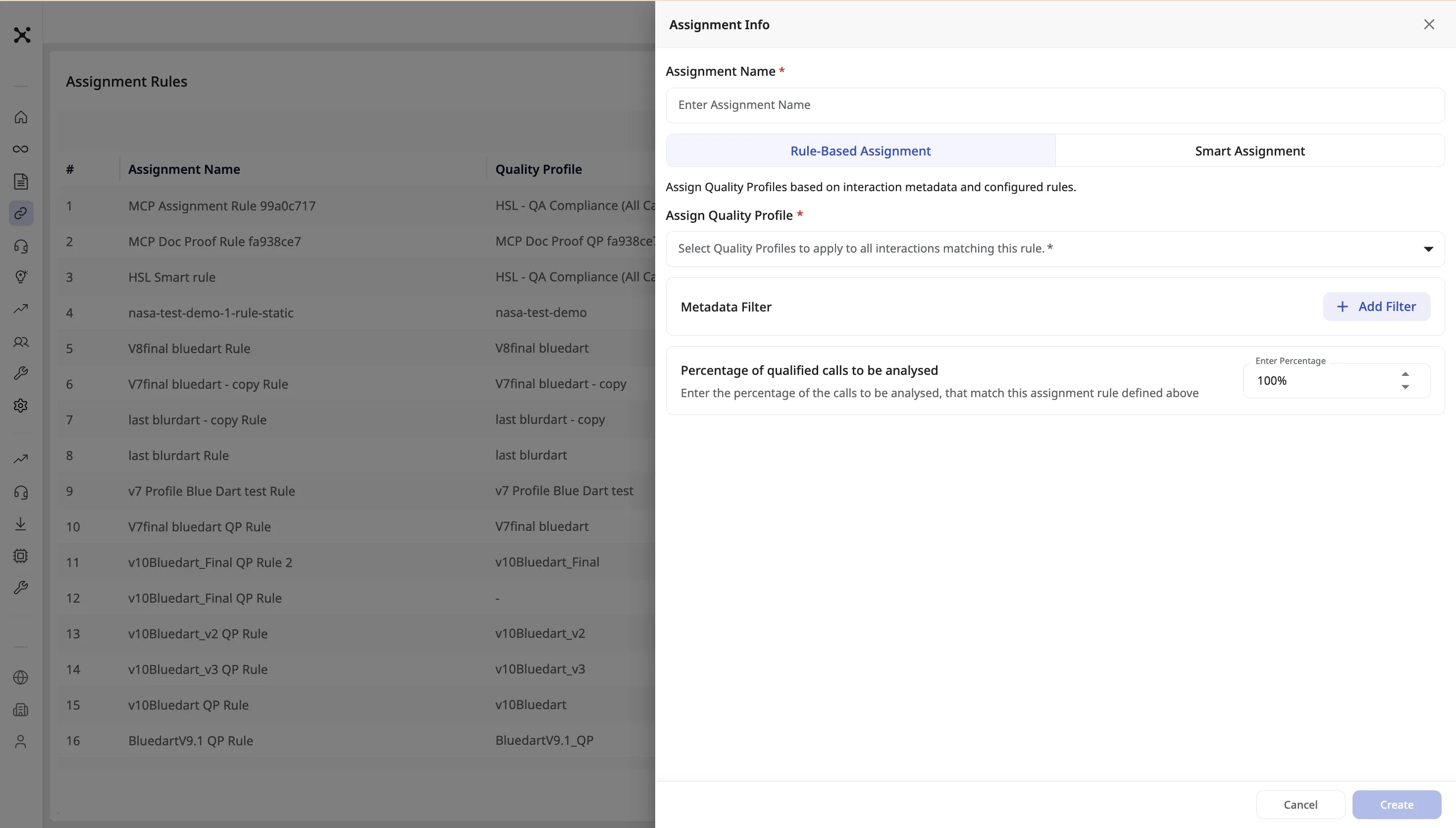
- Navigate to Assignment Rules.
- Click Create Assignment.
- Enter an Assignment Name.
- Keep the Rule-Based Assignment tab selected.
- Select Quality Profile: Choose the profile to apply (e.g., "Sales Profile").
- Add Filters (Define Conditions): Build logic statements using your Metadata fields.
- Example: IF Queue Name IS Support_L1 AND Talk Time IS GREATER THAN 60 seconds.
- Result: Only calls from the Support Queue that are longer than a minute will be scored against the "Sales Profile" .
- Set the percentage of interactions to analyze for this rule.
- Click Create. Automation applies the selected profile to matching new calls.
4.3.3. Creating a Smarter Assignment
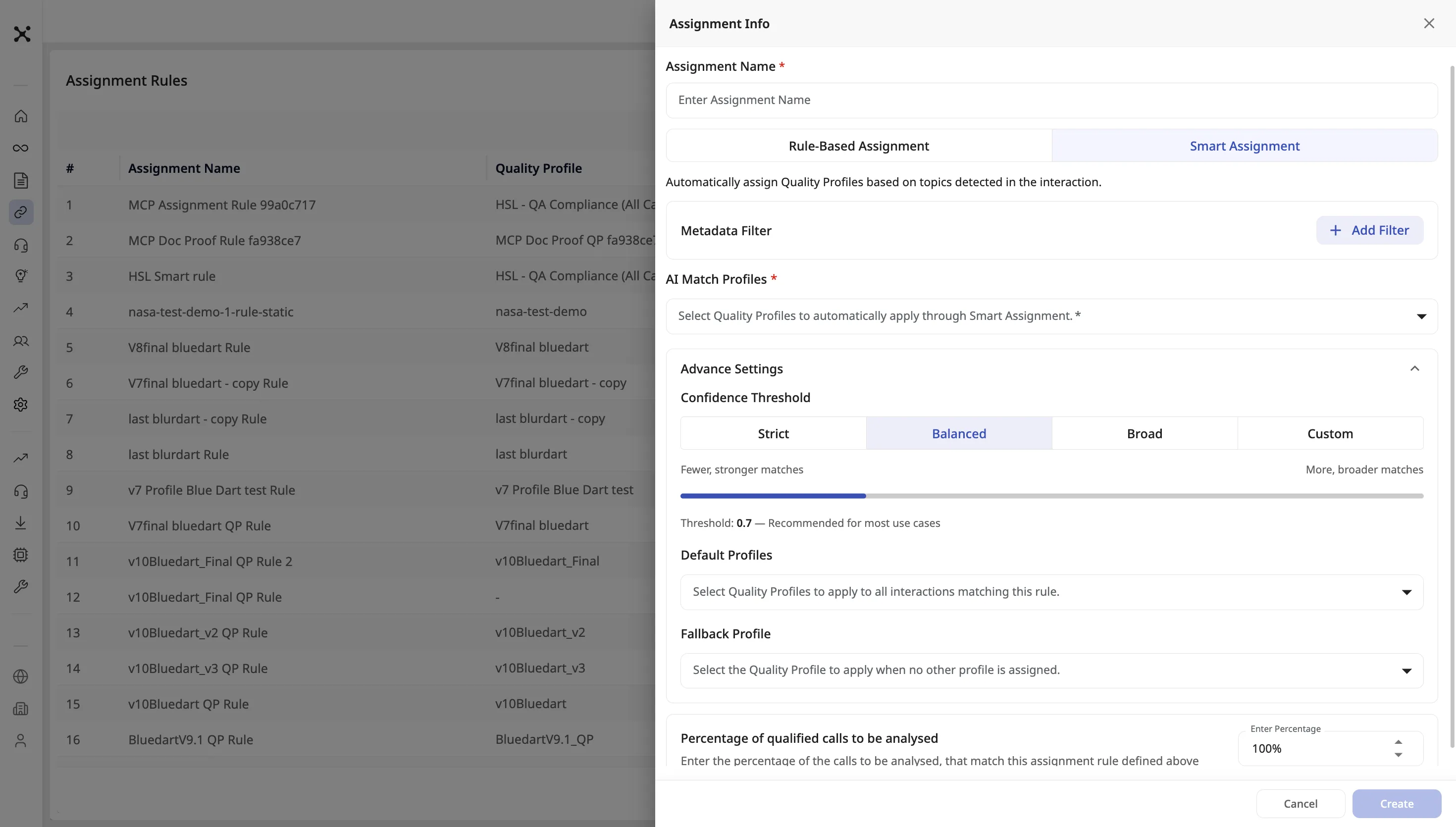
Use Smart Assignment when different conversations should map to different Quality Profiles based on what was discussed, not only on metadata.
Prerequisites: Add Topics on the Quality Profiles you will include in AI Match Profiles (see Building Quality Profiles). Maximum 10 topics per profile.
- Navigate to Assignment Rules.
- Click Create Assignment.
- Enter an Assignment Name.
- Select the Smart Assignment tab.
- Add Filters (optional): Build logic statements using your Metadata fields to Narrow down which calls to be considered for Smarter Assignment.
- Example: IF Queue Name IS Support_L1 AND Talk Time IS GREATER THAN 60 seconds.
- Result: Only calls from the Support Queue that are longer than a minute will be considered for Smarter Assignment.
- AI Match Profiles: Select one or more Quality Profiles that may apply based on topics. These are the candidates for topic matching.
- Advance Settings (optional):
- Confidence Threshold: Choose how strictly topics must match — Strict, Balanced, Broad, or Custom (enter a percentage). Higher confidence means fewer, more certain matches.
- Default Profiles: Profiles that are always applied when this rule matches, in addition to any topic matches.
- Fallback Profile: Used when no AI Match Profile topics match the conversation.
- Set the percentage of interactions to analyze for this rule.
- Click Create.
4.4. Managing and Inviting Users
Goal: Instantly add new team members to your workspace and manage role hierarchies.
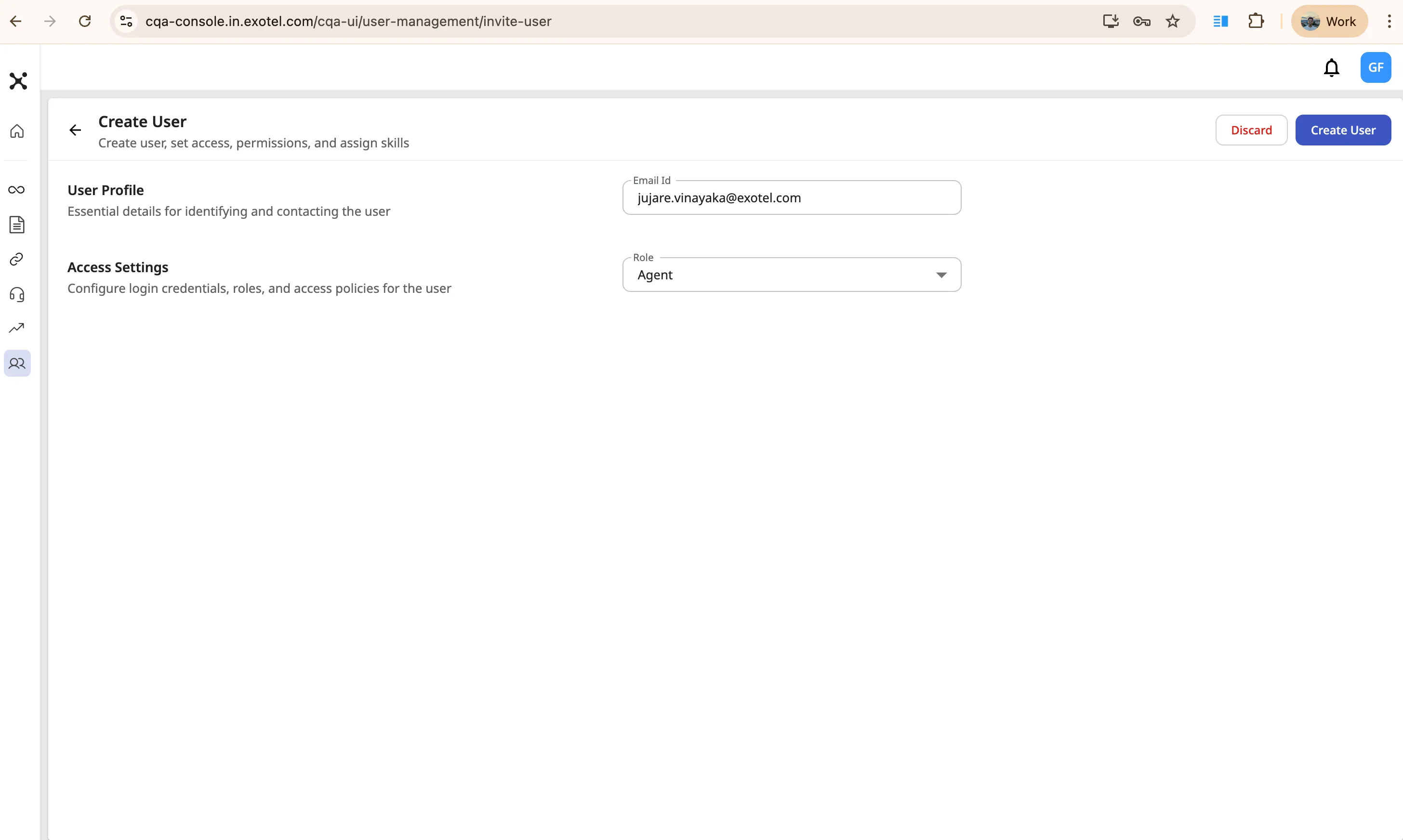
Steps to Invite a New User:
- Navigate: Click on User Management in the left-hand sidebar.
- Create: Click the + Create button located in the top right corner.
- User Profile: Enter the new user's Email Id.
- Access Settings: Select the user's Role from the dropdown menu (choose either Agent or Supervisor). (Note: For security and hierarchy management, Admins cannot invite other Admins).
- Send Invite: Click Create User. The system will immediately dispatch a "Welcome to CQA!" email with a registration link to the user.
4.5 Report Scheduling
Goal: Export analysis data on-demand or on a recurring schedule using the guided export job wizard.
CQA now uses a unified, 3-step Configure New Job wizard for both one-time exports and scheduled report deliveries. This replaces the previous Export Report / Schedule Report dialog.
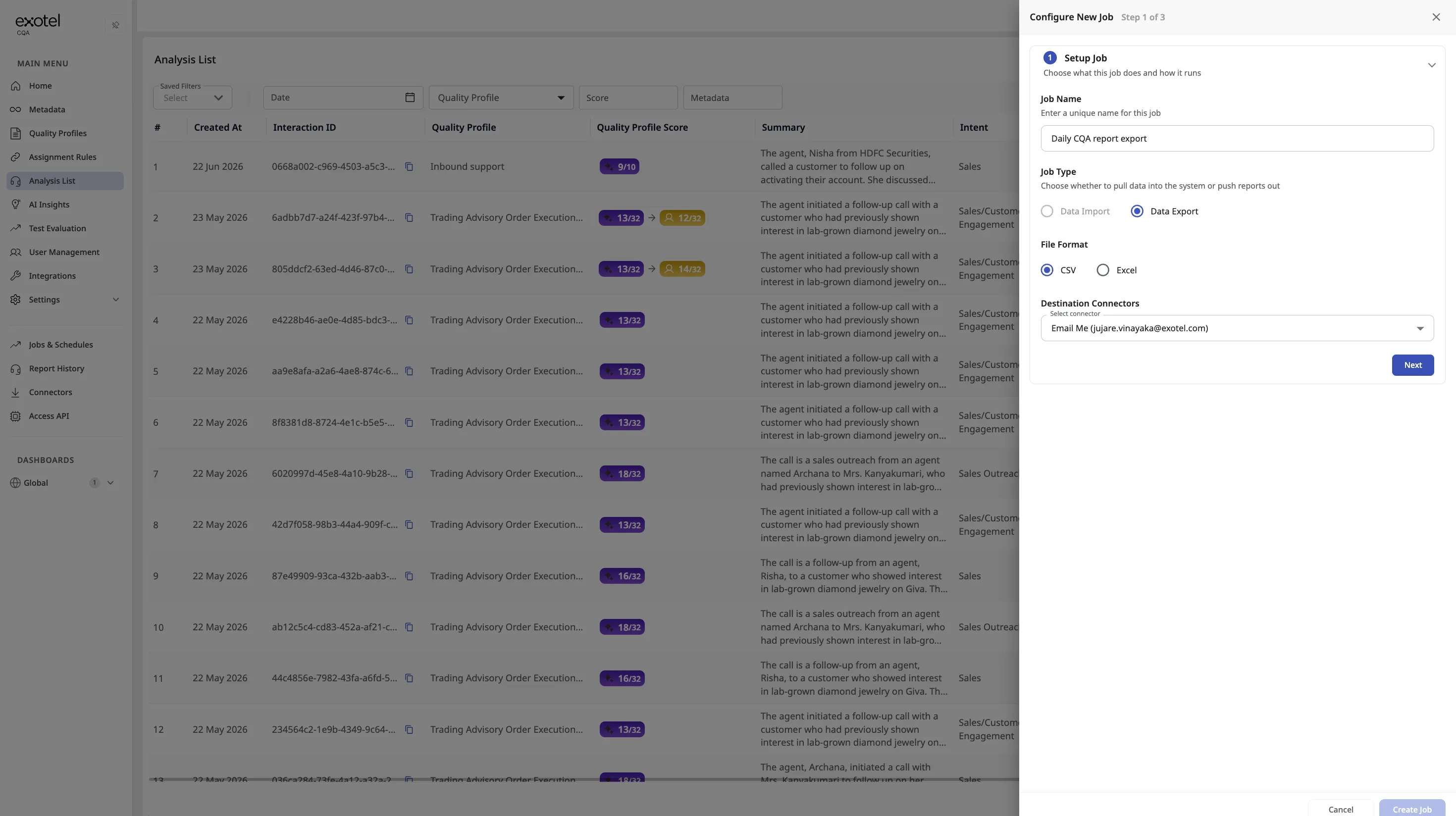
Key Concepts:
Concept | Description |
|---|---|
Export Job | A named configuration that defines what data to export, how often, and in what format. Jobs can run once or on a recurring schedule. |
Job Type | The type of job. For report exports, the job type is Data Export (selected automatically). |
Frequency | How often the job runs: One-Time, Daily, Weekly, or Monthly. |
Quality Profile | The report includes all analyses matching that quality profile within the configured date range. |
Columns & Filters | Choose which data columns to include in the export and apply filters (e.g., by KPI, score threshold, or metadata) to narrow the result set. |
Report History | A dedicated tab where you can view all previously extracted and scheduled reports, download completed exports, and track job execution status. |
Creating an Export Job
Navigate to the analysis list page and click Export Report. The Configure New Job wizard opens with three steps:
Step 1 — Setup Job
- Job Name — enter a descriptive name for the export (e.g., "Daily CQA Report Export" or "Onetime Export").
- The job type Data Export is enabled automatically.
- Click Next to proceed.
Step 2 — Set Schedule
- Frequency — select how often the job should run:
- One-Time — the job runs once immediately after creation.
- Daily — runs every day at the configured time. Specify the time of day and, optionally, a start and end date.
- Weekly — runs on a selected day each week.
- Monthly — runs on a selected date each month.
- For recurring schedules (Daily/Weekly/Monthly), configure the start date, end date (or select "Never End"), and the time of day.
- Click Next to proceed.
Step 3 — Select Data & Filters
- Quality Profile — choose the quality profile whose analyses you want in the report.
- Date Range — define the reporting window for the data.
- Columns — select which data fields to include in the export (e.g., metadata fields, KPI scores, transcripts, summaries, dispute details).
- Filters — optionally narrow results by specific KPIs, score thresholds, or metadata values.
- File Format — choose CSV or Excel.
- Click Create Job to save and activate.
For one-time exports, the report is generated immediately. For scheduled jobs, reports are generated automatically at each scheduled interval.
Viewing Reports
Navigate to the Report History tab (available in the left sidebar) to:
- View all completed and in-progress export jobs.
- Download generated reports.
- Check execution status and timestamps.
- Re-trigger a failed or missed export.
Note: The Report History tab replaces the need to track scheduled reports solely via email. Reports are also delivered to configured export destinations (email, S3, SFTP) if set up via the Data Integration Console — see Section 6.4 for details.
Exporting Reports from the Analysis List
In addition to creating export jobs from the Jobs & Schedules page, users can also trigger report exports directly from the Analysis List page:
- Navigate to the Analysis List and click Export Report.
- The export configuration dialog is the same console used for creating export jobs.
- An additional option is available: Email Me — this sends the report to the currently logged-in user's verified email address.
Note: Agents and Supervisors can use the Email Me option to export reports to their own verified email address only. They cannot specify a different destination email. This restriction ensures that analysis data is sent only to verified organizational email addresses.
4.6. PII Redaction
Goal: Protect sensitive customer data by automatically detecting and masking personally identifiable information (PII) in transcripts, scores, summaries, and reports.
4.6.1. How it Works
When PII redaction is enabled for your tenant, the CQA analysis pipeline automatically detects sensitive information in conversation transcripts and masks it before the data appears anywhere in the platform. The redacted content is displayed consistently across the transcript view, KPI result details, conversation summaries, and exported reports.
4.6.2. Supported PII Categories
CQA supports redaction across 11 predefined categories:
Category |
|---|
Phone Number |
Email Address |
Person Name |
Physical Address |
PAN (India) |
Aadhaar (India) |
Bank Account |
Credit Card |
URL |
IP Address |
ID Card Number |
4.6.3. Enabling PII Redaction
PII redaction is configured on a per-tenant basis by the Exotel delivery team. To enable PII redaction or customize which categories are active for your tenant:
- Contact your Customer Success Manager.
- Specify which PII categories you want enabled (or request all categories).
- The delivery team will configure your tenant settings.
- Once enabled, all newly processed interactions will have PII redacted according to your configuration.
Important: PII redaction changes apply only to interactions processed after the configuration is applied. Previously analyzed interactions are not retroactively modified.
4.6.4. What to Expect After Enablement
- Transcripts: Detected PII in enabled categories is replaced with placeholder text (e.g., [REDACTED]).
- KPI Results: If a KPI answer references redacted PII, the redacted version is shown.
- Summaries: Conversation summaries reflect redacted content.
- Reports: Downloaded or scheduled reports contain the redacted data — consistent with what is displayed in the UI.
4.7. Alerts & Notifications
Goal: Proactively surface quality issues, governance activity, adoption gaps, and usage warnings via scheduled email digests — so supervisors and admins act on problems without having to log into the dashboard.
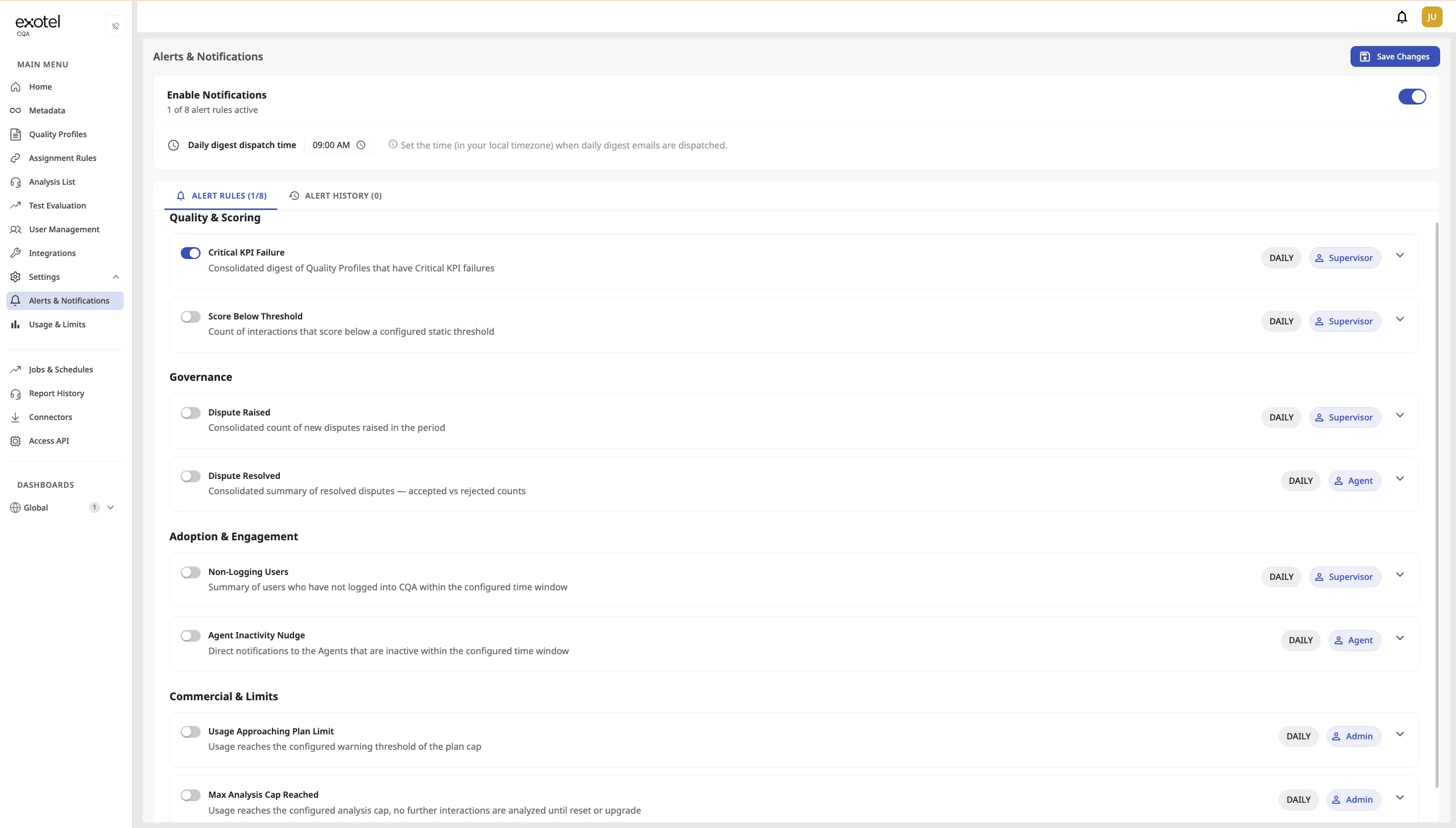
4.7.1. How it Works
The Alerts & Notifications engine evaluates active alert rules on a configured schedule (daily, weekly, or monthly). When a rule's conditions are met — for example, a critical KPI fails or an agent has not logged in — the engine builds a consolidated digest email and sends it to the configured recipients. Multiple events of the same type are batched into a single email per cadence run, so recipients receive one actionable summary instead of individual notifications for every occurrence.
4.7.2. Alert Event Types
CQA supports 8 alert event types organized across four categories:
Quality & Scoring
Event | Description | Default Recipient | Configurable Fields |
|---|---|---|---|
Critical KPI Failure | A critical KPI fails on an interaction (e.g., compliance disclosure missing). The digest lists all critical KPI failures from the evaluation period. | Supervisor | Cadence, Recipients |
Score Below Threshold | Any interaction's final score falls below a configured threshold (e.g., score < 60%). The digest reports the count of interactions below the threshold. | Supervisor | Score threshold (%), Cadence, Recipients |
Governance
Event | Description | Default Recipient | Configurable Fields |
|---|---|---|---|
Dispute Raised | New disputes are raised on AI-scored KPIs. The digest reports the count of new disputes. | Supervisor | Cadence, Recipients |
Dispute Resolved | Previously raised disputes are accepted or rejected. The digest summarizes accepted vs. rejected counts. | Agent | Cadence, Recipients |
Adoption & Engagement
Event | Description | Default Recipient | Configurable Fields |
|---|---|---|---|
Non-Logging Users | Agents or supervisors have not logged into CQA within a configured window. The digest lists inactive users (name, email, last login date) for supervisors or admins to act on. | Supervisor | Inactivity window (days), Cadence, Recipients |
Agent Inactivity Nudge | Sends a direct nudge email to agents who have not logged in within a configured window, prompting them to check their quality insights. Each agent receives at most one nudge per digest cycle. | Agent (self) | Inactivity window (days), Cadence |
Commercial & Limits
Event | Description | Default Recipient | Configurable Fields |
|---|---|---|---|
Usage Approaching Plan Limit | The tenant's analysis usage reaches the configured warning threshold of the plan cap. The email includes current usage vs. committed usage (absolute and percentage). | Admin | Cadence, Recipients |
Max Analysis Cap Reached | The tenant hits the analysis cap — no further interactions are analyzed until the limit is reset or the plan is upgraded. | Admin | Cadence, Recipients |
4.7.3. Configuring Alert Rules
Navigate to Settings > Alerts & Notifications in the sidebar. The page has two tabs: Alert Rules and Alert History.
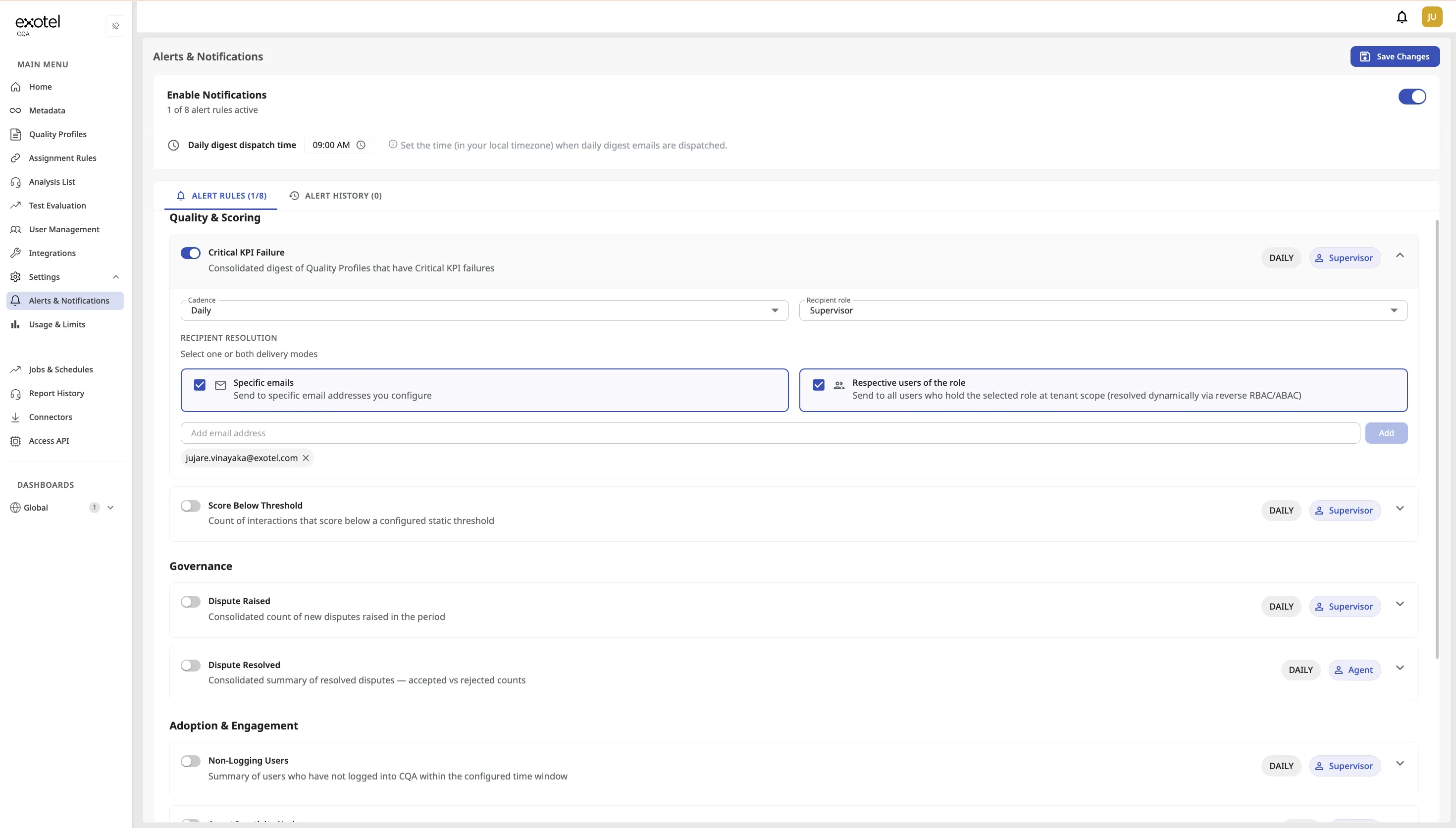
Enabling Notifications
- Toggle Enable Notifications at the top of the page. This is the master switch for the tenant — when off, no alert emails are sent regardless of individual rule settings.
- Set the Daily digest dispatch time (e.g., 09:00 AM). This controls when daily digest emails are dispatched, in your local timezone. Aligning this with your team's working hours ensures alerts arrive at the start of the day.
Setting Up an Alert Rule
- On the Alert Rules tab, you will see all 8 events grouped by category. Each event shows its name, a brief description, the current cadence, and the default recipient role.
- Click the expand arrow on any event to configure it.
- Cadence — Select how often the alert should run: Daily, Weekly, or Monthly.
- Recipient Role — Choose the default role for recipients (e.g., Supervisor, Agent, Admin).
- Recipient Resolution — Select one or both delivery modes:
- Specific emails: Enter specific email addresses that should receive the alert.
- Respective users of the role: Automatically sends to all users who hold the selected role at the tenant level. Recipients are resolved dynamically — when a new user is added to the role, they automatically start receiving alerts.
- Threshold (where applicable) — For events like Score Below Threshold, enter the threshold value (e.g., 60%). For Non-Logging Users and Agent Inactivity Nudge, enter the inactivity window in days.
- Toggle the event on (blue) to activate it.
- Click Save Changes at the top right to apply.
Note: Alert rules are configured post-onboarding — Quality Profiles and Users should already be set up before activating alerts.
4.7.4. Alert History
Switch to the Alert History tab to view a log of all sent notifications.
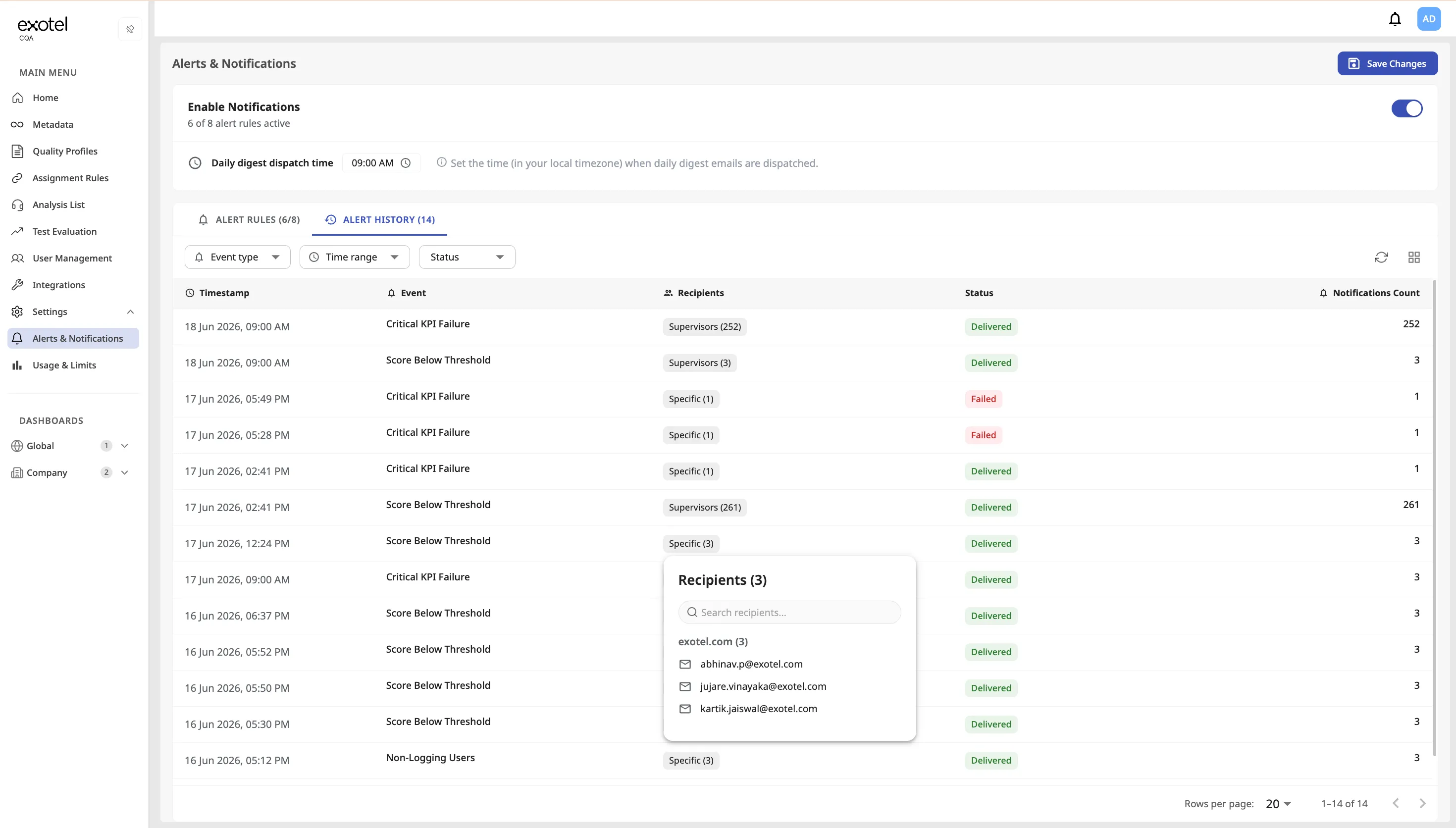
Columns
Column | Description |
|---|---|
Timestamp | Date and time the notification was dispatched. |
Event | The alert event type (e.g., Critical KPI Failure, Score Below Threshold). |
Recipients | The recipients who were targeted. Click to see individual email addresses. |
Status | Delivery status of the notification. |
Notifications Count | The number of individual notifications included in the digest (e.g., 252 critical KPI failures in one digest email). |
Delivery Statuses
Status | Meaning |
|---|---|
Delivered | All intended recipients received the email. |
Failed | No recipients received the email. |
Pending | The notification is queued but has not been sent yet. |
Partially Delivered | Some recipients received the email and some did not (e.g., a user has no email address on record). |
Filtering
Use the filter dropdowns at the top of the history table to narrow results by:
- Event type — Show only a specific alert type.
- Time range — Restrict to a date range.
- Status — Filter by delivery status.
4.7.6. Enabling Alerts & Notifications
Alerts & Notifications is disabled by default for all tenants. To enable it:
- Contact the Exotel delivery team or your Customer Success Manager.
- The delivery team will activate the feature for your tenant.
- Once enabled, an Admin can navigate to Settings > Alerts & Notifications to configure and activate individual alert rules.
4.8. Usage & Limits
Goal: Give tenant Admins self-service visibility into analysis consumption against Daily, Weekly, and Monthly caps — without filing a support ticket for usage numbers.
4.8.1. Accessing Usage & Limits
- Log in as an Admin.
- Navigate to Settings > Usage & Limits.
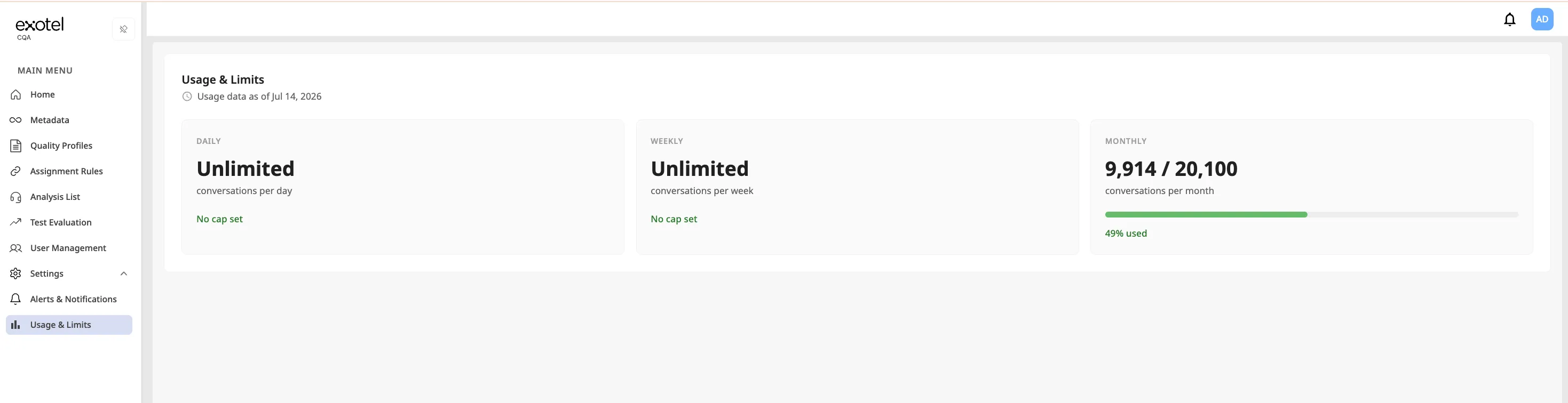
Supervisors and Agents do not have access to this page.
4.8.2. What You See
The Usage & Limits page shows:
- Daily, Weekly, and Monthly caps — The upper limits configured for your tenant's analysis volume.
- Actual usage through the previous day — How much of each cap has been consumed. Usage is updated on a daily basis (data as of the previous day's end). It is not a live / real-time counter.
Use this view to track consumption against your plan, anticipate approaching limits, and plan capacity or upgrades with your CSM.
4.8.3. How Caps Are Set
Analysis caps are configured for your tenant by Exotel (delivery). They are not editable by tenant Admins on the Usage & Limits page.
To change Daily, Weekly, or Monthly caps:
- Contact your Customer Success Manager or the Exotel delivery team.
- Request the updated limit values for your tenant.
- Once applied, the new caps appear on Settings > Usage & Limits.
4.8.4. When a Cap Is Reached
If the tenant hits a hard analysis cap, further interactions may not be analyzed until the limit resets for the period or the plan is adjusted. Admins can also enable email warnings via Settings > Alerts & Notifications:
- Usage Approaching Plan Limit — Warning before the hard stop.
- Max Analysis Cap Reached — Notification when the cap is hit.
See Alerts & Notifications for configuration.
4.8.5. Important Notes
- Admin-only — Only Admin users can open Usage & Limits.
- Previous-day freshness — Expect usage to reflect processing through the previous day, not the current hour.
- Visibility, not billing settlement — This page shows consumption against caps; formal billing and commercial adjustments remain with your CSM / commercial team.
4.9. Knowledge Base Integration
Goal: Upload and manage account-level SOP, product, and compliance documents so CQA can use them as context when evaluating selected KPIs. Knowledge Base improves evaluation context and coaching suggestions without changing your Quality Profile rubric
Enablement: Knowledge Base is not enabled for every tenant by default. Contact your Customer Success Manager or CQA Support to enable it for your account.
4.9.1. How it Works
- Administrators upload documents to the tenant Knowledge Base (account-level library).
- Documents are processed until they show a ready status.
- On a Quality Profile, you link one or more ready documents to the specific KPIs that should use that context.
- For new analyses that use those KPIs, the AI can reference the linked documents during evaluation.
4.9.2. Uploading Documents
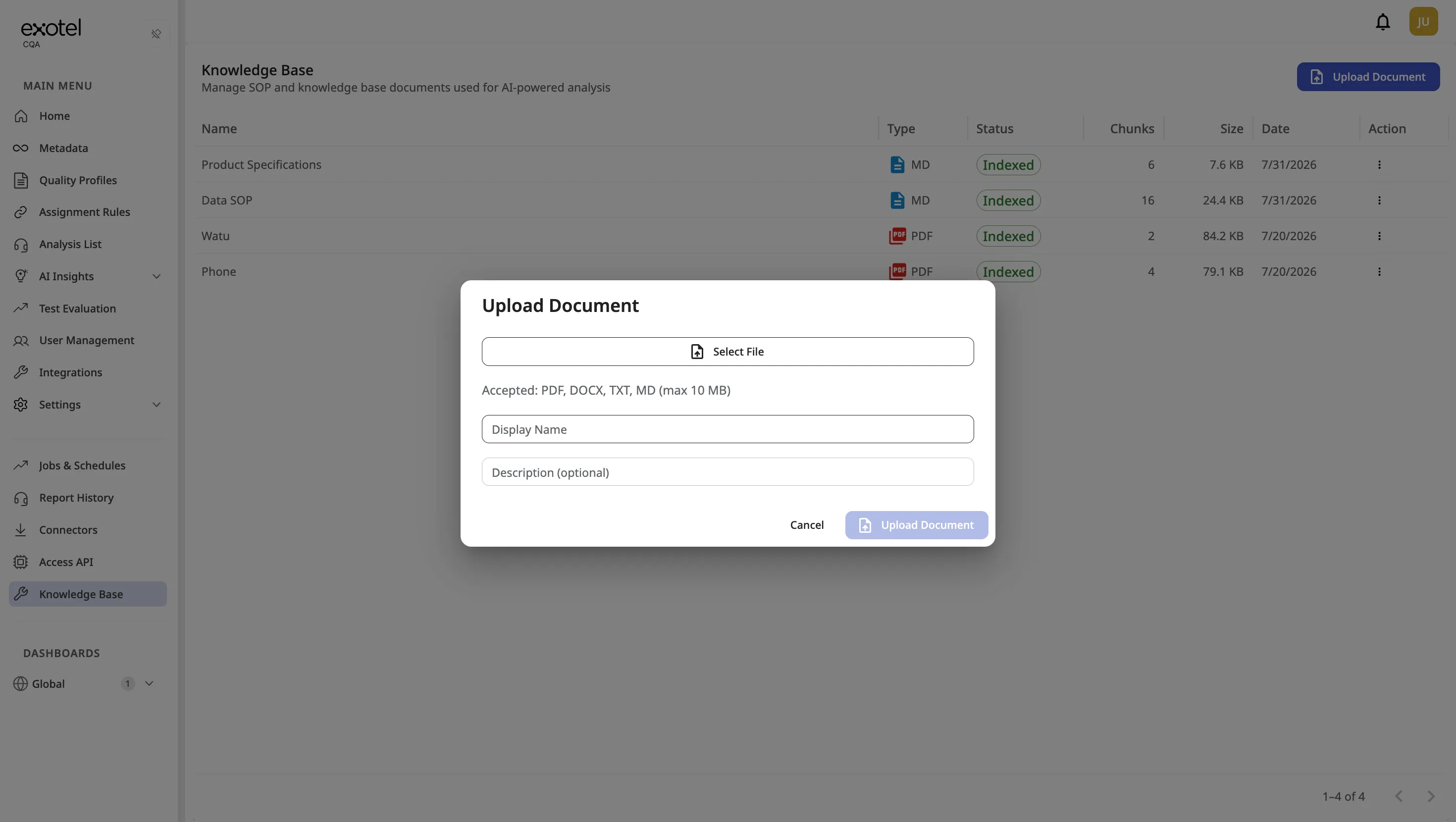
- Navigate to Knowledge Base in the sidebar (visible when the feature is enabled for your tenant).
- Upload the document(s) you want the AI to reference. Supported formats typically include PDF, text, and Word documents (follow on-screen guidance for limits and types).
- Click on Sync Status post the document upload, to change the Status from Pending to Indexed
4.9.3. Linking Documents to KPIs
- Navigate to Quality Profiles and create the profile that should use Knowledge Base context.
- Open the KPI that should reference your SOP or policy document.
- Link one or more Indexed Knowledge Base documents to that KPI.
- Save the Quality Profile. New interactions analyzed with that KPI can use the linked material as evaluation context.
4.10. Integrations & Second-Order Insights
Goal: Before scoring selected KPIs, CQA can call your REST systems of record, project only the fields bound on that KPI, and attach labeled external ground truth so the model verifies agent claims against truth — not transcript guesswork alone. This is Second-Order Insights.
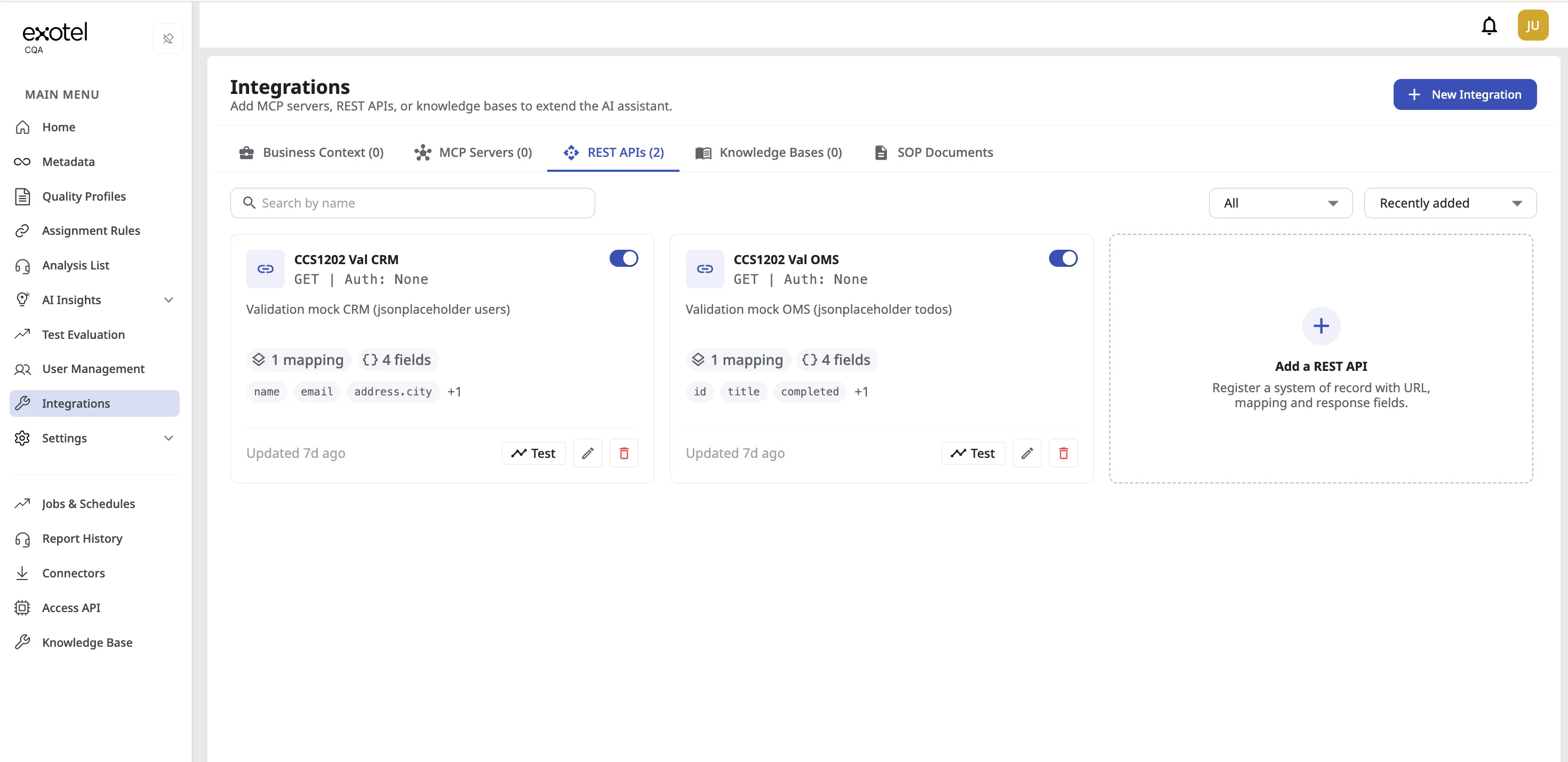
Note: Integrations / Second-Order KPI Scoring requires enablement by the Exotel delivery team. Contact your Customer Success Manager to activate this capability for your tenant. Only Admin users with the Integrations permission see the module.
4.10.1. Register a REST API (Integrations)
- Open Integrations from the sidebar.
- Select the REST APIs tab.
- Click + New Integration.
- Enter a unique name (unique within the tenant).
- Set the HTTP method (Phase 1 supports GET) and a URL template with placeholders for values that come from interaction metadata (e.g. https://oms.example.com/orders/{orderId}).
- Map interaction metadata keys → URL / query parameters so each analysis can resolve the correct record.
- Define the response field catalog: for each field the LLM may use, set a path into the JSON response and a short meaning that describes what the field represents.
- Save. The integration is available to bind on Quality Profile KPIs via Use Tool.
Tips:
- Declare only fields you intend to select on KPIs — the platform sends selected fields only, not the full API body.
- Keep metadata key names aligned with what ingestion / connectors actually send on interactions.
- REST API integrations for Second-Order scoring are distinct from Inject to AI on Metadata (short additional-context strings, truncated for AI).
4.9.2. Bind tools on a KPI (Use Tool)
- Open a Quality Profile and edit the KPI that needs external verification.
- Enable Use Tool.
- Select one or more registered REST integrations.
- For each selected integration, choose at least one field from that catalog. Empty field selection blocks save.
- Save the profile.
At analysis time, CQA resolves URL params from the interaction’s metadata, performs one HTTP call per unique tool+URL for that analysis (shared across KPIs that need the same call), and attaches labeled external-data blocks for the bound KPIs before scoring runs.
4.9.3. Failure behavior
If a required tool cannot be resolved or returns unusable data, analysis fails closed (does not silently score without verification):
Reason | Typical cause | What to check |
|---|---|---|
TOOL_METADATA_MISSING | A mapped metadata key is absent or empty on the interaction | Ingestion mapping; sample interaction metadata; tool URL param map |
TOOL_UNAVAILABLE | Tool HTTP error (e.g. 4xx), tool disabled/missing, or selected response fields missing from the payload | Tool URL / credentials with the customer system; field paths in the catalog; network allowlists |