Send call events to your systems
Send call events to your systems allow you to receive real-time notifications about events occurring during a voicebot call. When specific events occur, the VoiceBot platform sends HTTP POST requests to your configured webhook endpoints.
Webhooks enable:
- Real-time transcripts
- Dynamic webhook overrides per session
- Agent transfer orchestration
- Post-call analytics pipelines
Overview
Webhooks can be:
- Configured on the agent in the console (Configure → Webhooks)
- Overridden per session using:
- Custom parameters on the voicebot WebSocket connection
- The response of the Session Start webhook
Set up a webhook in the console
- Go to Agents, open the agent and click Edit agent.
- Go to Configure → Webhooks and click the + icon.
- Choose the event: Session Start, Insights Events, Transcript Events, Pre-Agent Transfer or Session End.
- Enter the Webhook URL. You can add call details to it as variables (see below).
- Click Test URL to check that your endpoint answers.
- Optionally set Authentication (None or Bearer), add Headers, and change the Timeout (1 to 30 seconds; the default is 2).
- Click Save and rollout.
Use call details in the webhook URL
Write a variable as <name> in the path or query of the URL, never in the host. For example: https://api.example.com/calls/<call_sid>/end?bot=<bot_id>. Click Show available variables under the URL box for the full list. Common ones:
- <session_id>, <conversation_id> and <call_sid>: the session, conversation and Exotel call IDs
- <contact_uri> and <landing_number>: the caller's number and the number they dialled
- <custom_params.KEY>: a custom parameter sent on the call
- <session_constants.KEY>: a value split from Custom-Header/UUI, or returned by the Session Start webhook
- <entities.KEY>: a value the agent collected during the call
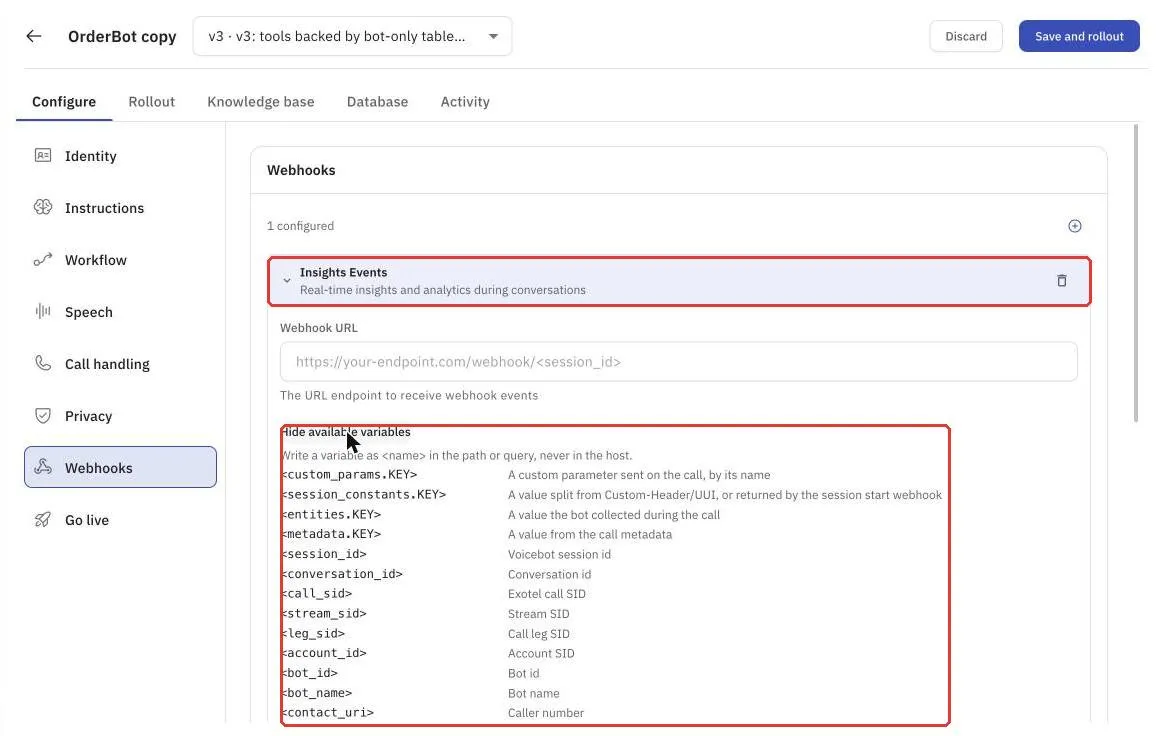
Figure 1 — Add a webhook, then click Show available variables to see what you can put in the URL.
Supported Webhook Types
Webhook | Description |
|---|---|
session_start | Triggered when a voicebot call begins |
session_end | Triggered when the conversation ends |
pre_agent_transfer | Triggered before transferring to a human agent |
transcript_events | Triggered on turn-progress and turn-complete |
insights_events is also available: it sends real-time insights and analytics during the conversation. Choose Insights Events when you add a webhook in the console.
Important Notes
- Timeouts: Your webhook must respond within the configured timeout
- Success Criteria: HTTP 2xx responses are treated as successful
- Retries: Failed webhooks are retried based on the retry configuration
- Ordering: Consumers must handle out-of-order events
- Session Scope: Webhook overrides apply only to a single session
- Bot-to-Bot Transfer: Webhook endpoints should be generic
- Special Override: call-setup-url custom param overrides the session_start webhook
Common Webhook Request Format
All webhook requests follow the same structure.
Event Object
Transcript Event Data
Transcript Notes
- status defaults to completed
- inprogress is used only for active turns
- Accumulated transcripts are sent per turn
- At most one sequence per webhook
- Transcripts are not sent in session_end webhook
Webhook Types
Session Start Webhook
When
Triggered when a voicebot call begins.
Allows dynamic override of other webhook endpoints.
Expected Response (2xx)
Pre-Agent Transfer Webhook
When
Triggered when the bot detects user intent to talk to an agent.
Expected Response (2xx)
Session End Webhook
When
Triggered when the conversation ends.
Expected Response (2xx)
Transcript Events Webhook
When
Triggered on:
- turn-progress
- turn-complete