Answering Machine Detection (AMD)
Answering Machine Detection (AMD) is a feature used in automated outbound dialing modes to determine if a call has been answered by a live person or an answering machine. By filtering out machines, AMD ensures that agents' time is spent speaking only with live prospects.
How It Works
When a call is answered, the AMD system analyzes the initial audio. It listens for cues that distinguish a human voice from a recorded greeting. If a machine is detected, the system disconnects the call. If a live person is detected, the call is immediately connected to an available agent.
Prerequisites
- The outbound campaign must be using a supported dialing mode.
- Action: Check the AMD checkbox to enable the feature for the campaign. Starting from version 4.13.33, AMD is available across all dialing modes, including Preview and Manual Dial — not only automated modes like Predictive.
Use Cases
- High-Volume Sales: In a telemarketing campaign, AMD screens out all the voicemails, dramatically increasing the number of live conversations agents have per hour.
- Lead Generation: AMD is used to quickly sift through large contact lists to identify and connect with interested prospects efficiently.
Benefits
- Massive Productivity Gains: Agents spend significantly more time talking to potential customers and less time listening to voicemail greetings.
- Improved Agent Morale: Focusing on live conversations is more engaging and rewarding for agents than repeatedly encountering answering machines.
- Increased Campaign ROI: By maximizing the number of productive interactions, AMD helps to improve the overall return on investment.
Fundamental AMD Logic and Mechanics
This part of the article will delve into the core algorithm that powers AMD in the Asterisk communication platform. While different AMD configurations exist, the underlying algorithm remains constant across all setups.
Flow
Answering Machine Detection (AMD) is a standalone application that communicates with Asterisk, a communication platform, using a local socket. Here's how the interaction between AMD and Asterisk works:
AMD Setup and Configuration:
- Loading Configurable Parameters: When AMD starts, it reads its configurable parameters from a specific file located at "/dacx/var/ameyo/dacxdata/etc/amds/1.6/amd.conf." Unfortunately, this file path is hardcoded within the AMD code, making it unchangeable after AMD is compiled.
From Asterisk's Perspective:
- Socket Communication: When Asterisk encounters an AMD extension, it creates a socket connection to AMD using the predefined path.
- Sending Frames: Once the socket connection is established, Asterisk sends an Asterisk frame from the channel to AMD.
- AMD's Response: AMD processes the received frame and responds back to Asterisk with one of the following outcomes:
- AM (Answering Machine): AMD identifies the call recipient as an answering machine.
- HUMAN: AMD detects that a live human has answered the call.
- CONTINUE: If the response is not clear, AMD requests additional frames from Asterisk to continue analyzing the call.
- Extension Handling: Based on the AMD response, Asterisk takes appropriate action. If it receives AM or HUMAN, it moves on to the next extension. If it gets CONTINUE, it sends more frames to AMD until a conclusive response (AM or HUMAN) is received or a timeout occurs.
From AMD's Perspective:
- Socket Listening: When AMD starts, it creates a local socket at the path "/dacx/var/ameyo/dacxdata/var/amds/1.6/amd.ctl" (Note that, similar to the AMD configuration, this socket path is also hardcoded and cannot be changed).
- Thread Creation: Whenever AMD receives a request from Asterisk, it creates a new thread for each request. This means that AMD can handle multiple requests concurrently, as it creates as many threads as the number of AMD detection requests it receives.
- Answering Machine Detection: AMD then starts its answering machine detection process for each connected client (Asterisk).
- Polling and Conclusion: During the answering machine detection process, AMD polls the incoming frames from the socket until it reaches a conclusion regarding whether the call recipient is an answering machine or a human.
- Timeout Handling: If AMD cannot make a clear determination within a certain time (timeout), it assumes a human has answered the call and responds accordingly.
Flow Diagram
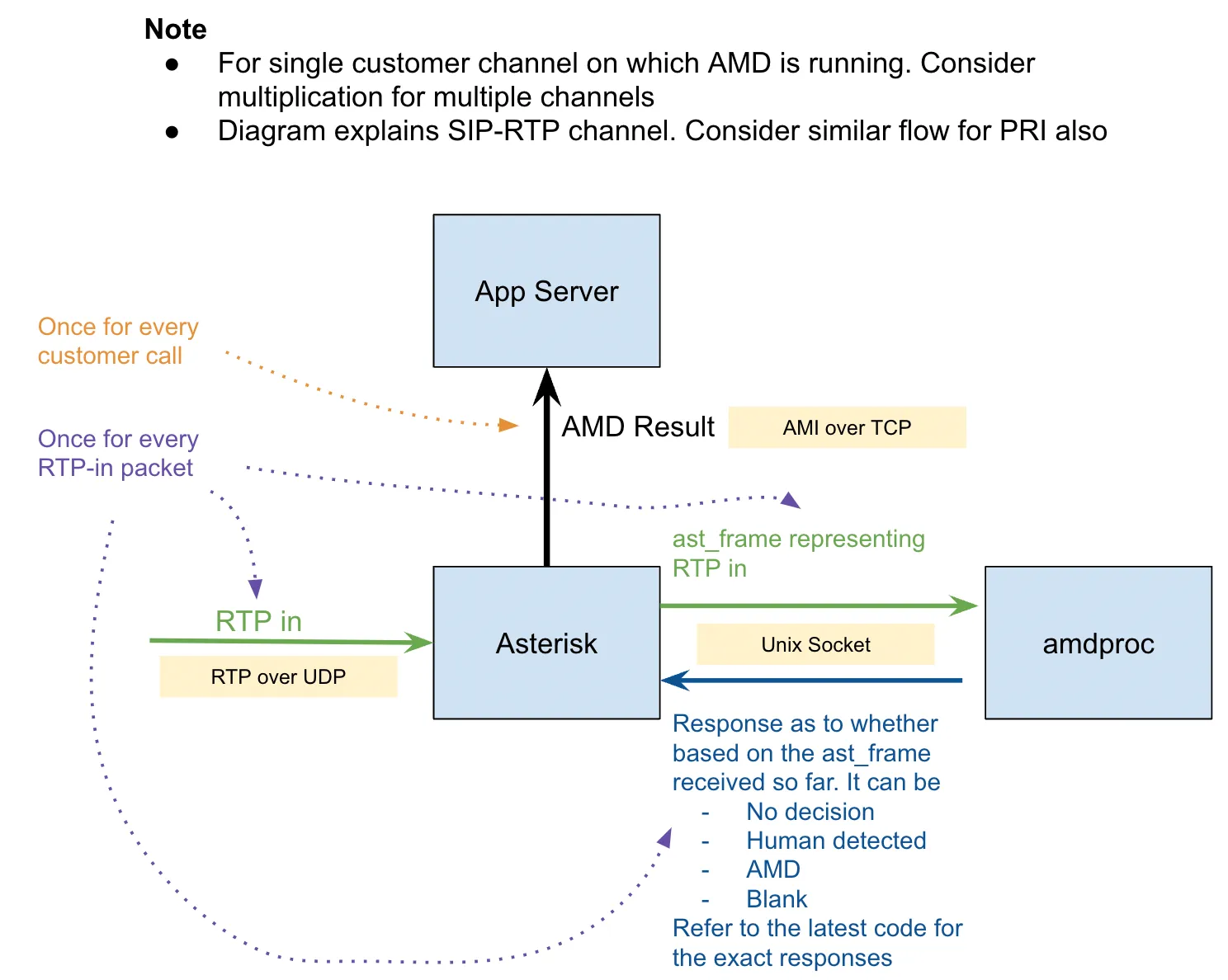
'
Answering Machine Detection (AMD) Algorithm
- Fetching and Computing Data:
- AMD fetches each unit of audio data (packet) from a socket and calculates its energy level.
- If AMD cannot confidently determine the result based on the current fetched data, it reads more data from the socket.
- Energy Level Thresholds:
- AMD divides the energy levels into three regions: Noise, Signal, and Intermediate.
- If the energy of a data unit is below a certain threshold (noise threshold), AMD classifies it as noise.
- If the energy is above another threshold (signal threshold), AMD classifies it as a signal (i.e., not noise).
- If the energy is between the noise and signal thresholds, the data is temporarily categorized as "Intermediate."
- Circular Buffer for Packet States:
- For every packet, AMD stores its computed state (noise, signal, or intermediate) in a circular buffer.
- This buffer helps AMD detect a continuous block of high-energy packets, referred to as an "utterance" (akin to a single word).
- Detecting Utterances:
- After processing each packet, AMD checks the circular buffer to determine if an utterance has started.
- An utterance is considered a single block of continuous high-energy packets (a word).
- Determining Utterance Boundaries:
- To determine the end of an utterance (word), AMD looks for a low-energy packet after detecting an utterance start.
- The time between utterance start and utterance end is stored in AMD's data structure.
- Smoothing Noise and Signals:
- After processing each packet, AMD smooths the noise and signals to achieve more accurate results.
- Smoothing helps in considering the minimum utterance duration for better word recognition.
- Decision Making:
- With information about utterance start and end times, AMD makes decisions based on specific criteria.
- Examples of decisions include:
- If AMD detects too many words, it returns "Answering machine."
- If the number of words per given time interval is high, it returns "Answering machine."
- If the length of a word is larger than the maximum allowed threshold, it returns "Answering machine."
- If the time gap between the end of the first word and the start of the second word is greater than the "hello silence threshold," it returns "Human."
- If the first word starts very late, it indicates "Answering machine."
Limitations
- AMD systems are not 100% accurate and can sometimes misclassify a live person as a machine ("false positive"), resulting in a dropped call.
- There can be a slight pause at the beginning of the call as the system analyzes the audio.
AMD FAQs
- Why is Answering Machine Detection used?
The primary reason for using AMD is to boost the efficiency of contact center agents and reduce operational costs. By automatically identifying and handling machine responses, AMD allows agents to focus their time on live conversations with potential customers, leading to better engagement and potentially higher conversion rates. This technology is also valuable for optimizing outreach in various communication platforms across sectors like healthcare and finance.
- How does Answering Machine Detection work?
AMD systems typically employ techniques such as audio signal processing, natural language processing, and silence detection to make accurate determinations. They analyze factors like ringing time, silence between phrases, and keywords in greetings. When a call is picked up, the system analyzes the initial audio. If a human is detected, the call is connected to an agent. If a machine is detected, the system can either disconnect the call, leave an automated message, or connect to an agent, depending on the configured workflow.
- Why is Answering Machine Detection particularly relevant now?
AMD has become increasingly relevant due to the rising number of voicemail subscribers, the significant growth of digital assistants and voicebots, and features like voicemail becoming a default on many devices like iPhone. The launch of features like Truecaller Assistant, which screens incoming calls using a voicebot, also highlights the prevalence of automated call answering systems. This increase in non-human call responses makes AMD crucial for efficiently managing outbound communications and maximizing agent productivity.
- What are the key benefits of using Ameyo AMD?
Ameyo AMD offers several benefits, including improved agent productivity by eliminating time spent on voicemails and assistants, and an improved agent experience by reducing frustration in outbound calling processes. It also leads to increased lead coverage by automatically handling machine-attended calls and reduces the overall cost of operations by optimizing agent utilization. Furthermore, Ameyo AMD can be optimized to specific business requirements with configurable sensitivity and customizable workflows. It is available as a default feature in both 4.x and 6.x versions and is language agnostic, as it detects based on silence, pitch, tonal analysis, and rate of speech rather than spoken words.
- How can Ameyo Answering Machine Detection be used?
To use Ameyo AMD, you need to contact your Customer Success Manager (CSM) to activate the license. Once activated, you can navigate to your Outbound Campaign settings and enable AMD. After activation, AMD will be applied to all automated calls dialed from that campaign, and detailed reports on the outcomes will be available. The default behavior is to disconnect the call if a voicemail, digital assistant, or voicebot is detected.
- What customization options are available with Ameyo AMD?
Ameyo offers several customization options for AMD as add-ons that can be enabled for each individual campaign. These include different workflows such as the default disconnect, leaving a voicemail, connecting to an agent, or providing manual dial support. These workflows can be combined with different types of dialing (automated or manual/Click-to-Dial). The benefits and operating costs associated with each customization also vary, allowing businesses to tailor the AMD behavior to their specific needs and objectives. For detailed customization options and pricing, you need to reach out to your CSM.
- What should I do to start using Ameyo Answering Machine Detection?
To start using Ameyo Answering Machine Detection and improve the returns of your outbound processes, you should immediately reach out to your Customer Success Manager (CSM). They will assist you in enabling the default AMD flow. This will allow you to begin benefiting from reduced operational costs and improved agent productivity right away.
Version History
Version | Enhancement | Release Notes |
|---|---|---|
4.13.33 | AMD support extended to Preview and Manual Dial flows | Contact Center - Patch Release Notes - Version 4.13.33Contact Center - Patch Release Notes - Version 4.13.33 |