Call Transfer - Agent
4 min
Overview
Call Transfer allows an agent to move a live call to another agent, supervisor, queue, or an external number. The system supports two primary types:
- Warm Transfer (Consultative Transfer): The agent first speaks with the receiving party to provide context before connecting the customer.
How It Works
During a live call, an agent initiates a transfer from their console. For a Cold Transfer, the agent selects the destination and completes the action. For a Warm Transfer, the agent first 'Consults' with the destination party while the customer is on hold, briefs them, and then connects the customer.
Prerequisites
- The agent must be on a live call.
- The intended recipient (agent, queue) must be available.
Steps
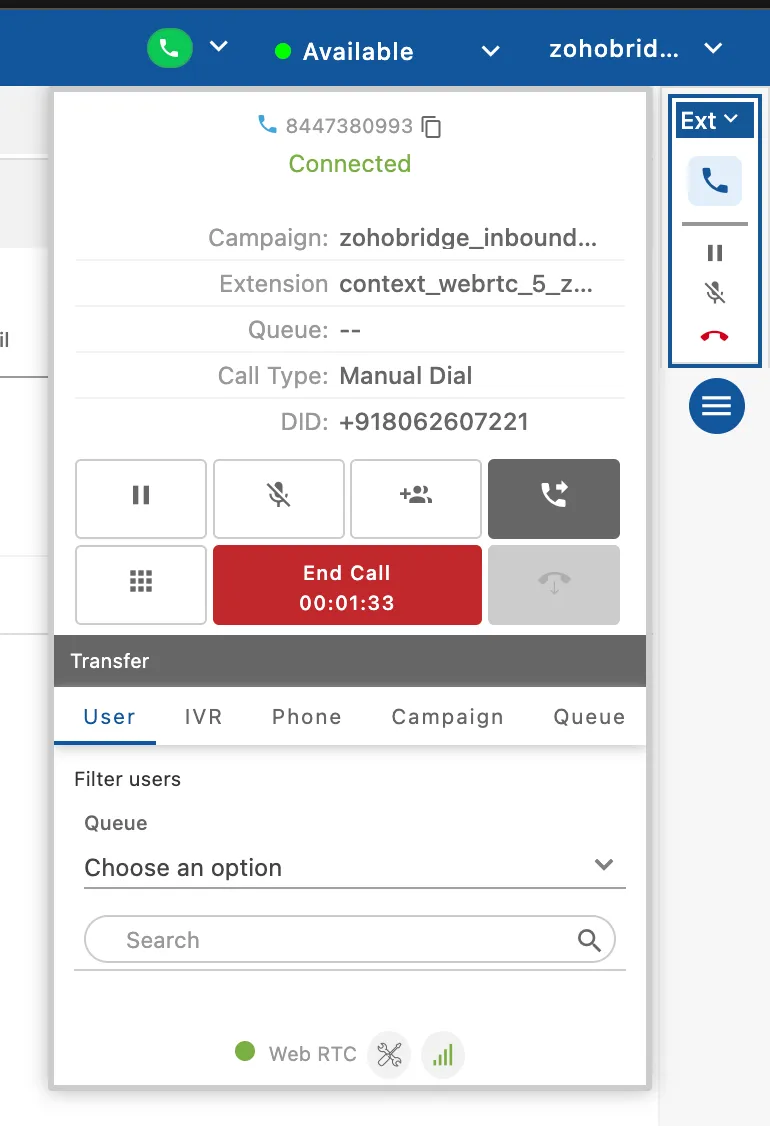
- Performing a Transfer (Agent): This is a standard feature on the agent's call control panel.
- Location: Agent > Agent Console > Call Control Panel
- Action:
- During a call, click the Transfer button.
- A pop-up will appear to select the destination.
- For a Warm Transfer, first click Confer. For a Cold Transfer, click Transfer directly.
Use Cases
- Cold Transfer: A receptionist receives a call for the sales department and performs a cold transfer directly to the main sales queue.
- Warm Transfer: A Tier 1 support agent encounters a complex issue and initiates a warm transfer to a Tier 2 specialist after explaining the problem.
Benefits
- Improved First-Contact Resolution: Ensures calls are directed to the person or department best equipped to handle the issue.
- Enhanced Customer Experience: A warm transfer provides a seamless handover, preventing the customer from having to repeat their issue
- Increased Efficiency: Quickly routes calls within the organization, reducing handle time.
Have a question?
Our knowledgeable support team and an awesome community will get you an answer in a flash.
To ask a question or participate in discussions, you'll need to authenticate first.