Data Encryption
Overview
Data Encryption protects sensitive customer and interaction data at rest across voice and digital channels. When Bring Your Own Key (BYOK) encryption is enabled for a contact center, the platform encrypts call recordings, chat/voice transcripts, message attachments, and select customer PII (like phone numbers) using keys that are ultimately protected by an external secret manager — never by a key stored in plain form inside the product database or codebase.
Secret manager and key hierarchy
BYOK encryption uses a two-tier (envelope) key model:
- Secret manager (master key) — the platform currently supports HashiCorp Vault as the external secret manager. One Vault connection (endpoint + auth details) is registered for the deployment, and the platform calls it to fetch the current master key. No other secret-manager type is selectable today — registering any value other than hashicorp is rejected.
- Data Encryption Keys (DEKs) — the master key is never used to encrypt customer content directly. Instead, it wraps/unwraps a data encryption key that is generated automatically the first time a given call, interaction, or configured context needs to be encrypted. Only the wrapped (encrypted) DEK is stored in the product database — the plaintext DEK exists only in memory while content is being encrypted or decrypted, and is re-derived from Vault on demand.
- If Vault is unreachable or returns an invalid response, encryption/decryption for that content fails safe (the operation is rejected) rather than falling back to an unencrypted key.
- Once fetched, a decrypted DEK is cached briefly (on the order of minutes) to avoid calling Vault on every single encrypt/decrypt operation. A change to the master key or a context's encryption state can take a short time to propagate for that reason.
Architecture at a glance
The same four-step pattern applies every time content is encrypted or decrypted, no matter which service is doing it — only the setup (top) happens once; everything below the divider happens on every call or interaction:
sequenceDiagram
    autonumber
    participant Admin as 👤 Administrator
    participant CMS as ⚙️ CMS<br/>(Configuration Plane)
    participant Svc as ☁️ Content Service<br/>(Voice/VLA, Chat & Digital, or AppServer)
    participant Vault as 🔐 HashiCorp Vault<br/>(Master Key)
    participant DB as 🗄️ Product Database

    rect rgb(244, 248, 255)
    Note over Admin,CMS: Setup — once, during onboarding
    Admin->>CMS: Register Vault connection (endpoint + auth details)
    Admin->>CMS: Enable BYOK and per-channel toggles
    end

    rect rgb(242, 249, 244)
    Note over Svc,DB: Runtime — every call or interaction
    Svc->>CMS: Read BYOK toggle and Vault connection details
    Svc->>Vault: Wrap / unwrap this context's DEK
    Vault-->>Svc: Plaintext DEK (held in memory only)
    Svc->>Svc: AES encrypt or decrypt the content
    Svc->>DB: Store the wrapped (encrypted) DEK and the encrypted content
    end
Figure: Steps 1–2 happen once per deployment, when an administrator (or Exotel Professional Services during onboarding) registers the Vault connection and turns on BYOK. Steps 3–7 repeat for every single call or interaction: the content service — Voice/VLA for recordings, Chat & Digital for transcripts and attachments, or AppServer/Framework for customer PII — reads its configuration from CMS, exchanges only the wrapped key with Vault, decrypts or encrypts the content in memory, and writes back the wrapped key. The plaintext DEK and the master key never touch the database, and the master key never leaves Vault.
What gets encrypted under BYOK
Content | Key scope | Where it applies |
|---|---|---|
Voicelog / call recordings | One DEK per call | Voice Logger & Archival (VLA) — recording files/streams are encrypted before being written to archival storage |
Chat and voice-call transcripts | One DEK per interaction | Digital interaction archival and transcription pipeline |
Chat/email attachments and other interaction media | One DEK per interaction | Media handling for chat, email, and other digital channels |
Customer phone number (voice calls) | DEK resolved per process | Encrypted before being stored with the call's leg details |
Customer name and phone (chat) | DEK resolved per process | Encrypted before being stored with the chat room / chat campaign customer details |
Customer phone numbers and similar fields elsewhere | DEK resolved per process (or other configured hierarchy context) | Used, for example, to decrypt a customer's number when generating a voicelog download filename |
Digit (DTMF) encryption, video-recording encryption, and web-access password encryption (see Configuration parameters below) are separate, purpose-built mechanisms and are not part of the Vault-backed BYOK key pipeline above.
How It Works
- An Administrator (or Exotel Professional Services, during onboarding) registers the secret-manager connection for the deployment — the Vault endpoint and authentication details.
- The Administrator enables BYOK for the contact center and turns on the channel-specific toggles for the content types that should be encrypted (attachments, custom fields, video recordings, voicelog archives).
- From that point on, the platform generates and manages the per-call / per-interaction encryption keys automatically — there is no manual per-recording or per-interaction key management for admins or agents.
- When an agent, supervisor, or integration uploads or downloads protected content (e.g. plays back a recording, opens a transcript, downloads an attachment), the platform encrypts or decrypts it transparently using the key for that context.
- Certificate and key lifecycle steps for the secret manager itself (generation, distribution, rotation of the master key) follow your organization's security policy; Exotel services can assist with initial enablement.
Prerequisites
- Encryption feature licensed for the tenant.
- A reachable HashiCorp Vault instance with the master key available at the configured endpoint — this is the only supported secret-manager type.
- Privileges: contactcenter:encryption-configuration.view-encryption-configuration (and related modify privileges when exposed in your build) for per-context encryption settings; system:vault-auth-details.view-vault-auth-details / system:vault-auth-details.add-modify-vault-auth-details for the Vault connection itself.
- Backup and DR procedures updated to include key material — losing the Vault master key makes all wrapped DEKs (and therefore all BYOK-encrypted content) unrecoverable.
Access & Permissions
Surface | UI | Access path | Notes |
|---|---|---|---|
BYOK toggle | Partial | System or contact-center preference (System Configuration) | Gates the whole Vault-backed encryption pipeline; can be set globally (system) or per contact center |
Secret manager (Vault) connection | API only | GET/POST/PUT/DELETE /v1/vault-auth-details | No dedicated Administrator Console screen was found for this in the current build — set up via API, typically during onboarding |
Per-context encryption configuration | API only (read) | GET /v1/encryption-configuration?context-type=&context-id= | Returns the wrapped DEK reference for a given contact center / process / campaign context; no admin write endpoint or UI screen was found |
Digit encryption (DTMF) | Partial | System configuration + admin APIs | Separate mechanism from the Vault/BYOK pipeline above |
Voicelog encryption mode | Partial | System / archiver configuration | Works with VLA and Interaction Archiver |
Privilege | Scope | Purpose |
|---|---|---|
contactcenter:encryption-configuration.view-encryption-configuration | Contact center | View per-context encryption configuration |
system:vault-auth-details.view-vault-auth-details | System | View the secret-manager (Vault) connection details |
system:vault-auth-details.add-modify-vault-auth-details | System | Add, update, or remove the secret-manager (Vault) connection |
system:dacx-system.admin.digit-encryption.get-key | System | DTMF / digit encryption key access |
system:dacx-system.admin.digit-encryption.get-decrypted-digits | System | Decrypt collected digits (restricted) |
Neither vault-auth-details.* privilege is pre-assigned to a named role in the default role/permission mapping — grant them deliberately to the administrators responsible for the secret-manager connection.
Configuration parameters
Key / parameter | Description | How to configure | Constraints / allowed values | Sample |
|---|---|---|---|---|
BYOKEncryptionEnabled | Master switch for Vault-backed customer-managed key encryption | System preference (applies to all contact centers) or contact-center preference (overrides system for that CC) | Boolean; requires BYOK license; default false | true |
Vault connection (apiEndpoint, authDetails, vaultType) | Secret-manager endpoint, auth headers, and vault type used to fetch the master key | POST/PUT /v1/vault-auth-details (one connection per deployment) | vaultType must be hashicorp; any other value is rejected | vaultType: "hashicorp" |
attachmentEncryptionEnabled | Encrypt email/chat attachments at rest | Process or campaign preference | Boolean | true |
videoRecordingEncryptionEnabled | Encrypt stored video KYC / video chat recordings | Process preference | Boolean | true |
encryptionKey | Wrapped DEK reference for a context (call, interaction, process, etc.) | Managed automatically; readable via Encryption Configuration API | Managed per context; versioned; generated on first use | (managed by security team) |
voicelogEncryptionMode | Voicelog archive encryption mode | System configuration + VLA | Mode enum per deployment | AES |
enablePasswordEncryptionOnWebaccess | Encrypt passwords on web-access channel | System preference | Boolean | true |
Interaction custom field encryption and certificate management follow the same Encryption Configuration hierarchy; enable only after key material is provisioned and validated in a non-production environment.
Limitations
- HashiCorp Vault is the only supported secret manager in this build — other vault/KMS backends cannot be selected.
- Only one secret-manager connection can be registered per deployment; it is not scoped per contact center.
- No Administrator Console UI was found for the secret-manager connection or for viewing per-context wrapped keys — both are API-only in the current codebase.
- Decide BYOK at setup time, not after the fact. Enabling BYOK only encrypts content going forward — it does not retroactively encrypt existing data, and there is no supported way to dynamically switch BYOK on or off for a contact center once content has been created under the current setting. Changing it later requires a manual re-encryption/decryption exercise.
- Key rotation and key versioning for the master key are not currently supported — treat the Vault master key as long-lived and protect it accordingly.
- CRM integrations are outside this encryption boundary. Customer data forwarded to a connected third-party CRM is not encrypted or decrypted through this pipeline — if your CRM integration needs the same protection, address it separately with your CRM provider.
- Encryption is one-way without keys — document key escrow and rotation before enablement. If the Vault master key becomes unavailable, all BYOK-encrypted content becomes unrecoverable — there is no fallback to an unencrypted key.
- Mixed encrypted and legacy plain-text records can coexist during migration; plan re-archival where required.
- BYOK and attachment encryption may require additional infrastructure (HSM/KMS behind Vault) per enterprise policy.
Related pages
- Security and ComplianceSecurity and Compliance
The Voice Log Archiver (VLA) is an automated system that fetches, converts, encrypts, and stores call recordings. It ensures that voice logs are retained for extended periods (up to 8 years) without impacting the performance of the active Contact Center.
Archival Process Workflow
The VLA operates through a four-stage process to ensure data integrity and security:
- Fetching: The system monitors the Ameyo Call Server in real-time. New voice logs are identified and downloaded to the Archiver server with a typical lag of only 20–25 minutes.
- Conversion:
- Raw audio files (separate In/Out streams) are first converted to WAV format.
- The streams are mixed into a single WAV file.
- The file is compressed into MP3 format to optimize storage.
- Encryption: The compressed files are secured using AES encryption. A unique key is generated for each voice log and stored in the Archiver Database. When BYOK is enabled for the contact center, this per-call key is itself protected by the deployment's secret manager rather than stored in the clear — see Data EncryptionData Encryption for how the secret manager and key hierarchy work.
- Storage: The final encrypted files are transferred to a mounted network drive (NAS/SAN) via FTP.
User Interface & Search
The VLA Console provides a centralized interface for Supervisors and Administrators.
Search & Retrieval
Supervisors and Administrators can locate specific recordings using a combination of standard and advanced filters on their interface:
- Standard Filters: Date Range, Campaign, Queue, User/Agent, Customer Phone Number, and Talk Time.
- Call Content Filters:
- Call Notes: Search for keywords within the notes added by agents.
- QA Scoring: Filter by "Scored" or "Unscored" calls.
- Dispositions: Filter by System or User Dispositions.
- Advanced Search: Allows attribute-based queries using operators (e.g., Credit Card Number Equals 1234).
Downloads
- Single/Bulk Download: Users can download individual files or select multiple records to download as a ZIP file.
- Format: Downloads are typically provided in MP3 format for easy playback.
Configuration & Administration
Administrators have access to system-level settings via the Configuration tab.
- Audio Controls:
- InGain / OutGain: Adjust the volume levels for the input (customer) and output (agent) audio streams. Values range from 1 to 9.
- Presets: Select audio processing presets such as HIGH_PHONE, LOW_PHONE, HIGH_VOICE, or LOW_VOICE to optimize audio quality based on the source.
- Storage Path: Define or update the destination directory on the NAS/SAN storage.
- Reload: Applies changes made to the call server configuration without restarting the system.
Monitoring & Safeguards
The system includes built-in health monitoring to prevent data loss or server crashes.
- Disk Usage Protection: The system continuously monitors disk space. If free space falls below 5 GB, the fetching process stops automatically. Administrators must manually resume the service after clearing space.
- Execution Details: The Monitoring tab displays the real-time status of the "Conversion" and "Fetching" jobs.
Operational Guidelines
Prerequisites
- Licensing: Separate licenses are required for Voice Log Archiver
- Infrastructure:
- Dedicated Archiver Server (Windows/Linux).
- Network Storage (NAS/SAN) accessible via FTP/Mapped Drive.
- Ameyo Call Manager (for VLA) and Ameyo Database access.
Sizing Considerations
Proper sizing is essential for performance. Factors influencing server requirements include:
- Total Agents and Calls Per Day.
- Average Call Duration.
- Retention Period (e.g., 1 year vs. 5 years).
- Recording Format (MP3 compression ratio).
Retention & Cleanup
- Data Lifecycle: Data is retained based on the configured policy (e.g., 3 years).
- Auto-Cleanup: The system can be configured to automatically purge data older than the retention period to free up storage, though archival to external media is recommended before purging.
- Per-Tenant Retention Overrides (4.13.48+): Administrators can configure per-tenant voice-log retention periods via the server_preference_store, overriding the global default. The minimum retention is 3 months. A nightly cleanup job automatically purges recordings that exceed the configured retention window.
Number Masking in Voice Logs
When Number Masking is enabled at the process level, voice log filenames on the call server are masked by default. The following controls are available:
- Reveal Real Numbers (4.13.9+): Authorized users with the appropriate privilege can click an eye icon in the VLA console to temporarily reveal the actual phone number associated with a masked recording.
- Unmasked Filenames on Call Server (4.13.26+): The unmaskRawVoiceLogs system configuration flag, when set to true, writes voice log files on the call server with the real (unmasked) filename while the UI continues to display masked values. This is useful for integrations that rely on filenames matching actual phone numbers.
- Unmasked Filenames in VLA Storage (4.13.38+): The unmasked-filename behaviour was extended to recordings archived by VLA, ensuring downstream systems consuming archived files also receive unmasked filenames.
Token-Based Voice Log Download API
Starting from version 4.13.25, a token-based download API is available for secure programmatic access to voice log files. External systems (CRM, analytics, compliance tools) can request a short-lived download token and use it to retrieve recordings without requiring a full UI session. This is the recommended approach for automated integrations.
Version History
Version | Enhancement | Release Notes |
|---|---|---|
4.13.9 | Authorized users can reveal real numbers via eye icon when masking is on | 4.13.9 Release Notes4.13.9 Release Notes |
4.13.25 | Token-based Voicelog Download API for secure integrations | 4.13.25 Release Notes4.13.25 Release Notes |
4.13.26 | unmaskRawVoiceLogs flag for unmasked filenames on call server | 4.13.26 Release Notes4.13.26 Release Notes |
4.13.38 | Extended unmasked-filename behaviour to VLA stored recordings | Contact Center - Patch Release Notes - Version 4.13.384.13.38 Release Notes |
4.13.48 | Per-tenant retention overrides (min 3 months, nightly cleanup) | Contact Center - Patch Release Notes - Version 4.13.484.13.48 Release Notes |
- Interaction ArchiverInteraction Archiver
Number Masking allows organizations to make customer phone numbers confidential, hiding them from agents and other users. This feature ensures compliance with IT regulatory standards and industry requirements regarding consumer data privacy. When enabled, identifiable information like phone numbers is anonymized or masked, preventing unauthorized recognition or use beyond the intended purpose.
Key Capabilities
- Role-Based Visibility: Administrators can grant specific user roles the privilege to view unmasked (actual) numbers for verification purposes.
- Process-Level Configuration: Masking can be enabled or disabled for specific processes. If enabled for a process, it applies to all campaigns within that process.
- Masking Policies: Choose between random alphanumeric strings or partial character replacement.
Configuration
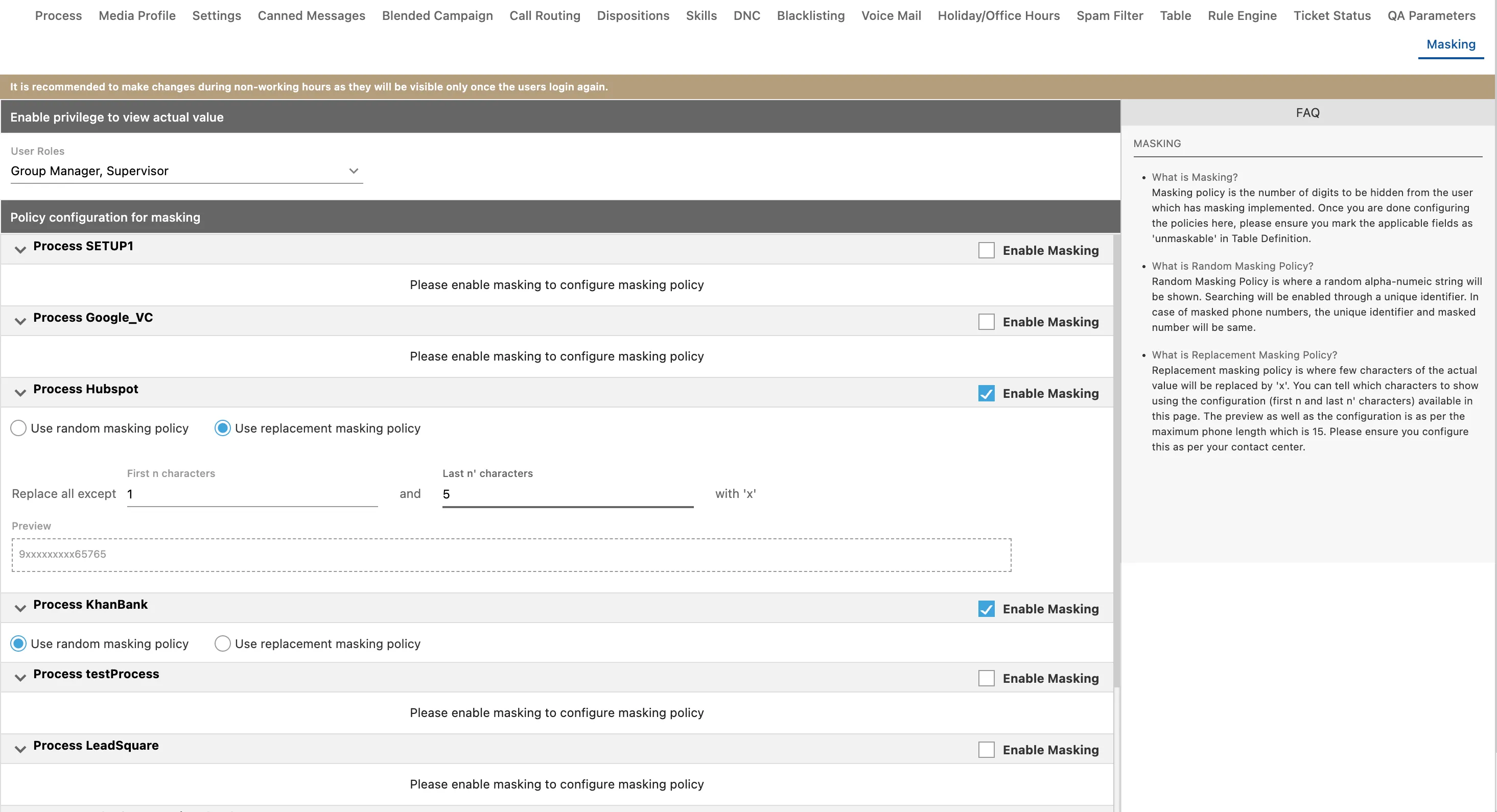
Accessing the Masking Tab
- Log in to the Administrator Console.
- Navigate to System Configuration.
- Click on the Masking tab.
Enabling Unmasked View for Specific Roles
In certain scenarios, roles such as Supervisors or Analysts may need to verify actual phone numbers. To grant this privilege:
- In the Masking tab, locate the "Enable Privilege to view the Actual number for the User Roles" section.
- Select one or more of the following roles to allow them to view unmasked values:
- Analyst
- Executive
- Group Manager
- Professional Agent
- Supervisor
Configuring Masking Policies
Once masking is enabled for a process, you must select a masking policy:
1. Random Masking Policy
- Description: Replaces the phone number with a random alphanumeric string.
- Searching: Searching is enabled through a unique identifier. In this policy, the unique identifier and the masked number are the same.
2. Replacement Masking Policy
- Description: Replaces specific characters of the actual number with 'x'.
- Configuration: You define how many characters to show at the start (n) and at the end (n') of the number. The remaining characters in the middle are masked.
- Constraint: The preview and configuration are based on a maximum phone length of 15 digits. The sum of the first characters (n) and last characters (n') must not exceed 15. If the total exceeds 15, an inline error is displayed.
Applying Changes
- After configuring the policy and roles, click Apply.
- Important:
- Changes such as enabling, disabling, or modifying policies will only be visible to users after they log out and log in again to the Ameyo Application Server.
- It is recommended to make changes during non-working hours to avoid impacting business operations.
- Once phone numbers are masked using a Masking Policy, they cannot be unmasked.
Voice Log Filename Masking
When number masking is enabled, voice log filenames on the call server are also masked by default. Starting from version 4.13.26, the unmaskRawVoiceLogs system configuration flag can be set to true to store voice log files with the real (unmasked) filename on the call server, while the UI continues to show masked values. This is useful for integrations that match recordings by phone number.
UI Masking Consistency
Starting from version 4.13.33, number masking behaviour is aligned across all UI surfaces — including the Agent Toolbar and Supervisor console — so that masked numbers appear consistently regardless of where they are viewed.
Privilege Management Enhancements
Starting from version 4.13.48, administrators have expanded control over masking-related privileges, allowing more granular assignment of who can view unmasked data across different user roles and contexts.
Version History
Version | Enhancement | Release Notes |
|---|---|---|
4.13.26 | Configurable voice-log filename masking via unmaskRawVoiceLogs flag | 4.13.264.13.26 Release Notes |
4.13.33 | UI masking alignment across Agent Toolbar and Supervisor console | Contact Center - Patch Release Notes - Version 4.13.334.13.33 Release Notes |
4.13.48 | Expanded mask-related privilege management | Contact Center - Patch Release Notes - Version 4.13.484.13.48 Release Notes |
- High Availability & Disaster RecoveryHigh Availability & Disaster Recovery