ECC Custom Apps – Developer Guide
Overview
ECC custom apps allow you to build and embed your own applications directly inside the Exotel Ameyo ECC 4.x agent workspace. These apps run inside an iframe within the agent workbench and communicate with the platform using the AAF SDK (aaf_sdk.js — Ameyo Application Framework).
Using SDK events and methods, your application can:
- React to call and chat lifecycle changes
- Fetch agent, session, and campaign context
- Trigger host UI actions (toasts, forms, popups)
- Make Ameyo REST calls through the parent shell
- Access CRM data and interaction context
- Exchange structured data with ECC in real time
This enables advanced workflows such as screen pop, contextual CRM panels, campaign-specific data capture, call workflow orchestration, and real-time agent assistance.
Where the app runs
The custom app is loaded inside the ECC 4.x agent workspace:
- It runs inside an iframe within an assigned workbench slot
- It receives context through query parameters such as origin, instanceId, and sdkBaseUrl (if configured)
- Your application must dynamically load and initialize the AAF SDK before using any events or methods
Getting started
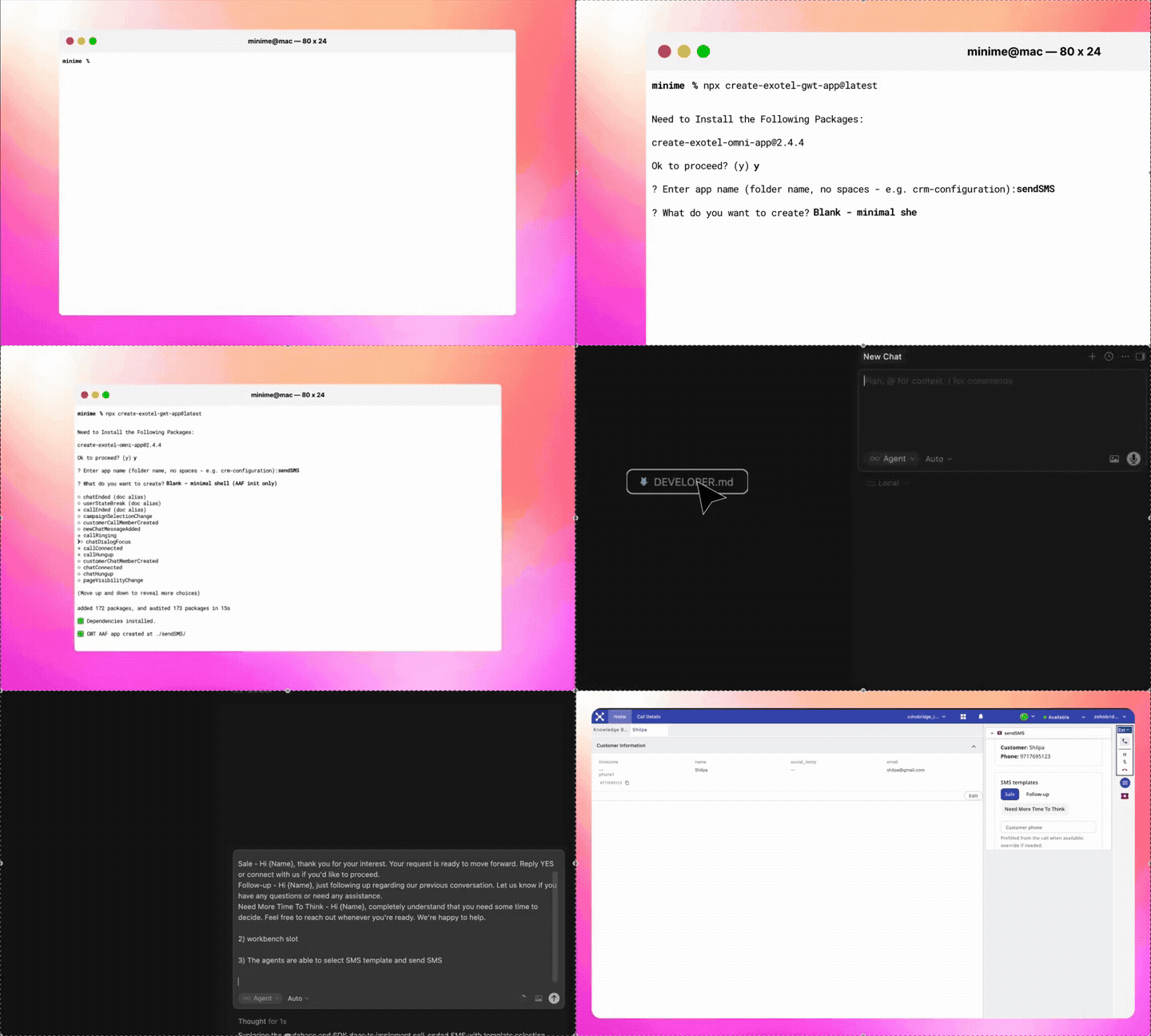
Install the CLI and generate your app:
npx create-exotel-gwt-app@latestYou will be prompted for an app folder name and a starting template (Blank, Call session monitor, or Global events logger). Then:
cd your-app-folder
npm install
npm run dev
When ready to deploy:
npm run shipThis produces gwt-upload.aaex, which you upload via Admin → App Manager and assign to a workbench slot.
Common use cases
Custom apps are typically built for:
- CRM screen pop and contextual record loading
- Click-to-call or outbound automation
- Campaign-specific data capture forms
- Real-time interaction insights
- Workflow orchestration and call scripting
- Custom disposition workflows
- External system integration panels
- AI assist dashboards
Application architecture
A custom app may be built using plain HTML + JavaScript, React, Angular, Vue, or any framework capable of running in an iframe.
Minimum requirements:
- A single entry HTML file (or SPA entry point)
- Dynamic AAF SDK loading
- SDK initialization
- Event registration
- Method invocation handling
The generated scaffold handles SDK loading, typed event helpers, the Signal Design System setup, and the correct .aaex packaging layout out of the box. You focus on the use case, not the plumbing.
Loading the AAF SDK
The SDK (aaf_sdk.js) is provided by the ECC host. The scaffold resolves the correct URL in this order:
- sdkBaseUrl query parameter
- origin query parameter
- window.location.origin
Remove any trailing slash before appending the SDK path. Dynamic import is recommended for modern applications.
SDK initialization
After the SDK module loads, initialize it using:
AmeyoClient.initialize({ instanceId: "ameyoiframe" })Store the returned client instance and use it throughout your app lifecycle. Do not register any events or call any methods before initialization completes.
Working with events
The SDK exposes two primary event groups:
Global events — registered via client.globalEvent(eventName, callback). Used for:
- Call lifecycle tracking (callConnected, callHungup, etc.)
- Agent session and availability changes
- CRM triggers and screen pop logic
Context events — registered via client.contextEvent(eventName, callback). Used for:
- Slot-local events such as tab changes and ticket saves
- Events scoped to the workbench slot rather than the whole session
Refer to the SDK reference documentation in your generated project for the complete event list, payload definitions, and valid slot contexts.
Always handle registration promise rejections. Error code 121 means the event name is not recognized on this ECC build. Error code 122 means the event is not allowed in the current slot type.
Calling SDK methods
Methods are available under namespaces on the client:
// Fetch data about the logged-in agent
client.globalData.get("loggedInUser")

// Trigger a host UI action
client.interface.trigger({ action: "showToast", data: { ... } })

// Make a REST call through the parent shell
client.httpRequest({ method: "GET", url: "...", ... })
All methods return Promises. Always handle both success and error states. Argument structure must match the SDK documentation exactly — refer to the SDK reference in your generated project.
Data flow best practices
- Use event payload data to drive UI updates
- Use campaign and session context to determine business logic
- Do not assume undocumented fields will be present
- Treat SDK contracts as strict — only use documented event names and method signatures
- Always implement error handling for SDK load failure, initialization failure, event registration errors, and method invocation failures
- Use only event names from the supported events list in your scaffold — do not invent or guess event names
UI guidelines
Use the Signal Design System (@exotel-npm-dev/signal-design-system), included in every generated project. It provides components built to match the agent interface and behave correctly inside an iframe.
- Light theme only — agent workbench slots expect a light, readable UI. Do not add a dark-mode toggle.
- Narrow and wide layouts — design for compact workbench slots using drawers, dialogs, and progressive disclosure rather than dense single-page layouts.
Testing your app
Before deployment, verify:
- SDK loads correctly from the resolved base URL
- Initialization occurs once and completes before any event registration
- Event callbacks trigger as expected
- Method calls return expected responses
- Behavior is correct across call types (inbound, outbound, manual)
- Behavior is correct when the agent switches campaigns or logs out and back in
Always test inside the live ECC agent workspace — local development gives you the shell, but AmeyoClient is only available inside the real ECC environment.
Packaging and deployment
npm run ship produces gwt-upload.aaex — a ready-to-upload archive containing index.html, static/, manifest.json, and app logos.
Upload via Admin → App Manager, then assign to a workbench slot.
Common deployment pitfalls:
- manifest.json name and version must match the URL path ECC serves (e.g. /si/{name}/{version}/)
- A mismatch causes 404 errors on JS bundles or static assets
- If the SDK fails to load, confirm origin / instanceId query parameters are correct, or set ?sdkBaseUrl= to your ECC base URL
AI-assisted app development
If you are using AI tools such as Cursor, Copilot, or Claude to build an ECC custom app, every generated project includes a DEVELOPER.md file. This is a structured contract that tells AI tools how to work correctly inside this system — which helpers to use, which files to leave alone, and how to implement features without breaking SDK initialization or packaging.
Open DEVELOPER.md, copy the "Copy/paste into an AI agent" block into your agent chat, and say "let's begin." The agent will ask a few short questions and then implement in the repo.
A reference sample app is included in the scaffold. Use it as a structural reference for the essential files required by the app framework.
Troubleshooting
Symptom | Likely cause |
|---|---|
AmeyoClient not available | App not opened inside ECC agent workspace, or parent didn't load aaf_sdk.js |
JS bundle 404 / 403 | manifest.json name/version mismatch; wrong /si/... path |
Event registration fails (121) | Event name not recognized on this ECC build — use only supported event names from your scaffold |
Event registration fails (122) | Event not allowed in this slot type (workbench vs modal vs navBar) |
No aaf_sdk.js in Network | Fix bundle 404 first; then check sdkBaseUrl / origin parameters |
Theme looks wrong | Confirm light theme is applied; check parent iframe color-scheme |
Build fails on imports | Direct @mui/material import — use @exotel-npm-dev/signal-design-system instead |
When to contact support
Reach out to Exotel support if:
- The SDK fails to load despite correct configuration
- Events are not firing as documented
- Method calls fail with platform-level errors
- You suspect an environment or ECC configuration issue