Generic Toolbar Integration
Overview
The Generic Web Toolbar is a dedicated, web-based telephony solution designed to achieve seamless Computer Telephony Integration (CTI) with a third-party, web-based Customer Relationship Management (CRM) application.
The toolbar acts as the agent's telephony palette, operating within an iframe embedded directly inside the third-party CRM's web page. Its purpose is to provide agents with essential telephony functions and display their real-time call and presence status without requiring them to switch between applications.
Note: This is a licensable feature and requires enablement and full deployment by Professional Services and Support.
Key Benefits
- Embedded telephony inside CRM for fewer context switches, faster handle time, and consistent agent experience across inbound, outbound, preview, and callbacks.
- Rich two‑way interoperability: CRM can trigger dial/dispose, while the toolbar emits events for screen pops, status, transfer/conference, and lifecycle updates for synchronized UI and workflows.
- Flexible authentication and extensibility: password or CRM‑backed SSO, auto‑extension selection, custom showCrm handlers, and optional nodeflow customizations for callback and wrap‑up behaviors.
How It Works
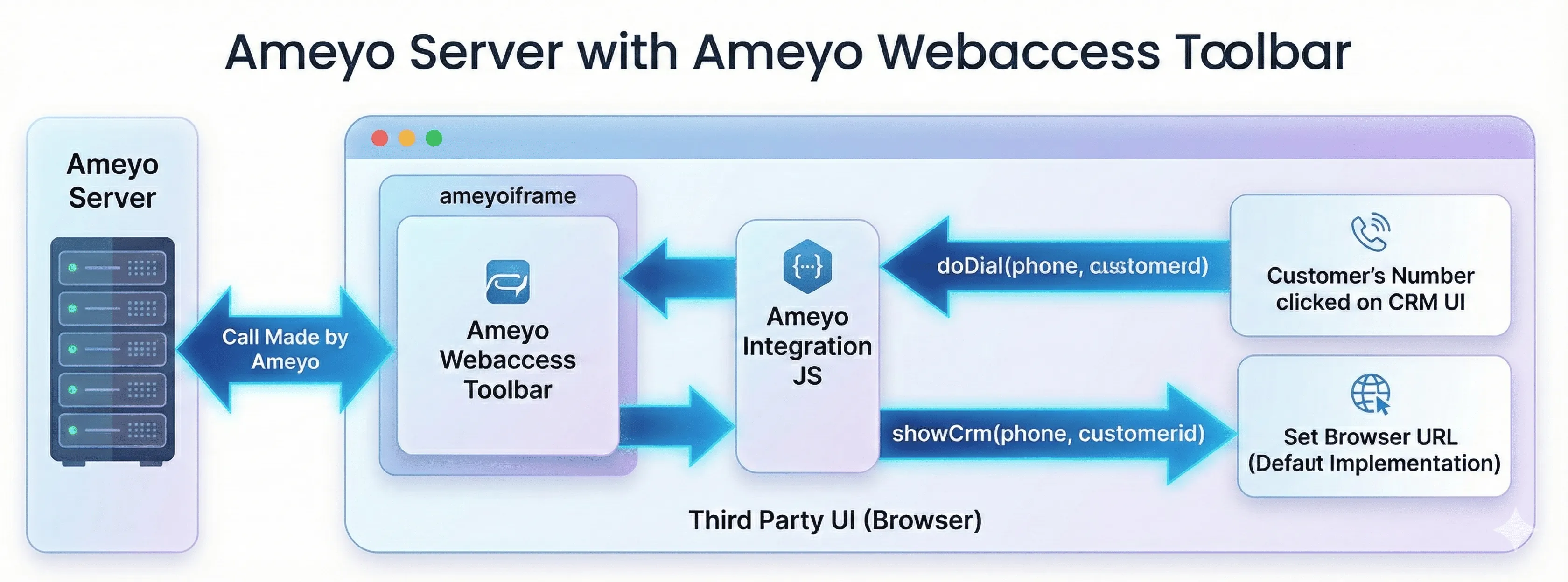
The integration uses a two-way communication model via JavaScript APIs to link Ameyo's core contact center functionalities with the third-party CRM application.
Integration Approach
The third-party CRM is responsible for embedding the Ameyo toolbar into an iframe within its user interface. This process involves:
- Glue Code: Incorporating a specific JavaScript integration file as "glue code" in the headers of the CRM pages.
- Container: Defining a specific div element with the ID ameyolframeDiv where the toolbar window will load.
Prerequisites
- CRM pages must support an iframe and include a container with id ameyoIframeDiv on each page where the toolbar appears, along with the Ameyo integration script in headers.
- Matching users must exist in CRM and Ameyo, with Ameyo agents provisioned prior to SSO or password login attempts to ensure successful authentication and campaign access.
- Agent browsers must reach the Ameyo host and ameyowebaccess endpoints, and the CRM must expose a POST /login_logout endpoint for SSO if CRM‑backed authentication is required.
Core Communication Flows and Functions
Plan and prepare
- Confirm license entitlement, engage Professional Services, and identify CRM pages where the toolbar must appear to finalize scope and timelines.
- Verify the CRM supports iframes on those pages, and ensure agent browsers can reach the Ameyo host and ameyowebaccess endpoints over the required protocol and port.
- Provision matching users in Ameyo and CRM; userId must match if CRM SSO is required, and Ameyo users must exist before attempting login from the toolbar.
Add the integration script
- Include the Ameyo integration script on every CRM page that will host the toolbar: <Protocol>://<Domain_of_Ameyo_Application>:<Port_Number>/ameyowebaccess/toolbar/js/ameyo-integration-v<file_version>.js as a script tag in the page head to enable two‑way messaging.
Create the iframe container and inject the toolbar
- Add a div with id ameyoIframeDiv to each CRM page and inject an iframe whose src points to <Protocol>://<Domain_of_Ameyo_Application>:<Port_Number>/ameyowebaccess/toolbar-crm.htm?origin=<crmOrigin>, where crmOrigin is computed from window.location to scope cross‑window communication.
- Example snippet:
Initialize handlers and load lifecycle
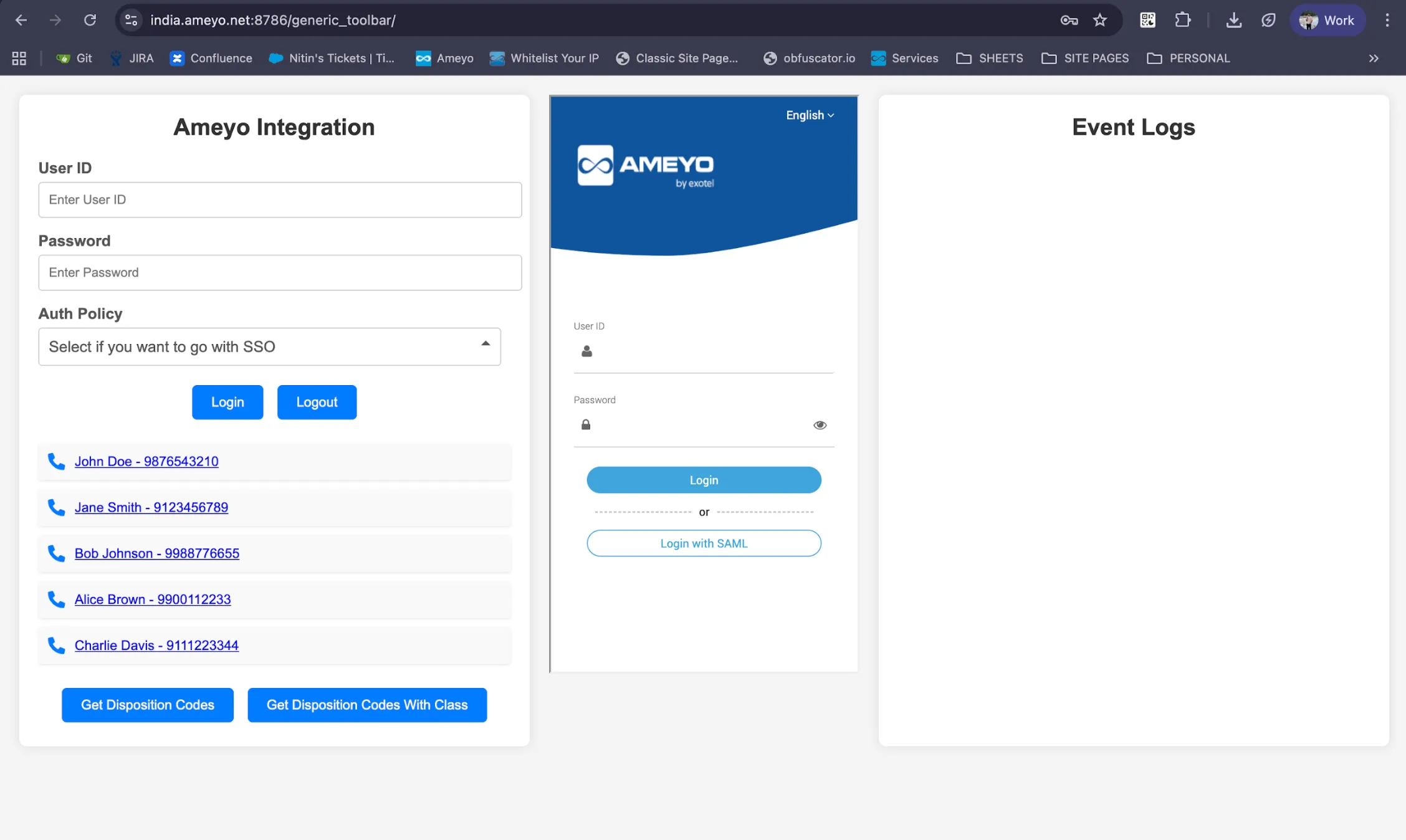
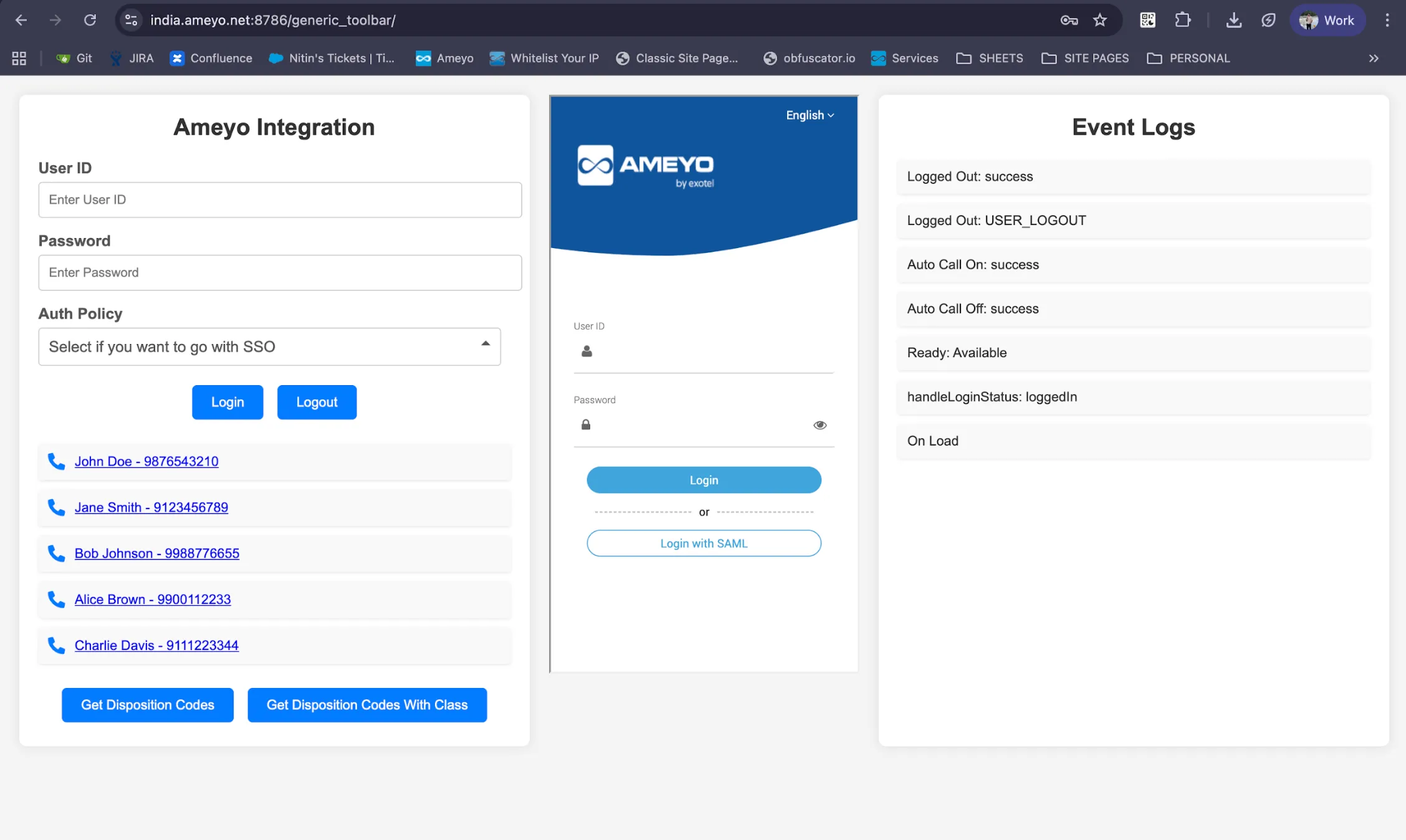
- Use onLoadHandler to verify the page and iframe are ready, and listen for loginStatusHandler on each page open or refresh to reflect current session state in the CRM shell.
- If overriding screen pop, register your CRM function with ameyo.integration.registerCustomFunction("showCrm", { showCrm: fn }) to take control of navigation and complete the pop using ameyo.integration.api.setRecordInfoForShowCrm(requestId, …) after CRM context has loaded.
Choose and wire authentication
- For password login, call ameyo.integration.doLogin(username, password, 'auth.type.password'); for CRM SSO, call ameyo.integration.doLogin(username, password, 'auth.type.crm.http') to trigger the CRM authentication flow.
- Implement a POST /login_logout endpoint in the CRM that accepts requestXml and returns <status>, <message>, and <crmSessionId> on successful command=login, and that terminates the CRM session when Ameyo later calls command=logout.
Sample JSON for SSO
- Login request and response structure with method = POST & content-type application/json
- Login request and response structure with method = POST & content-type application/x-www-form-urlencoded
- SSO API Response should be in below format with method = POST & content type application/json
- Logout request and response structure: response includes command=logout with crmSessionId, and status indicates success or failure for CRM session termination. Method = POST Request
Response
Handle login state and force login
- React to loginHandler to display success, prompt for force login on session clash, or surface explicit failure reasons such as auth.policy.incorrect and username.or.password.empty for user guidance.
- When force login is required, call ameyo.integration.doForceLogin() from the CRM to take over the prior session and continue the initialization.
Auto‑select the agent’s extension
- Implement a global getExtensionInfo function that returns a JSON object { name: '<Extension_Name>', phone: '<endpoint>' } so the toolbar auto‑binds the known device after login, and reflect the outcome via selectExtensionHandler in the CRM UI.
- Example:
Campaign selection and agent presence
- Allow agents to select the target campaign and reflect that via selectCampaignHandler, then toggle availability with readyHandler or breakHandler to keep CRM rosters and action controls in sync.
- For preview or auto‑dial campaigns, also listen to autoCallOnHandler and autoCallOffHandler to display current dialing mode in the CRM header or status area.
Screen pop flow for inbound and outbound
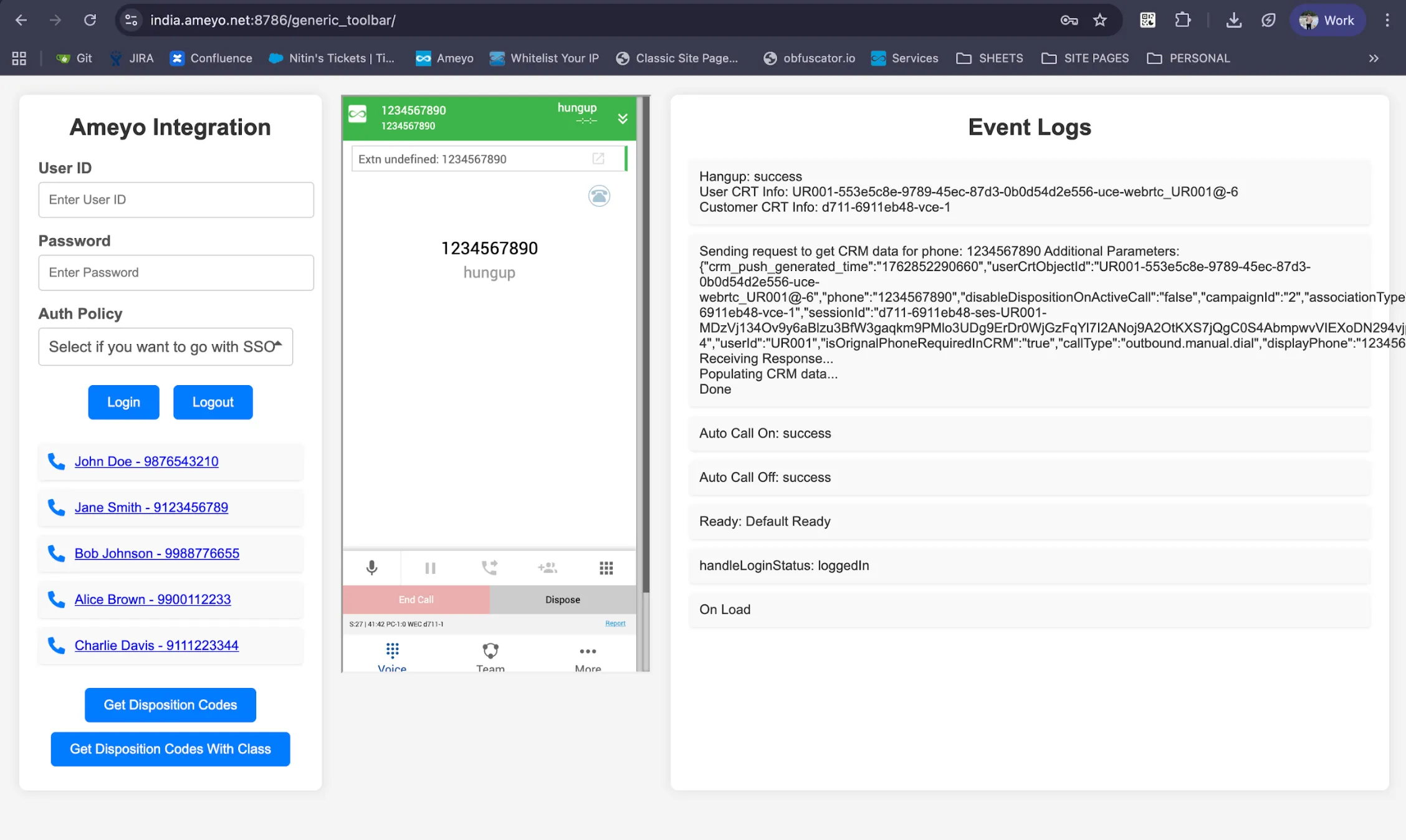
- Define showCrm(phone, additionalParameters) in the CRM to navigate to customer/case context for inbound ACD, auto, manual, preview, callback, and click‑to‑dial scenarios, or override with registerCustomFunction to centralize the pop logic across pages.
- After rendering, call ameyo.integration.api.setRecordInfoForShowCrm(requestId, requestId, phone, callback) to acknowledge completion and keep the toolbar and CRM synchronized.
- Example pattern:
Click‑to‑dial from CRM records
- Initiate calls using ameyo.integration.doDial(phone, customerId, additionalParameters) from record pages to pass context for routing and analytics, or prefill the dial box with ameyo.integration.populateNumberInDialBox(phone) when agent confirmation is required.
- Example:
Disposition and wrap‑up
- Fetch two‑level dispositions with ameyo.integration.getDispositionCodes(campaignId?) and render CRM dropdowns, then submit the agent’s selection with ameyo.integration.disposeCallByDisposition(dispositionCode) and wait for handledisposeCallByDispositionCode to confirm completion.
- Dispose Call with Callback using ameyo.integration.disposeAndScheduleCallback()
Dispose Call with Callback
This method schedules a callback for the provided phone number at the specified date and time. The callbackParams object is used to open the relevant CRM record when the callback is received. The additionalParameters object allows storing supplementary metadata for callback processing.
Parameter Details
Parameter | Data Type | Description |
|---|---|---|
phoneNumber | String | Phone number for which the callback needs to be scheduled. |
selfcallback | Boolean | Determines whether the callback is self-assigned (true) or not (false). |
date | String | Callback date and time in the required format: MM/DD/YYYY HH:MM. |
callbackParams | Object | CRM-related record details used to open the relevant record when the callback is received. |
additionalParameters | Object | Additional metadata such as notes or custom parameters that need to be stored during callback scheduling. |
Required Formats
Date Format
MM/DD/YYYY HH:MM
callbackParams Format
JSON
additionalParameters Format
JSON
Sample API Usage
JavaScript
Linked Events
These event handlers are triggered based on the outcome of the function execution:
- callbackSuccessNotifyHandler — Triggered when the callback is successfully scheduled.
- failedScheduleCallBackNotifyHandler — Triggered when an error occurs while scheduling the callback.
Examples
- customCallbackSuccessNotifyHandler: Callback scheduled successfully
- customFailedScheduleCallBackNotifyHandler: Callback time not valid
- customFailedScheduleCallBackNotifyHandler: Callback scheduled for less than current time
Dispose‑and‑dial
- Use ameyo.integration.disposeNDial(dispositionCode, phone) to end the current call and immediately dial the next number, noting that the default release disallows the “Callback” disposition in this path unless explicitly customized by Professional Services.
- Confirm both the disposition result and subsequent dial status via handledisposeCallByDispositionCode to decide whether to advance the CRM workflow or retry.
Transfers and conferences
- Log and visualize call routing by listening to transferToPhoneHandler, transferToAQHandler, transferToUserHandler, transferToIVRHandler, transferToCampaignHandler and the conference counterparts, updating the CRM timeline and participants accordingly.
- Use these events to annotate activity history, e.g., “Transfer.To.Agent.Queue.Request.Sent,” and to keep ownership and queue metadata current on the CRM record.
Logout and session termination
- When CRM signs out the agent, call ameyo.integration.doLogout() to end the Ameyo session; when the toolbar logs out, Ameyo will call the CRM’s /login_logout with command=logout, which the CRM must honor by terminating its session and cleaning up UI state.
- Display logoutHandler results and remove any cached call context or disposition UI remnants to prevent accidental reuse on the next login.
Error handling and diagnostics
- Surface explicit login errors from loginHandler, including auth.policy.incorrect and username.or.password.empty, and guide agents to retry or contact support, while handling invalid sessionId responses on logout gracefully.
- For SSO, display the <status>failed</status> and <message> returned by the CRM endpoint and avoid creating CRM sessions or proceeding to extension binding until a success is received.
Security and origin governance
- Always include origin=<crmOrigin> in the iframe URL and validate origin in custom message handlers to scope cross‑window communication to trusted pages only.
- Pass crmSessionId returned by the CRM SSO login in subsequent CRM web requests where required by policy to preserve session integrity and auditability across interactions
Events and handlers
Name | Type | When it fires | Payload | Typical CRM use |
|---|---|---|---|---|
onLoadHandler | Event | When the current page fully loads, possibly multiple times due to redirects | None | Initialize page state and verify toolbar iframe and messaging channel are ready |
loginHandler | Handler | After a login attempt, including UI login, doLogin, or auto‑relogin | Success status or force‑login required; on failure: auth.policy.incorrect, username.or.password.empty, unknown.error.occurred.please.refresh.or.retry | Reflect login result in CRM header, prompt for force login if required, or display reason on failure |
loginStatusHandler | Handler | On open/refresh to communicate current session state; emitted once per load | status | Show “Logged in/out” banner or auto‑resume UI based on status |
forceLoginHandler | Handler | When a session is created forcefully because the same user was already logged in | status: forceLoginRequired + responseText | Ask agent to confirm takeover and then invoke doForceLogin from CRM |
logoutHandler | Handler | When the server deletes the session due to user logout, supervisor action, or timeout | OnSuccess: success; OnFailure: Invalid sessionId | End CRM session and redirect to login; clear cached call context |
showCrm | Event | On inbound, auto, manual, preview, callback, and click‑to‑dial to drive CRM navigation | currentPhone, requested, additionalParameters (e.g., CRM URL or callId) | Open or focus the customer/case record and acknowledge via setRecordInfoForShowCrm |
selectExtensionHandler | Handler | After an agent selects an extension | OnSuccess: success, userCustomerCRTInfo; OnException: responseText detail, userCustomerCRTInfo | Confirm device binding and show active endpoint in agent bar |
modifyExtensionHandler | Handler | After an agent modifies the extension | OnSuccess: success, userCustomerCRTInfo; OnException: responseText detail, userCustomerCRTInfo | Update device label and re‑validate reachability before next call |
selectCampaignHandler | Handler | After an agent selects a campaign | campaignNameWithId | Switch CRM disposition set and list views to the selected campaign |
autoCallOnHandler | Handler | When agent enables auto‑dial | OnSuccess: success | Indicate predictive/progressive mode in CRM status area |
autoCallOffHandler | Handler | When agent disables auto‑dial | OnSuccess: success | Revert CRM status to manual dialing mode |
readyHandler | Handler | When agent sets presence to ready | status: Available | Mark agent as available in CRM roster and enable click‑to‑dial controls |
breakHandler | Handler | When agent sets a break state | status: Training, Snacks, Lunch, or Unavailable | Show break reason in CRM roster and disable outbound actions |
hangupHandler | Handler | When an agent ends a call | OnSuccess: success, userCustomerCRTInfo | Trigger wrap‑up timer and show disposition form in CRM |
transferToPhoneHandler | Handler | When an agent transfers to another phone | Transfer.To.Phone.Request.Sent, userCustomerCRTInfo | Append transfer event to interaction timeline and update call party list |
transferInCallHandler | Handler | When an agent transfers to an in‑call party | Transfer.To.Phone.Incall.Request.Sent, userCustomerCRTInfo | Log warm transfer intent and hold state transitions in CRM |
transferToAQHandler | Handler | When an agent transfers to an Agent Queue | Transfer.To.Agent.Queue.Request.Sent, userCustomerCRTInfo | Record queue transfer and show downstream queue/campaign in activity log |
transferToIVRHandler | Handler | When an agent transfers to IVR | Transfer.To.IVR.Request.Sent, userCustomerCRTInfo | Log IVR transfer and display self‑service path if applicable |
transferToUserHandler | Handler | When an agent transfers to another user | Transfer.To.User.Request.Sent, userCustomerCRTInfo | Show receiving user and update ownership on the CRM record |
transferToCampaignHandler | Handler | When an agent transfers to a campaign | Transfer.To.Campaign.Request.Sent, userCustomerCRTInfo | Track campaign reassignment in the case history |
conferWithPhoneHandler | Handler | When an agent starts a conference with a phone | Confer.Phone.Request.Sent, userCustomerCRTInfo | Add conference participant and mark three‑way call in UI |
conferWithTPVHandler | Handler | When an agent starts a conference with TPV | Confer.With.TPV.Request.Sent, userCustomerCRTInfo | Note TPV involvement and flag compliance workflow in CRM |
conferWithUserHandler | Handler | When an agent starts a conference with another user | Confer.With.User.Request.Sent, userCustomerCRTInfo | Add internal participant and show consult state |
conferWithLocalIVRHandler | Handler | When an agent starts a conference with Local IVR | Confer.With.Local.Ivr.Request.Sent, userCustomerCRTInfo | Indicate IVR assist and capture prompt path if exposed |
handleDispositionCodes | Handler | After requesting disposition codes | Array/list of disposition classes and codes | Populate CRM wrap‑up dropdowns with two‑level options |
handledisposeCallByDispositionCode | Handler | After attempting to dispose a call or dispose‑and‑dial | status for disposition result and, for disposeNDial, subsequent dial status | Confirm save, close wrap‑up modal, or show retry on failure |
handleFailedDispositionNotifyGeneric | Handler | On disposition exceptions such as null crtObjectId or invalid code | reason string describing failure | Display validation error and keep wrap‑up form open for correction |
Prerequisites
- Licensing: This is a licensable feature.
- Professional Services: Requires enablement and deployment from Professional Services and Support.
- CRM Compatibility: The third-party CRM must be web-based and capable of embedding external content within an iframe.
- User Mapping: User IDs must be consistent between the Ameyo system and the CRM for Single Sign-On.
Use Cases
- Unified Agent Experience: Integrating the toolbar into the CRM for sales or support workflows to eliminate context switching.
- Optimized Sales Dialing: Utilizing the Click-to-Dial function directly from a lead list in the CRM.
- Automated Customer Context: Using the Screen Pop event to automatically display the customer's service ticket or history upon an incoming call.
- Session Integrity: Leveraging the forceLoginHandler and logoutHandler to ensure sessions are correctly terminated in both Ameyo and the CRM to prevent unauthorized access.