URL-Based CRM Integration with Ameyo
24 min
Overview
URL‑based toolbar integration invokes CRM pages inside Ameyo’s embedded browser at defined lifecycle events—login, connect, preview, and dispose—passing identifiers like session, campaign, call, and user extension as URL query parameters to maintain context across pages. The approach supports multiple disposition patterns (CRM‑only, Ameyo‑only, forced dispose, or dual) and recommends disposing in CRM before Ameyo to prevent premature tab closure and agent wrap delays. Session management can be unauthenticated, cookie‑based, or Single Sign‑On, with SSO attaching the CRM session token to all subsequent CRM URLs and issuing a logout on agent sign‑out.
Key Benefits
- Seamless screen‑pop across inbound, outbound, manual, preview, and callback flows by invoking CRM pages with call and agent context parameters, reducing context switching for agents.
- Flexible disposition handling with CRM‑initiated dispose callbacks or Ameyo forced/dual dispose, ensuring agents are freed for the next call without waiting for wrap time when CRM notifies Ameyo.
- Streamlined session experience via cookie‑based or Single Sign‑On options, appending the CRM session token to all Customer/Preview/Dispose URLs and invoking CRM logout at agent sign‑out.
- Simple, low‑overhead integration using HTTPS GET query parameters for Knowledge Base, Customer, Preview, and Dispose URLs configured per campaign, avoiding heavy SDKs or custom adapters.
- End‑to‑end workflow control from the CRM using built‑in APIs: Manual Dial, Dispose‑and‑Manual‑Dial, and Voice Log download, enabling dialing, dispositioned redials, and recording retrieval within the CRM.
- Queue‑aware CRM behavior using queueId and queueName to render different pages or processes per queue for more tailored agent guidance in inbound scenarios.
- Consistent traceability with identifiers like sessionId, campaignId, crtObjectId, userCrtObjectId, and customerId for linking CRM records to Ameyo call and recording artifacts.
- Security alignment through HTTPS support and identity mapping where CRM user‑id equals Ameyo user‑id for SSO while Ameyo continues to authorize by Ameyo roles.
- Web-based third‑party CRM integration via configurable URLs invoked at agent login, call connect, and disposition events.Manual Dial API to dial a specific number from CRM for a specific agent session and campaign.
- Dispose and Manual Dial API to dispose a call and immediately redial from CRM with the appropriate campaign disposition.
- Voice Logs API to download recordings for a call by Ameyo call identifier in wav or mp3 formats.
- Optional SSO with CRM-managed authentication and session propagation into Ameyo URL query parameters.
How it Works
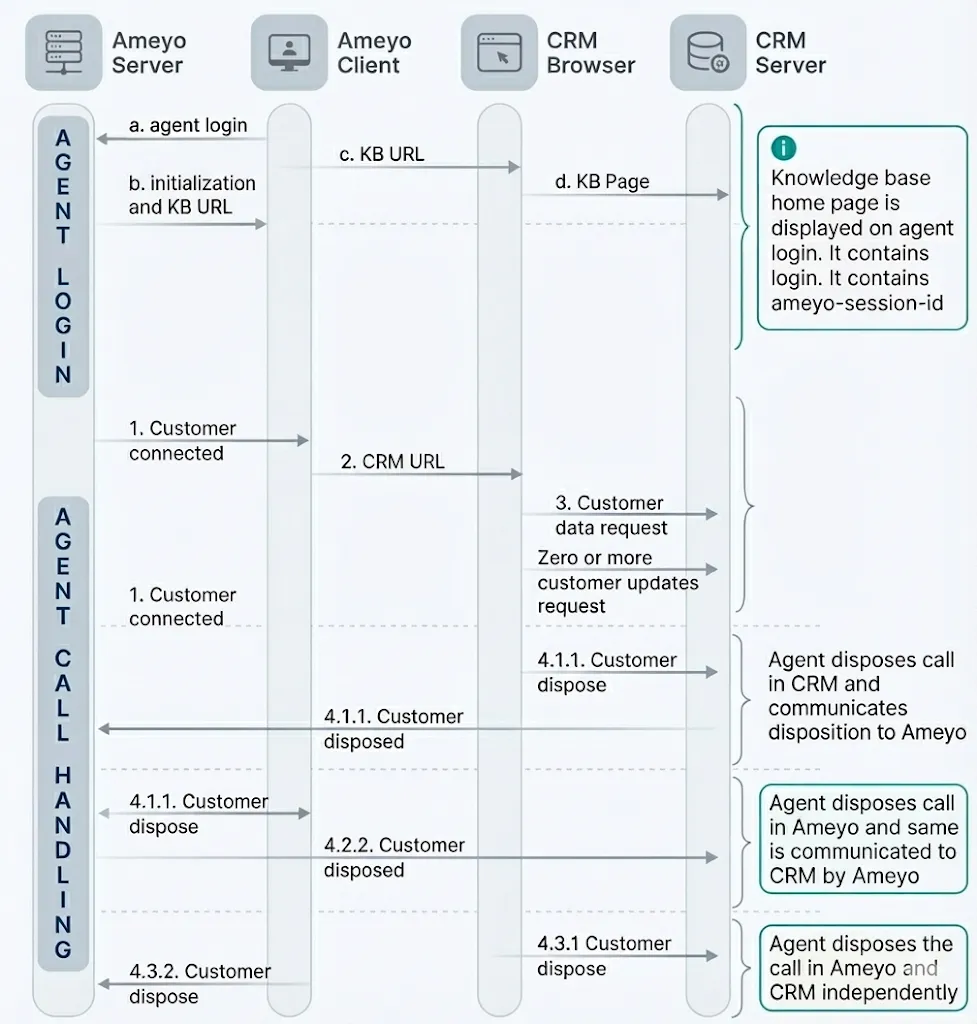
- Ameyo Server handles agent activities and call context while emitting configured CRM and knowledge base URLs at defined lifecycle events.
- Ameyo Client hosts the agent user interface, including an embedded browser for Knowledge Base and CRM tabs that receive parameterized URLs from the server.
- CRM Browser renders third‑party CRM pages and persists navigation while in call, driven by URL parameters including session and call identifiers.
- CRM Server provides customer data, accepts login/logout for SSO, and may receive dispose callbacks from Ameyo.
Integration Approach
- Agent Login: Ameyo sends a preconfigured Knowledge Base URL to the embedded browser for agent reference at login, optionally requiring authentication as per CRM design
- Agent Call Handling: URL-based screen‑pop occurs for incoming, auto‑dial, manual dial, preview, and callback scenarios with call identification and agent context parameters.
- Agent Call Disposition: Supported patterns include CRM-only, Ameyo-only, Forced Dispose from Ameyo (with CRM notification), or dual entry, with the recommendation to dispose in CRM before Ameyo to avoid CRM tab closure.
Agent UX overview
- The interface includes a telephony palette, a workbench with tabs, an embedded Knowledge Base, and an embedded CRM tab that is populated per call and may be read‑only in preview flows based on configured URLs.
- When a call is disposed in Ameyo, the CRM tab can be closed by the client as the agent returns to Wait status for the next call, so CRM disposition and data save should occur first if using dual entry.
Core Communication Flows and Functions
URL formats
- General: <protocol>://<domain>/<port>?<key1>=<value1>&<key2>=<value2>… with protocol typically http or https; use https where possible for transport security.
- Knowledge Base URL parameters: userId and sessionId for identification and continued session parameter updates from Ameyo.
- Customer URL parameters: sessionId, campaignId, crtObjectId, userCrtObjectId, userId, customerId (outbound optional), phone, queueId, queueName as applicable.
- Preview URL: identical to Customer URL but triggered during preview to allow CRMs to render read‑only views if desired.
- Dispose URL parameters: sessionId, campaignId, crtObjectId, userCrtObjectId, userId, customerId, disposition, and dispositionAttribute for callbacks where applicable.
Session management
- No authentication: CRM simply renders data on screen pop, not commonly used due to security constraints.
- Cookie-based: Authenticate at login (e.g., using Knowledge Base URL) and rely on browser cookies within the embedded browser across the session; ensure CRM logout before Ameyo logout to avoid stale sessions.
- Single Sign-On: Authenticate via CRM‑provided HTTP API at Ameyo login to obtain crmSessionId and append it as query parameters on subsequent CRM/Knowledge Base URLs; send logout to CRM at Ameyo logout.
CRM URL configuration
- Admin configures CRM base URL per campaign as <Domain_Port>://<crm_server_ip>/<crmdirectory>/<crmpage> in Administrator settings.
- On call connect, Ameyo appends DACX parameters via GET to form <Domain_Address>://<crm_server_ip>/crmdirectory/crmpage?<key1>=<value1>&…; CRMs should read via GET.
- Expected Params
- sessionId
- campaignId
- crtObjectId
- userCrtObjectId
- userId
- customerId
- phone
Disposition handling
- Ameyo expects a disposition indication to return the agent to Wait and enable the next call, which can be driven from CRM via a dispose callback URL or via Ameyo Force Dispose with prior CRM save.
- Disposition URL format: http://ameyo_server_ip:8888/ameyorestapi/disposeCallForUser with request data including campaignId, sessionId, crtObjectId, userCrtObjectId, customerId, phone, userId plus Disposition Code and optional Disposition Attr for callbacks.
- Disposition Attr examples include local-<date time>, customer-<date time>, after-<date time>, and selfCallback flags to control scheduling semantics and ownership.
- A sample shows callback scheduling with session identifiers and selfCallback=true; ensure the Disposition Code exists in the campaign’s disposition plan.
curl --location 'https://demoprawin.ameyoemerge.in:8887/ameyorestapi/voice/disposeCallForUser' \
--header 'Content-Type: application/json' \
--header 'Authorization: 12345abc' \
--data '{
"userId":"vaptuser1",
"dispositionCodeName":"sale",
"dispositionParams":{"isSelfCallback":"false", "callbackTime":"", "phone":"7004281599"},
"requestId":"8989898989",
"notes":""
}'
Single Sign-On API
- Provide a single CRM API endpoint at http://<CRM_SERVER_IP>:<PORT>/<SOME_PATH>/login_logout accepting POST parameter request for both login and logout commands.
- Login: Send command=login with userId and password; on success receive crmSessionId to be appended on subsequent CRM requests; failures return status=failed with message.
- Logout: Send command=logout with crmSessionId when the agent logs out of Ameyo; CRM should terminate the CRM session and return status.
- Notes: Authorization remains Ameyo‑role based and Ameyo does not continuously validate CRM session freshness; CRM user‑id should equal Ameyo user‑id for role alignment.
Manual Dial API
- Purpose: Initiate an outbound call from CRM for a specific agent session within a campaign via Ameyo Web Access.
- Endpoint format: http://<ApplicationServerIP>:<Port>/ameyowebaccess/command/?command=clickToDialWithTokenAsync &data is passed in request body with content type application/json.
- Required parameters: campaignId, phone, and customerRecord when the campaign uses a custom table or primary key other than phone1.
- Response: JSON with result and reason, returning success or failed with an explanatory reason on error.
- Sample request: Token will be shared by support or Professional Services team
curl --location 'https://AmeyoServerDomain.ameyoe.in:8887/ameyowebaccess/command/?command=clickToDialWithTokenAsync' \
--header 'hash-key: ameyoGeneratedToken' \
--header 'requesting-host: setup.ameyo.net' \
--header 'policy-name: token-based-authorization-policy' \
--header 'Content-Type: application/json' \
--data '{
  "userId": "agent",
  "campaignId": "1",
  "shouldAddCustomer": false,
  "phone": "9911337923",
  "additionalParams": {
    "recordId": "0015g00000Z04cfAAB"
  }
}'- Sample success response:
json{ "result": "success", "reason": "success" }
Dispose and Manual Dial API
- Purpose: Dispose the current call in Ameyo and immediately redial from CRM with an appropriate disposition tied to the campaign.
- Endpoint format: http://<ApplicationServerIP>:<Port>ameyorestapi/voice/disposeAndManualDial & data is sent in request body.
- Required parameters: campaignId, userCRTObjectId, crtObjectId, customerId (for customer context), dispositionCode, and phone.
- Response: JSON with result and reason, with detailed error responses for missing disposition assignment, invalid crtObjectId, or invalid sessionId.
- Sample request and success response:
curl --location 'https://demoprawin.ameyoemerge.in:8887/ameyorestapi/voice/disposeAndManualDial' \
--header 'sessionId;' \
--header 'Content-Type: application/json' \
--header 'Cookie: __METADATA__=0ab6aca4-8f2d-4b85-98a9-9730aed1f6e8' \
--data '{
    "campaignContextId": 8,
    "userCRTObjectId": "d202-5b4d83c1-ses-agent-vmVUGgpB-1-uce-5",
    "crtObjectId": "d202-5b4d83c1-vce-5",
    "dispositionCode": "Sale",
    "phone": "465456",
    "customerId": "-1",
    "requestId": "dcf7eec5-0c8f-86c1-8d2f-c9f31db9ae8c"
}'
{ "result": "success", "reason": "success" }
- Sample failure responses: disposition not in plan, invalid crtObjectId, invalid sessionId with status and reason fields for diagnostics.
Voice Logs API
- Purpose: Download voice recordings by Ameyo call identifier in a specified format (wav default, mp3 supported) via HTTP commands.
- Command: downloadVoiceLog with JSON‑encoded data including crtObjectId and optional targetFormat, passed via GET or POST request parameters.
- Request sample:
curl --location --globoff 'https://demoprawin.ameyoemerge.in:8887/ameyowebaccess/command?command=downloadVoiceLog&data=%7B%22crtObjectId%22%3A%22d865-68dbb572-vce-22%22%2C%22targetFormat%22%3A%22mp3%22%7D'
- Behavior: On success, the voice log download starts; failures return a JSON message indicating the recording could not be found.
Parameter reference
- sessionId: Unique Ameyo agent session identifier used across communications and URL query strings.
- campaignId: Identifier for the current campaign for routing and process identification.
- crtObjectId: Unique call identifier in Ameyo for linking voice logs and CRM records.
- userCrtObjectId: Identifier for the specific active agent voice extension when multiple are possible.
- userId: Unique Ameyo user identifier, also used to align SSO identities where CRM user‑id should match.
- customerId: Unique customer record identifier in Ameyo for outbound and contact uploads when available.
- phone: Caller ID or dialed number provided to CRM and used in dispose and dialing commands.
- queueId/queueName: Inbound routing context to allow CRM page variation per queue.
- disposition/dispositionCode: Code configured in the campaign’s disposition plan that must match exactly for successful dispose.
- dispositionAttribute: Attributes for callback scheduling such as local, customer, after, and selfCallback flags.
- crmSessionId: Session token issued by CRM on SSO login and appended to subsequent CRM URLs until logout.
Configuration and examples
- Configure CRM and Knowledge Base URLs in Administrator campaign settings and ensure CRMs read parameters via GET when the URL is thrown on call connect.
- Example screen‑pop shows SugarCRM integrated with Ameyo via URL-based method using the embedded CRM browser.
- A complete sample Dispose URL illustrates callback scheduling and session scoping across user and call identifiers for traceability and workflow actions.
Operational notes
- If CRM handles disposition but does not notify Ameyo, the agent will not be freed until wrap timeout; ensure the CRM invokes Ameyo’s dispose URL or rely on Ameyo Forced Dispose with prior CRM save.
- For cookie-based sessioning, authenticate early via Knowledge Base URL and advise agents to logout of CRM before logging out of Ameyo to avoid stale cookies in the embedded browser.
- For SSO, remember that Ameyo uses CRM API only for authentication and continues to authorize by Ameyo roles; Ameyo does not continuously validate CRM session freshness.
Sample JSON for SSO
- Login request and response structure with method = POST & content-type application/json
{"password":"agent","userId":"agent","command":"login"}
- Login request and response structure with method = POST & content-type application/x-www-form-urlencoded
request={"password":"admin","userId":"admin4","command":"login"}
- SSO API Response should be in below format with method = POST & content type application/json
{"status":"success","crmSessionId":"crm-sess-norah-123-434343","message":"message"}
- Logout request and response structure: response includes command=logout with crmSessionId, and status indicates success or failure for CRM session termination. Method = POST Request
{
"command": "logout",
"crmSessionId": "crm-1234-hjsdch"
}
Response
{
"status": "success/failed",
"message": ""
}
Security considerations
- Use https for CRM and dispose endpoints when available since the URL format supports both http and https, and include only necessary identifiers in query strings to minimize exposure.
- Align identities across Ameyo and CRM for SSO by keeping the same user‑id, and ensure CRM sessions are invalidated on Ameyo logout via the logout command to avoid orphaned sessions.
Testing checklist
- Validate Knowledge Base URL loads at agent login and, where applicable, establishes cookie or SSO‑based sessions with CRM.
- Confirm Customer and Preview URLs carry correct session, campaign, call, and user extension identifiers and render expected CRM views, including read‑only behavior for preview.
- Exercise all disposition modes and verify agent state returns to Wait upon CRM‑initiated dispose with valid codes configured in the campaign’s disposition plan.
- Execute Manual Dial, Dispose and Manual Dial, and Voice Logs APIs, asserting success responses and enumerated failure responses for invalid disposition, crtObjectId, and sessionId cases.
Have a question?
Our knowledgeable support team and an awesome community will get you an answer in a flash.
To ask a question or participate in discussions, you'll need to authenticate first.