Omni-channel Campaign Configuration (6X Voice Process)
The Omnichannel Campaign Enhancement is a strategic feature that introduces Omnichannel capabilities to the existing 6X Voice Process at the Campaign Level. This feature allows businesses to retain their powerful Auto-Dialer and Lead-centric workflows—including existing Voice Blending capabilities—while empowering agents to handle Digital Interactions (Chat, WhatsApp etc) within a Unified Agent Desktop (UAD).
Administrators can "promote" specific Voice Inbound campaigns to handle digital channels without altering the entire Voice Process or affecting other campaigns running in the same environment.
2. Key Architectural Concepts
2.1 Campaign-Level Promotion
- Scope: This is a Campaign Level configuration, not a Process Level change. You can have a "Standard Voice Campaign" and an "Enhanced Omni Campaign" running simultaneously within the same Voice Process.
- Legacy Model: Supported Voice Blending (Inbound + Auto-Dialer/Outbound) but operated independently of digital channels.
- Enhanced Model: Specific Voice Inbound Campaigns are promoted to Omni Inbound Campaigns. This single campaign type now serves as the "anchor" for:
- Inbound Voice calls & Auto-Dialer calls (Existing Voice Blending).
- Digital Inbound interactions (Customer responses).
- Manual Digital Outbound tasks.
- Data Structure: The system retains the Lead-based data structure. It does not force a migration to a "Clean Contact" object, ensuring compatibility with existing lead upload workflows.
2.2 Unified Agent Desktop (UAD)
Agents no longer need to toggle between screens. The UAD provides a "Single Pane of Glass" view where:
- Voice & Digital Coexist: An agent can view an active Chat window alongside a Dialer interface.
- Interaction History: A consolidated timeline displays previous calls and digital messages for the Lead.
- Dual Login: Agents can access the system via the legacy interface (/app) or the new Omni interface (/omniapp) based on the specific campaign they are logging into.
3. The Blending & Capacity Engine
The core of this enhancement is the Max Capacity Pool logic, which dictates how interactions are routed to agents within the enhanced campaign.
3.1 Capacity Pool Definitions
Every agent is assigned a Max Capacity value (Default: 10). Different interaction types consume this capacity differently.
Interaction Type | Consumption Rule | Description |
|---|---|---|
Digital Inbound | Consumes Capacity | Routing stops if Current Load >= Max Capacity. |
Manual Digital Outbound | Consumes Capacity | Agent-initiated tasks (e.g., sending a WhatsApp template) reduce available capacity for new inbound tasks. |
Inbound Voice | Consumes Capacity | Typically consumes a significant portion (or all) of the capacity. Blocked if the pool is full. |
Manual Voice Outbound | Conditional | • Via Omni Inbound Campaign: Consumes Capacity. Blocks/Reduces Digital flow. • Via Outbound Campaign: Does NOT Consume Capacity. Digital interactions can still arrive. |
Auto-Dialer Voice | Bypasses Capacity | The Exception: The Dialer logic ignores the Digital capacity pool. An agent can receive a dialer call even if their capacity is 100% full. |
3.2 The "Single Voice Channel" Constraint (Existing Behavior)
The system maintains the standard Voice Blending rule: an agent is physically restricted to one active voice interaction at a time.
- Scenario: If an agent is on an Auto-Dialer call, they are marked "Busy" for Inbound Voice, even if they have 0 Digital interactions.
3.3 Blending Matrix (Routing Behavior)
The following matrix describes how the system handles concurrent interaction attempts.
Current Agent State | Incoming Interaction | Routing Decision | Reason |
|---|---|---|---|
Handling Digital (Capacity Available) | Digital Inbound | Delivered | Capacity pool has space. |
Handling Digital (Capacity Full) | Digital Inbound | Queued / Blocked | Max Capacity reached. |
Handling Digital (Capacity Full) | Inbound Voice | Queued / Blocked | Max Capacity reached. |
Handling Digital (Capacity Full) | Auto-Dialer Call | Delivered | Exception: Dialer bypasses capacity checks. |
On Voice Call (Any Type) | Voice Call (Any Type) | Not Possible (One Voice channel at a time) | Physical voice channel is occupied (Standard Voice Blending). |
On Voice Call (Any Type) | Digital Inbound | Allowed | Only if capacity permits (Voice consumes capacity, but if weight < max, digital can arrive). |
4. Operational Workflows
4.1 Digital Outbound Strategy
Since this approach enhances the Voice Process, there is no "Auto Omni-Dialer."
- Mass Messaging: Automated digital broadcasts are managed by other modes (e.g., ExoCampaigns).
- Inbound Response: When a customer replies to a broadcast, the interaction enters the 6X system as a Digital Inbound interaction.
- Manual Follow-up: Agents can initiate Manual Digital Outbound messages from the UAD. Note: This action consumes Agent Capacity.
4.2 Reporting & Supervision
- Reporting: Voice reporting remains unchanged (Legacy Reports). Digital interactions are logged in new Interaction tables.
- Supervision: Supervisors use separate views:
- Call View: Monitor live voice states (Talking, Wrap, Ready).
- Interaction View: Monitor digital concurrency and chat content.
5. Configuration Guide
5.1 Enable Omni Capability (Per Campaign)
To promote a campaign, the enableOmniCapability flag must be set in the server_preference_store. This setting is specific to the Context ID (Campaign ID).
5.2 Agent Capacity Management
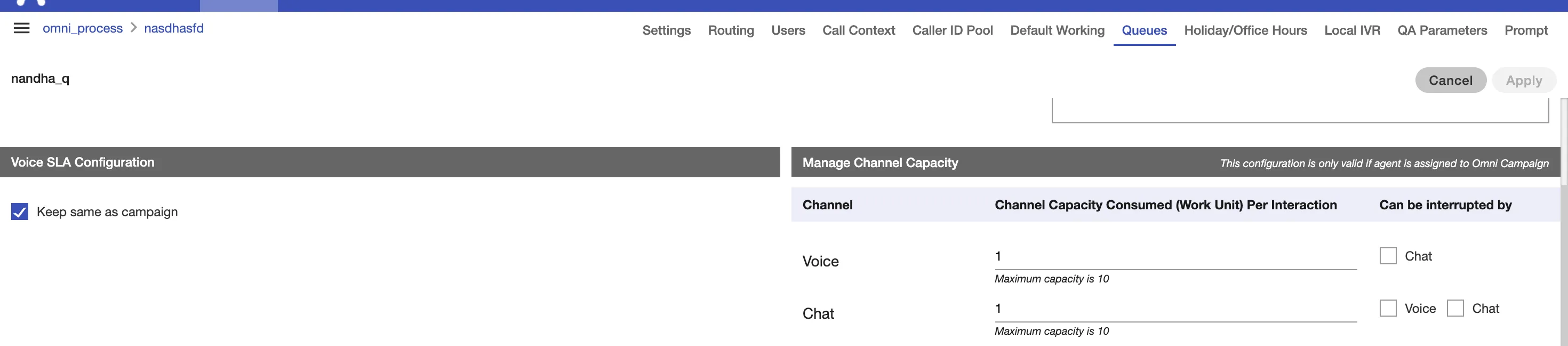
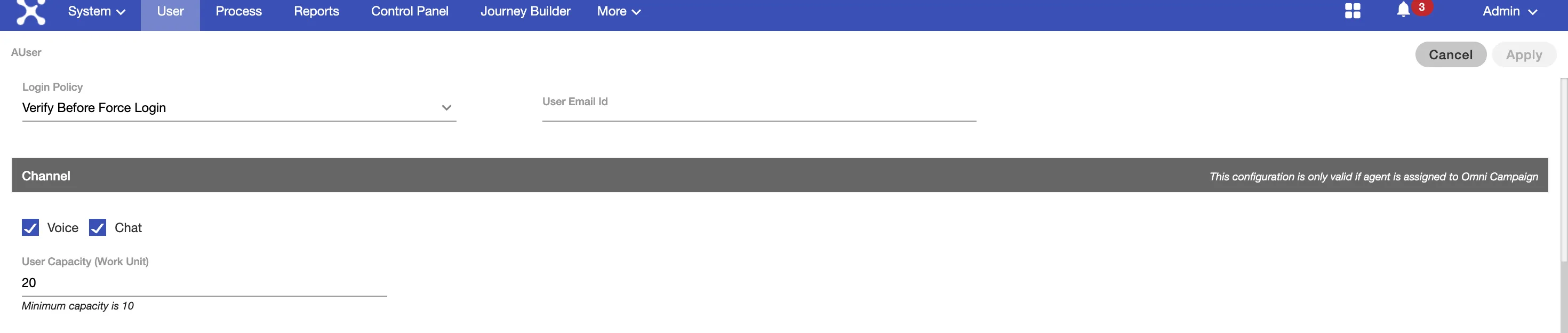
Capacity is managed at the User Configuration and Queue configuration is possible
Manage Channel Capacity at Queue Configuration
Configure Channel Capacity per User(Agent)
Important: The classic interface for UAD remains Voice-Only. To handle digital interactions, agents must switch to the new Agent Workspace.