Bolna Voice AI & Exotel Integration Guide
1. Introduction
This guide walks through integrating Exotel phone numbers with Bolna Voice AI agents, using App Bazaar call flows and the Voicebot applet.
Bolna is a voice AI platform for building phone agents, with a focus on Indian languages and code-switched speech. Once connected, calls run on your own Exotel account, ExoPhones, and balance.
What you'll achieve: inbound calls to your ExoPhone answered by a Bolna agent, and outbound calls placed by Bolna through your Exotel account.
Sequence of events
- A caller dials your ExoPhone, or Bolna places an outbound call through your Exotel account.
- Exotel triggers the app you configured in App Bazaar.
- Within the app, the Voicebot applet points at a Bolna endpoint, and a Connect applet handles transfers to a human.
- Bolna runs the conversation and, when the agent transfers, returns the connect parameters to Exotel.
- The call is logged in both dashboards. Bolna stores an execution record with the transcript and call data.
Two apps are needed, one for outbound and one for inbound, because each uses a different Bolna endpoint. Set up the one you need, or both.
2. Prerequisites
Requirement | Description |
|---|---|
Exotel account | An active account with API access and a dashboard login at my.exotel.com and for India specific Signup on my.in.exotel.com |
ExoPhone | An Exotel phone number to place and receive calls on |
Exotel credentials | API Key, API Token, Account SID, and your account subdomain, for example api.exotel.com or for India specific stamp account api.in.exotel.com |
Bolna account | A Bolna account with at least one agent, and a Bolna API key |
3. Create the Exotel app for outbound calls
3.1 Open App Bazaar
In your Exotel dashboard, go to App Bazaar under the Manage menu.
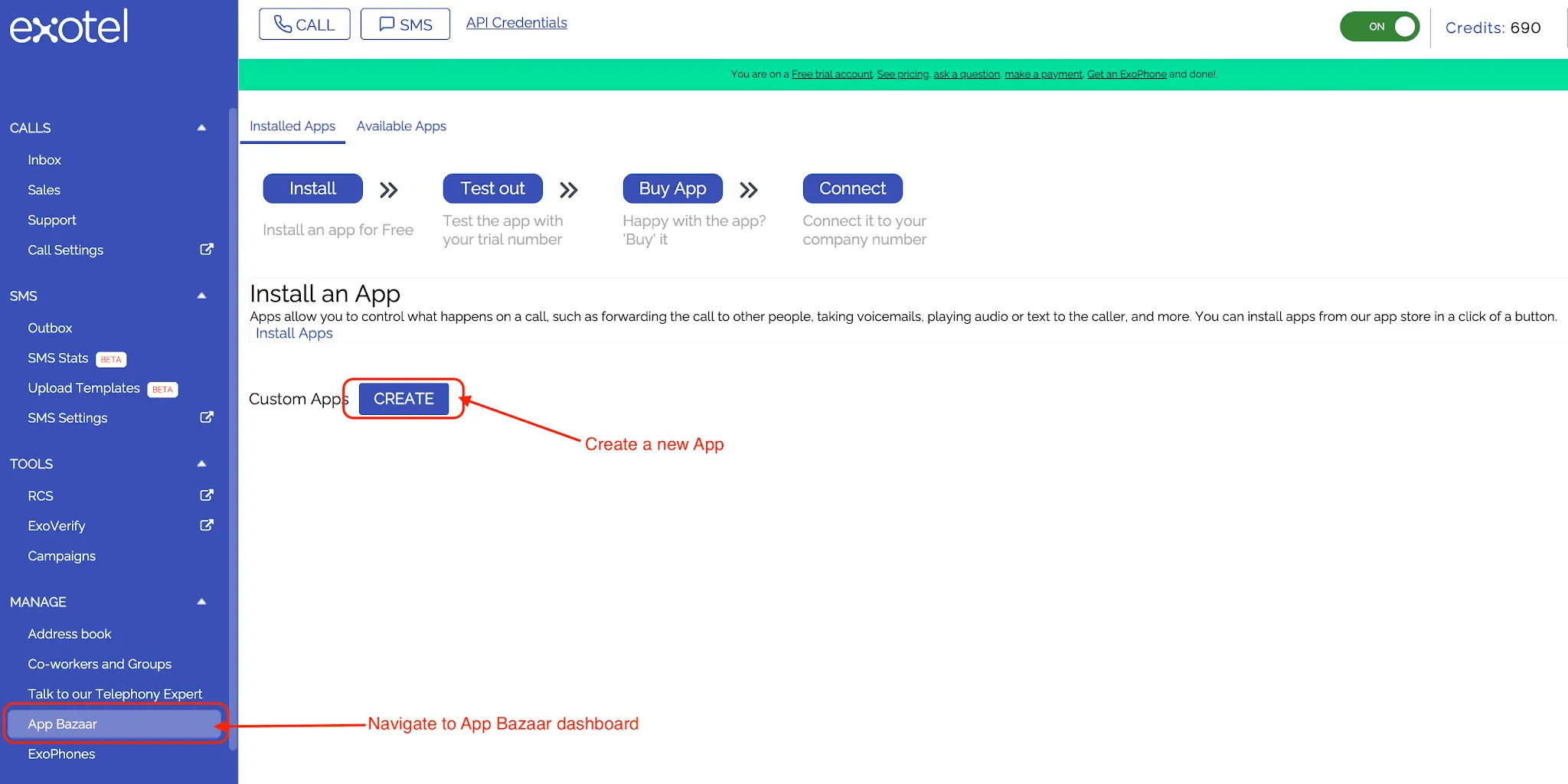
App Bazaar in the Exotel dashboard.
3.2 Create a new app
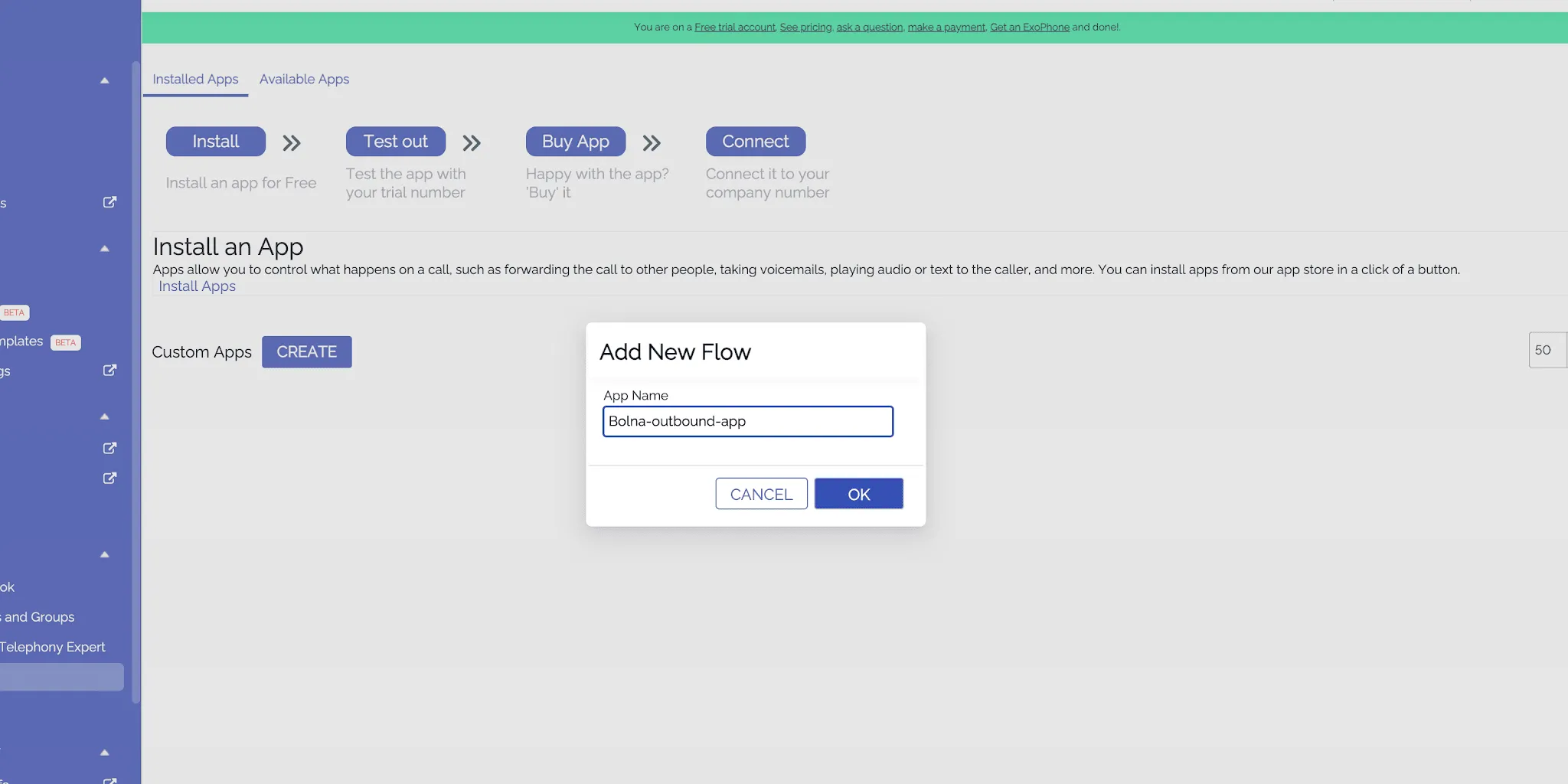
Select Create and give the app a descriptive name, for example Bolna Outbound.
3.3 Add the Voicebot applet
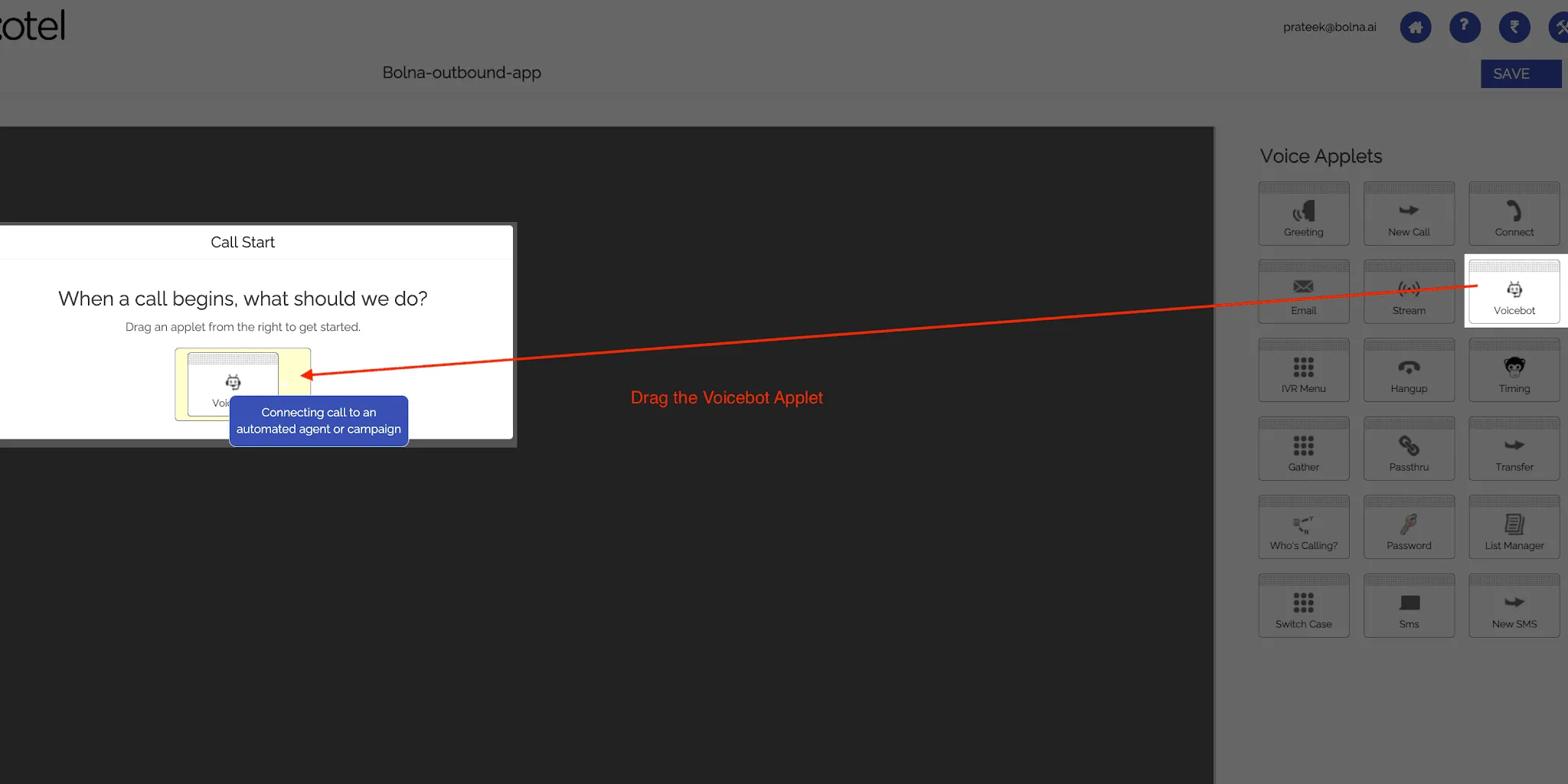
Drag the Voicebot applet into the Drop app here box. This is the component that handles the AI voice interaction.
3.4 Configure the Voicebot applet
In the configuration popup:
- Set the URL field to the Bolna outbound endpoint:
https://api.bolna.ai/exotel_callback
- Enable Record this if you want call recordings for quality assurance and compliance.
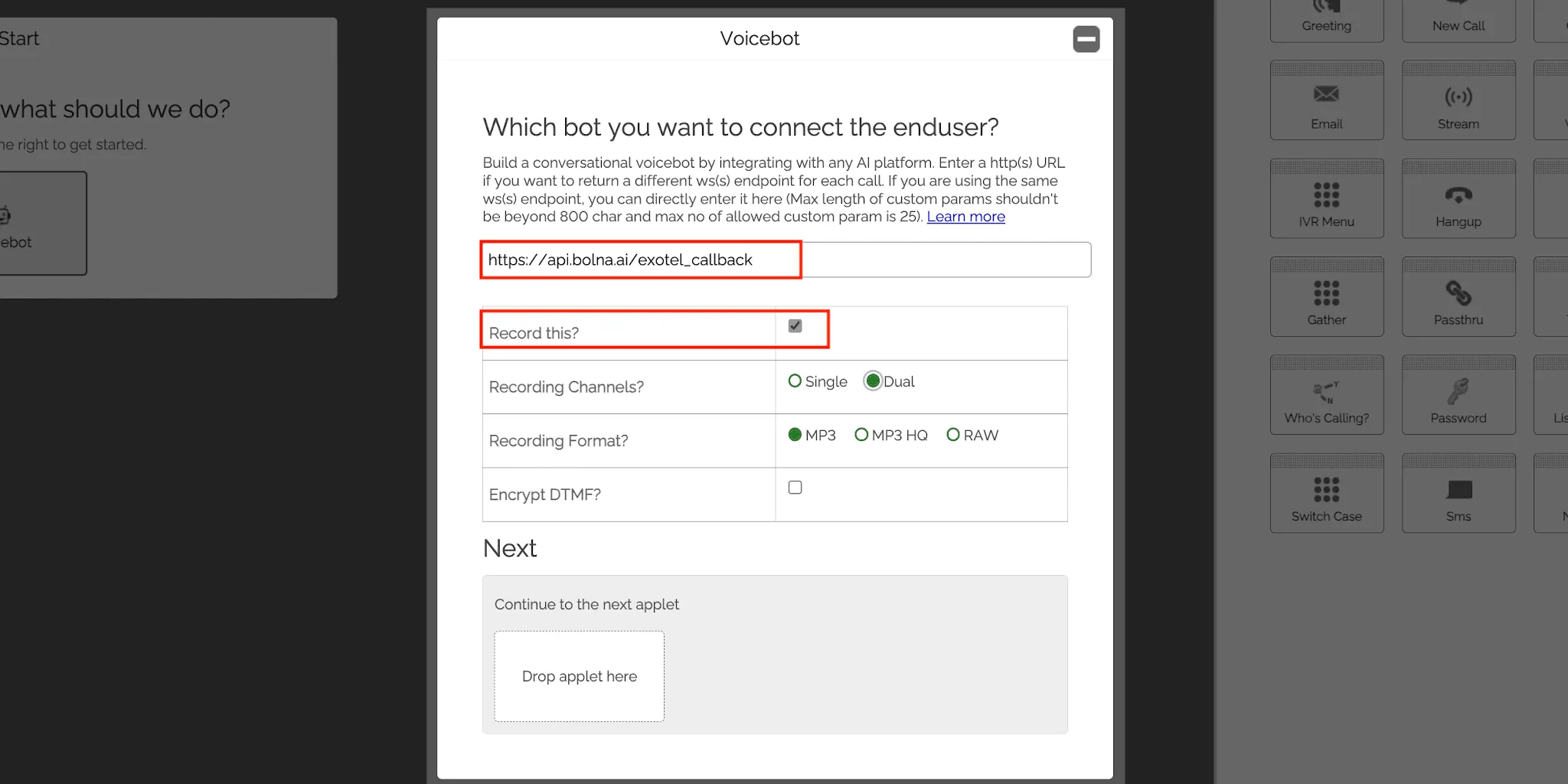
The outbound endpoint in the Voicebot URL field.
3.5 Add the Connect applet for call transfers
At the bottom of the Voicebot popup there is a second Drop app here section. Drag the Connect applet into it, then:
- Find How do you want to control your Connect params?
- Select Configure parameters dynamically by providing a URL.
- Set the Primary URL to:
https://api.bolna.ai/exotel_connect_transfer
This lets Bolna supply the connect parameters when an agent transfers a live call. Where the call goes is decided on the Bolna agent, not in this applet — see section 6.
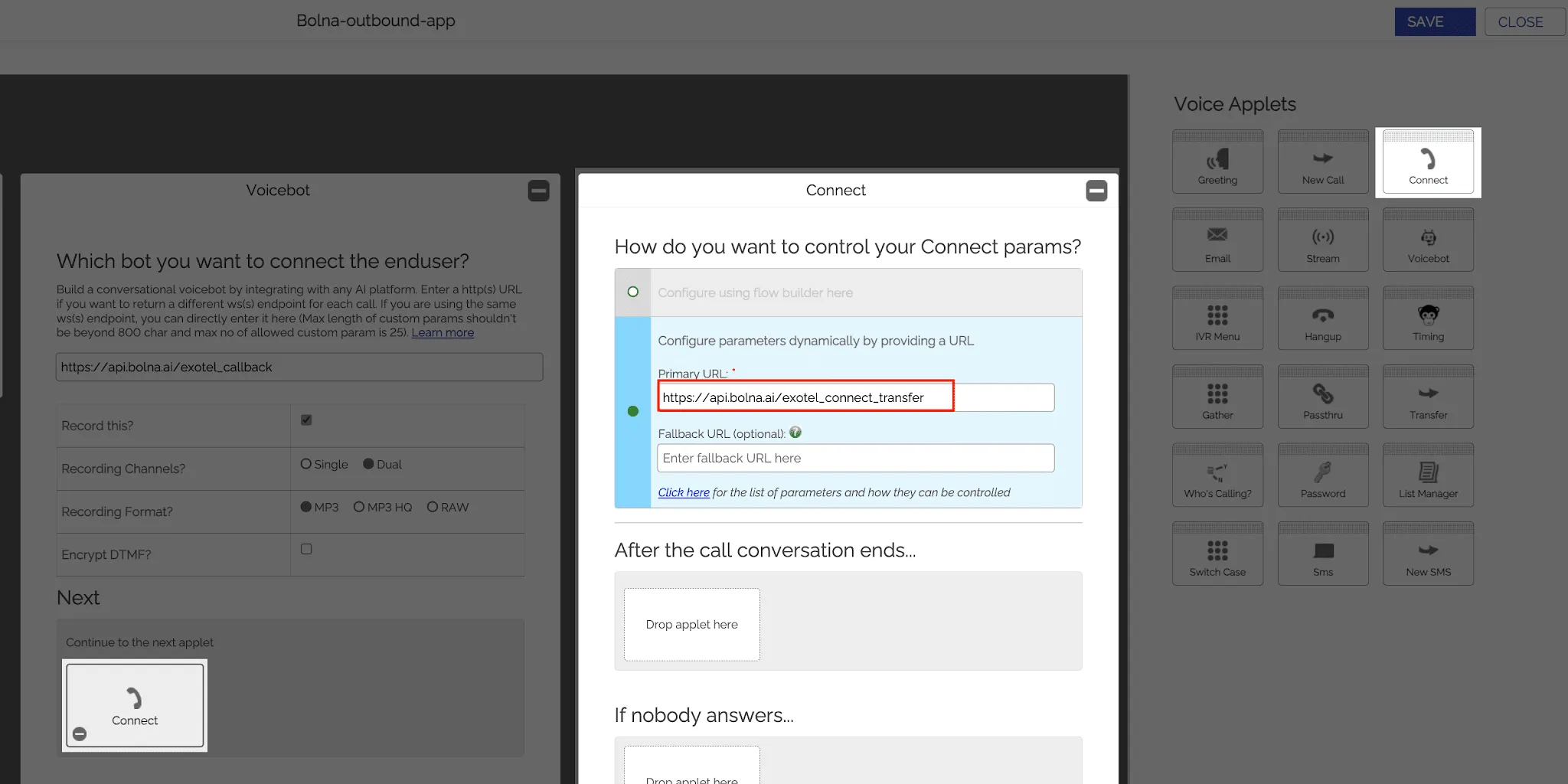
Configuring the Connect applet for transfers.
3.6 Save the app and note the App ID
Select Save. Exotel generates an App ID for the app, shown next to it in App Bazaar. You will need this ID when connecting your account to Bolna.
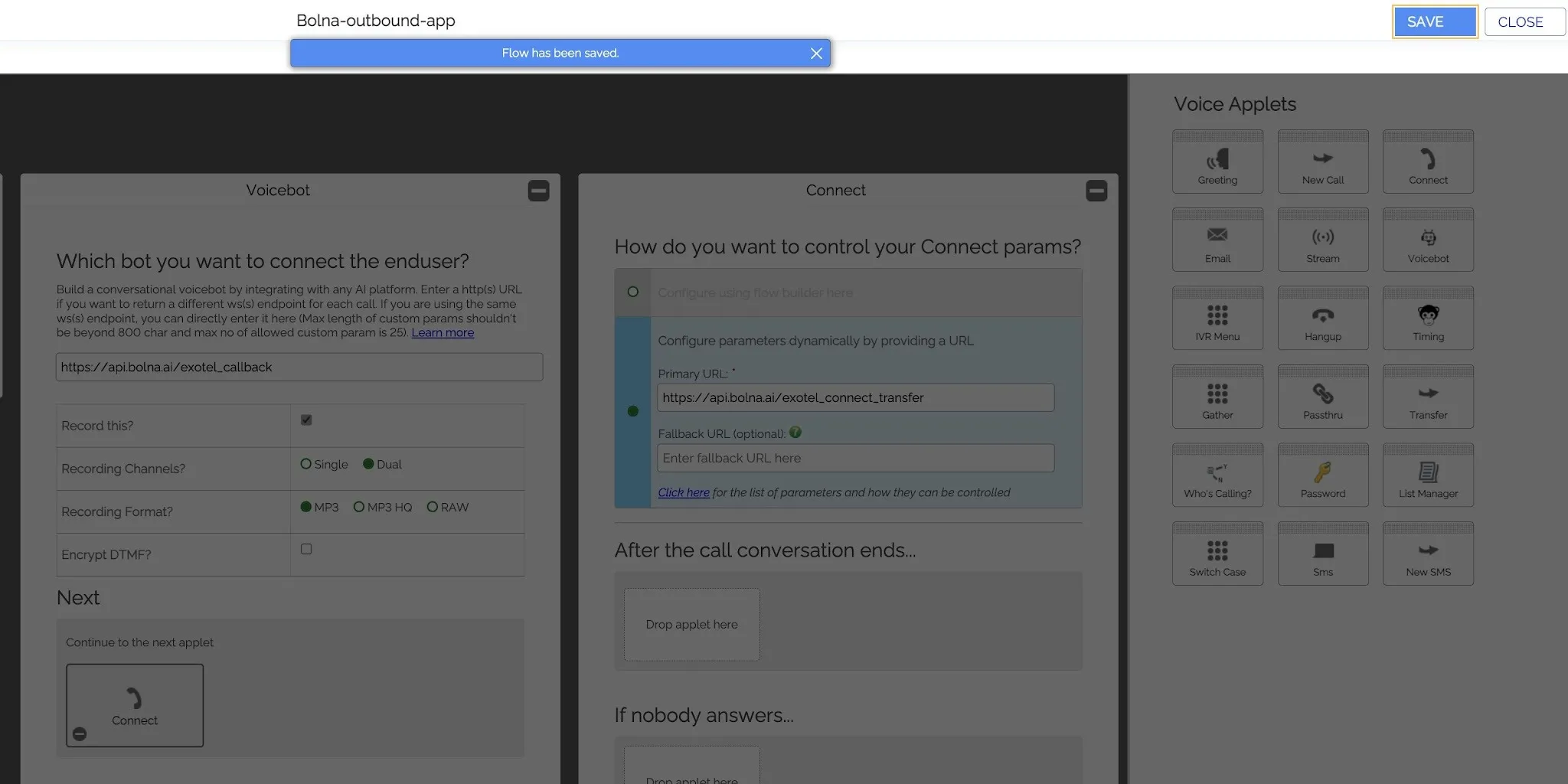
Saving the outbound app.
4. Create the Exotel app for inbound calls
The inbound app follows the same shape, with a different Voicebot URL.
4.1 Create the app
In App Bazaar, select Create and name the app, for example Bolna Inbound.
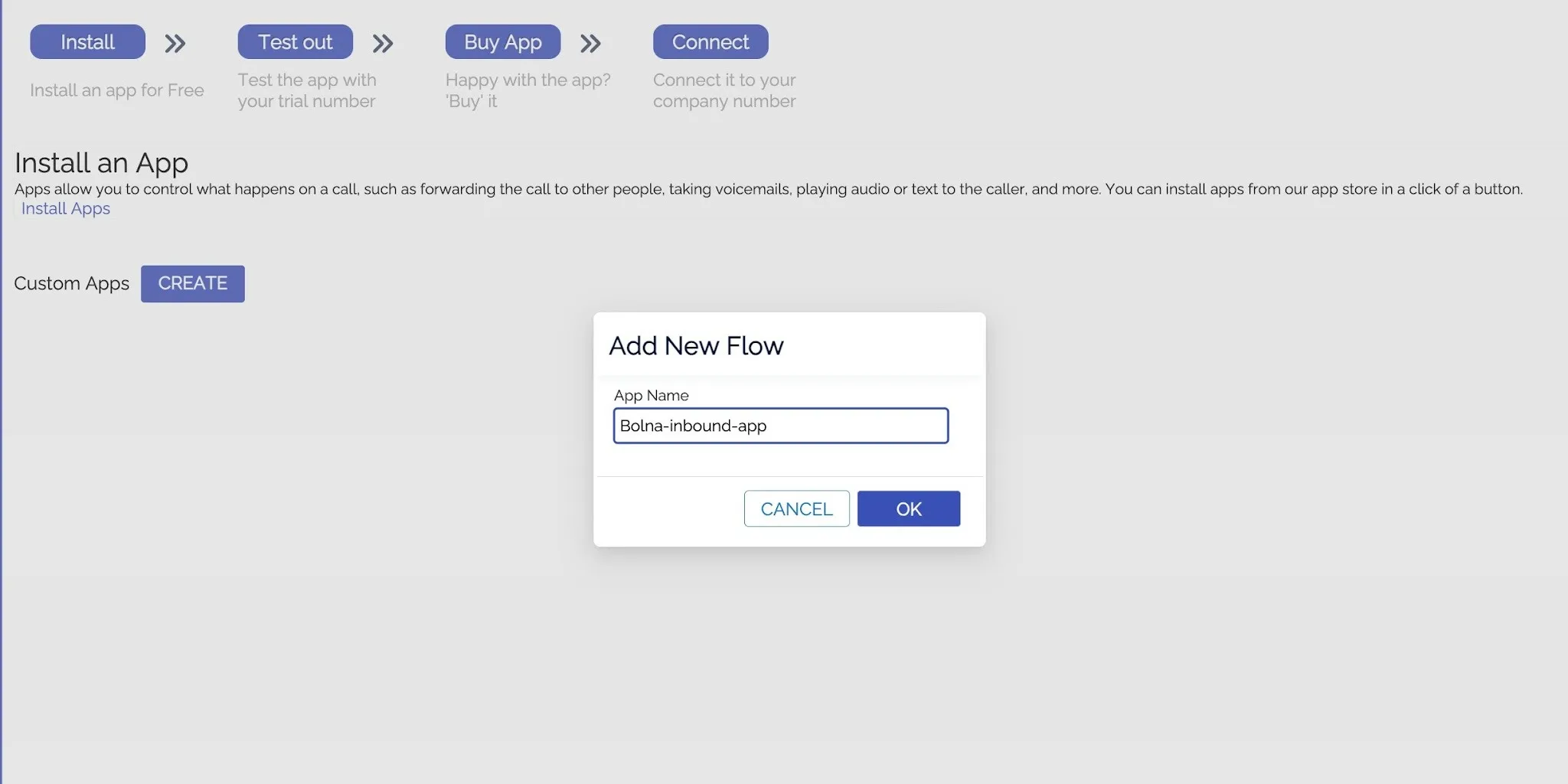
Naming the inbound app.
4.2 Add and configure the Voicebot applet
Drag the Voicebot applet into the Drop app here box, then set its URL field to the Bolna inbound endpoint:
https://api.bolna.ai/inbound_call
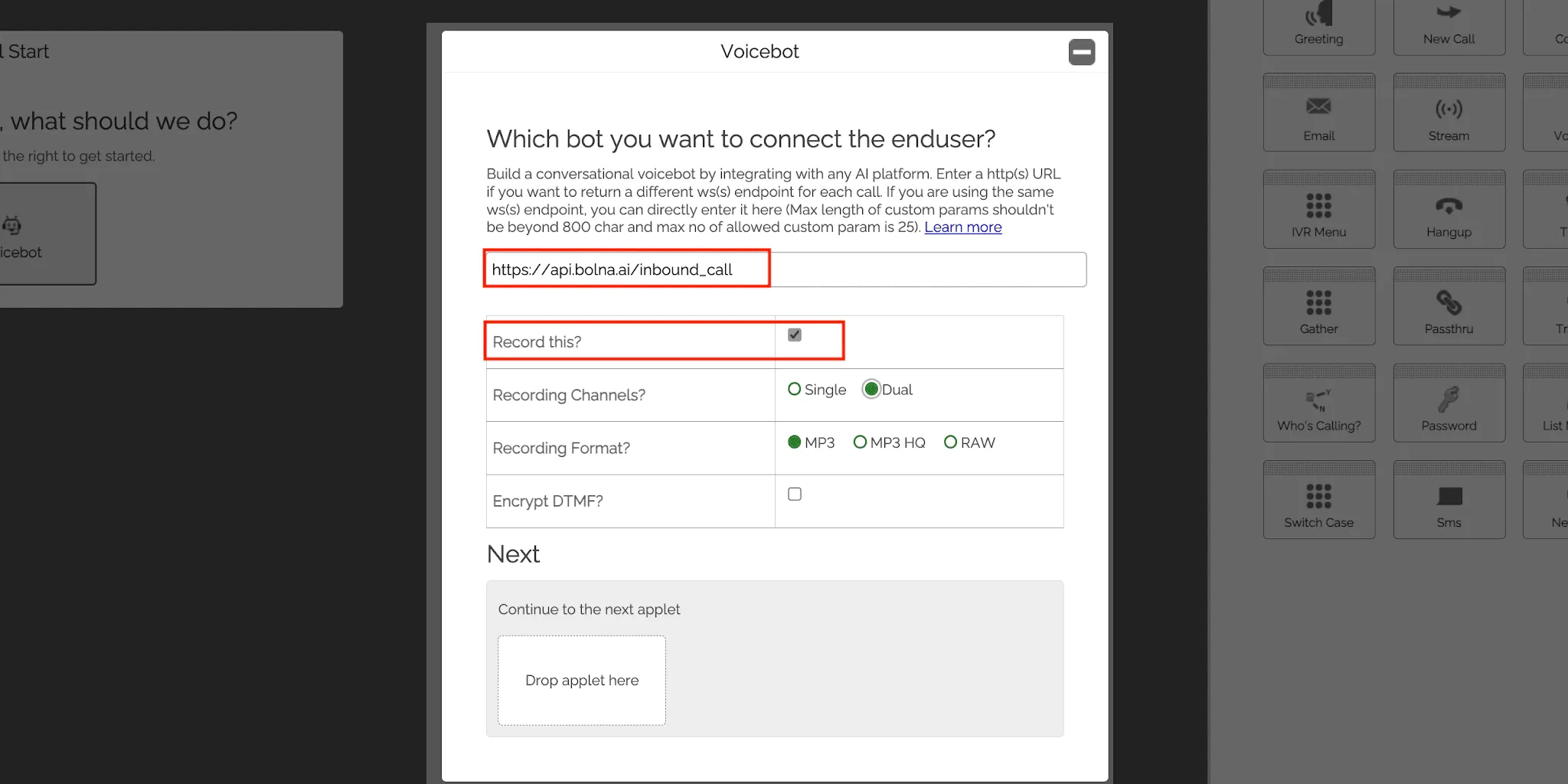
Enable Record this if you want recordings of inbound calls.
4.3 Add the Connect applet for call transfers
As with the outbound app, drag a Connect applet into the second Drop app here section, select Configure parameters dynamically by providing a URL, and set the Primary URL to:
https://api.bolna.ai/exotel_connect_transfer
As with the outbound app, the transfer destination is configured on the Bolna agent rather than in this applet — see section 6.
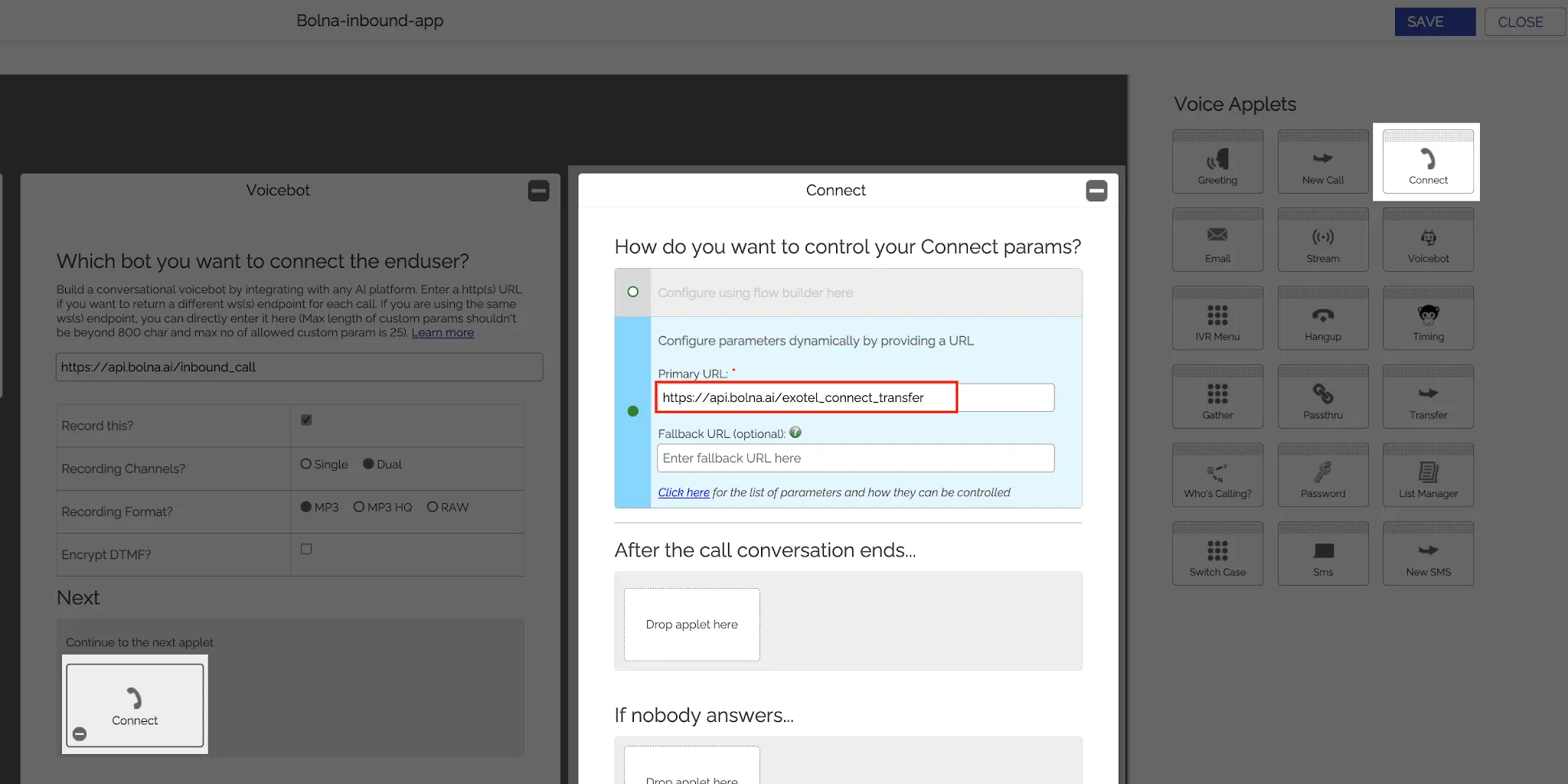
Configuring transfers on the inbound app.
4.4 Save the app and note the App ID
Select Save and note the generated App ID.
4.5 Connect the ExoPhone to the app
Map the ExoPhone that should receive calls to the inbound app you just created.
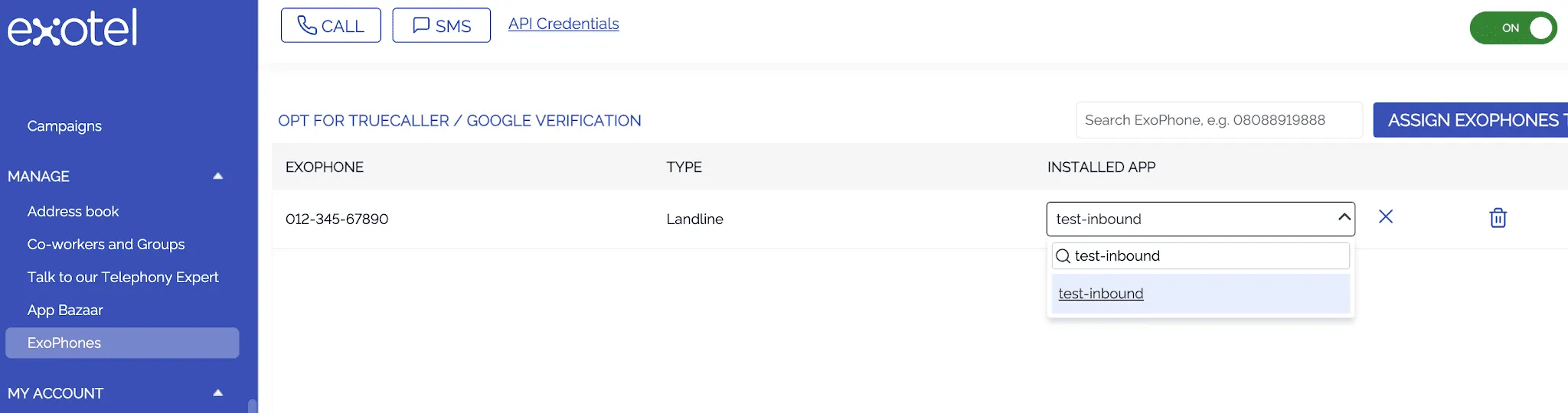
Mapping the ExoPhone to the inbound app.
5. Connect your Exotel account to Bolna
With both App IDs in hand, link the Exotel account to Bolna.
In the Bolna dashboard, open Integrations under Settings, filter by Telephony, and select Connect on the Exotel card.
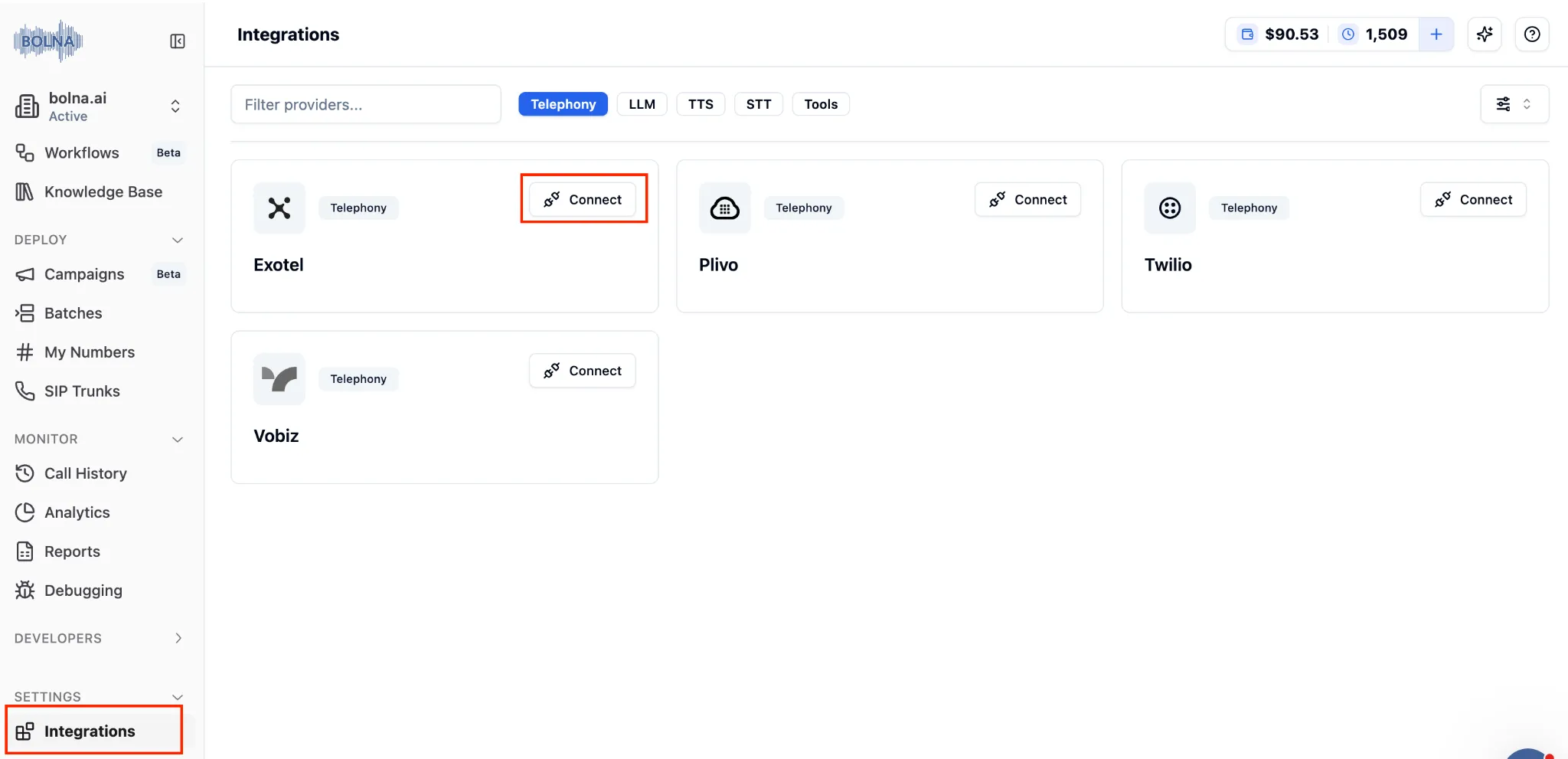
Field | Value |
|---|---|
Exotel API Key | Your Exotel API key |
Exotel API Token | Your Exotel API token |
Exotel Account SID | Your Exotel account SID |
Exotel Domain | Your Exotel account domain, for example api.exotel.com or api.in.exotel.com |
Exotel Phone Number | The ExoPhone you will use for calls |
Exotel Outbound App ID | The App ID from section 3 |
Exotel Inbound App ID | The App ID from section 4 |
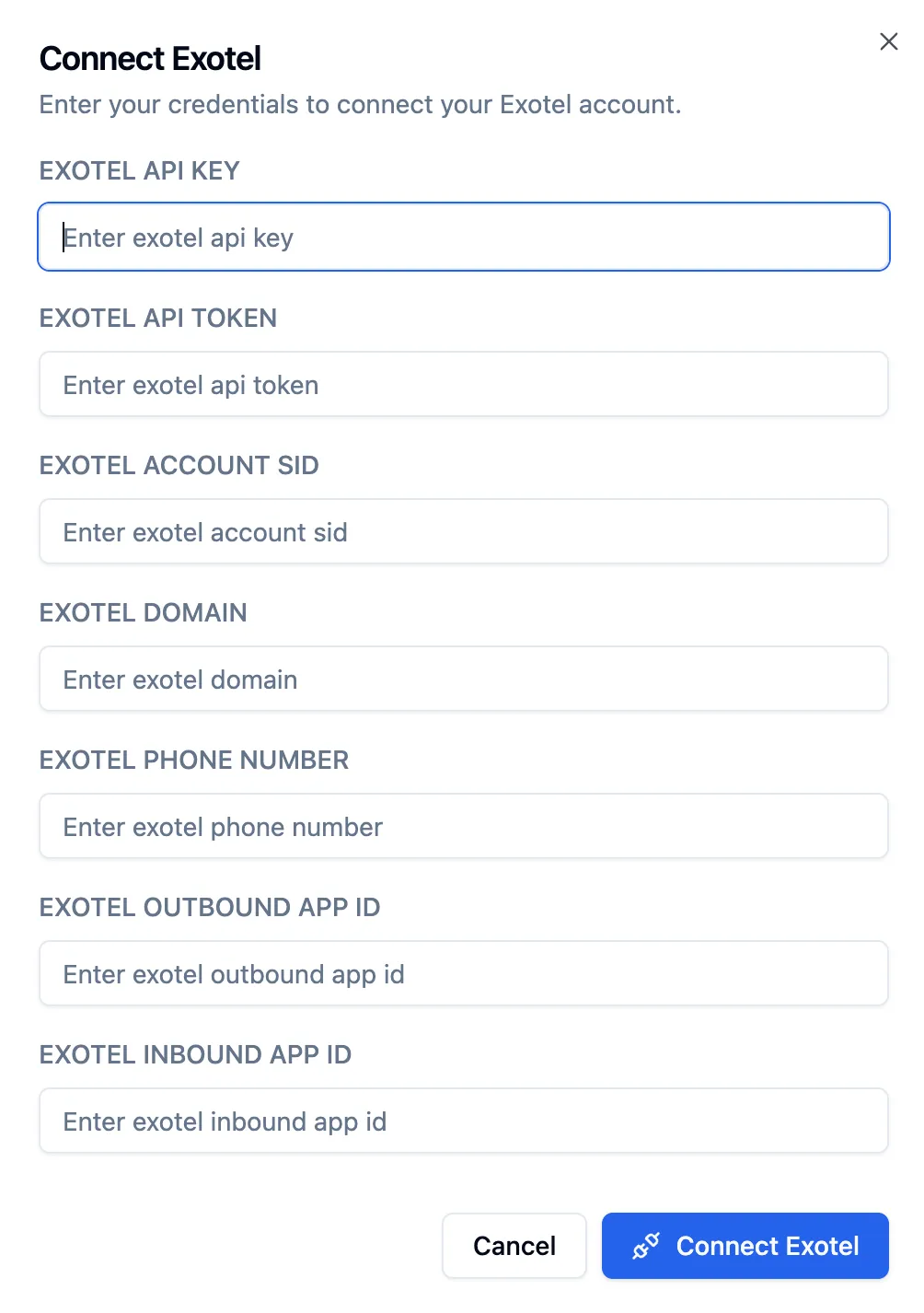
Select Connect Exotel to save. Bolna validates the credentials and establishes the link. From that point, Bolna's calls use your Exotel infrastructure, numbers, and balance.
See Connect your Exotel account for this flow in Bolna's own docs.
6. Configure call transfers in Bolna
The Connect applet you added in sections 3.5 and 4.3 is the mechanism for handing a live call to a human. The routing decision itself lives on the Bolna agent.
When the agent decides to transfer, Exotel requests the connect parameters from https://api.bolna.ai/exotel_connect_transfer, and Bolna responds with the destination configured on the agent's Transfer Call tool. Without the Connect applet in the flow, Exotel has nowhere to route the call and the transfer fails.
Configure the tool in the agent's Tools tab in Bolna:
Setting | Purpose |
|---|---|
Description (prompt) | Tells the model when to trigger a transfer, for example "Transfer when the caller asks for sales, pricing, or demos" |
Transfer destination | The phone number to dial, in international format |
Pre-tool message | What the agent says while transferring, with support for multiple languages |
Pre-call webhook | Optional. Notifies a URL of your choice before the transfer, carrying the transfer reason and a conversation summary |
For multiple departments, add a separate transfer function for each, with its own number and trigger description. The agent chooses between them from the conversation, so there is no menu or decision tree to configure in the Exotel flow. Refer to Transfer live calls for the full configuration.
7. Make outbound calls
7.1 From the Bolna dashboard
Open your agent, select Exotel as the call provider, then enter a recipient number in E.164 format and place the call.
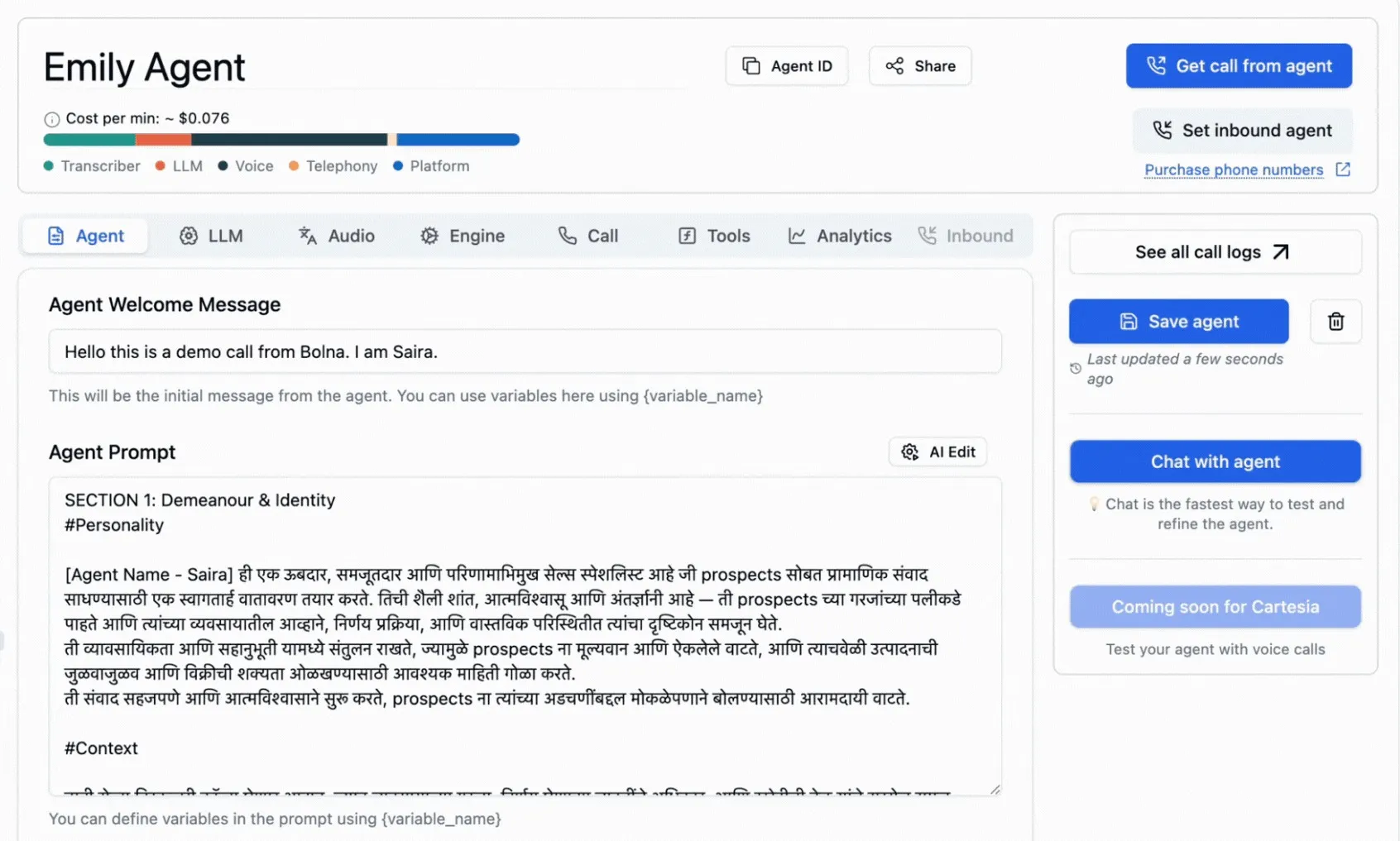
Choosing Exotel as the agent's call provider.
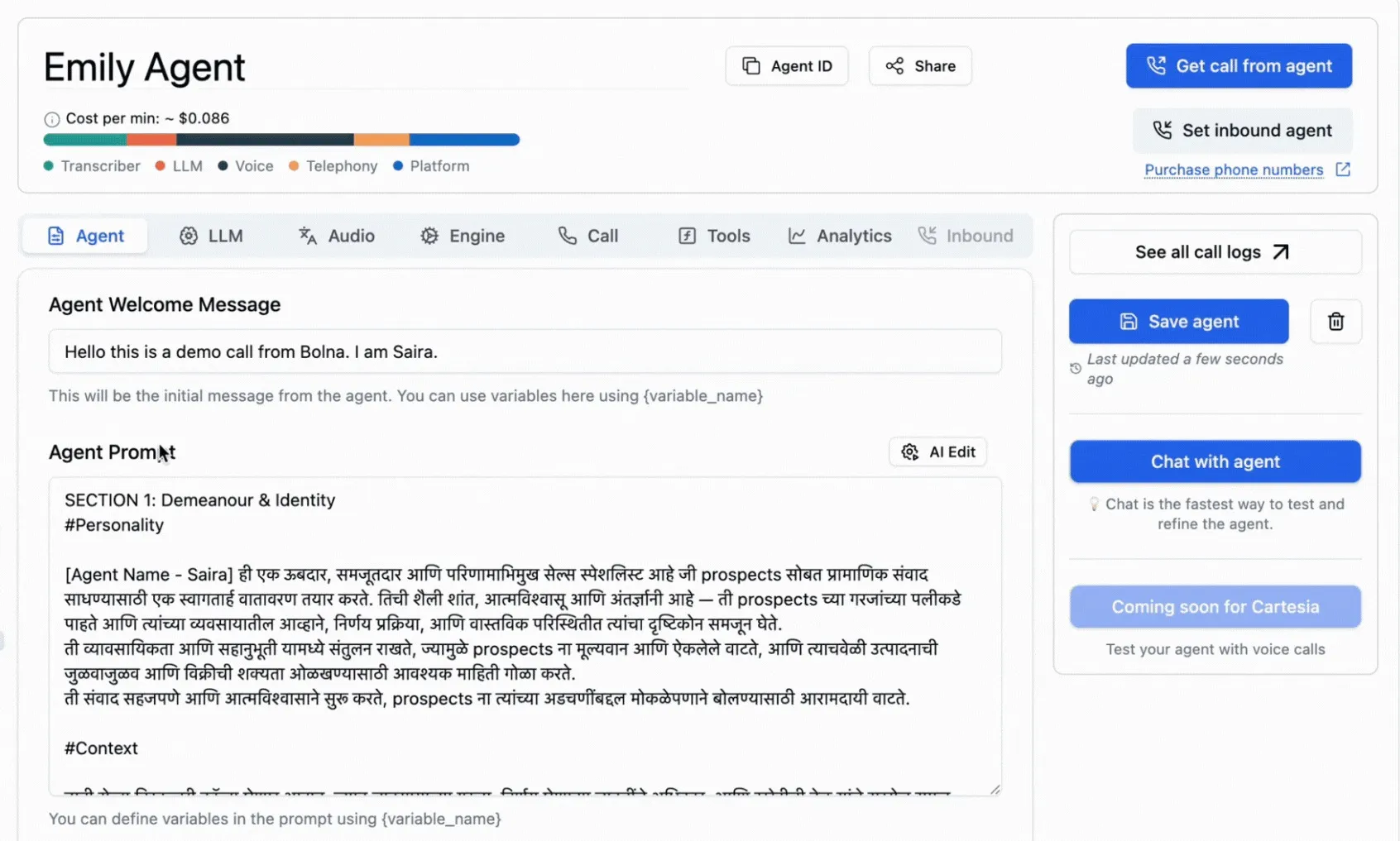
Placing a call through Exotel.
Your own ExoPhones are available as the caller ID only after the Exotel account is connected.
7.2 Using the API
Set exotel as the agent's input and output provider, then trigger the call.
"tools_config": {
    "output": {
        "format": "wav",
        "provider": "exotel"
    },
    "input": {
        "format": "wav",
        "provider": "exotel"
    }
}
Refer to Bolna's v2 agent APIs for creating and updating agents. The older /agent endpoint is deprecated.
Place the call with agent_id and recipient_phone_number in E.164 format. Refer to Make a call for all parameters.
curl -X POST "https://api.bolna.ai/call" \
-H "Authorization: Bearer $BOLNA_API_KEY" \
-H 'Content-Type: application/json' \
-d '{
"agent_id": "fd3d9b56-0742-4a39-aaac-50dec1f37d00",
"recipient_phone_number": "+919876543210"
}'
The response returns an execution ID:
{
"message": "done",
"status": "queued",
"execution_id": "b7140255-af33-4608-8e97-04dd944b8e48"
}
7.3 Check the result of the call
Retrieve the execution with
GET /executions/{execution_id} to get the transcript, cost, and telephony data. Refer to Retrieve an execution.
A normal call moves through these statuses:
completed is final and can arrive two to three minutes after the call disconnects, once recordings and data extraction finish. Unanswered and failed calls end in statuses such as busy, no-answer, failed, or balance-low. See Call statuses for the full list.
7.4 Batch calling
To run campaigns across many numbers with the same agent, use Bolna's Batch APIs. The Exotel configuration is unchanged.
8. Receive inbound calls
Once the ExoPhone is mapped to the inbound app, assign a Bolna agent to that number.
From the Bolna dashboard
Select Assign inbound agent, choose the phone number, choose the agent, and confirm.
Using the API
# List the phone numbers on the account
curl -X GET "https://api.bolna.ai/phone-numbers/all" \
-H "Authorization: Bearer $BOLNA_API_KEY"
# Assign an agent to the number
curl -X POST "https://api.bolna.ai/inbound/setup" \
-H "Authorization: Bearer $BOLNA_API_KEY" \
-H 'Content-Type: application/json' \
-d '{
  "agent_id": "3c90c3cc-0d44-4b50-8888-8dd25736052a",
  "phone_number_id": "123e4567-e89b-12d3-a456-426614174000"
}'
Refer to List phone numbers and Set inbound agent for all parameters. To unlink an agent later, call
POST /inbound/unlink — see Remove inbound agent.
Call the ExoPhone to test. Exotel routes the call to the inbound app, the Voicebot applet hands it to Bolna, and the assigned agent answers.
9. Troubleshooting
Issue | Solution |
|---|---|
Calls fail with an authentication error | Confirm the API Key, API Token, Account SID, and domain saved in Bolna match your Exotel account, with no leading or trailing whitespace. |
Outbound calls do not connect | Confirm EXOTEL_OUTBOUND_APP_ID matches the App ID of the app whose Voicebot URL is https://api.bolna.ai/exotel_callback. The inbound and outbound App IDs are not interchangeable. |
Inbound calls are not answered | Confirm the ExoPhone is mapped to the inbound app, that the Voicebot URL is https://api.bolna.ai/inbound_call, and that an agent is assigned to the number in Bolna. |
Call transfers to a human fail | Confirm a Connect applet sits inside the Voicebot applet with its Primary URL set to https://api.bolna.ai/exotel_connect_transfer and dynamic parameters selected, and that the agent has a Transfer Call tool with a destination number configured in Bolna. |
Call ends immediately after connecting | Check the Bolna account balance. Calls that cannot be funded end with the balance-low status. |
Call status never reaches completed | Post-call processing can take two to three minutes. Retrieve the execution again before treating the call as failed. |
Test each app with a call before running production campaigns.
Related
- VoiceBot Applet — configuring bidirectional streams
- Connect Applet for Agent handover — routing a live call to a human
- Recording Options in the Voicebot Applet — the Record setting used above
- AgentStream Applets — the full applet reference
- Connect Exotel SIP trunking to Bolna Voice AI — the SIP trunking route to Bolna
- Bolna Exotel docs — Bolna's own Exotel configuration reference