Agent Monitoring in Inbound Campaign
The Agent Monitoring section allows supervisors to track and manage agent activities within an Inbound Campaign
.
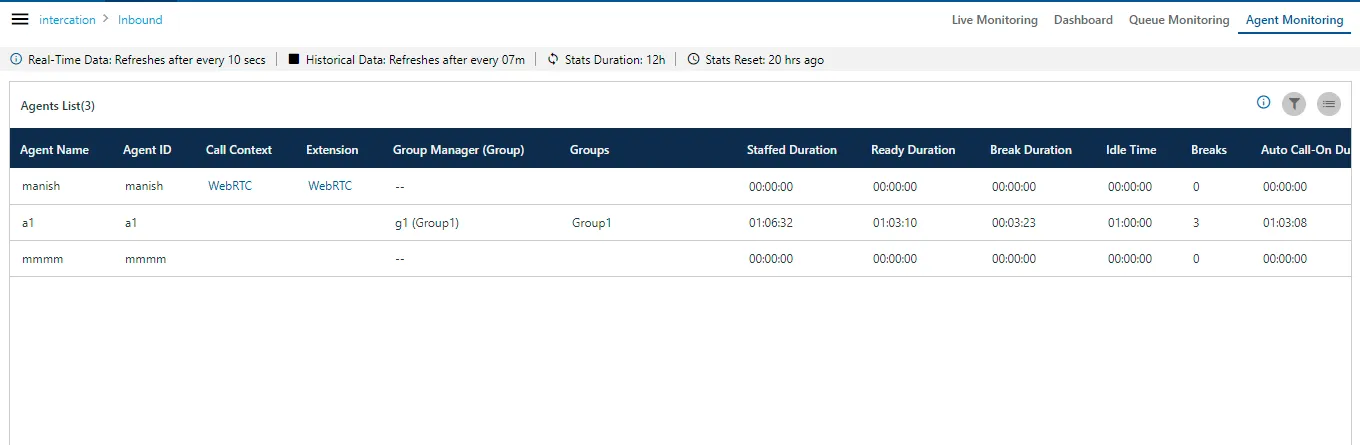
You can perform the following operations here.
Data Collection Indications
On the top, a horizontal bar shows the indications of different data collection intervals.

Figure: Data Collection Indications
Filter
Using the filter icon, supervisor can filter the agents on the basis of their Groups(Group Manager)
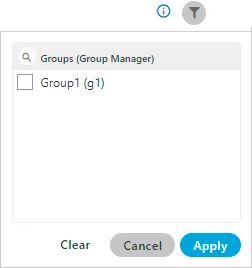
Figure: Filter
- Real-Time Data: The Data Metrics, whose data is refreshed after 5 seconds, then it will be indicated with the border of blueish color.
- Historical Data: The Data Metrics, whose data is refreshed after every 5 minutes, then it will be indicated with the border of black color.
- Stats Duration: It informs about the time interval for which the statistics are showing on the page. Here, the time interval selected is the 12 hours.
- Stats Reset: It informs the interval after which the statistics were reset last.
Search
You can search for a particular agent to view its details.
User Card
The supervisor can see the basic information of agents assigned in that campaign by hovering its mouse over the agents name. The user card is displayed while hovering the mouse on the user name of the user. Following screen is displayed while hovering the mouse over the username of the user.
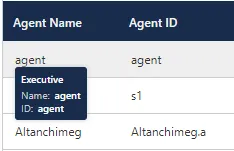
Figure: User Card
The user card contains the user-role, username, and userID.
Additional Information
Hover the mouse over  icon to see the information on the data that is, Statistical data, Last calculated time and last fetched time.
Customize the View
You can click  icon to select the columns that you want to show on the screen.
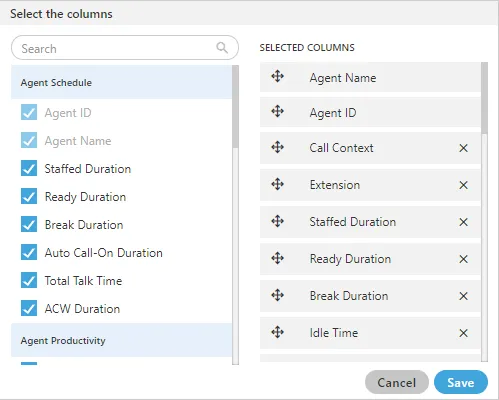
Figure: Column Headers
In the right part of the section, the user can click and hold  icon and drag a column upward or downward to change the sequence of the columns in the table. The column on top will be displayed at the first position from the left.
If some columns are mandatory to be displayed, then the user will not have the option not to select or deselect the colums.
icon and drag a column upward or downward to change the sequence of the columns in the table. The column on top will be displayed at the first position from the left.
If some columns are mandatory to be displayed, then the user will not have the option not to select or deselect the colums.
Select the column headers that you want to display on the Agent Monitoring Page. It contains the following customizations.
- Agent Schedule: It contains the following columns which the supervisor can select from.
- Call Context: It shows the name of the call context selected by the agent. In case of multiple extensions with an agent, the only one call context will be visible. If the agent changes the call context, then the row will be updated in maximum 2 minutes 35 seconds.The agent name may not be visible in any of the following cases.
- The Refresh Time is not reached.
- The agent has not selected the extension containing the selected call context.
- In the case of WebRTC, the call context name will be auto-generated.
The row will be visible after 5 minutes. It shows the current data and its maximum Data Refresh Interval is 2 minutes 35 seconds.
- Staffed Duration: It is the total time duration (that is the plus of the total ready time and the total break time) in which the agent has been assigned in the campaign for the last interval.
Calculation :
 Figure: Calculation of Staffed DurationIf the user has selected multiple campaigns, then only one campaign will be displayed here.
Here, the time is being calculated as per a campaign. Therefore, the time spent by the user after the logon but before selecting a campaign will not be counted here.It shows the data of the last 12 hours. The Current Data on the User Interface will be updated in maximum 2 minutes 35 seconds, whereas the historical data will be updated in maximum 32 minutes 35 seconds.
Figure: Calculation of Staffed DurationIf the user has selected multiple campaigns, then only one campaign will be displayed here.
Here, the time is being calculated as per a campaign. Therefore, the time spent by the user after the logon but before selecting a campaign will not be counted here.It shows the data of the last 12 hours. The Current Data on the User Interface will be updated in maximum 2 minutes 35 seconds, whereas the historical data will be updated in maximum 32 minutes 35 seconds.
- Extension: It shows the agent's phone numbers. In the case of multiple extensions, only the selected call context in one row will be visible. The local and endpoints will not be displayed here. The agent has been logged on to the system but its name may not be visible in any of the following cases.The row will be visible after 5 minutes. It shows the current data and its maximum Data Refresh Interval is 2 minutes 35 seconds.
- The Refresh Time is not reached.
- The agent has not selected the extension containing the selected call context.
- Ready Duration: It is the total ready duration of an agent in a campaign.It shows the data of the last 12 hours. The Current Data on the User Interface will be updated in maximum 2 minutes 35 seconds, whereas the historical data will be updated in maximum 32 minutes 35 seconds.
- Break Duration: It is the total break duration of an agent.It shows the data of the last 12 hours. The Current Data on the User Interface will be updated in maximum 2 minutes 35 seconds, whereas the historical data will be updated in maximum 32 minutes 35 seconds.
- Breaks: It shows the count of breaks taken by the agent staffed to this campaign.If the agent is automatically set on "Auto Available" just after the logon, then the break count will be increased by 1.
- Auto-Call on Duration: It is the total duration when the agent is on auto-call on status.It shows the data of the last 12 hours. The Current Data on the User Interface will be updated in maximum 2 minutes 35 seconds, whereas the historical data will be updated in maximum 32 minutes 35 seconds.
- Agent Performance: It contains the following columns according to the various agent performances.
- Total Talk-Time: It is the total talk time of an agent for all calls in a campaign.It is the total talk time of an agent for all calls in a campaign. It shows the data of the last 12 hours. The Current Data on the User Interface will be updated in maximum 2 minutes 35 seconds, whereas the historical data will be updated in maximum 32 minutes 35 seconds.
- ACW Duration: It is the total wrap time of an agent for all calls in a campaign.It shows the data of the last 12 hours. The Current Data on the User Interface will be updated in maximum 2 minutes 35 seconds, whereas the historical data will be updated in maximum 7 minutes 35 seconds.
- Avg Call Duration: It is the average call duration for an agent in a campaign.It shows the data of the last 12 hours. The Current Data on the User Interface will be updated in maximum 2 minutes 35 seconds, whereas the historical data will be updated in maximum 7 minutes 35 seconds.
- Avg Handling Time: It is equal to the sum of Customer Talk Time for this agent, Customer Hold Time for this agent, and Wrap Time of Connected Calls divided by the total connected calls for this agent. It includes only Customer Interactions, but Dial User (Internal Calls) are not included.
Calculation :
 Figure: Calculation of Avg Handling TimeAHT does not include the Average Wrap Time of an agent as the Average Wrap Time will also include the wrapping of not connected calls.It shows the data of the last 12 hours. The Current Data on the User Interface will be updated in maximum 2 minutes 35 seconds, whereas the historical data will be updated in maximum 7 minutes 35 seconds.
- Avg Hold Duration: It is average hold time of an agent for customer calls in a campaign. It does not include the hold time on dial user (Internal Calls). It is equal to the total hold time divided by the count of customer calls with hold.Calculation:
 Figure: Calculation of Avg Hold DurationIt shows the data of the last 12 hours. The Current Data on the User Interface will be updated in maximum 2 minutes 35 seconds, whereas the historical data will be updated in maximum 7 minutes 35 seconds.
- Avg ACW Duration: It is the average of ACW Duration of an agent in a campaign. It is the total wrap-up time divided by all wrapped calls for an agent.
Calculation:
 Figure: Calculation of Avg ACW DurationIt shows the data of the last 12 hours. The Current Data on the User Interface will be updated in maximum 2 minutes 35 seconds, whereas the historical data will be updated in maximum 7 minutes 35 seconds.
- Agent Productivity: It contains the following columns according to the various productivity of the agent's calls.
- Connected Calls: It shows the total calls answered by an agent in the campaign.It shows the data of the last 12 hours. The Current Data on the User Interface will be updated in maximum 2 minutes 35 seconds, whereas the historical data will be updated in maximum 7 minutes 35 seconds.
- Connected Inbound: It shows the total number of inbound calls received in a campaign.It shows the data of the last 12 hours. The Current Data on the User Interface will be updated in maximum 2 minutes 35 seconds, whereas the historical data will be updated in maximum 7 minutes 35 seconds.
- Connected Transfers: It shows the total number of transferred calls received and connected in a campaign.It shows the data of the last 12 hours. The Current Data on the User Interface will be updated in maximum 2 minutes 35 seconds, whereas the historical data will be updated in maximum 7 minutes 35 seconds.
- Connected Manual Dials: It is the total number of manual dials connected to the customers in a campaign.It shows the data of the last 12 hours. The Current Data on the User Interface will be updated in maximum 2 minutes 35 seconds, whereas the historical data will be updated in maximum 7 minutes 35 seconds.
- Connected Callbacks: It is the total number of callbacks attended by an agent in a campaign.It shows the data of the last 12 hours. The Current Data on the User Interface will be updated in maximum 2 minutes 35 seconds, whereas the historical data will be updated in maximum 7 minutes 35 seconds.
- Total Wrapped Calls: It is the total number of calls successfully completed and wrapped by the agent in that campaign.It shows the data of the last 12 hours. The Current Data on the User Interface will be updated in maximum 2 minutes 35 seconds, whereas the historical data will be updated in maximum 7 minutes 35 seconds.
- Disposition Code: It contains the following columns of various disposition codes which the agent used while completing their calls.
- Foreign Language: It is the total number of calls disposed in "Foreign Language" disposition.It shows the data of the last 12 hours. The Current Data on the User Interface will be updated in maximum 2 minutes 35 seconds, whereas the historical data will be updated in maximum 7 minutes 35 seconds.
- Sale: It is the total number of calls disposed in "Sale" disposition.It shows the data of the last 12 hours. The Current Data on the User Interface will be updated in maximum 2 minutes 35 seconds, whereas the historical data will be updated in maximum 32 minutes 35 seconds.
- Callback: It is the total number of calls disposed in "Callback" disposition.It shows the data of the last 12 hours. The Current Data on the User Interface will be updated in maximum 2 minutes 35 seconds, whereas the historical data will be updated in maximum 32 minutes 35 seconds.
- Already Hangup: It is the total number of calls disposed in "Already Hangup" disposition.It shows the data of the last 12 hours. The Current Data on the User Interface will be updated in maximum 2 minutes 35 seconds, whereas the historical data will be updated in maximum 32 minutes 35 seconds.
- Abrupt Disconnection: It is the total number of calls disposed in "Abrupt Disconnection" disposition.It shows the data of the last 12 hours. The Current Data on the User Interface will be updated in maximum 2 minutes 35 seconds, whereas the historical data will be updated in maximum 32 minutes 35 seconds.
- Echo: It is the total number of calls disposed in "Echo" disposition.It shows the data of the last 12 hours. The Current Data on the User Interface will be updated in maximum 2 minutes 35 seconds, whereas the historical data will be updated in maximum 32 minutes 35 seconds.
- Customer Not able to hear: It is the total number of calls disposed in "Customer Not Able to Hear" disposition.It shows the data of the last 12 hours. The Current Data on the User Interface will be updated in maximum 2 minutes 35 seconds, whereas the historical data will be updated in maximum 32 minutes 35 seconds.
- Customer Volume Too Low: It is the total number of calls disposed in "Customer Volume Too Low" disposition.It shows the data of the last 12 hours. The Current Data on the User Interface will be updated in maximum 2 minutes 35 seconds, whereas the historical data will be updated in maximum 32 minutes 35 seconds.
- Agent Volume Too Low: It is the total number of calls disposed in "Agent Volume Too Low" disposition.It shows the data of the last 12 hours. The Current Data on the User Interface will be updated in maximum 2 minutes 35 seconds, whereas the historical data will be updated in maximum 32 minutes 35 seconds.
- Voice Breakage: It is the total number of calls disposed in "Voice Breakage" disposition.It shows the data of the last 12 hours. The Current Data on the User Interface will be updated in maximum 2 minutes 35 seconds, whereas the historical data will be updated in maximum 32 minutes 35 seconds.
- Conference Voice Breakage: It is the total number of calls disposed in "Conference Voice Breakage" disposition.It shows the data of the last 12 hours. The Current Data on the User Interface will be updated in maximum 2 minutes 35 seconds, whereas the historical data will be updated in maximum 32 minutes 35 seconds.
- Conference Disconnection: It is the total number of calls disposed in "Conference Disconnection" disposition.It shows the data of the last 12 hours. The Current Data on the User Interface will be updated in maximum 2 minutes 35 seconds, whereas the historical data will be updated in maximum 32 minutes 35 seconds.
- Conference DTMF: It is the total number of calls disposed in "Conference DTMF" disposition.It shows the data of the last 12 hours. The Current Data on the User Interface will be updated in maximum 2 minutes 35 seconds, whereas the historical data will be updated in maximum 32 minutes 35 seconds.
Columns
It contains the following columns(the columns which are not covered in above section).
Agent Name
It shows the name of the agent.
The row will be visible after 5 minutes. It shows the current data and its maximum Data Refresh Interval is 2 minutes 35 seconds.
Agent ID
It shows the ID of the agent.
The row will be visible after 5 minutes. It shows the current data and its maximum Data Refresh Interval is 2 minutes 35 seconds.
Group Manager
It shows the ID of the group manager under whom the agent is assigned into.
Groups
It displays the group name in which the agent is assigned.