Chat Theme Tab in Process Settings
The Chat Theme tab in Process Settings enables you to create customized themes for the Web Chat. Configuration is performed via various APIs, which are provided by default within Ameyo Server 4.3 and above. By using the parameters available in this tab, you can call any API to execute its specific function.
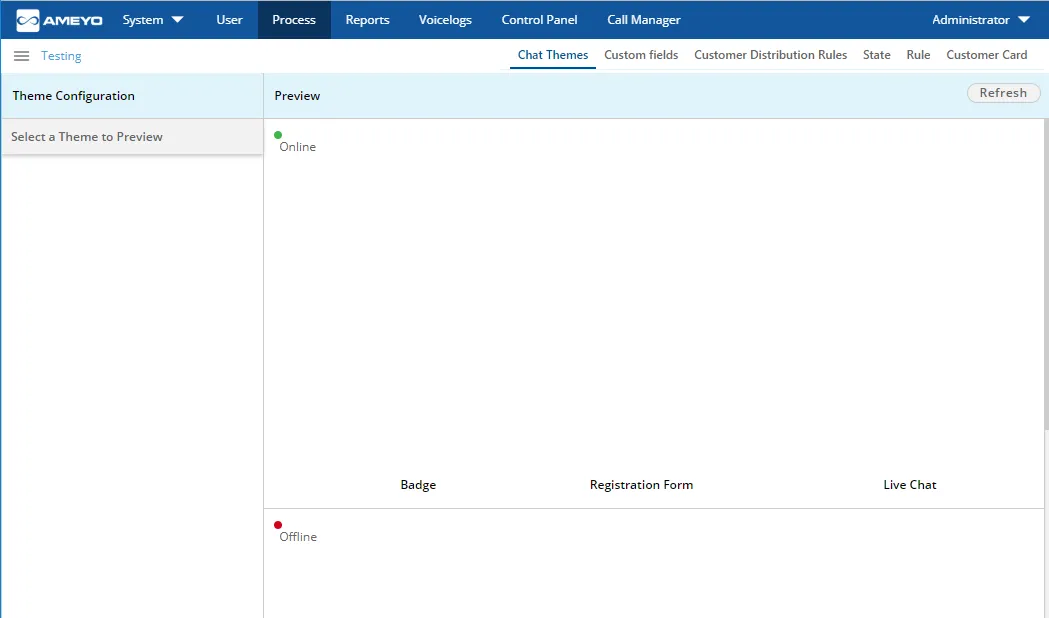
This tab and the "Default Chat Theme" will remain disable until a Customized theme is added.
Parameters
The Parameters section outlines the hierarchy and values needed to execute theme operations via APIs. The hierarchy is structured as follows: Theme Configuration → Component → Property → Value.
- DEFAULT_REGISTRATION_FORM: It is the registration form to start the chat. It has the following components.
- HEADER: It lets you modify the header in the form.
- TEXT: It lets you modify the text in header. It accepts the value in text format.
- COLOR: It lets you modify the color of header in the form. It accepts the value in RGBA(<number>,<number>,<number>,<number>).
- TEXT_COLOR: It lets you modify the color of the text in the header in the form. It accepts the value in RGBA(<number>,<number>,<number>,<number>).
- INPUT_FIELD: It lets you modify the formatting of the input field in the form.
- TEXT_COLOR: It lets you modify the color of the text in the Input Field in the form. It accepts the value in RGBA(<number>,<number>,<number>,<number>).
- BUTTON: It lets you modify the formatting of the button in the form.
- COLOR: It lets you modify the color of button in the form. It accepts the value in RGBA(<number>,<number>,<number>,<number>).
- TEXT_COLOR: It lets you modify the color of text in button in the form. It accepts the value in RGBA(<number>,<number>,<number>,<number>).
- SHAPE: It lets you modify the shape of the button. It accepts the value as cornered or rounded.
- SUCCESS_MESSAGE: It lets you modify the formatting of the success message.
- COLOR: It lets you modify the color of the text in the success message. It accepts the value in RGBA(<number>,<number>,<number>,<number>).
- ERROR_MESSAGE: It lets you modify the formatting of the error message.
- COLOR: It lets you modify the color of the text in the error message. It accepts the value in RGBA(<number>,<number>,<number>,<number>).
- BACKGROUND: It lets you modify the background color in the form.
- COLOR: It lets you modify the color of the background in the form. It accepts the value in RGBA(<number>,<number>,<number>,<number>).
- DEFAULT_OFFLINE_REGISTRATION_FORM: It is the default offline registration form that appears when the chat is offline. It has the following components.
- HEADER: It lets you modify the header in the form.
- TEXT: It lets you modify the text in the header. It accepts the value in text format.
- COLOR: It lets you modify the color of the header in the form. It accepts the value in RGBA(<number>,<number>,<number>,<number>).
- TEXT_COLOR: It lets you modify the color of text in the header in the form. It accepts the value in RGBA(<number>,<number>,<number>,<number>).
- INPUT_FIELD: It lets you modify the formatting of the input field in the form.
- TEXT_COLOR: It lets you modify the color of the text in the Input Field in the form. It accepts the value in RGBA(<number>,<number>,<number>,<number>).
- BUTTON: It lets you modify the formatting of the button in the form.
- COLOR: It lets you modify the color of the button in the form. It accepts the value in RGBA(<number>,<number>,<number>,<number>).
- TEXT_COLOR: It lets you modify the color of the text in the button in the form. It accepts the value in RGBA(<number>,<number>,<number>,<number>).
- SHAPE: It lets you modify the shape of the button. It accepts the value as cornered or rounded.
- SUCCESS_MESSAGE: It lets you modify the formatting of the success message.
- COLOR: It lets you modify the color of the text in the success message. It accepts the value in RGBA(<number>,<number>,<number>,<number>).
- ERROR_MESSAGE: It lets you modify the error message.
- COLOR: It lets you modify the color of the text in the error message. It accepts the value in RGBA(<number>,<number>,<number>,<number>).
- BACKGROUND: It lets you modify the background in the form.
- COLOR: It lets you modify the color of the background in the form. It accepts the value in RGBA(<number>,<number>,<number>,<number>).
- PLACEHOLDER: It lets you modify the text that is displayed over the input field as an introduction to the offline registration form.
- TEXT: It lets you modify the placeholder text in the form. It accepts the value in plain text.
- TEXT_COLOR: It lets you modify the color of the placeholder text in the form. It accepts the value in RGBA(<number>,<number>,<number>,<number>).
- CHAT_SCREEN: It is the main chat screen. It has the following components.
- BACKGROUND: It lets you modify the background of the chat screen.
- COLOR: It lets you modify the color of the background in the chat screen. It accepts the value in RGBA(<number>,<number>,<number>,<number>).
- SYSTEM_MESSAGE: It lets you modify the formatting of the system message.
- COLOR: It lets you modify the color of the text in the system message. It accepts the value in RGBA(<number>,<number>,<number>,<number>).
- CUSTOMER_MESSAGE: It lets you modify the formatting of the customer message.
- BACKGROUND_COLOR: It lets you modify the background color of the text in the customer message.
- COLOR: It lets you modify the color of the text in the customer message. It accepts the value in RGBA(<number>,<number>,<number>,<number>).
- AGENT_MESSAGE: It lets you modify the formatting of the agent message.
- BACKGROUND_COLOR: It lets you modify the background color of the text in the agent message. It accepts the value in RGBA(<number>,<number>,<number>,<number>).
- COLOR: It lets you modify the color of the text in the agent message. It accepts the value in RGBA(<number>,<number>,<number>,<number>).
- TIMESTAMP: It lets you modify the formatting of the timestamp (given below the messages) in the chat screen.
- COLOR: It lets you modify the color of the timestamp. It accepts the value in RGBA(<number>,<number>,<number>,<number>).
- FOOTER: It lets you modify the formatting of the footer.
- COLOR: It lets you modify the color of the footer. It accepts the value in RGBA(<number>,<number>,<number>,<number>).
- HEADER: It lets you modify the header in the chat screen.
- COLOR: It lets you modify the color of the header in the chat screen. It accepts the value in RGBA(<number>,<number>,<number>,<number>).
- TEXT_COLOR: It lets you modify the color of the text in the header in the chat screen.
- TEXT: It lets you modify the text in the header in the chat screen. It accepts the value as text.
- TEXT_AREA: It lets you modify the formatting of the text area in the chat screen.
- COLOR: It lets you modify the color of the text area.
- TEXT_COLOR: It lets you modify the color of the text in the text area.
- ATTACHMENT_ICON: It lets you modify the formatting of the attachment icon that is used to upload the files.
- COLOR: It lets you modify the color of the attachment icon. It accepts the value in RGBA(<number>,<number>,<number>,<number>).
- SEND_ICON: It lets you modify the formatting of the send icon that is used to send the messages.
- COLOR: It lets you modify the color of the send icon. It accepts the value in RGBA(<number>,<number>,<number>,<number>).
- WELCOME_SCREEN: It is the welcome screen of chat that is displayed on the starting. It has the following components.
- OFFLINE_BADGE: It lets you modify the formatting of the offline badge.
- TEXT: It lets you modify the text in the badge. It accepts the value in text.
- COLOR: It lets you modify the color of the badge. It accepts the value in RGBA(<number>,<number>,<number>,<number>).
- TEXT_COLOR: It lets you modify the color of the text in the badge. It accepts the value in RGBA(<number>,<number>,<number>,<number>).
- ONLINE_BADGE: It lets you modify the formatting of the online badge.
- TEXT: It lets you modify the text in the badge. It accepts the value in text.
- COLOR: It lets you modify the color of the badge. It accepts the value in RGBA(<number>,<number>,<number>,<number>).
- TEXT_COLOR: It lets you modify the color of the text in the badge. It accepts the value in RGBA(<number>,<number>,<number>,<number>).
All color values accept the RGBA format for precise control over appearance. This detailed parameter structure allows thorough customization of the Ameyo Web Chat theme to create engaging customer interactions.
Get Session ID of Administrator Login Session
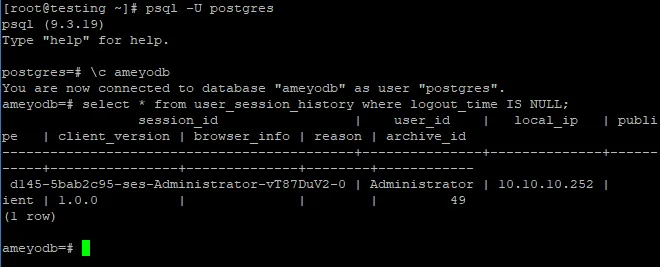
It is requierd to provide the session ID of the current Administrator's login while using the APIs. Get the access to the server operating system where Ameyo Server is installed and execute the following commands to get the same.
psql -U postgres
\c ameyodb
select * from user_session_history where logout_time is NULL;
Replace ameyodb with the Ameyo Database of your Ameyo Server Installation.
The Session ID of the Administrator changes with every new login. So, you have to execute the above command every time whenever the Administrator logins.
Chat Theme APIs
Following operations can be performed through the APIs. Each oepration is served by a dedicated API.
- Add Theme
- Add Property to Theme
- Update Theme
- Apply Theme
- Remove Property from a Configuration of a Theme
- Get All Themes
- Get Theme Configuration
- Remove a Theme
Add Theme API
Following is the URL of the API to be called for adding a theme for Web Chat.
You have to replace the values in the following URL, copy it, and browse it in the same Web browser where you are logged on to Ameyo Application.
Replace the following variables.
Variable | Required Value |
|---|---|
<protocol> | HTTP or HTTPS |
<IP_OR_DOMAIN_OF_APPSERVER> | IP Address or Domain Name of the Site where Ameyo Application is running. |
<PORT_NUMBER> | 8888 for HTTP or 8443 for HTTPS |
<SESSION_ID> | Session ID of the Administrator's current login session, which you have obtained through the command given above. |
<NAME_OF_THEME> | Here, you have to provide a name for this new theme. It should be provided in text format. |
<boolean> | true OR false |
<COMPONENT_NAME> | Provide a name for the component, of which formatting you want to modify. |
<PROPERTY_NAME> | Provide a name for the property of the already provided component, of which formatting you want to modify. |
<VALUE> | Provide a value for the already provided property. Common property value formats are given below. * COLOR or TEXT_COLOR: 'RGBA(<number>,<number>,<number>,<number>)' |
- TEXT: Text format
- SHAPE: cornered or rounded. |
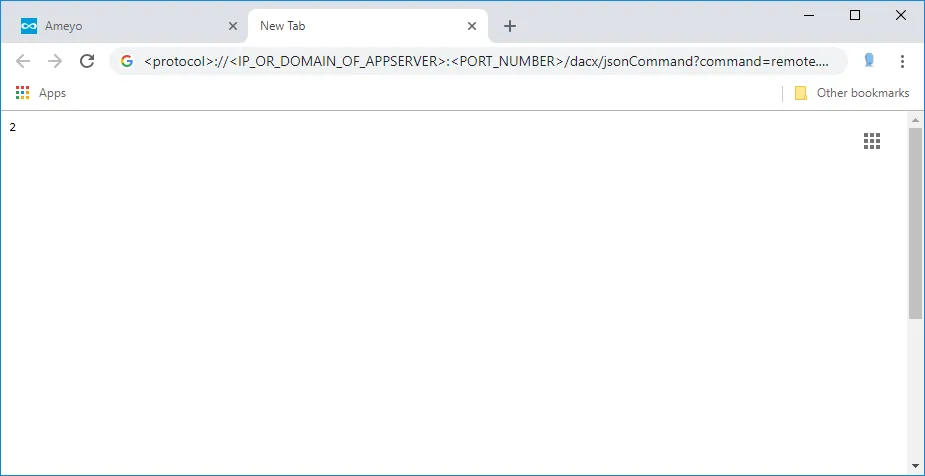
When you execute the above command, the browser gives you a theme ID. Note it down.
"Chat Themes" tab in "Process Settings" now shows the newly added theme.
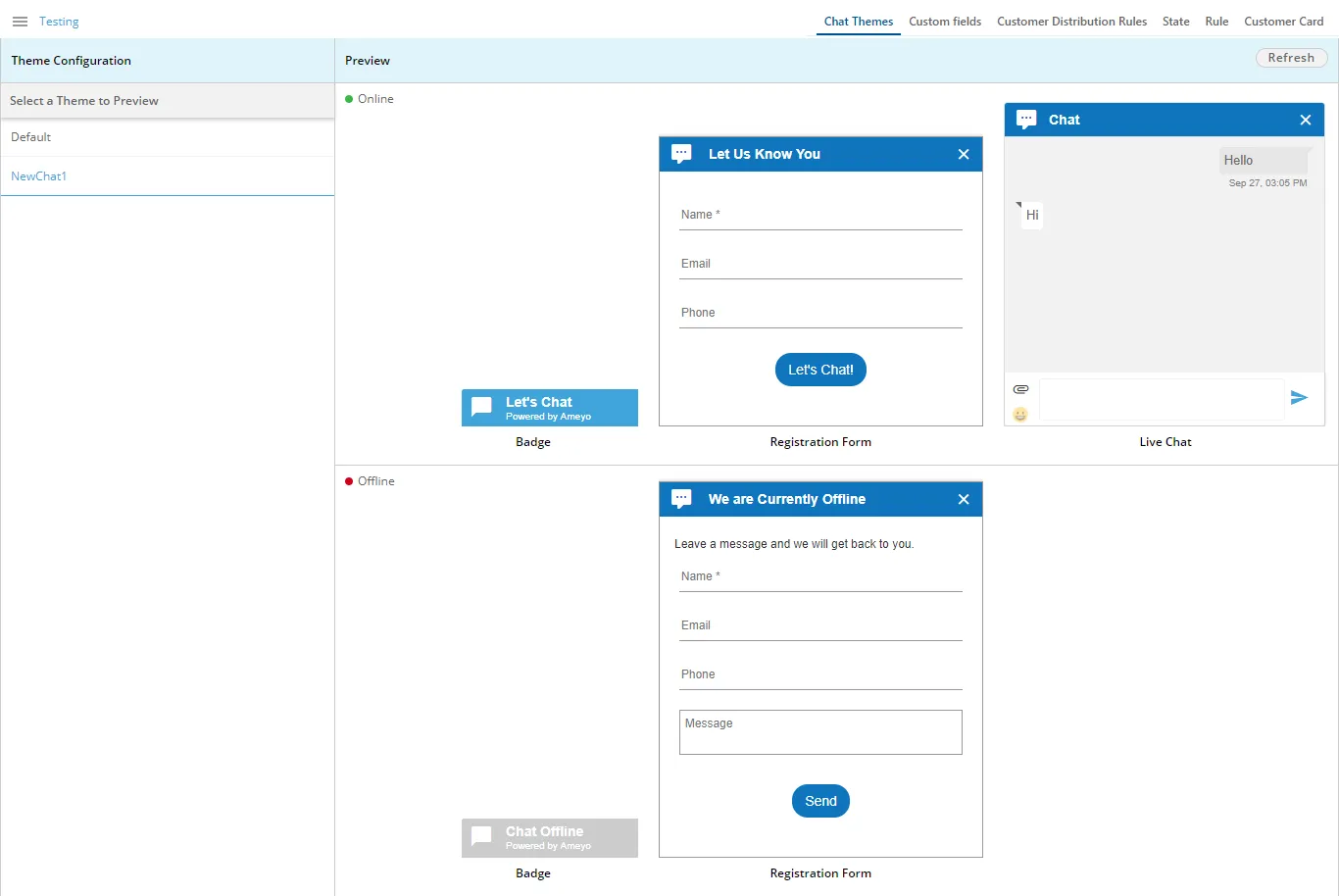
Default Theme will also be activated with the addition of this customized theme.
Add Property to Theme API
Following is the URL of the API to be called for adding or modifying a property to any screen in your selected Web Chat Theme.
You have to replace the values in the following URL, copy it, and browse it in the same Web browser where you are logged on to Ameyo Application.
Replace the following variables.
Variable | Required Value |
|---|---|
<protocol> | HTTP or HTTPS |
<IP_OR_DOMAIN_OF_APPSERVER> | IP Address or Domain Name of the Site where Ameyo Application is running. |
<PORT_NUMBER> | 8888 for HTTP or 8443 for HTTPS |
<SESSION_ID> | Session ID of the Administrator's current login session, which you have obtained through the command given above. |
<THEME_ID> | Provide the ID of the theme that you want to modify. |
<SCREEN_NAME> | Provide the name of the theme configuration that you want to modify. |
<COMPONENT_NAME> | Provide a name for the component, of which formatting you want to modify. |
<PROPERTY_NAME> | Provide a name for the property of the already provided component, of which formatting you want to modify. |
<VALUE> | Provide a value for the already provided property. Common property value formats are given below. * COLOR or TEXT_COLOR: 'RGBA(<number>,<number>,<number>,<number>)' |
- TEXT: Text format
- SHAPE: cornered or rounded. |
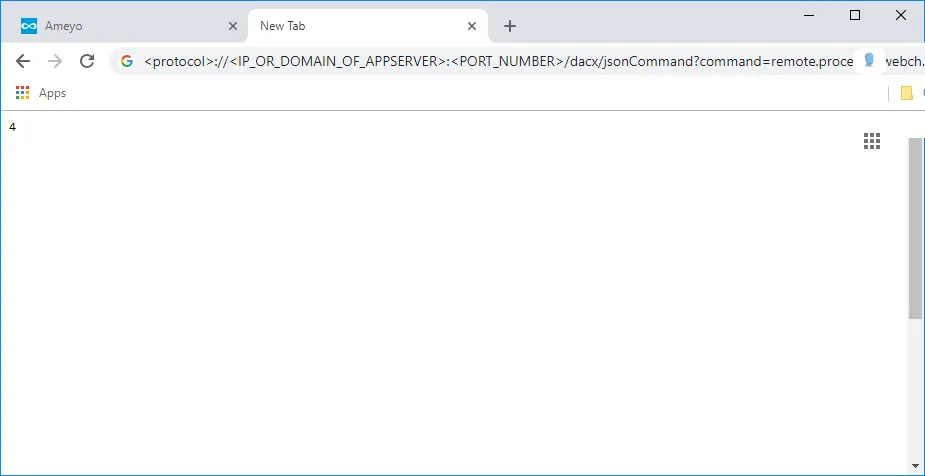
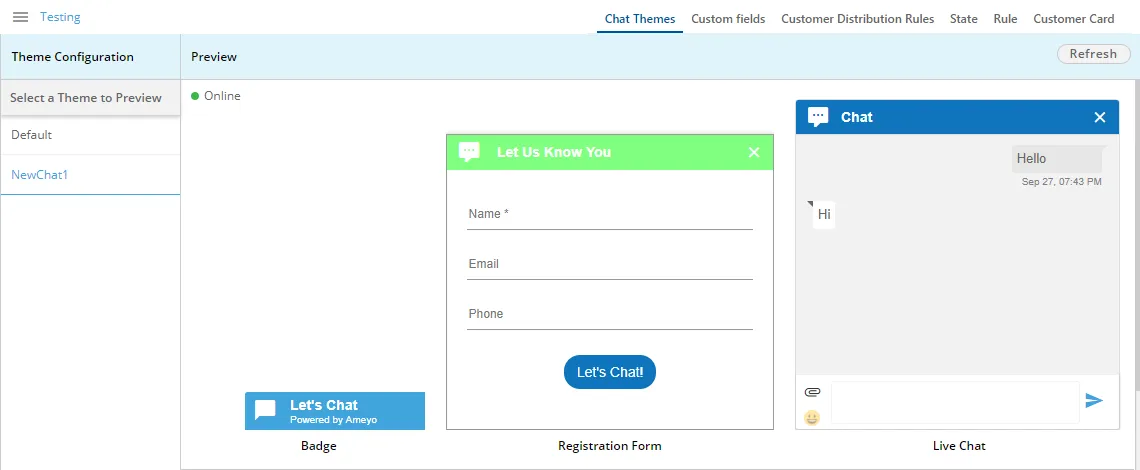
After executing the API, browse "Chat Theme" tab and check the theme in which you have modified the property. Press "Refresh" to update the changes, if required. Here, in this test case, the color of header of Default Online Registration Form has been changed to "Green".
Rename Theme API
Following is the URL of the API to be called for renaming a selected theme.
You have to replace the values in the following URL, copy it, and browse it in the same Web browser where you are logged on to Ameyo Application.
Replace the following variables.
Variable | Required Value |
|---|---|
<protocol> | HTTP or HTTPS |
<IP_OR_DOMAIN_OF_APPSERVER> | IP Address or Domain Name of the Site where Ameyo Application is running. |
<PORT_NUMBER> | 8888 for HTTP or 8443 for HTTPS |
<SESSION_ID> | Session ID of the Administrator's current login session, which you have obtained through the command given above. |
<THEME_ID> | Provide the ID of the theme that you want to modify. |
<NAME_OF_THEME> | Provide the Name of the theme that you want to modify such as 'THEME_NAME'. (Add single quote). |
<BOOLEAN> | true or false |
Apply Theme API
Following is the URL of the API to be called for applying a selected theme on the Web Chat.
You have to replace the values in the following URL, copy it, and browse it in the same Web browser where you are logged on to Ameyo Application.
Replace the following variables.
Variable | Required Value |
|---|---|
<protocol> | HTTP or HTTPS |
<IP_OR_DOMAIN_OF_APPSERVER> | IP Address or Domain Name of the Site where Ameyo Application is running. |
<PORT_NUMBER> | 8888 for HTTP or 8443 for HTTPS |
<CAMPAIGN_ID> | You have to provide the ID of the campaign, which you can get from the campaign settings. |
<NODEFLOW_ID> | Provide the ID of the nodeflow where the selected Chat Theme will be applied. Execute the following commands at the server operating system where Ameyo Server is installed. psql -U postgres: to enter the PostgreSQL console. \c ameyodb: to enter the database. select * from acd_node_to_aq_mapping;: to get the information on nodeflow along with its ID. |
<THEME_ID> | Provide the ID of the theme that you want to apply on the selected nodeflow in the selected campaign. |
Get Theme Configuration API
Following is the URL of the API to be called for getting Theme Configuration.
You have to replace the values in the following URL, copy it, and browse it in the same Web browser where you are logged on to Ameyo Application.
Replace the following variables.
Variable | Required Value |
|---|---|
<protocol> | HTTP or HTTPS |
<IP_OR_DOMAIN_OF_APPSERVER> | IP Address or Domain Name of the Site where Ameyo Application is running. |
<PORT_NUMBER> | 8888 for HTTP or 8443 for HTTPS |
<SESSION_ID> | Session ID of the Administrator's current login session, which you have obtained through the command given above. |
<THEME_ID> | Provide the ID of the theme that you want to modify. |
Remove Theme Configuration API
Following is the URL of the API to be called for removing a theme configuration.
You have to replace the values in the following URL, copy it, and browse it in the same Web browser where you are logged on to Ameyo Application.
Replace the following variables.
Variable | Required Value |
|---|---|
<protocol> | HTTP or HTTPS |
<IP_OR_DOMAIN_OF_APPSERVER> | IP Address or Domain Name of the Site where Ameyo Application is running. |
<PORT_NUMBER> | 8888 for HTTP or 8443 for HTTPS |
<SESSION_ID> | Session ID of the Administrator's current login session, which you have obtained through the command given above. |
<THEME_PROPERTY_ID> | Provide the ID of the theme configuration (also called Property ID) that you want to delete. Execute the following commands at the server operating system where Ameyo Server is installed. psql -U postgres: to enter the PostgreSQL console. \c ameyodb: to enter the database. select * from webchat_theme_configuration_properties;: to get the ID of theme configuration. |
Remove Theme API
Following is the URL of the API to be called for removing a theme.
You have to replace the values in the following URL, copy it, and browse it in the same Web browser where you are logged on to Ameyo Application.
Replace the following variables.
Variable | Required Value |
|---|---|
<protocol> | HTTP or HTTPS |
<IP_OR_DOMAIN_OF_APPSERVER> | IP Address or Domain Name of the Site where Ameyo Application is running. |
<PORT_NUMBER> | 8888 for HTTP or 8443 for HTTPS |
<SESSION_ID> | Session ID of the Administrator's current login session, which you have obtained through the command given above. |
<THEME_ID> | Provide the ID of the theme that you want to delete. |