Dashboard of Outbound Campaign
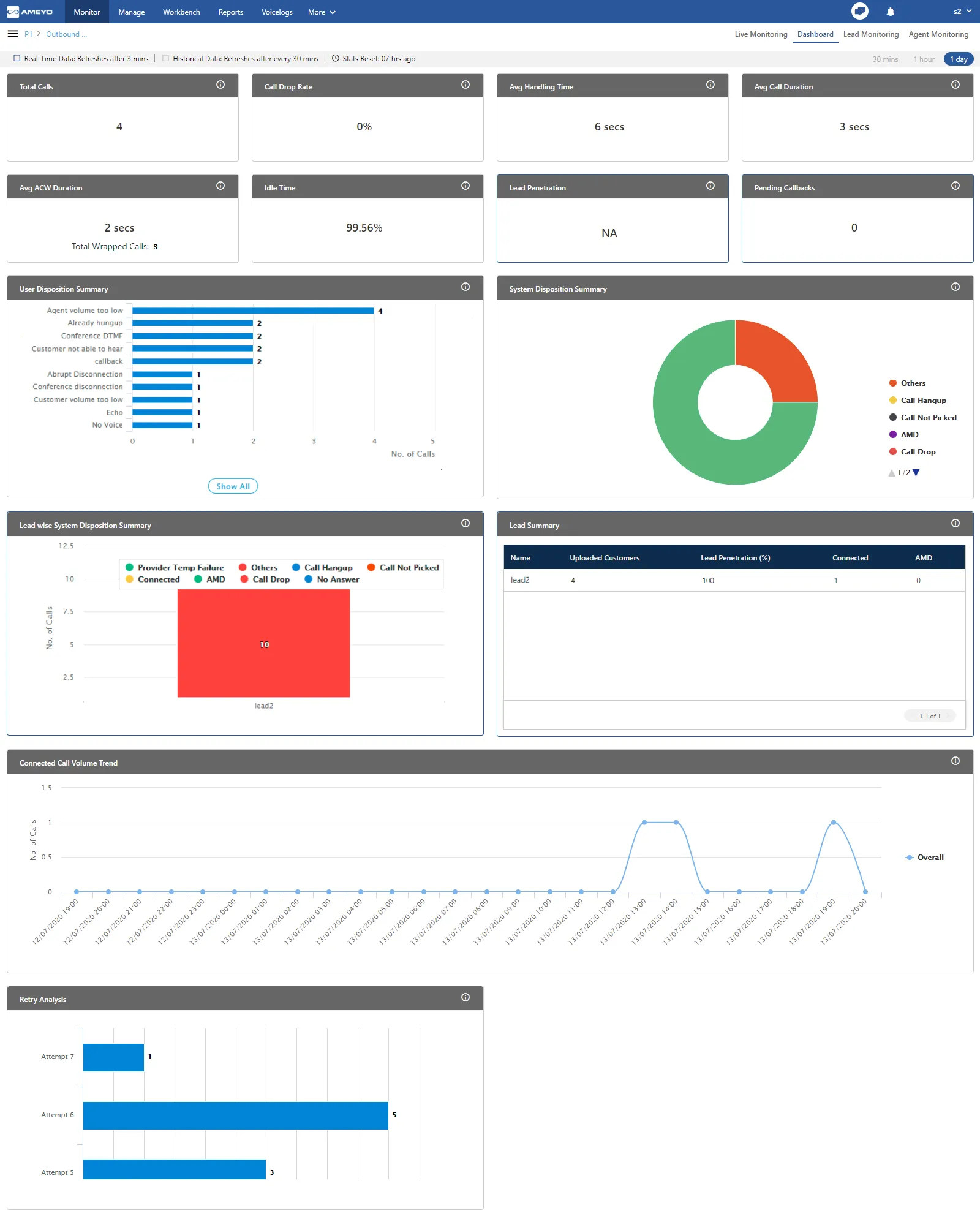
The dashboard tab of Outbound campaign shows the following items.
- Data Collection Indications
- Time Duration
- Call Details
- User Disposition Summary
- System Disposition Summary
- Lead wise System Disposition Summary
- Lead Summary
- Connected Call Volume Trend
- Retry Analysis
Data Collection Indications
On top, a horizontal bar shows the indications of different data collection intervals.

- Real-Time Data: The Data Metrics, whose data is refreshed after 5 seconds, then it will be indicated with the border of blueish color .
- Historical Data: The Data Metrics, whose data is refreshed after every 5 minutes, then it will be indicated with the border of black color .
- Stats Reset: It informs the interval after which the statistics were reset last.
Time Duration
The Supervisor can view the recent activities of contact center for selected campaigns as per the following time durations
- 30 minutes: Click to view the activities in the selected campaign for the last 30 minutes.This tab shows the data of the last 30 minutes. The Current Data on the User Interface will be updated in maximum 8 minutes, whereas the historical data will be updated in maximum 38 minutes.
- 1 hour: Click to view the activities in the selected campaign for the last one hour.This tab shows the data of the last 1 hour. The Current Data on the User Interface will be updated in maximum 8 minutes, whereas the historical data will be updated in maximum 38 minutes.
- 1 day: Click to view the activities in the selected campaign for the present one day starting from 00:00 hour.This tab shows the data of the last 1 day. The Current Data on the User Interface will be updated in maximum 1 hour 3 minutes, whereas the historical data will be updated in maximum 1 hour 33 minutes.
Call Details
In this section, supervisor can view the overall call summary of the selected outbound campaign and time duration.
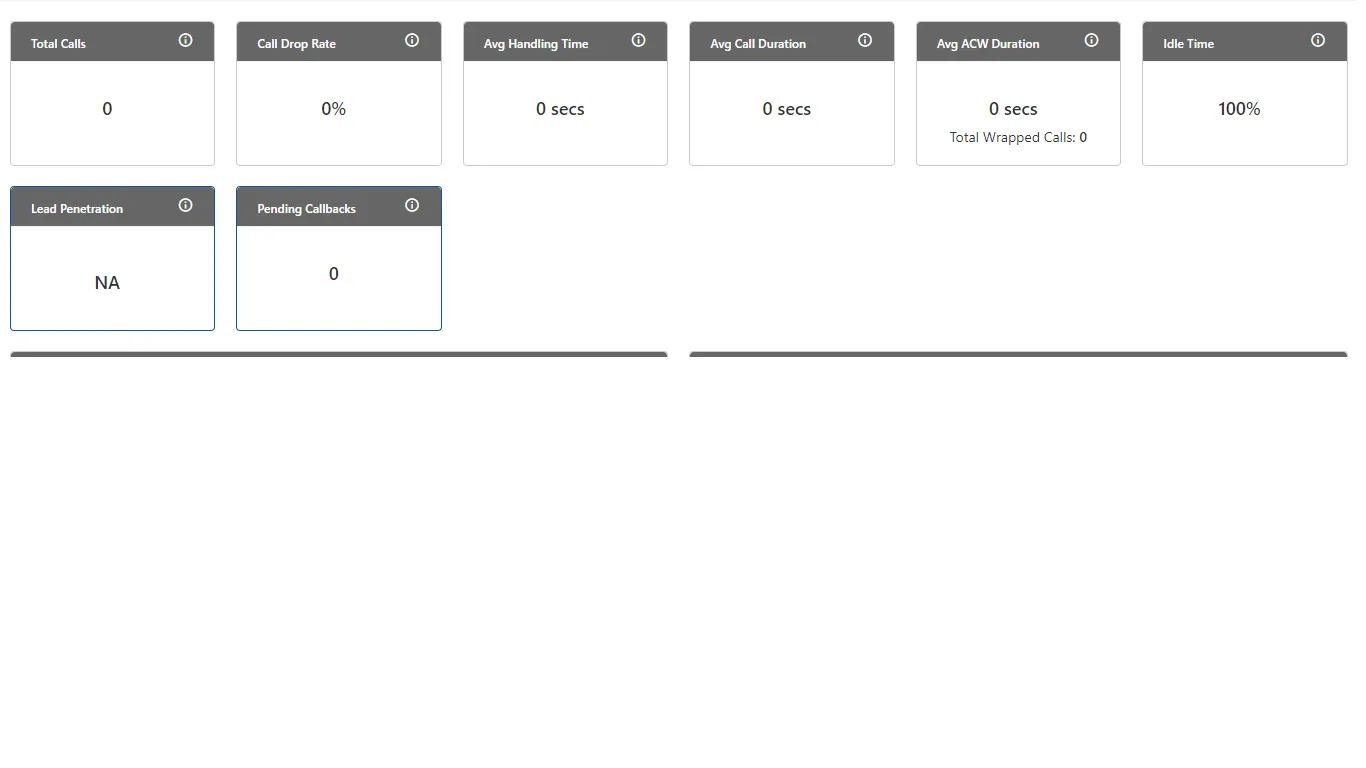
It contains the following widgets:
- Total Calls
- Call Drop Rate
- Avg Handling Time
- Avg Call Duration
- Avg ACW Duration
- Idle Time
- Lead Penetration
- Pending Callbacks
- Total Calls
It shows the total number of calls of the following call types in the campaign.
- inbound.call.dial
- outbound.auto.dial
- outbound.callback.dial
- outbound.auto.preview.dial
- outbound.manual.preview.dial
- transfer.to.campaign.dial
- outbound.manual.dial
- click.to.call.dial
Total Calls does not show any other call type.
Additional Information:
Hover the mouse over  icon to view the basic definition, last calculated time, and last fetch time of "Total Calls".

- Call Drop Rate
It shows the call drop, which is the percentage of calls that were disconnected before reaching to the agent.
Additional Information:
Hover the mouse over icon to view the basic definition, last calculated time, and last fetch time of "Call Drop Rate".

Enumeration Example:
In a Predictive Algorithm based Auto-Dialing, the customer call leg is being connected first and then the agent call legs will be connected. If the system throws 10 calls and there only 6 agents to attend the calls. Now, 6 calls will be connected with 6 agents.
Total Calls = 10
Connected Calls = 6
Customer disconnected the calls before connecting with the agents = 4 (These calls are disposed of with “CALL_DROP” system disposition).
Call Drop Count = 4
Call Drop Ratio = 4/10 = 40%
It is configurable through the backend that after modifying system_configuration_parameter, Call Drop Count will also depend upon the System Dispositions such as CALL_HUNGUP and CALL_NOT_PICKED.
Avg Call Duration
It shows the average time taken by the agents on a call speaking to the customer.
Additional Information:
Hover the mouse over icon to view the basic definition, last calculated time, and last fetch time of "Call Drop Rate".

Enumeration Example:
- On Call 1, Agent1 has talk time of 20 seconds on one call, out of which Agent1 has put the Customer on hold for 10 seconds.
- On Call 2, Agent1 has talk time of 30 seconds on second call, out of which Agent has put the Customer on Hold for 15 seconds.
- On Call 3, Supervisor has talk time of 20 seconds on one call, out of which, Supervisor has put the customer on hold for 10 seconds..
- On Call 4, Supervisor has talk time of 30 seconds on another call, out of which, Supervisor has put the Customer on hold for 15 seconds.
Average Call Duration = [(Total Talk time of all agents) + (Total Hold Time of all agents)] / Count of all calls in Campaign
Average Call Duration = [(20+30+20+30) + (10+15+10+15)] / 4
Average Call Duration = [100 + 50] / 4
Average Call Duration = 150 / 4
Average Call Duration = 37.5
Idle Timeis applicable only for Single Extension in Voice. It is not available for Chat Campaign, Interaction Campaign, and Voice with Multiple Extensions.
Idle Time for an agent in a campaign | = | Ready | — | Agent Ringing Time for all calls taken by this agent in this campaign + Agent Preview Time for all calls taken by this agent in this campaign + Customer Ringing Time (in case the customer is initiated after the agent) + Customer Setup Time (in case the customer is initiated after the agent) + Agent Talk Time for all calls taken by this agent in this campaign + Agent Customer Hold Time for all calls taken by this agent in this campaign + Agent ACW Duration for all calls taken by this agent in this campaign |
|---|
Idle Time will be a campaign-level metric, that is, it will be calculated differently for each campaign. If an agent have selected multiple campaigns and handling all calls in one campaign only, then its Idle Time will be equal to the Ready Duration in other campaigns.
Limitation of Multiple Extension
If the Multiple Extension license is enabled, then the Idle Time will be neither displayed in the User Interface nor included in Reports. In case of multiple license, the following disclaimer will be displayed in the Agent Productivity Summary Report.
"Feature should work on the multiple extension - data may be wrong."
Additional Information:
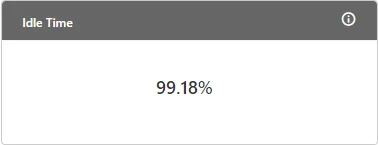
Hover the mouse over icon to view the basic definition, last calculated time, and last fetch time of "Idle Time".

Figure: Further Information of Idle Time
Avg ACW Duration
It is the average of all ACW durations spent by the users on the calls in this campaign.
Additional Information:
Hover the mouse over icon to view the basic definition, last calculated time, and last fetch time of "Average ACW Duration".

Total Wrapped Calls
It displays the calls wrapped by all agents in the Campaign.
Enumeration Example:
There are following 6 calls in the campaign.
- Agent disposed of one call while talking to the agent. ACW Duration will be 0 in this case.
- Agent have disposed of one call in 15 seconds.
- Agent have disposed of one call in 20 seconds.
- One call was wrapped automatically as the pre-configured call wrap-time of 30 seconds was exceeded.
- Agent have transferred one call to another campaign and it took 15 seconds to dispose of the call in Campaign 1.
- One call is attended by User1 who transferred it to User2. User1 took 10 seconds to wrap the call and User2 took 15 seconds to wrap the call.
Average ACW Duration = (Total ACW Duration) / (Number of Calls)
Average ACW Duration = (0+15+20+30+15+10+15) / 6
Average ACW Duration = 105 / 6
Average ACW Duration = 17.5 seconds
Avg Handling Time
It shows the Average Handling Time of all connected calls with users in campaign. It is the sum of Customer Talk Time for this agent, Customer Hold Time for this agent, and Wrap Time of Connected Calls. It includes only Customer Interactions, but Dial User (Internal Calls) are not included.

AHT does not include the Average Wrap Time of an agent as the Average Wrap Time will also include the wrapping of not connected calls.
Additional Information:
Hover the mouse over icon to view the basic definition, last calculated time, and last fetch time of "Average Handling Time".

Enumeration Example:
- Inbound Calls in Campaign but not reached to ACD = 2
- 1 Inbound Call connected to user1
- Talktime = 50,000 milliseconds
- Hold time = 30,000 milliseconds
- Wrap time = 20,000 milliseconds
- 1 Manual Dial Call connected to user1, who transferred it to user2.
- Talk time = 45,000 milliseconds (as dumped in Call History Table for this call)
- Hold time = 30,000 milliseconds (as dumped in Call History Table for this call)
- Wrap time of user1 = 15,000 milliseconds
- Wrap time of user2 = 18,000 milliseconds
Average Handling Time = | = {(50000+30000+20000) + (45000+30000+15000+18000)} / 2 = (1,00,000 + 1,08,000) / 2 = 2,08,000 / 2 = 1,04,000 milliseconds = 104 seconds = 1 minute 44 seconds |
|---|
Lead Penetration
It shows the lead penetration of a lead that has minimum percentage of phone numbers attempted by the dialer. All leads (enabled, disabled, and Attempt Failed) are considered. The Churning does not reduce the penetration rate. The migration of phone numbers from one lead to another will impact the lead penetration metric of both leads.
Additional Information:
Hover the mouse over icon to view the basic definition, last calculated time, and last fetch time of "Lead Penetration".

Pending Callbacks
It shows the number of callbacks pending in the selected duration tab.
Additional Information:
Hover the mouse over icon to view the basic definition, last calculated time, and last fetch time of "Pending Callbacks".

User Disposition Summary
It shows the graph displaying the count of calls disposed with top 4 user dispositions.
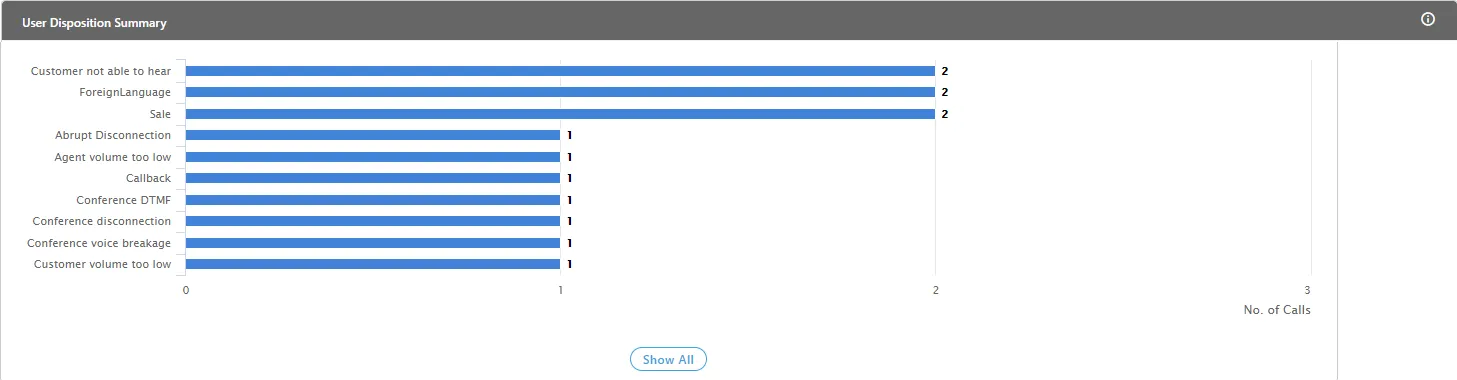
The Supervisor can view the following information here.
- Count of Disposed calls: It is the X-axis of the graph, which shows the total number of calls disposed with different user disposition in the respective campaigns.
- User Dispositions: It is the Y-axis of the graph, which shows 5 campaign names in which highest number of calls are disposed by agents among all selected campaigns.
On hovering the mouse cursor on the bars of the dispositions, it shows the disposition method, total number of calls and total number of calls received after being transferred from another campaigns.
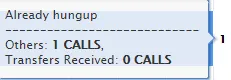
If there are more than 10 dispositions, then "Show ALL" button will appear in the graph. Click this button to see all the user dispositions. After clicking "Show All" button, the following wizard is displayed.
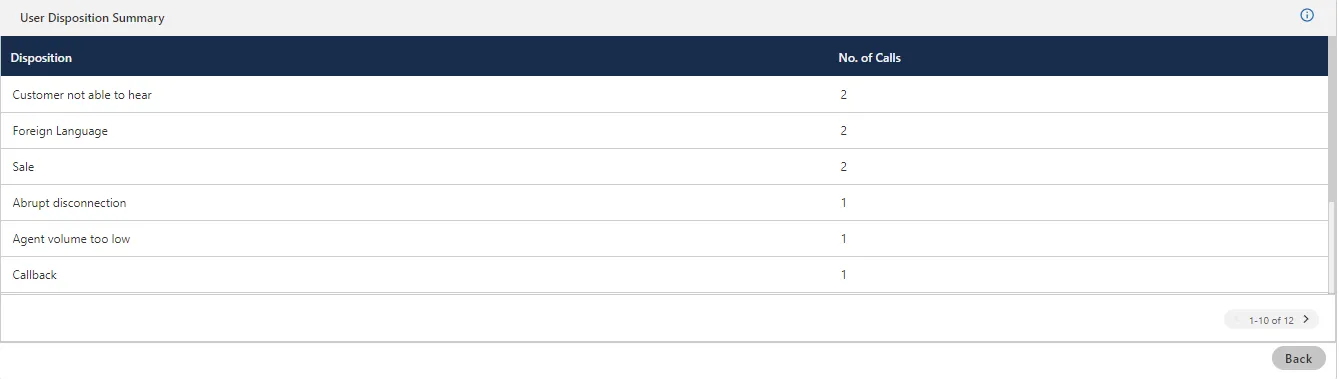
The supervisor has to click > icon in  to see the next page of the user dispositions.
Additional Information:
Hover the mouse over icon to view the basic definition, last calculated time, and last fetch time of "User Disposition Summary".

System Disposition Summary
This doughnut pie chart shows the overall call distribution (in percentage) disposed with different system dispositions.
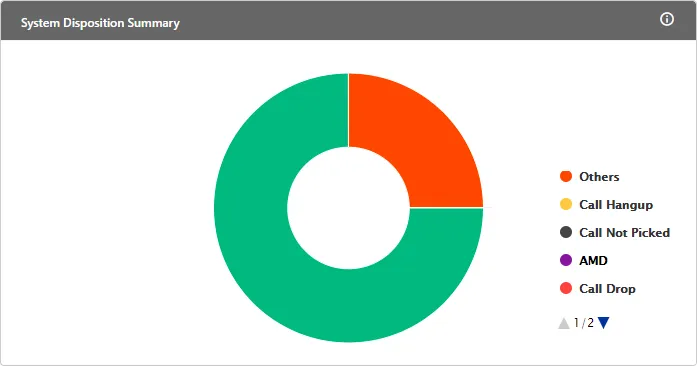
On hovering the mouse cursor on the bar of a disposition, the supervisor will be able to view the count of calls disposed of with this disposition.
Additional Information:
Hover the mouse over icon to view the basic definition, last calculated time, and last fetch time of "System Disposition Summary".

Lead wise System Disposition Summary
This bar graph shows the system dispositions for the phone numbers of the lead. It includes these dispositions: Provider Temp Failure, Call Hangup, Call not Picked Up, AMD, Call Drop, No Answer, Connected and others. All leads (enabled, disabled, and Attempt Failed) are considered. The Churning does not reduce the penetration rate. The migration of phone numbers from one lead to another will impact the lead penetration metric of both leads.
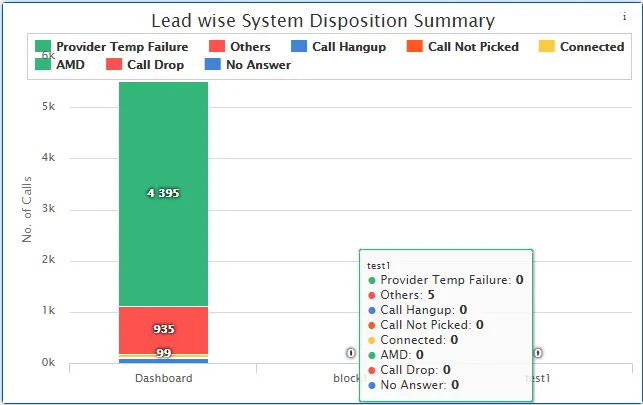
The Supervisor can view the following information here.
- Lead Name: It is the X-axis of the graph, which shows the lead name from which the numbers are dialed.
- Count of Calls: It is the Y-axis of the graph, which shows the count of different types of calls dialed from a particular lead.
On hovering the mouse cursor on the bars of a lead, the supervisor will be able to view the call count with respective call type.
Additional Information:
Hover the mouse over icon to view the basic definition, last calculated time, and last fetch time of "Lead-wise System Disposition Summary".

Lead Summary
Supervisor can view the performance of the leads enabled in the selected campaign. .
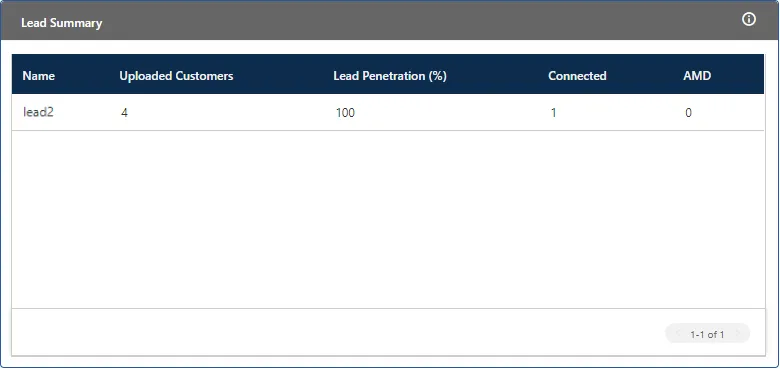
- Name: It is the lead name which is enabled in the selected campaign.
- Uploaded Contacts: It shows the count of numbers uploaded in that lead.
- Lead Penetration Percentage: It shows the percentage of contacts that the dialer dialed from the respective lead.
- Connected: It shows the number of calls on which call got connected, that is, number of calls disposed with "Connected" system disposition by Ameyo application.
- AMD: It shows the number of calls disposed with "AMD" system disposition by Ameyo application.
Additional Information:
Hover the mouse over icon to view the basic definition, last calculated time, and last fetch time of "Lead Summary".

Connected Call Volume Trend
This line graph shows number of connected calls in a campaign with respect to different time intervals.
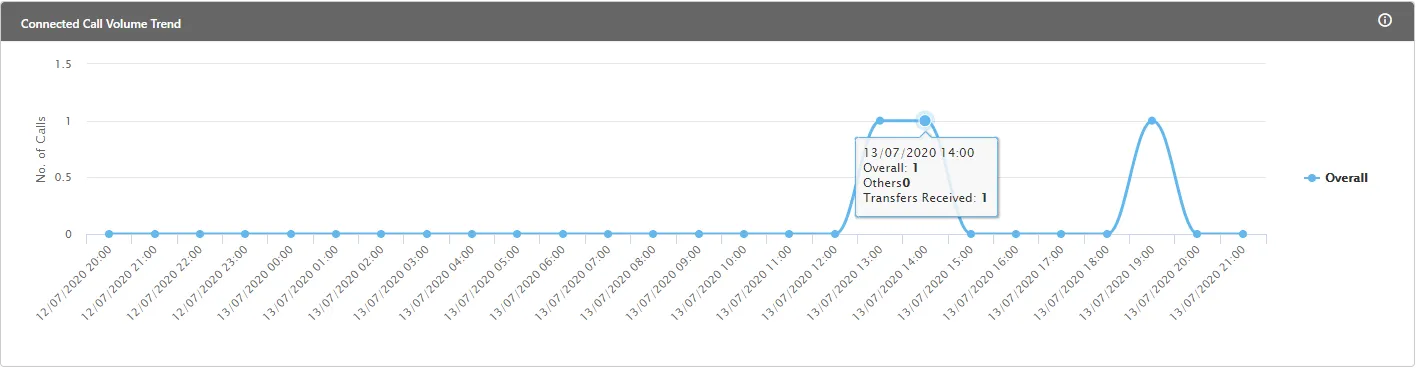
The Supervisor can view the following information here.
- Time Interval: It is the X-axis of the graph, which shows the time interval at which number of calls dialed/received.
- Number of Calls: It is the Y-axis of the graph, which shows the count of calls dialed/received at a particular time interval.
On hovering the mouse cursor on the bars of a lead, the supervisor can view the count of calls at a particular time.
Additional Information:
Hover the mouse over icon to view the basic definition, last calculated time, and last fetch time of "Connected Call Volume Trend".

Retry Analysis
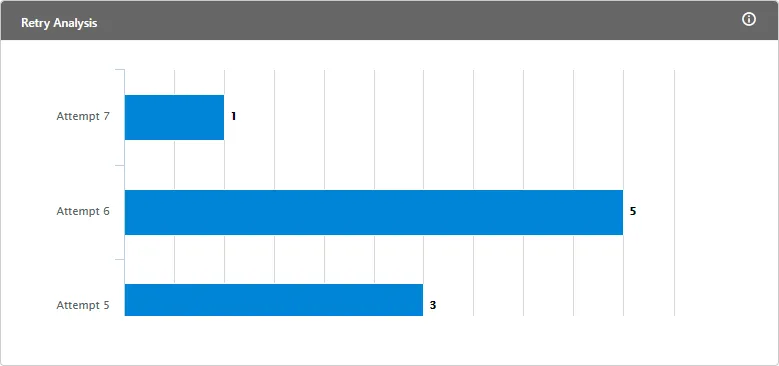
This graph shows the number of retries for a particular system disposition and the number of phone numbers reached for these attempts. It includes Auto Dial, Auto Preview Dial, Manual Dial, and Manual Preview Dial. It does not consider Attempt Failed.
Additional Information:
Hover the mouse over icon to view the basic definition, last calculated time, and last fetch time for "Retry Analysis".
