Live Monitoring of Outbound Campaign
The Agent Monitoring section allows supervisors to track and manage agent activities within an Inbound Campaign.
Interface Elements
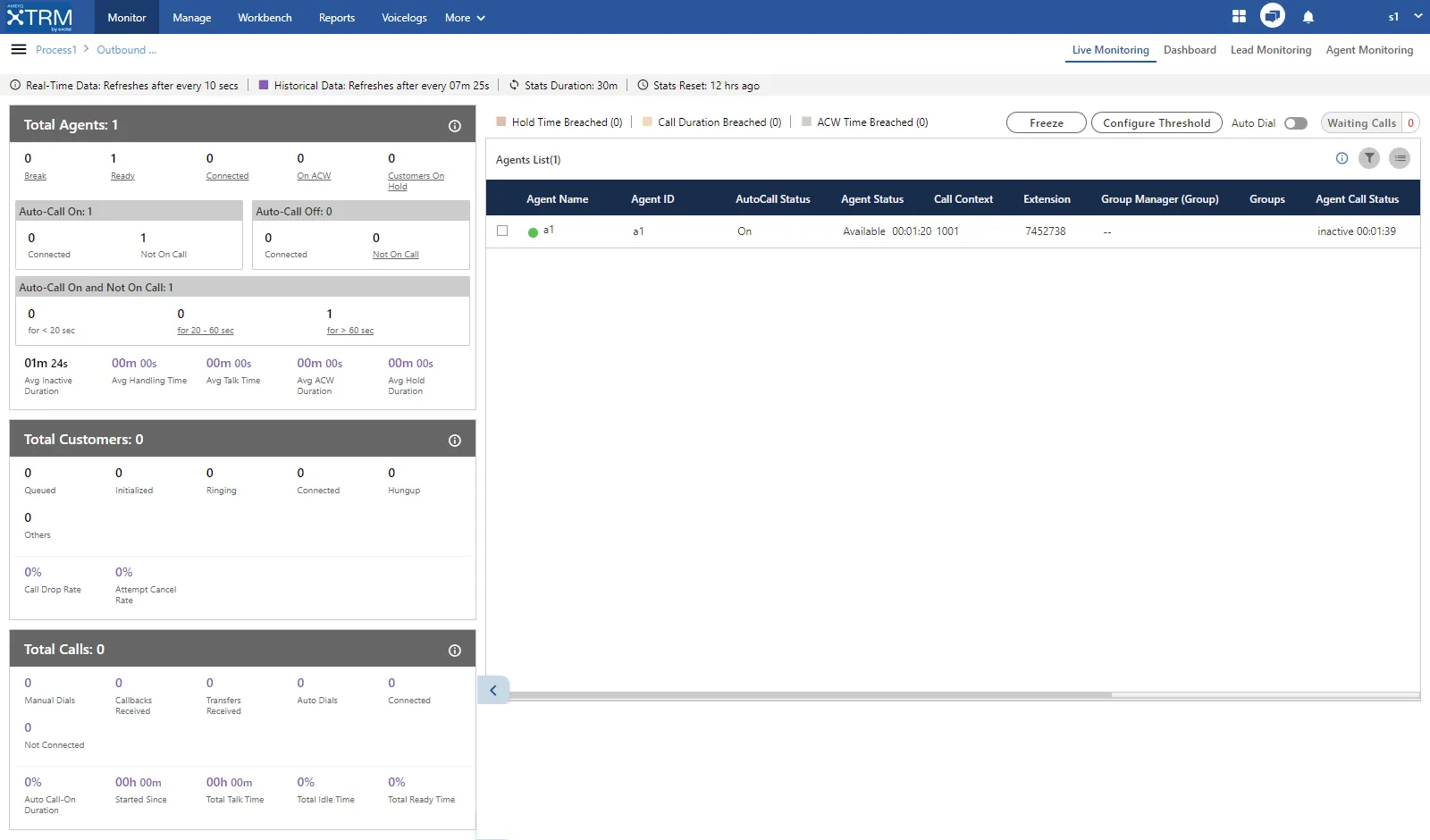
Overall, the interface of Live Monitoring in Outbound Campaign can be divided into the following sections.
Cautionary Extension Selection Message
At the top of the screen, a cautionary message is displaying in the red bar.It arises in the case when the supervisor does not select the extension of his phone. Select the extension to remove this cautionary mark from the screen.
You can also click on this cautionary bar to select the extension.

Data Collection Indications
A horizontal bar at the top displays indicators for different data collection intervals.

- Real-time Data: Metrics refreshed every 5 seconds are highlighted with a blue border.
- Historical Data: Metrics refreshed every 5 minutes are highlighted with a black border.
- Stats Duration: Displays the selected time interval for statistics, for example, 12 hours.
- Stats Reset: Indicates when the statistics were last reset.
1.Campaign Runtime Summary (Total Calls)
This section displays the performance of calls processed within the last 30 minutes. It shows the runtime summary of all calls made in this campaign.
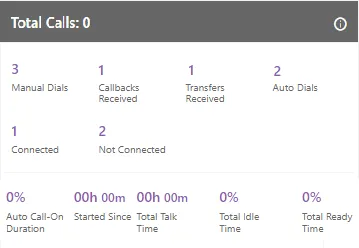
- Data Refresh: Every 5–10 seconds.
- Timestamps: Hover over the (i) icon to view the "Last Calculated" and "Last Fetched" times.

Key Metrics
- Volume Metrics:
- Auto Dials: Total number of auto-dial calls made in this campaign.
- Manual Dials: Total number of manual dial and manual preview dial calls in the campaign.
- Callbacks Received: Total number of callbacks in the campaign including Queue Callback, Campaign Callback, Self Callback, and Preview Callback.
- Transfers Received: Total number of transferred calls received in the campaign.
- Outcome Metrics:
- Connected: Total number of connected calls. It shows the total calls answered by the customers in the Outbound campaign.
- Not Connected: Total calls that failed to connect.
- Time Metrics:
- Total Talk Time: Total time duration of all agents which they consume on the calling.
- Auto-Call On Duration %: Total percentage of the duration of the agents who had their auto-call status as "ON" while being in the ready state in the campaign.

- Total Idle Time %: The percentage of Total Idle Duration divided by Total Ready Duration. Here, the Total Idle Duration is the difference between Total Ready Time and Total Service Time in a campaign

Here, the following is the definition of Total Idle Duration:

Total Ready Time %: The total percentage of the duration of the agents who were on ready state while being staffed in the campaign.

2. User Runtime Summary (Total Agents)
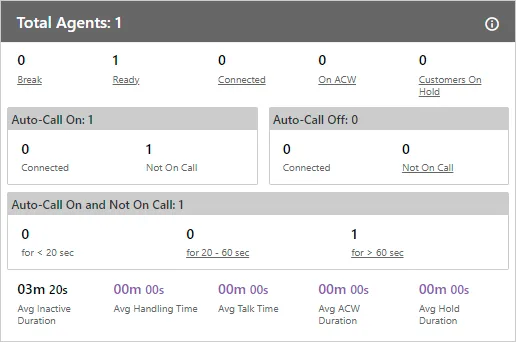
This section provides a snapshot of the current workforce status. Clicking on specific metrics (like Break or Ready) will filter the Agent List below to show only relevant agents.
- Data Refresh: Every 5–10 seconds (Current Data).
Agent State Metrics
- Ready: The number of unique agents staffed in the campaign, who are on "Available" status.
- Break: Number of agents currently on break. ()Number of Agents on Break/Number of Agents whose status is break
- Connected: Agents currently on a call.
- On ACW: Agents performing After Call Work (disposing calls).
- Customers on Hold: Agents who have placed customers on hold even if they are in conference. In the case of the conference where both agents had put the customer on hold, "on hold" count will include both agents.
Auto-Call Status
- Auto-Call On: Agents with auto-dialing enabled.
- Auto-Call Off: Agents with auto-dialing disabled.

- Auto-Call On and Not on Call
"Auto-Call On and Not on Call" are the number of agents whose Auto Call status is On but they are not on any call. It includes an agent only when its status is set as "Auto-Call On" and "Available". It also include agent who has put himself on hold.
Example: It includes only the current status for all the calculations, that is, if the user (with "Available" and "Auto-Call On" status) is not getting a call from last 60 seconds, and it switched to break for 5 seconds, then after coming back from break, that agent will be seen inactive in "<20sec" field, the last 60 seconds is lost. The count will decrease when the agent selects any break or sets its Auto-Call status as "OFF." The count will increase when the agent selects available after coming from any break or sets its Auto-Call Status as "ON."
Break/Ready | Auto Call On/Off | Operations Permitted | Meaning |
|---|---|---|---|
Break | No | Not Possible | When an agent selects the break option, their auto-call status will automatically switch to Off |
Break | Off | No Operations Permitted | The Manual Dial button and text box are also disabled. |
Ready | On | Auto Dial, Callbacks, Manual Dial, Conference and Transfer Call, Inbound Calls | The agent is currently online and is available to receive all incoming calls. |
Ready | On | Manual Dial:- Yes Transfer to User Call:- Yes Transfer to Queue Call:- Not Allowed as agent is not considered available for campaign calls Transfer to Campaign Call:- Not Allowed as agent is not considered available for campaign calls Confer to User:- Yes Self/Campaign Callback Call:- Not Allowed as agent is not considered available for callback calls Auto Dial Call:- Not Allowed Inbound Call:- Not Allowed | The agent wants to be visible as online to the system but prefers not to handle PD, Inbound, or Callback calls. |
It shows the inactive agents in the following intervals.
- <20 sec: It is the total number of agents who are on "Auto-Call On" status and waiting for the calls for less than 20 seconds.It shows the current data. The Data Refresh Interval on the User Interface is maximum 5 to 10 seconds.
- 20-60 sec: It is the total number of agents who are on "Auto-Call On" status and waiting for the calls from the last 20 to 60 seconds.It shows the current data. The Data Refresh Interval on the User Interface is maximum 5 to 10 seconds.
- >60 sec: It is the total number of agents who are on "Auto-Call On" status and waiting for the calls for more than 60 seconds.It shows the current data. The Data Refresh Interval on the User Interface is maximum 5 to 10 seconds.
Average Performance Metrics
- Avg Handling Time (AHT): It is equal to the sum of Customer Talk Time, Customer Hold Time for, and Wrap Time of Connected Calls divided by the total connected calls. It includes only Customer Interactions, but Dial User (Internal Calls) are not included.
- Calculations:

- Note: AHT does not include the Average Wrap Time of an agent as the Average Wrap Time will also include the wrapping up of not connected calls.
- Avg Talk Time: It is equal to the total time (in seconds) spent by the agents while talking to the customers divided by the total number of answered customer calls in this campaign.
- Calculations:

- Avg ACW Duration: It is the average amount of time spent by all the agents in disposing the calls.It represents the average time taken by the Agents to dispose the calls.
- Avg Hold Duration: Avg Hold Duration
It is equal to the total hold time divided by the count of customer calls with holds.
Calculation:

- Avg Inactive Duration: It is the average of all inactive duration of the agents staffed in the campaign.
3.Customer Runtime Summary (Total Customers)
This section tracks the lifecycle of leads currently active in the system.
- Data Refresh: Every 5–10 seconds (Current Data).
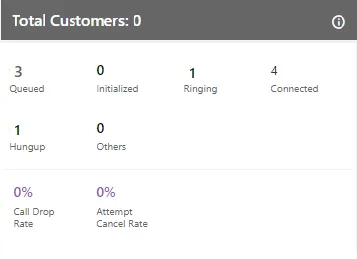
Key Metrics
- Initialized: Calls initiated from the campaign to be dialed.
- Queued: Calls waiting for initialization (includes Preview and Callbacks).
- Ringing: Calls currently ringing on the customer or agent side (includes transfers).
- Connected: Total currently active calls.
- Hungup: Calls disconnected by the customer but not yet disposed of by the agent.
- Call Drop Rate %: Percentage of calls dropped before an agent could answer.
- Attempt Cancel Rate %: Percentage of calls canceled due to any reason.
- Others: Total number of customer calls where the agent channel is ringing (predictive auto-dials, transfers to campaign or queue) or the call is in a connected transfer-to-phone state.
4.Agent List & Live Monitoring
The Agent List details the status of every staffed agent. Supervisors can filter this list, search for specific users, and perform live interventions.

It contains the following columns:
- Agent Name: It shows the usernames of the agents who have been assigned in the selected campaign.It shows the current data. The Data Refresh Interval on the User Interface is maximum 5-10 seconds.
- Agent ID: It shows the IDs of the agents who have been assigned in the selected campaigns.It shows the current data. The Data Refresh Interval on the User Interface is maximum 5-10 seconds.
- Extension:It shows the extension selected by an agent or assigned forcefully to an agent.It shows the current data. The Data Refresh Interval on the User Interface is maximum 5-10 seconds.
- Auto Call Status: It shows the auto-call status of an agent.It shows the current data. The Data Refresh Interval on the User Interface is maximum 5-10 seconds.
- Agent Status: It shows the status of an agent and the duration since when the agent is on this status.It shows the current data. The Data Refresh Interval on the User Interface is maximum 5-10 seconds.
- Call Context: It shows the call context assigned to an agent.It shows the current data. The Data Refresh Interval on the User Interface is maximum 5-10 seconds.
- Agent Call Status: It shows the call status of an agent. If the agent is on dial user (internal call) or connected on call in other campaign, the columns (call type, customer info, customer status, and queue) will remain blank. There is no feature for the Supervisor to identify such calls.It shows the current data. The Data Refresh Interval on the User Interface is maximum 5-10 seconds.
- Call Type: It shows the type of call, which is connected with the agent at present.If the agent is on dial user (internal call) or connected on call in other campaign, the columns (call type, customer info, customer status, and queue) will remain blank. There is no feature for the Supervisor to identify such calls.It shows the current data. The Data Refresh Interval on the User Interface is maximum 5-10 seconds.
- Phone: It shows the customer information. As of now, the call context is being displayed in case of Outbound calls where the phone number is being displayed in case of manual dial calls.It shows the current data. The Data Refresh Interval on the User Interface is maximum 5-10 seconds.
- Customer Call Status: It shows the status of the call of the customer.It shows the current data. The Data Refresh Interval on the User Interface is maximum 5-10 seconds.
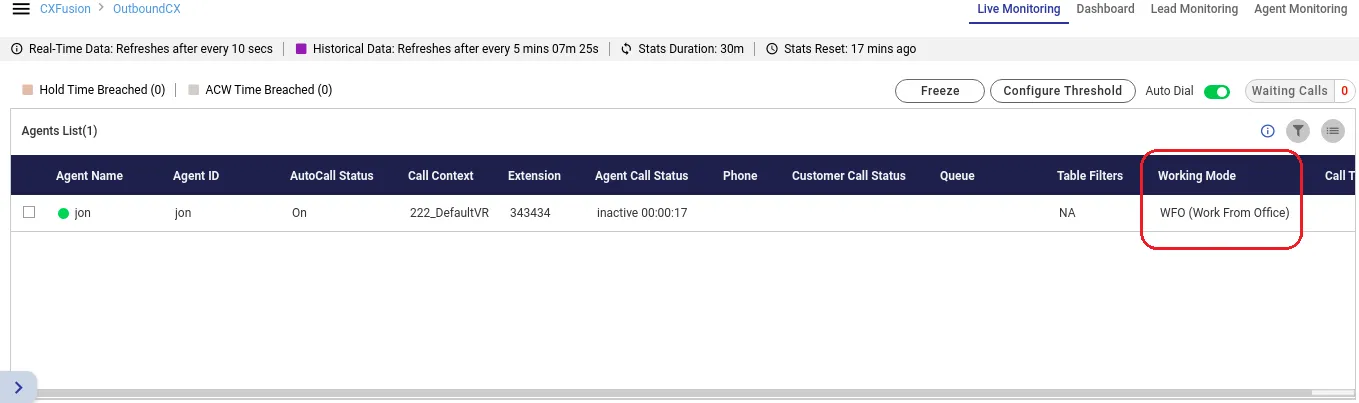
- Working Mode: It shows the selected working mode by the agents. Know more...It shows the current data. The Data Refresh Interval on the User Interface is maximum 5-10 seconds.
- Queue: It shows the name of queue in which the Outbound call has arrived. Even if the agent has been assigned in the multiple queues, still the name of that queue will be displayed in which the agent is connected to the customer.It shows the current data. The Data Refresh Interval on the User Interface is maximum 5-10 seconds.
- Agent Availability: The status of agent is shown with the agent's name in the form of green
 or red
  circle(here "a1" and "a2" are the agent names). If the status of agent is available then the green circle starts showing with the agent's name and if the agent is status is unavailable or the agent is on break then the status of the agent shows with red mark. Through this feature, the supervisor can easily recognize that whether the agent is available or not.
- Group Manager: It shows the name of the group manager under which the agent is assigned into.
- Groups: It shows the name of the groups in which the agent is assigned into.
- Table Filters: It shows the name table filter name when the masking feature is enabled.
The status of agent will show only when the agent logged-in to the Ameyo and till the time agent do not logged off his profile.
If any agent is on call through Dial User App, then the metrics like Call TYpe, Phone, Customer Call Status, and Queue in Agent List will remain blank. However, the Agent Call Status should remain "Connected".

Threshold Alerts (Licensable)
Supervisors can configure time limits for specific activities. If breached, the agent's row changes color.
- Configure: Click Configure Threshold > Enter limits for Hold, ACW, Call Duration, or Break Reasons > Click Apply.
- Types:
- Hold Time Breached: Customer held too long.
- ACW Time Breached: Wrap-up time exceeded.
- Call Duration Breached: Total interaction time exceeded.
- Break Duration Breached: Specific break type limit exceeded.
Live Call Monitoring Operations (Agent Coaching and Monitoring)Live Call Operations (Floating Window)
Clicking on an agent's row opens a floating window with session details and control buttons:
Operation | Description |
|---|---|
Snoop | Listen to the call silently. Neither agent nor customer can hear you. |
Whisper | Speak to the agent. The customer cannot hear you. |
Conference | Join the call as a third party. All parties hear each other. |
Barge | Take ownership of the call. The Supervisor's CRM opens, and the agent is muted. |
Disconnect | Forcefully end the call for both parties. |
Force Logout | Log the agent out of the system (Reason required). |
Auto Dial Toggle | Enable/Disable auto-dialing for a specific agent (requires uploaded leads). |
Additional Tools
Waiting Calls: View a list of customers currently waiting to be answered, including their status duration and queue.
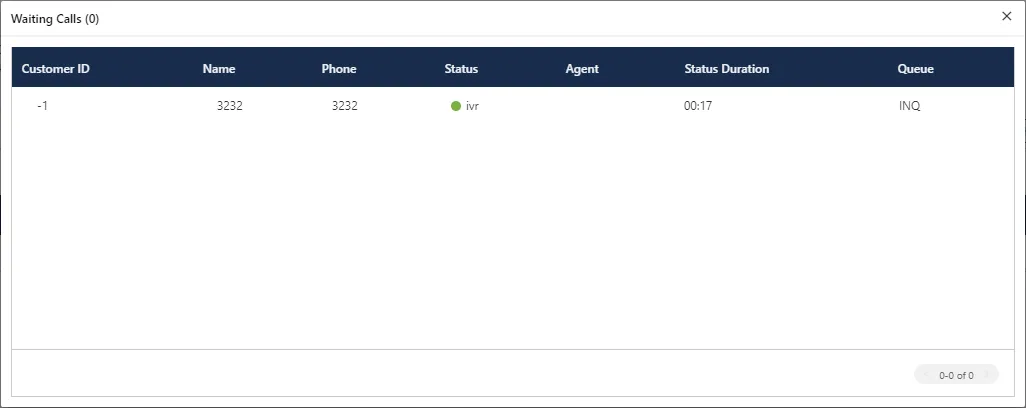
The opened pop-up contains the following columns.
- Customer Id: It shows the id of the registered customer. If the customer is not registered, then it shows "-1" as customer id.
- Name: It shows the name of the customer, if registered. If the customer is not registered, then it shows the extension name from which the call is coming.
- Phone: It shows the phone number of the customer.
- Status: It shows the status of the call in which it is currently present.
- Agent: It contains the agent name to whom the call is going to assign. If there is no agent free at the time of call, it shows blank as agent name.
- Status Duration: It shows the total time of the call which is spent by the call before assigning it to any of the agent.
- Queue: It shows the name of the queue in which the call has been assigned or landed.
Freeze/Unfreeze: Pause the dashboard to analyze a snapshot of data without updates.
Filters: Use the Filter Icon to search agents by Status (Ready/Break), Call Status (Connected/Wrapping), or Threshold Breaches.
Supervisor can click  icon to filter the data as per the available filters.
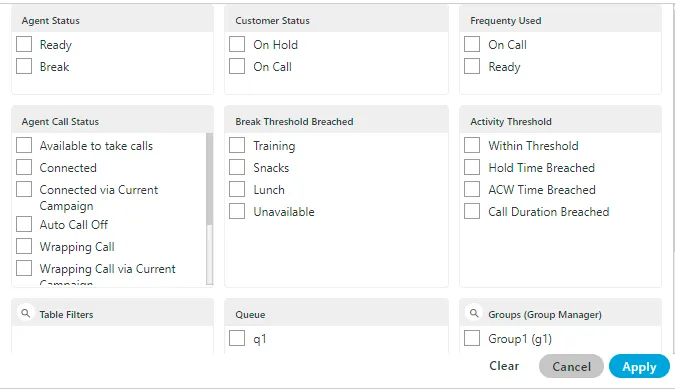
The supervisor can select the single or multiple filters from the following list.
- Customer Status : The supervisor can select the status of the customer either the customer is on the call or on the Hold.
- On Call : It means that the agent is on the call with the customer.
- On hold : It means that the agent is either not active on the call or the agent put the customer's call on hold.
- Frequently Used : It shows the frequently used filters which are used by the supervisors mostly.
- Agent Status: It filter the agents based on the status of their work, that is, whether the agent is ready or is on the break. It contains the following options.
- Ready: It shows the agents who are ready to attend the calls.
- Break: It shows the agents who are on break.If the agent is automatically set on "Auto Available" just after the logon, then the break count will be increased by 1.
- Agent Call Status : The supervisor can filter the status of the agents from the following status.
- Available to take calls : It means that the agent is free and available to take the next call.
- Connected : It means that the agent is connected with the campaign and also selected the extension.
- Connected via current campaign : It filters the agents of the selected campaign.
- Auto Call Off : It shows that the agent is not on the auto call or the auto call for those agents are off.
- Wrapping Call : It filters for those agents who are wrapping-up their calls or agents who are disposing off their calls.
- Wrapping Call via current campaign : It filters for those agents who are wrapping-up their calls with the current campaign with which the supervisor is logged-in at the same time.
- Activity Threshold : It allows the supervisor to filter for those call which are in the various threshold range. It contains the following parameters which can be used to filter the list.
- Within Threshold: It filter the list of those agents which are lying in the threshold limit set by the administrator.
- Hold Time Breached: It filters the list of those agents who breached the hold time limit set by the administrator.
- ACW Time Breached: It filters the list of agents who breached the time limit to dispose off the call which is set by the administrator.
- Call Duration Breached: It filters the list of agents who breached the limit of Call duration which is set by the administrator as well.
- Break Threshold Breached :The supervisor can search those users whose status is on break and the break time configured by the supervisor has already been breached. It contains all the break reason which are configured in the system by the administrator.
- Queue : The supervisor can filter for particular agents which are assigned in the particular queue.
Working Mode Selection Monitoring
Due to the covid-19 pandemic situation, all organizations were operating from home. But, after restoration of situations, the organizations started mixed mode of working, where some agents started working from office and some of the agents are working from home. In such scenarios, the work of supervisor to monitor the agents is increased, as the supervisor would want to know the agent's working mode. This will help the supervisor to know how to communicate with the agent. Thus, to provide the better agent monitoring, the working mode selection functionality has been provided to the agents, which a supervisor is also able to view.
Thus if the working mode selection is available/configured for the agents, then a data metric column will be available to the supervisor in the Agents List section. It will show the selected working mode by the agent. The following two working mode selection is present:
- WFO (Work from Office): The agents who are working from Office, have to select this working mode option.
- WFH (Work from Home): The agents who are working from home, and is enabled with Ameyo remote solution, have to select this working mode option.