Dialer Settings
Dialer Settings
Through this tab, Supervisor can configure Dialer Settings for outbound campaigns. This includes dialing algorithm type, enable AMD and types of AMD etc. In order to undo the required changes before saving, Supervisor can click on "Refresh" button while to save the required changes, Supervisor has to click on "Apply" button.
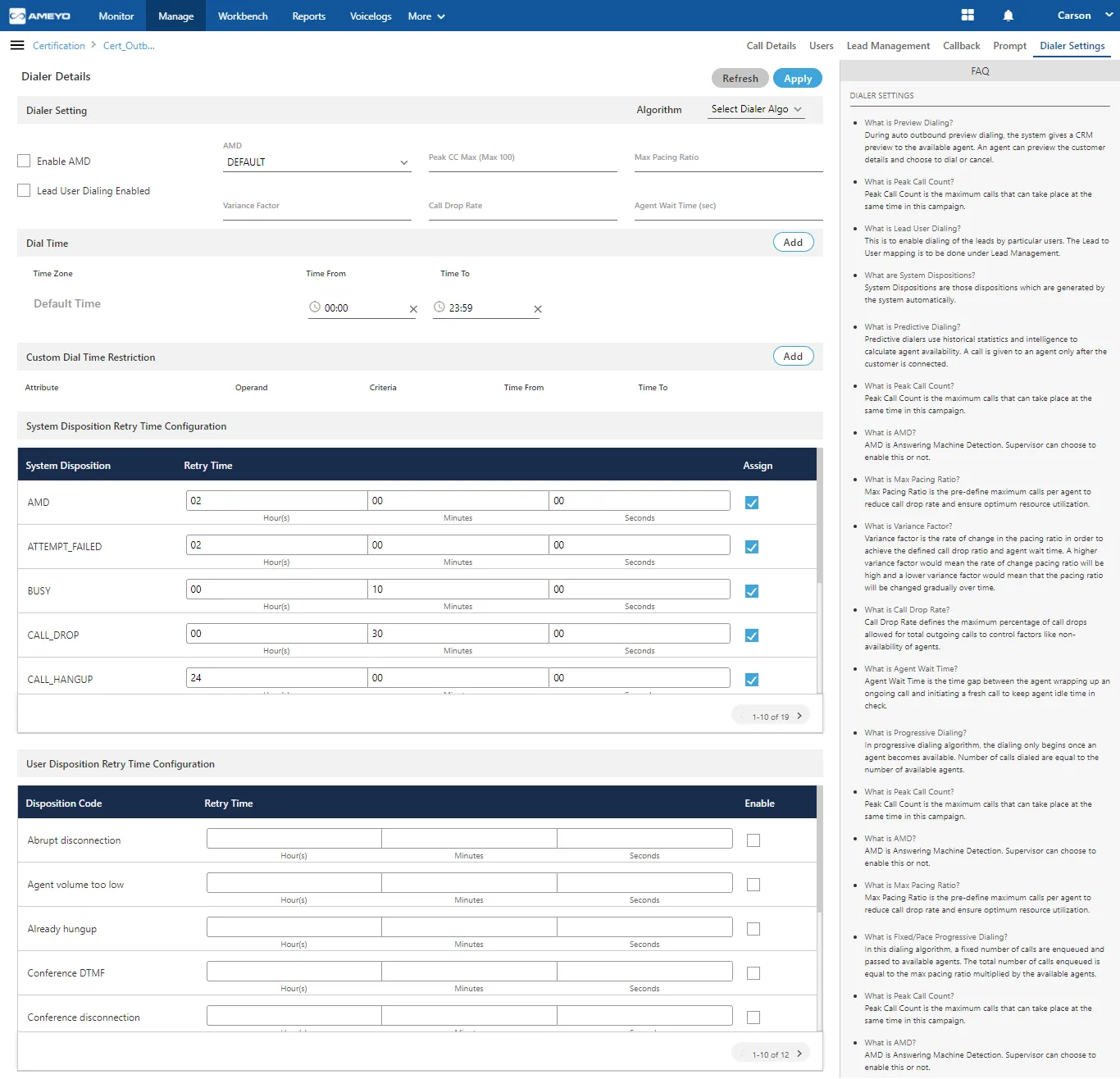
At the right side of the dialer settings page, some of the commonly asked questions about settings are defined. You can refer to those definitions.
The Supervisor can select the following algorithms for outbound dialing.
Progressive DialingProgressive Dialing
It works in a similar manner as the Predictive mode, except that dialing only begins once an agent becomes available. Number of calls dialed are equal to the number of available agents. Progressive dialing factors include peak CC.
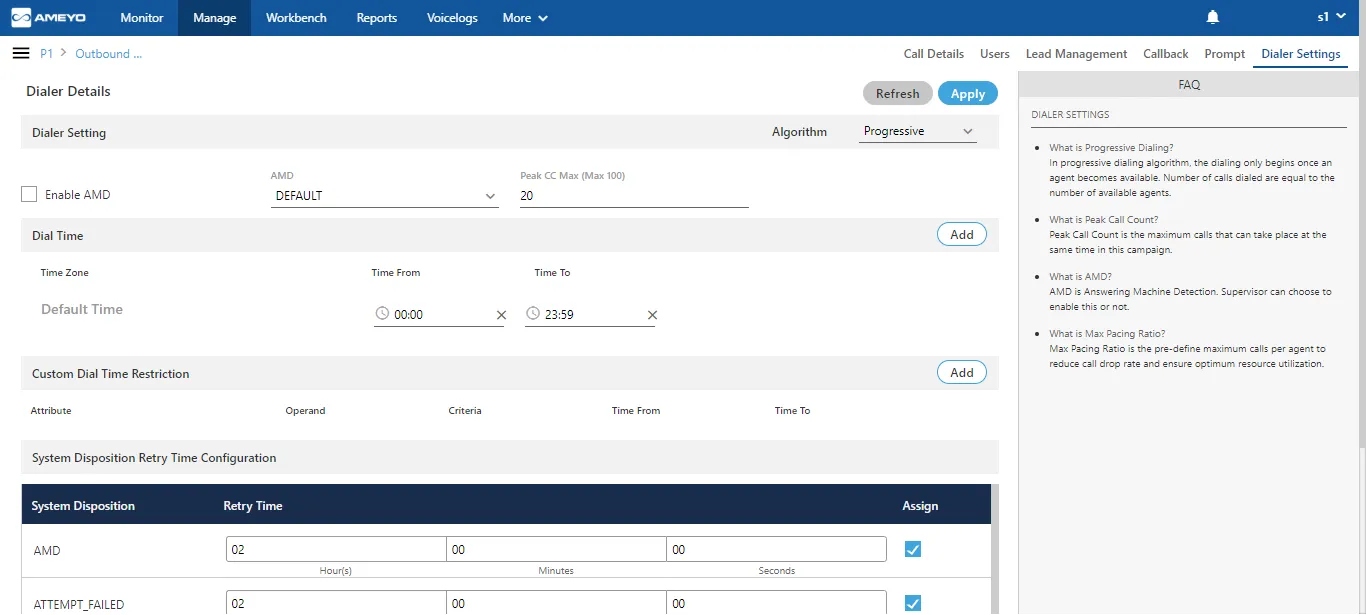
- AMD: If Supervisor wants to disable Answering Machine detection (AMD) in auto dialing then the supervisor can select "None".
- Peak Call Count: Supervisor can specify the maximum number of simultaneous calls which should be dialed by the dialer for particular campaign. The maximum number of peak call count which can be defined by supervisor depends upon the number of the peak call count defined at the campaign level by administrator. The supervisor can not define this count greater than the defined number by administrator.The maximum number (here 100) shows here in braces is depends upon the number of the peak call count defined by the administrator at campaign level and hence is customized.
Fixed Pacing DialingFixed/Paced Progressive
In this dialing algorithm, a fixed number of calls are enqueued and passed to available agents. The deciding factor in fixed-pacing dialing is max pacing ratio and peak CC. The total number of calls enqueued is equal to the max pacing ratio multiplied by the available agents. For eg., let's say we have defined max pacing ratio as 2.5 and the available agents are 2, then the total number of calls to be dialed will be 5 but if peak CC is less than 5 then the number of calls to be dialed will be equal to peak CC.

- AMD: If Supervisor wants to disable Answering Machine detection (AMD) in auto dialing then the supervisor can select "None".
- Peak Call Count Max (Max 100): Supervisor can specify the maximum number of simultaneous calls which should be dialed by the dialer for a particular campaign. The maximum number of peak call count which can be defined by supervisor depends upon the number of the peak call count defined at the campaign level by administrator. The supervisor can not define this count greater than the defined number by administrator.
- Max Pacing Ratio: This parameter controls the ratio of dialing calls to free agents. A higher value implies an increase in the number of dialing calls.
Predictive DialingPredictive Dialing
It is most productive dialing algorithm for agents. Predictive dialers use historical statistics and intelligence to calculate agent availability. Thus, based on past trends, the solution will know exactly how many dialing attempts and how much time is required to reach a live contact. A call is transferred to an agent only when it becomes live, thus avoiding the call drop and answering machine detection. Predictive algorithm depends on a number of factors, including peak CC, max pacing ratio, variance factor, agent wait time and call drop ratio.

- AMD: If Supervisor wants to disable Answering Machine detection (AMD) in auto dialing then the supervisor can select "None"
- Peak Call Count Max (Max 100): Supervisor can specify the maximum number of simultaneous calls which should be dialed by the dialer for a particular campaign. The maximum number of peak call count which can be defined by supervisor depends upon the number of the peak call count defined at the campaign level by administrator. The supervisor can not define this count greater than the defined number by administrator.
- Max Pacing Ratio: This parameter controls the ratio of dialing calls to the free agents. A higher value implies an increase in the number of dialing calls.
- Variance Factor: It defines how effectively the settings of Maximum Pacing Ratio / Call Drop Ratio / Agent Wait Time can be followed.
- Call Drop Rate: The call drop ratio is a metric that indicates the allowable rate at which customer calls can be dropped within a particular campaign.Example: if you configure the call drop ratio to 10%, it means that up to 10% of your connected calls are permitted to be dropped. Based on this ratio, the dialer will automatically increase or decrease the number of calls being placed to maintain the desired performance level.
- Agent Wait Time (sec): Agent wait time is the allowable average time an agent waits for the next call in a specific campaign managed by a dialer.Example: if you configure the agent wait time to 5 seconds, it means that the dialer is set to ensure that an agent waits no more than 5 seconds for the next call. If the actual wait time exceeds the configured value, the dialer will increase the number of calls being placed to reduce the wait time.
The dialer first aims to meet the configured call drop rate before attempting to achieve the target agent wait time.
Preview DialingPreview Dialing
During auto outbound preview dialing, the system gives a preview popup to the available agent. An agent can preview the account and choose to dial or reject to move to the next account. Preview dialing factors include peak CC.

- Lead User Enabled: If Supervisor wants to enable the dialing using the uploaded lead then enable the "Lead User Enabled" Checkbox.
- Peak Call Count: Supervisor can specify the maximum number of simultaneous calls which should be dialed by the dialer for a particular campaign. The maximum number of peak call count which can be defined by supervisor depends upon the number of the peak call count defined at the campaign level by administrator. The supervisor can not define this count greater than the defined number by administrator.
Manage Time Zone in "Dial Time"
Supervisor can define the time zone in which dialing needs to be restricted for specific country timezone by clicking on "Add" button.

By default, a Default Time Zone is defined. The Supervisor can specify the default time range that the dialer would refer to.
- Select the timezone from the drop-down and specify the time range (Time from and Time To in hh:mm:ss format).
- Any record can be deleted by clicking the "X" icon.
Custom Dial Time Restriction
This feature is used for limiting the auto-dialing based on several attributes like phone, name and timezone. Custom dial time restriction can be added by clicking on the "Add" button.

You can click "X" icon in the end of the row of a custom time zone to delete it.
Retry Time Settings
Retry Time is the time duration after which the dialer will retry for those numbers, which do not get connected in the first attempt.
System Disposition Retry Time Configuration
Supervisor can configure the retry time for different system dispositions. The Supervisor can also assign the system dispositions to the respective campaign. If the system disposition is not assigned in this tab then the retry time defined for that system disposition will not work.
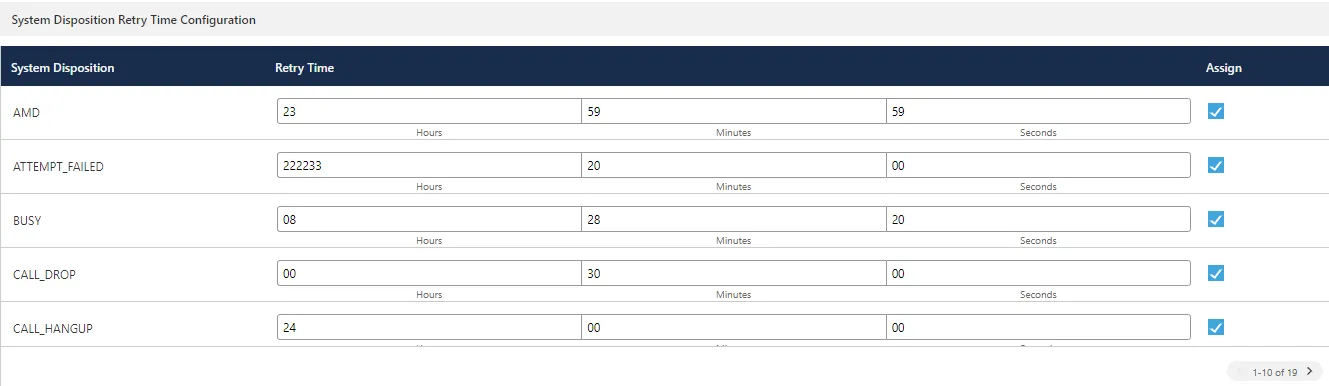
System dispositions will be assigned by checking the assign checkbox of that particular system disposition.
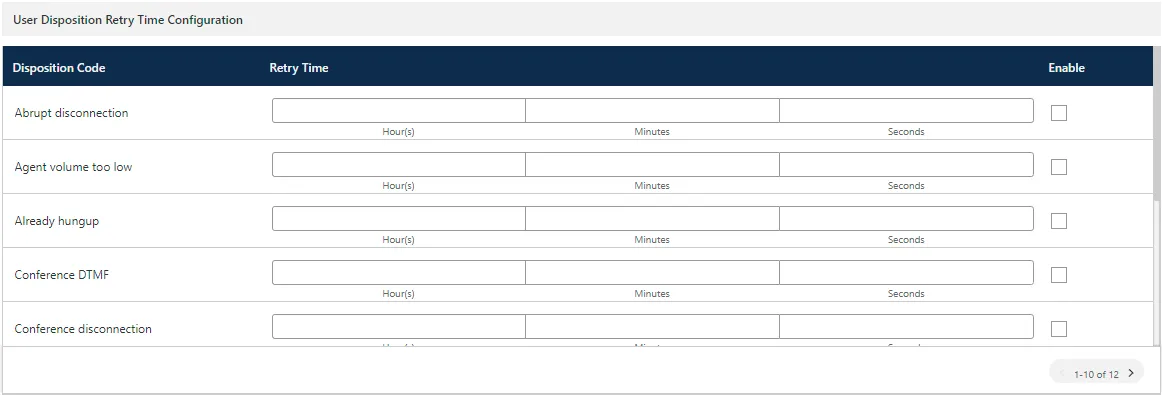
(Licensable) User Disposition Retry Time Configuration
Supervisor can configure the retry time for different user dispositions. Supervisor has to select the dispositions and provide the retry time for each selected disposition