External Voicebot Integration
Overview
Your own voicebot can answer calls on your ECC 6X numbers and hand callers to a live agent on the same call. ECC streams the call audio to your bot over a secure WebSocket, and your bot asks ECC for an agent with one HTTPS request.
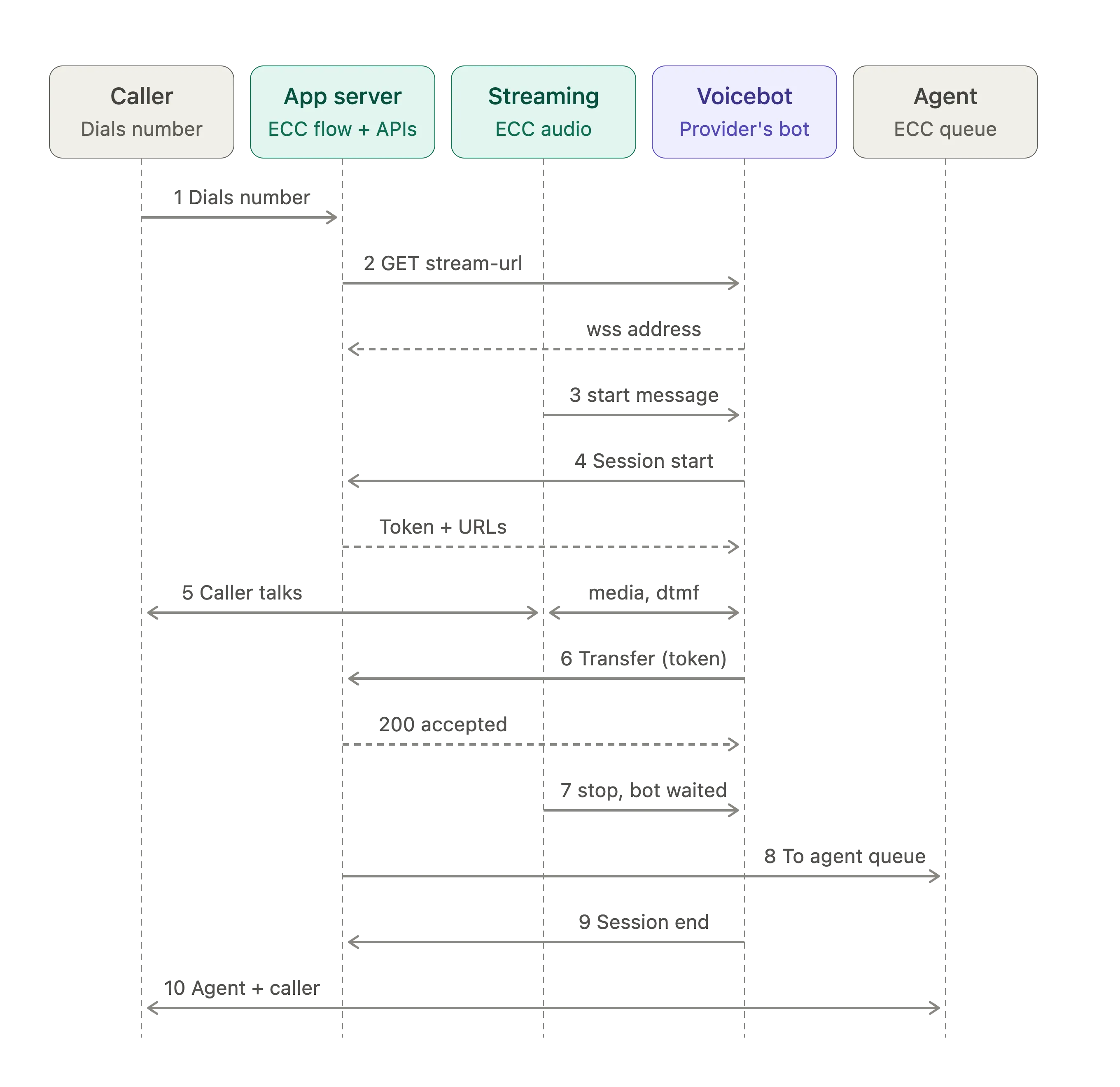
How a call flows:
- A call reaches the Voicebot node in your campaign's call flow. Any ECC IVR steps before the node run first.
- ECC calls your bot's HTTPS endpoint, and your endpoint replies with a wss://URL for this call.
- Exotel opens a WebSocket to that URL and streams the caller's audio. Your bot replies with audio on the same connection.
- When the caller needs a person, your bot sends a transfer request to ECC with any context as JSON.
- ECC stops the stream and routes the call to an agent. The agent joins the same call, so the caller isn't redialled.
If your bot can't be reached, the call flow takes a failure branch within about 10 seconds, for example to an agent queue or a message.
Availability: ECC 6X. Exotel confirms availability for your account during onboarding.
Before you begin
You build the bot; Exotel sets up the call flow and routing in ECC.
What you provide
- Your bot's HTTPS endpoint (see Bot endpoint).
- The audio sample rate you want: 8000 Hz (default), 16000 Hz or 24000 Hz.
- Routing inputs: the numbers whose calls go to the bot, and the queues or campaigns that take transfers.
- The JSON your bot sends on transfer, the field that picks the queue, and the queue for each value.
- What callers should get if your bot can't be reached: a message, an agent queue, or both.
- A test number, a go-live date and a contact for UAT sign-off.
What Exotel sets up
- The campaign, queues and call flow, with a Voicebot node pointing at your bot.
- Routing of your numbers to that call flow.
- The Transfer to Campaign flow that reads your JSON and picks the campaign, plus the failure branch.
- End-to-end testing with you, then go-live support.
Setup steps
# | Step | Owner |
|---|---|---|
1 | Share the bot endpoint, sample rate, routing inputs and transfer JSON | You |
2 | Create the campaign, queues and call flow with the Voicebot node | Exotel |
3 | Route your numbers to the call flow | Exotel |
4 | Build the Transfer to Queue flow and failure branch | Exotel |
5 | Build stream handling, the call setup request and the transfer | You |
6 | Test answer, handoff, routing and the failure branch | Exotel with you |
7 | UAT sign-off and go-live | You |
Bot endpoint
Give Exotel one HTTPS URL; ECC calls it once per call and streams to the wss://URL in your reply.
URL format
- The /bots/<bot-id>/segment is required. <bot-id>is any value you choose.
- The host, port and the rest of the path are yours.
- Use a valid TLS certificate, reachable from the internet.
Reply
Reply with HTTP 200 and JSON naming the WebSocket URL for this call:
Exotel then opens the stream to that wss://URL. Put any per-call token in the path of the wss://URL, not in a query string.
Stream messages
Each call is one WebSocket carrying JSON text messages both ways: caller audio in, your bot's audio out.
Audio format
Item | Value |
|---|---|
Encoding | 16-bit linear PCM, mono, little-endian, base64 in the payloadfield |
Sample rate | 8000 Hz (default), 16000 Hz or 24000 Hz, agreed during setup; confirmed in start.media_format.sample_rate |
Audio your bot sends | Chunks of 3.2 KB to 100 KB of raw audio (before base64), each a multiple of 320 bytes |
Messages Exotel sends
Event | When | What your bot does |
|---|---|---|
connected | Right after the WebSocket opens | Wait for start |
start | Once, before any audio | Save stream_sid; read the caller's number and the number dialled; call call_setup_url |
media | Continuously, with caller audio | Feed the audio to your speech recognition |
dtmf | The caller presses a key | Act on the digit |
mark | Audio you labelled has finished playing | Continue your turn logic |
stop | The stream has ended, after a transfer or a hang-up | Clean up; don't call the transfer API after stop |
Use the top-level stream_sid. Numeric-looking values such as sequence_number, chunk, timestamp, sample_rateand durationarrive as strings.
start
media
dtmf
mark
stop
Messages your bot sends
Every message carries the stream_sidfrom start.
Event | Purpose |
|---|---|
media | Play your bot's audio to the caller |
mark | Label a point in your audio; Exotel echoes it back when playback reaches it |
clear | Drop audio queued but not yet played, for example when the caller interrupts |
Transferring a call to an agent
A transfer takes two requests from your bot: one when the call starts, one when the caller needs an agent.
Step 1: Get the transfer URL and token. When startarrives, send a POST with an empty JSON body to start.custom_parameters.call_setup_url, exactly as received.
The response (trimmed) holds the transfer URL and a token for this call:
Keep the URL and token until the call ends; the token is valid for 6 hours. Make this request when the call starts, so the transfer is ready when it's needed.
Step 2: Request the transfer. When the caller needs an agent, send your JSON to the transfer URL, as returned:
Step 3: Keep the WebSocket open. After a 2xx, stop sending audio but don't close the WebSocket, or the call may drop before the agent joins.
Step 4: Wait for stop. Exotel sends stoponce the handoff is under way. Clean up then.
Transfer JSON. The body is any JSON you agree with Exotel; the Transfer to Queue flow reads the agreed fields to pick the queue. A common choice is intentas the routing field.
Transfer to another campaign. Add voiceBotTargetCampaignId=<campaign id>to the transfer URL's query string. That campaign's transfer flow then picks the queue. Use only campaign IDs agreed with Exotel.
Responses
Response | Meaning | What to do |
|---|---|---|
2xx | Transfer accepted | Keep the WebSocket open and wait for stop |
401 / 403 | Token missing, invalid or expired | Check the header and token |
500 "Duplicate Request" | A transfer is already under way for this call | Don't retry |
500 voicebot inactive | The bot session for this call isn't active | Don't retry |
Timeout | No response | Retry once; "Duplicate Request" on the retry means the first one worked |
Ending the call and failures
To end the call, close the WebSocket without calling the transfer API; ECC hangs up the caller.
- Bot errors mid-call. ECC can't tell a deliberate close from a crash or a network drop, so a failure mid-call disconnects the caller. Keep your WebSocket handling robust, and transfer to an agent when your bot hits an error it can recover from.
- Bot unreachable at call start. If the stream can't start, the call flow takes its failure branch within about 10 seconds.
- Caller hangs up. Exotel sends stop. Don't call the transfer API after stop.
Security
All traffic is HTTPS and WSS; you can add two checks so your bot only accepts Exotel's calls.
- IP allowlisting. Exotel shares the IP addresses its requests and streams come from, so you can allow only those through your firewall.
- A secret in your URLs. Include a long random secret in the HTTPS endpoint you give Exotel, and reject requests without it. Return a wss://URL with a short-lived token for that call in its path, and refuse WebSocket connections without it.
- The transfer token is issued per call by call_setup_url. Keep it on your server and out of your logs.
Field reference
Field | In | Meaning |
|---|---|---|
event | All messages | Message type |
stream_sid | All except connected | ID of this stream |
sequence_number | Messages from Exotel | Order of the message in the stream |
call_sid | start, stop | Exotel's ID for the call leg |
start.from, start.to | start | Caller's number and number dialled |
start.custom_parameters.call_setup_url | start | URL your bot calls to get the transfer URL and token |
start.media_format | start | Encoding, sample rate and bit rate |
media.payload | media | Base64-encoded 16-bit PCM audio |
media.chunk, media.timestamp | media from Exotel | Chunk number and timestamp in ms |
dtmf.digit, dtmf.duration | dtmf | Key pressed, and how long in ms |
mark.name | mark | Your label |
stop.reason | stop | Why the stream ended; usually canceled or call ended, for a transfer and a hang-up alike |
FAQs
Do I need a SIP trunk or an Exotel phone number? No. The call stays in ECC, and its audio is streamed to your bot.
Can the Voicebot node take a wss://URL directly? Not today. It takes an HTTPS URL that replies with the wss://URL (see Bot endpoint).
Are DTMF tones removed from the audio? Key presses reach your bot as dtmf events with the digit and its duration. If your use case needs the tones removed from the audio, for example for PIN or card entry, Exotel can explore a suppression option with you.
What happens if my bot is down? The call flow's failure branch runs within about 10 seconds, so callers can still reach an agent or hear a message.