Inbound Routing Strategies /Automatic Call Distributor
Overview
The Automatic Call Distributor (ACD) is an intelligent mechanism designed to streamline high-volume inbound processes. Its primary function is to route incoming calls to the most suitable agent who can address the caller’s specific needs appropriately.
By eliminating the dependence on traditional PBX systems and manual intervention, the ACD ensures smooth call routing, reduces call abandonment, and optimizes resource utilization.
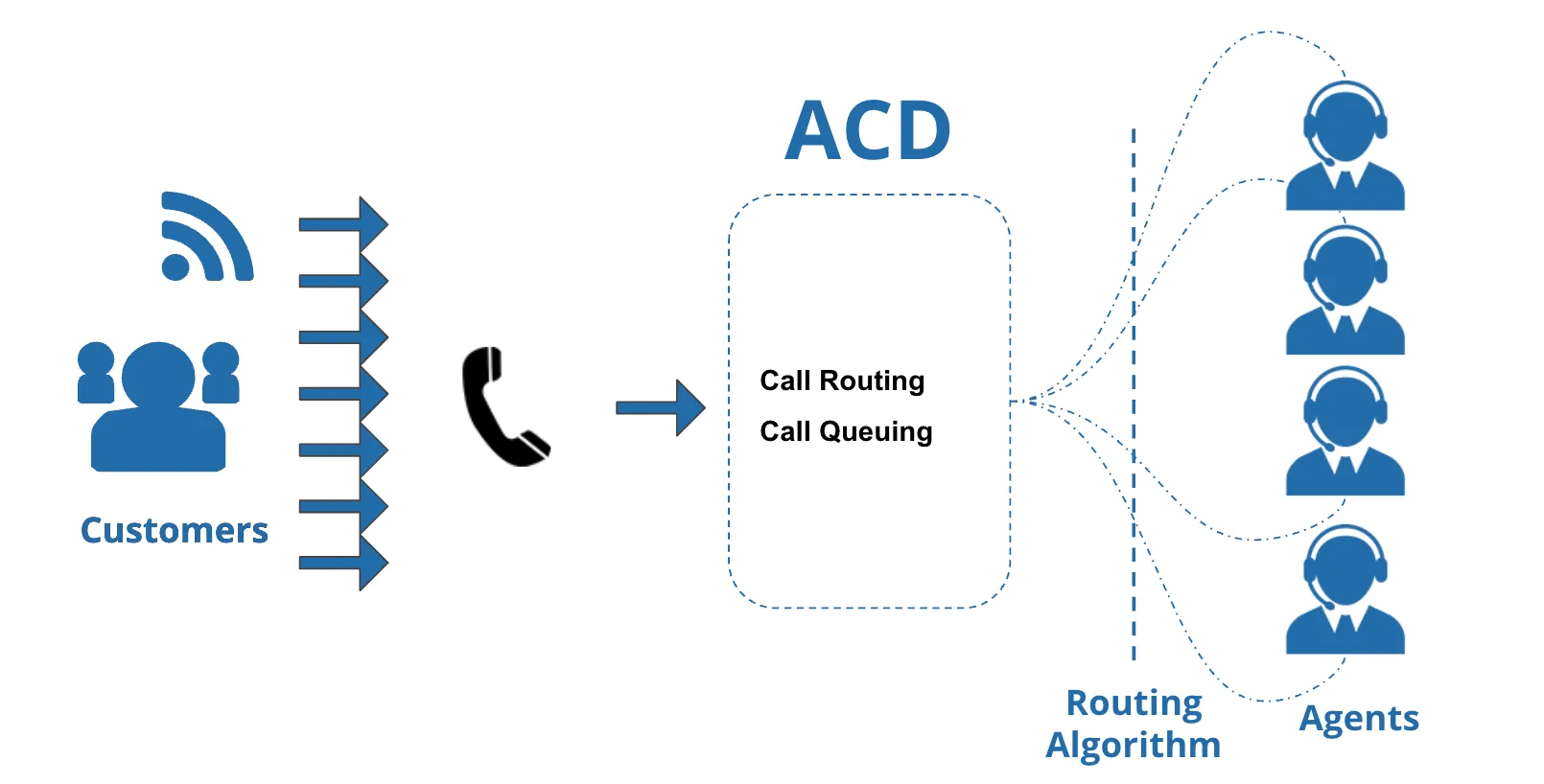
Robust Routing Capabilities (in voice campaign)
The ACD system offers flexible algorithms that can be customized based on CRM data, IVR selection, business hours, and agent skills. The core routing strategies include:
1. Skill Based Routing and Skill managementSkill based routing (SBR)
This logic connects callers to the best-suited agent based on the agent's specific skills and level of expertise.
- Benefit: Ensures agents only handle queries within their purview, reducing frustration and improving resolution quality.
- Use cases/Example:
- Language-based skill routing: When a customer chooses a preferred language (for example, English or Spanish), the system routes the call to the available agent with the highest skill rating in that language. Lower-rated agents receive calls only when higher-skilled agents are busy, ensuring better call outcomes and efficient use of agent capacity.
- Multi-skilled agent priority: If an agent has multiple language skills but is stronger in one (for example, Spanish over English), the system prioritizes routing calls that match their strongest skill. The agent will handle other skill queues only when there are no pending calls in their primary skill, or when doing so is necessary to meet SLA commitments.
2. Queue-based Routing
Queue-based routing focuses on routing calls to queues (teams) based on queue-level priority instead of individual agent skills. Queues typically represent different groups, such as senior vs. junior agents or separate departments.
- How it works: You create different queues (e.g., "Expert Team," "General Support") and assign them priority levels. The system offers calls to the highest-priority queue first.
- Best for: Managing tiered support teams or specialized departments.
- Example: A call is first routed to the "Senior Agents Queue" (Priority 1) to ensure high-quality resolution. If all senior agents are busy, the call automatically overflows to the "General Support Queue" (Priority 2) to minimize wait times.
3.Preferred Agent Routing
Often referred to as "Sticky Agent" logic, this routes the caller to the specific agent they spoke with previously.
- Configuration: The system checks for interactions within a configurable amount of time to ensure continuity.
4. Priority-Based Routing
A Priority-based routing in a voice call campaign is based upon the priority given to the calls initiated by the customers. It means that the calls which are more important for the business gets priority and answered first than to the calls with less priority.
- Best for: Prioritizing high-value calls or urgent inquiries.
- How it works: Priority is assigned to the call itself based on the customer type or the IVR selection (e.g., Sales vs. Support). Higher priority calls jump ahead of lower priority calls in the waiting line.
- Example: A "Sales" call (Priority 1) will be answered before a "General Inquiry" call (Priority 2), even if the general inquiry caller has been waiting longer. This ensures revenue-generating or critical calls are never delayed.
5. Run-Time Queue Changes
Design workflows that seamlessly route a caller from one queue to another.
- User Experience: The transfer happens without any break or additional wait time for the caller.
Operational Advantages
Implementing an intelligent ACD mechanism addresses common challenges such as frequent transfers, long hold times, and scalability restrictions.
Increased Agent Productivity
- Reduced AHT: Agents handle calls they are specifically trained for and have subject knowledge on, which significantly reduces Average Handling Time (AHT).
- Effective Utilization: Prevents ineffective resource utilization by matching demand with the right supply of skills.
Improved First Call Resolution (FCR)
- Accuracy: Routing to the right agent ensures a faster and more accurate response.
- Efficiency: Higher FCR is achieved by removing the need to transfer calls between different departments.
Streamlined Operations & Scalability
- Integration: The system supports easy integration to enable call conferencing and transfers with real-time customer data.
- Instant Scalability: There is no requirement for additional hardware or IT involvement to scale up or down instantly (up to a certain limit of call volume).
- Reduced Costs: By achieving higher FCR and reducing transfer times, overall call center costs are reduced.
Routing in a Voice Campaign (from Administrator interface)
Here, you can create and manage the routing for both Inbound and Outbound Calls in Interactive Voice Application Campaign, Outbound Campaign, and Parallel Predictive Campaign.
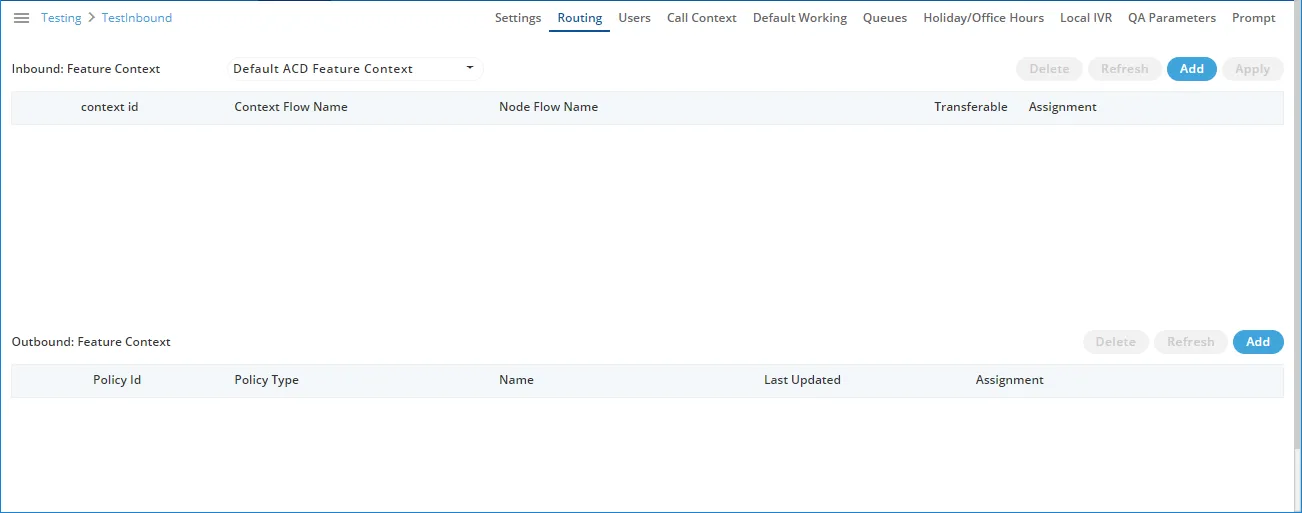
Routing for Inbound
Add a Nodeflow for Routing
Perform the following steps to create a nodeflow.
- Click "Add" button to create a nodeflow. It shows a new row in the white area just below the column header.

- Provide a name for the context flow.
- In "Node Flow Name" column, you have to upload either a .nodeflow or .anfx flow
Service Engineer will provide you the required nodeflow files.
Click "Browse" to open a nodeflow file. Select the location where the file stored. Select the required file and click "Open".
- Check "Transferable" if you want to transfer the call from this nodeflow to another nodeflow.
- Click "Apply" to add the nodeflow.
Assign Nodeflow to a Queue
Perform the following steps to assign a nodeflow to a queue in the campaign.
- Check the box to select a queue.
- Click "Assignment" to assign this nodeflow to a queue. It shows the following pop-up.
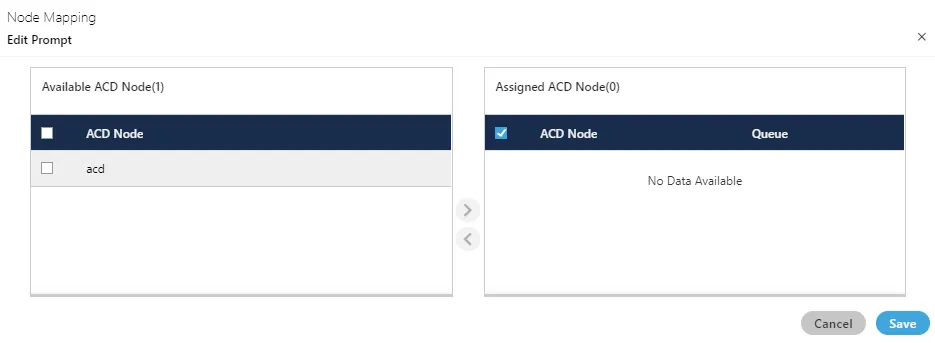
- Select "ACD" node in "Available ACD Node" section, and click
 icon.
icon.
- Select the nodeflow in "Assigned ACD Node" section.
- In "Queue" drop-down menu, select the queue to which you want to assign this nodeflow.
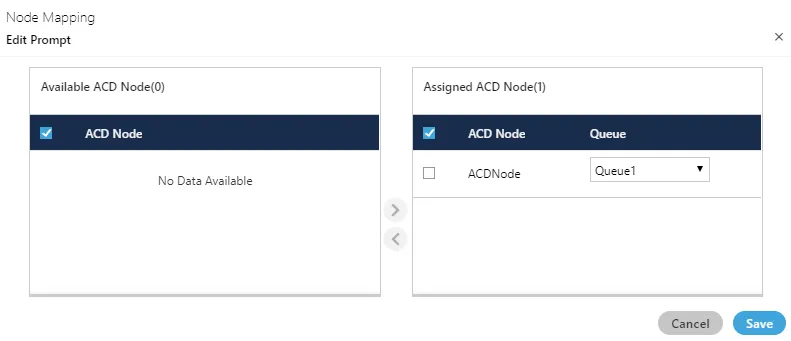
- Click "Save" to assign the nodeflow to the selected queue. It takes you back to "Routing" Tab.
You can perform the same steps to create the nodeflow and to assign it to a queue.

You can fetch a nodeflow and download it as a file on the disk, assign or unassign it to a queue, and delete the nodeflow.
Delete Routing Policy
- Select the Routing Policy for which you want to delete permanently. Click "Delete" button. A confirmation pop-up comes up. Click "Yes" if you want to delete the routing policy, else click "No".
