Skill Based Routing and Skill management
Overview
Skill-based routing (SBR) is a core component of the Automatic Call Distributor (ACD) system. It is designed to filter and direct incoming inquiries to the call center agents possessing the most applicable skill sets. By routing calls to the most qualified agents, callers get quicker resolutions and shorter wait times, reducing Average Handle Time. Specialized training minimizes onboarding needs, while skilled agents can focus on key clients, improving resource allocation, lowering abandonment rates, and boosting overall efficiency.
How It Works
The system routes calls to agents who possess the required skill. Calls are prioritized and offered first to agents with a higher proficiency level in that skill.
Key Benefits
- Customer Experience Improvement: Provides an immediate connection to the most qualified agent, significantly reducing friction points and enhancing customer satisfaction.
- Reduced Handling Time: By closely matching calls to the best-prepared agent, callers experience faster issue resolution, thus reducing the Average Handle Time (AHT).
- Targeted Training & Efficiency: Agents focus on specific skill sets, increasing their utilization and productivity within those domains. This specialization leads to reduced call abandon rates and a more efficient call center operation overall.
- Resource Prioritization: Highly-skilled agents can be strategically assigned to high-value clients or complex queues, ensuring critical resources are targeted where they provide the most return for the call center.
- Flexible Setup: Different skills can be created as per the requirements of different Queues or DIDs (Direct Inward Dialing), offering granular control over resource allocation.
Functionality
Skill Management is configured under the System Configuration in the Administrator/Voice-Admin consoles. The feature allows for the creation of skills, definition of skill levels with corresponding weightages, and the assignment of users to specific skills for use in skill-based call routing.
- Skills: A skill is created with a unique name (e.g., "Spanish Language Support," "Tier 2 Technical").
- Skill Levels: Each skill can have multiple defined levels, each assigned a specific weightage (e.g., Level 1: Weightage 5, Level 5: Weightage 100) to prioritize agents.
- User Management: Users are assigned to a skill and a level via a management interface.
Maintenance Constraint
Once a skill is created, it cannot be edited; it must be deleted and re-created to apply modifications to the skill name or defined levels. However, user assignments and the management of skill levels can still be performed on an existing skill.
Use Cases
- Multi-Language Support: Routing all calls from customers who select Spanish in the IVR directly to agents with the "Spanish Language" skill.
- Product Tiering: Directing calls about Product A to agents with the "Product A Specialist" skill, while directing complex technical issues to agents with "Tier 3 Troubleshooting" skill.
- Sales vs. Support: Using a skill to differentiate agents who handle Sales Inquiries (high conversion skills) from those who handle Technical Support (high resolution skills).
Prerequisites
- Licensing: This feature is a Licensed Feature and requires the appropriate license component to be available and visible in the user interface for configuration.
- IVR Configuration: The implementation of skill-based routing requires changes to the Interactive Voice Response (IVR) flow to capture the customer’s intent (e.g., product issue, language preference) which is then used by the ACD to match the call with the appropriate agent skill.
- Professional Services Involvement: Due to the complexity of integrating skill capture in the IVR and configuring the underlying ACD logic, Professional Services involvement is typically required to ensure correct deployment and optimal routing configuration.
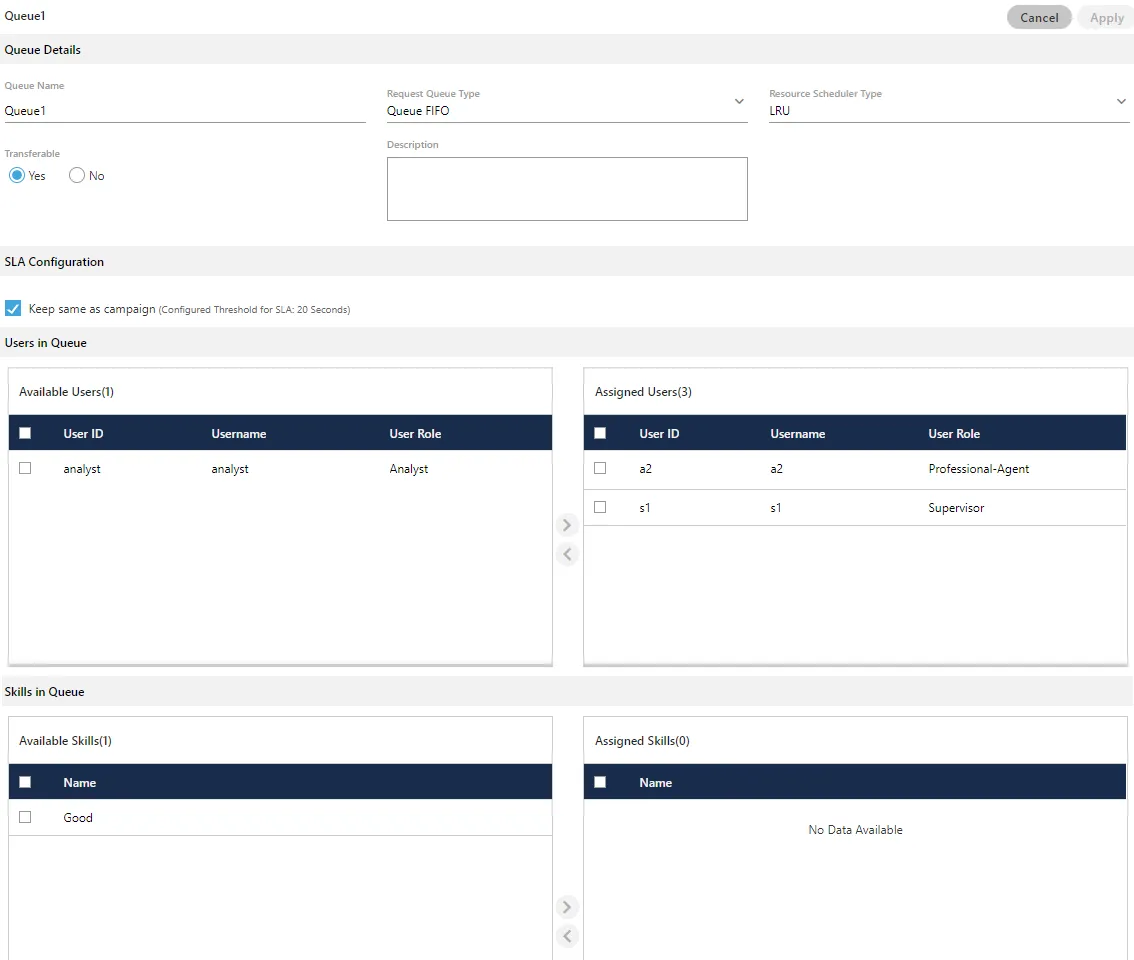
- Routing Configuration: Skills must be applied to a Queue while editing the queue settings in any campaign for skill-based routing to function.
Usage Instructions
At Administrator level (Changed System Configuration After Creating Campaign)
Creating a Skill and Levels
- Navigate to the Skills Tab (located under System Configuration).
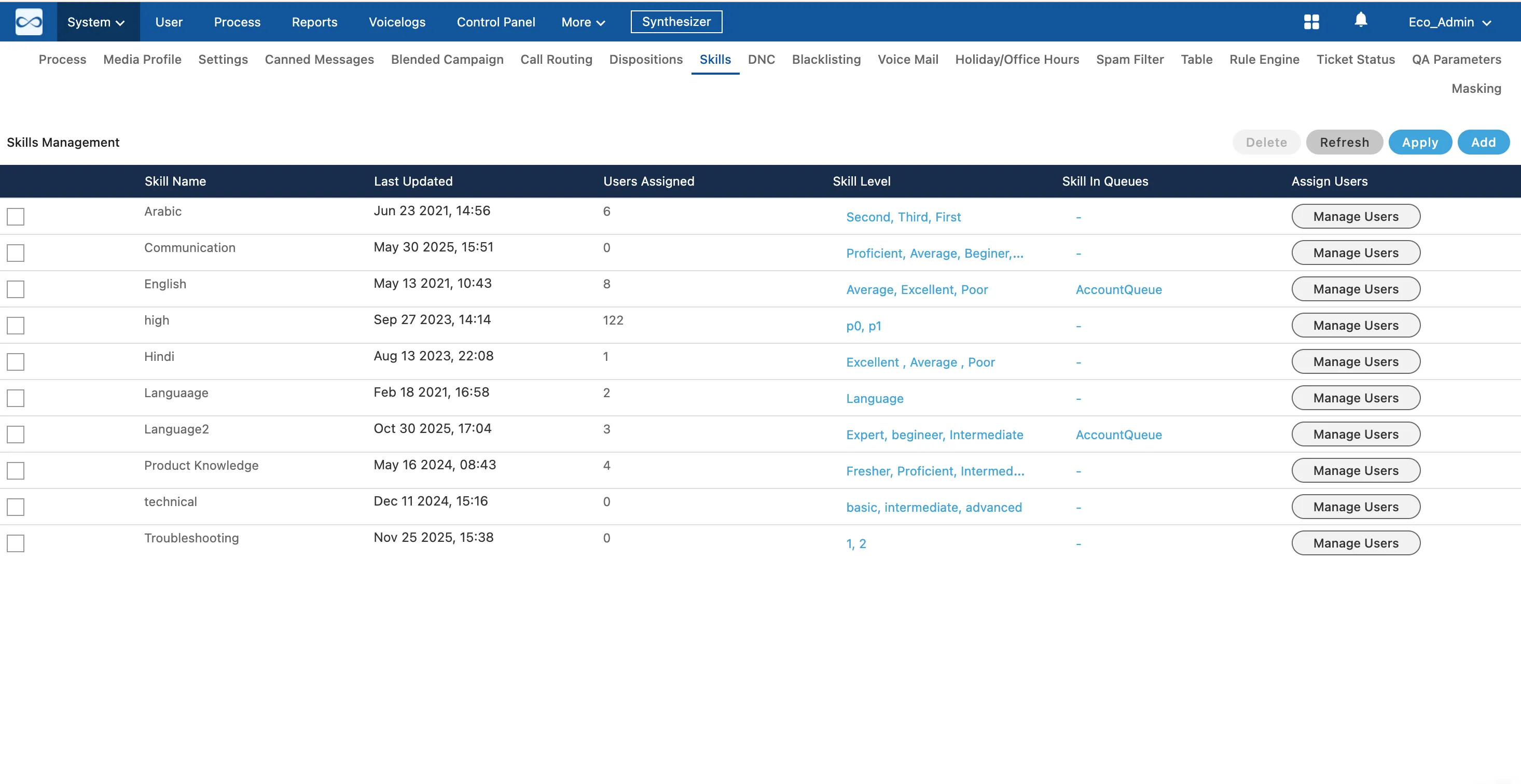
- Enter Skill name and define skill levels by clicking "Add Skill Level". Here, click "Add" button to add a skill level. Enter the name of skill level and its weightage.
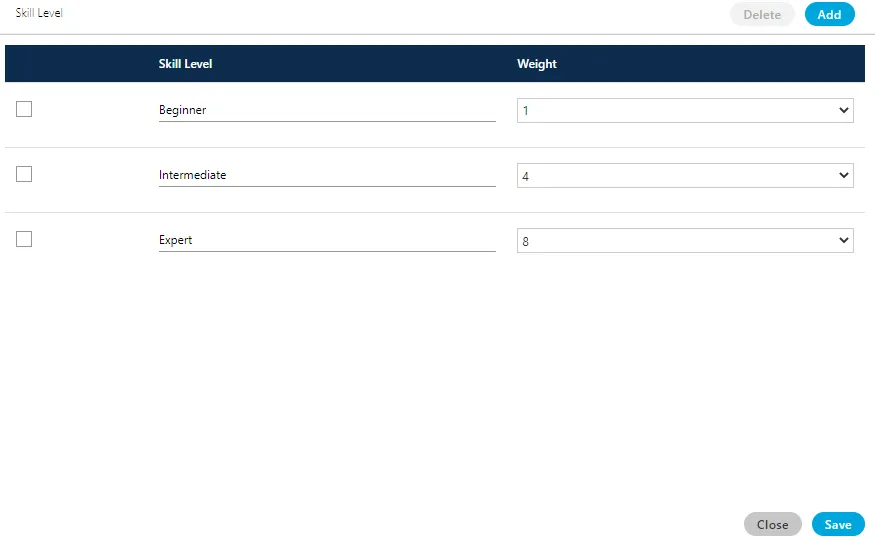
- In the pop-up, click "Add" to create a level, enter the name of the skill level, and define its weightage. Click "Save" to save the defined skill levels.
- Click "Apply" in the main Skills tab to apply the newly created skill to the system.
Assigning Users to a Skill
- In the Skills Tab, select the desired skill and click the "Manage Users" button.
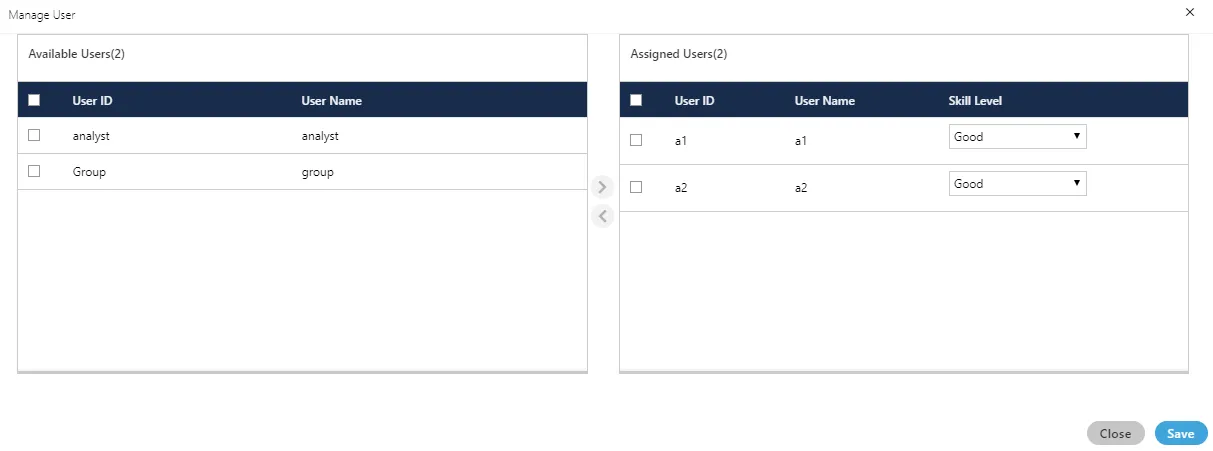
- Select the users from the "Available" section.
- Click the ">" icon to move them to the "Assigned" section.
- To remove users, select them in the "Assigned" section and click the "<" icon.
- Click "Save" to commit the changes to user assignments.

Assign Skills to Queues
- The skills can be assigned to the queue while editing it in the settings of any campaign. Here, "Skill in Queue" column shows the list of queues where a skill has been assigned. Click the link in "Skill in Queues" column to see the list of queues in which it has been assigned.
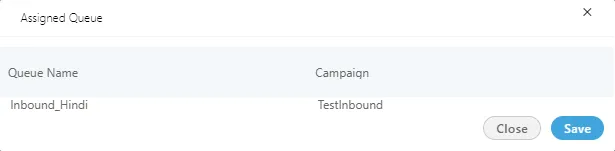
- Click "Apply" to apply the changes. Rather, you can click "Refresh" to discard the changes. You can add multiple skills here.
Set Scheduler Type
- The queue must be configured to use skill-based logic. In the queue management tab (either in Administrator intrface of Supervisor interface), select Skill Based from the Queue ManagementQueue Management dropdown menu.
Deleting a Skill
- Select the skill you wish to delete from the list.

- Click the "Delete" button.
- A confirmation prompt will appear. Click "Yes" to confirm deletion.
The deleted skill cannot be retrieved. Also, the deleted skill will not be applied in the selected queue and campaign.
Related Features/Modules
- Call Routing/Queue ManagementQueue Management: Skills are fundamentally linked to Skill Based RoutingSkill Based Routing, a routing type where calls are offered based on the agent's defined skill set and level. Skills must be assigned to a Queue for SBR to be utilized as detailed out below (skill based routing in a voice campaign).
- Agent Monitoring: Supervisors can monitor agent activity and call distribution based on skills within the monitoring tabs, allowing them to track the performance and utilization of skill groups.
Skill-based Call Routing in a Voice Campaign
Perform the following steps to route your call according to skills defined.
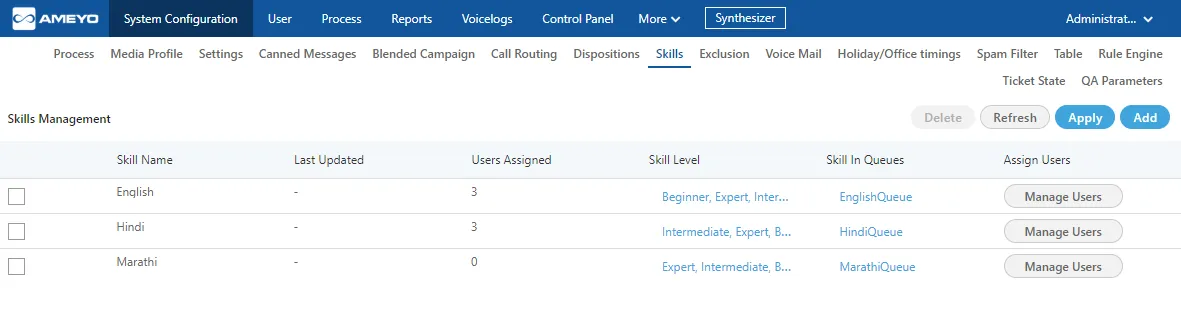
- Add the skill category, skill levels, and assign skills to the agents.
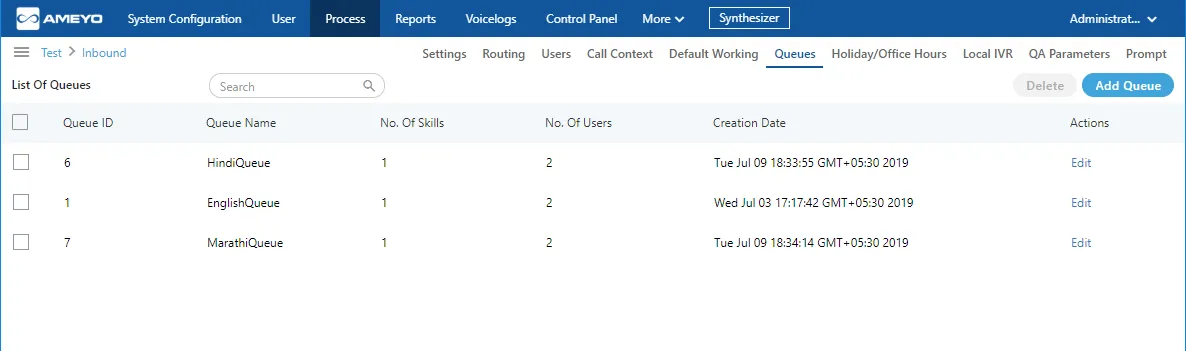
- In "Process" Tab, select "Inbound Campaign" and go to "Queues" Tab. Create the queues as per the defined skills.
- Now, assign the skills in the queue.
- Create the routing for the skills which you have created. Assign the ACD Node and the queues corresponding to the skills.
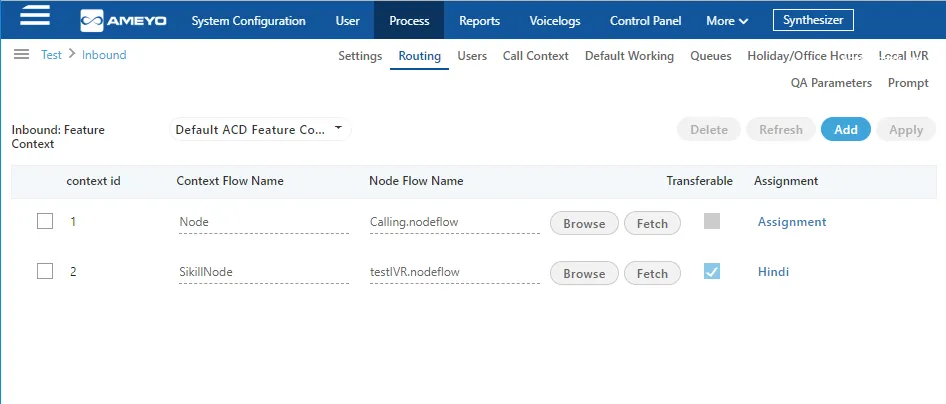
Do not delete the old routing nodeflows created earlier rather add the new nodeflows.
- Again switch the tab to the skills in System configuration menu and click "Skill in Queues" column.
- Assign the queue to the corresponding skill levels.
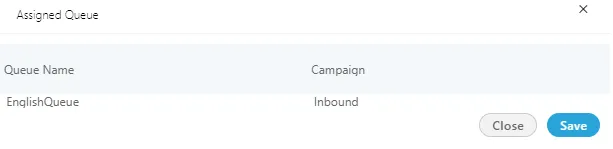
- Now, go to the inbound campaign and switch the tab to the "Prompt". Here, you have to add the prompt from which the customer has to select the skill level, so that the calls gets to route according to the defined skills.
Example&#xNAN;:In this test case, we are using three skills for routing, that is, English, Hindi, and Marathi. In the Voice Prompt, the English queue is assigned to number 1, Hindi queue is assigned to number 2, and Marathi queue is assigned to number 3.Now, if the customer presses 1, then the call will be routed to the English queue, if customer presses 2 then the call will be routed to Hindi queue, and if the customer presses number 3 then the call will be routed to Marathi queue.
The agents with the higher skills will receive the call first and then the agents with lower skills get the calls only if the higher skilled agents are not free to take the call.
Privileges
Privilege | Purpose |
|---|---|
contactcenter:dacx-cc.admin.skill-mgmt.view-skill:invoke-access | View the Skills tab and the list of configured skills. |
contactcenter:dacx-cc.admin.skill-mgmt.add-skill:invoke-access | Create a new skill and its skill levels. |
contactcenter:dacx-cc.admin.skill-mgmt.modify-skill:invoke-access | Edit skill levels, weightages, and user assignments. |
contactcenter:dacx-cc.admin.skill-mgmt.rem-skill:invoke-access | Delete a skill. |
system:dacx-system.admin.view.skills:invoke-access | Visibility of the Skills area from the system-level administrator console. |
Related pages
- Inbound Routing Strategies /Automatic Call DistributorInbound Routing Strategies — Automatic Call Distributor
- Queue ManagementQueue Management
- Routing in a Voice CampaignRouting in a Voice Campaign
- Types of Routing in Voice CampaignTypes of Routing in Voice Campaign