Preview Dialing
5 min
Overview
Preview Dialing is an outbound dialing mode where the system presents an agent with customer information before the call is placed. This allows the agent to "preview" the case and prepare for the conversation before the call is initiated (automatically by the dialer, or manully by the agent).
How It Works
The dialer pushes a customer record to an available agent's screen. The agent reviews the information for a configurable period (the preview timeout). After reviewing, the agent can either manually clicks on a button to dial the number or wait for the timer to complete and autodialer to initiate the call. Preview dialing factors include:
- Lead User Enabled: If Supervisor wants to enable the dialing using the uploaded lead then enable the "Lead User Enabled" Checkbox.
- Peak Call Count: Supervisor can specify the maximum number of simultaneous calls which should be dialed by the dialer for a particular campaign. The maximum number of peak call count which can be defined by supervisor depends upon the number of the peak call count defined at the campaign level by administrator. The supervisor can not define this count greater than the defined number by administrator.
Prerequisites
- An Outbound Voice Campaign must be created.
- A lead list must be uploaded to the campaign.
Configuration Steps
- Set Dialing Mode:
- Location: Supervisor > [Outbound Campaign Name] > Manage Tab > Dialer Settings > General Configuration
- Action:
- Select Preview from the Dialing Mode dropdown menu.
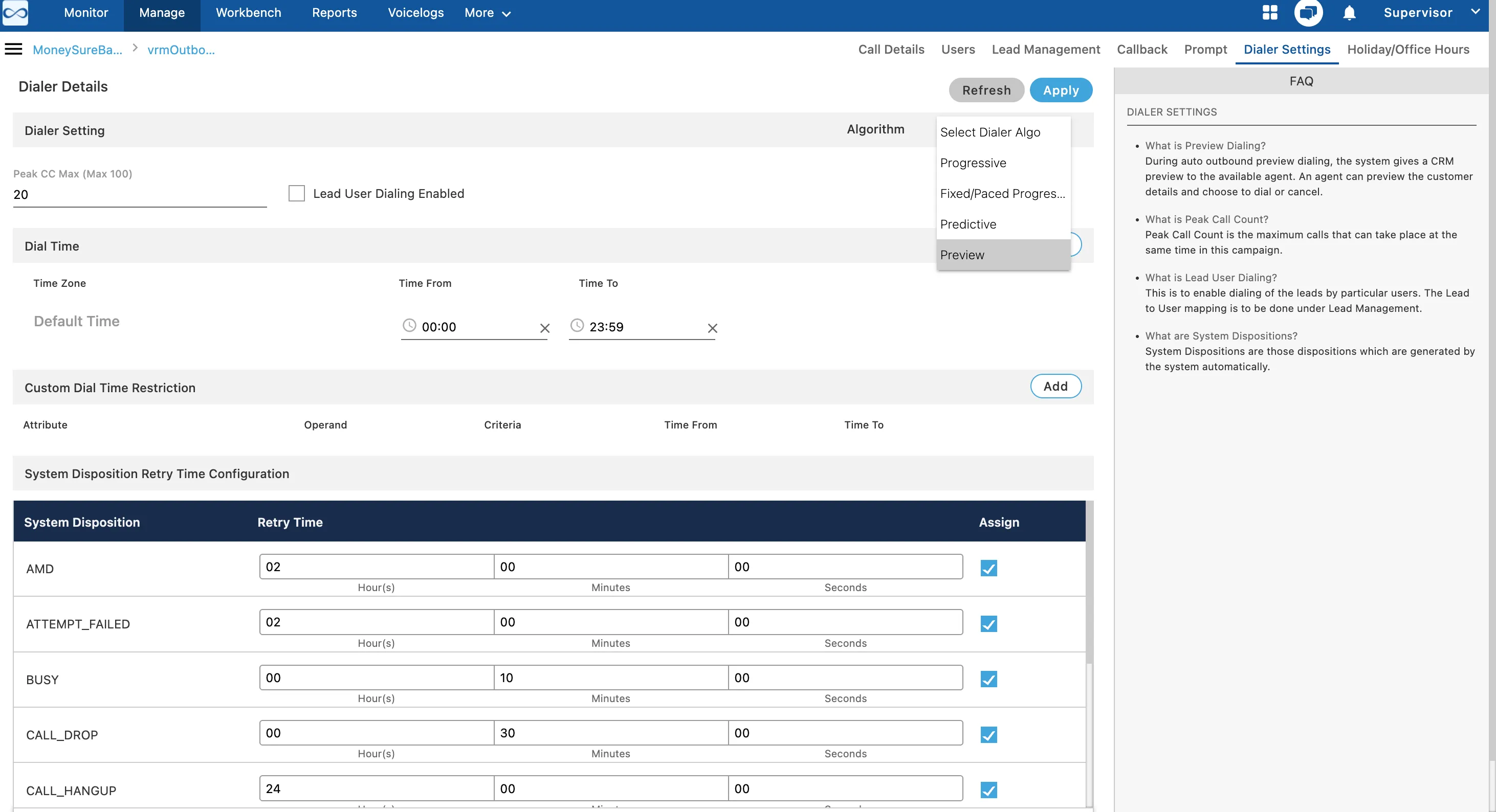
- Configure the associated parameters such as Lead User Dialing Enabled and Peak CC.
- Configure other dialing detail such as Time Zone configuration, Retry time settings etc. Know moremore
Use Cases
- Complex Sales (B2B): Sales agents review a prospect's company details and previous interactions before making a consultative call.
- Debt Collection: A collections agent reviews a debtor's payment history and notes before initiating a call.
Benefits
- Improved Agent Preparation: Agents are better prepared for each call, leading to more meaningful and successful conversations.
- Increased Conversion Rates: A well-prepared agent can better address customer needs and handle objections.
- Enhanced Customer Experience: The agent's familiarity with the customer's context leads to a more personalized and professional interaction.
Limitations
- This mode offers lower agent productivity in terms of call volume compared to other automated dialing modes.
Have a question?
Our knowledgeable support team and an awesome community will get you an answer in a flash.
To ask a question or participate in discussions, you'll need to authenticate first.