QA Parameters in a Campaign
1 min
This Tab lets you assign and unassign the QA Parameters to this campaign, which you have created at the System Level. Refer to "QA Parameters" in System Configuration to know the steps to create the QA Parameters.
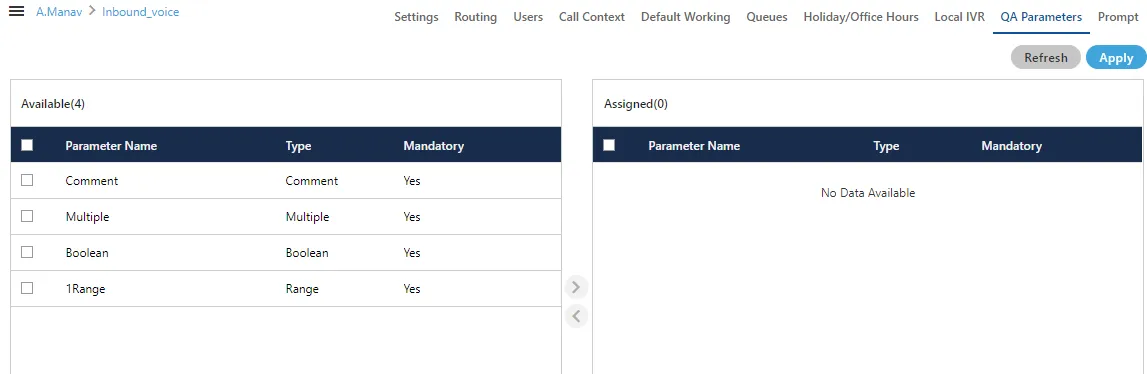
Perform the following steps to assign QA Parameters to this campaign.
- Select the QA Parameters in "Available" section
- Click
 icon to proceed to assign the selected QA Parameters.
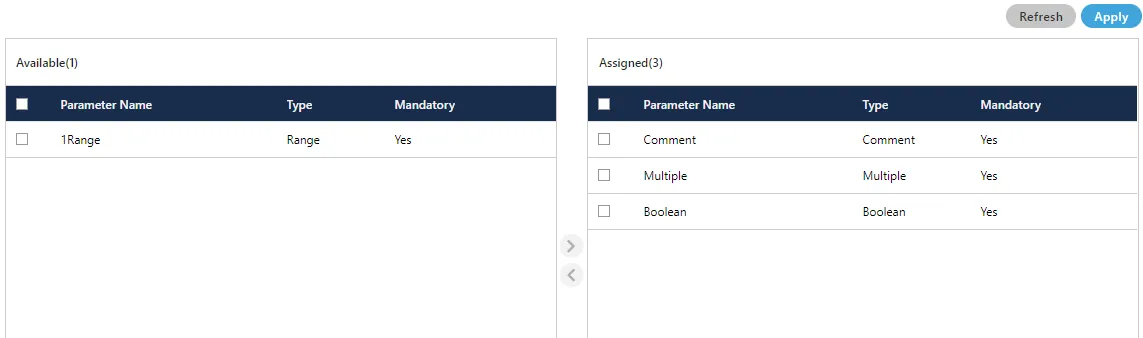
- Click "Apply" to assign the QA Parameters to this campaign. Rather, you can click "Refresh" to not assign the selected parameters.
To unassign a QA Parameter, select it in "Assigned" section, click  icon, and click "Apply" to unassign the selected QA Parameter from the campaign.
Have a question?
Our knowledgeable support team and an awesome community will get you an answer in a flash.
To ask a question or participate in discussions, you'll need to authenticate first.