Agent Table Definition
The Agent Table Definition serves as a template to define the fields (or columns) used to store customer information on the Agent Dashboard. Its user interface allows the administrator to assign specific fields to individual agents. Agents not assigned certain Table Definition Fields will be unable to view, access, or modify those customer information fields. The administrator also controls which agents have permission to modify the assigned fields.
Additionally, the administrator can arrange the sequence in which these definition fields appear.
Whenever a new Data Table Definition is created, a default Agent Table Definition is automatically generated. By default, all fields from the Data Table Definition are assigned as visible in this default Agent Table Definition. To control what information agents see and edit, administrators must create new Agent Table Definitions specifying field visibility and edit permissions.
A new sub-tab named Agent Table Definition has been added under the Table tab in System Configuration within the Administrator Console.
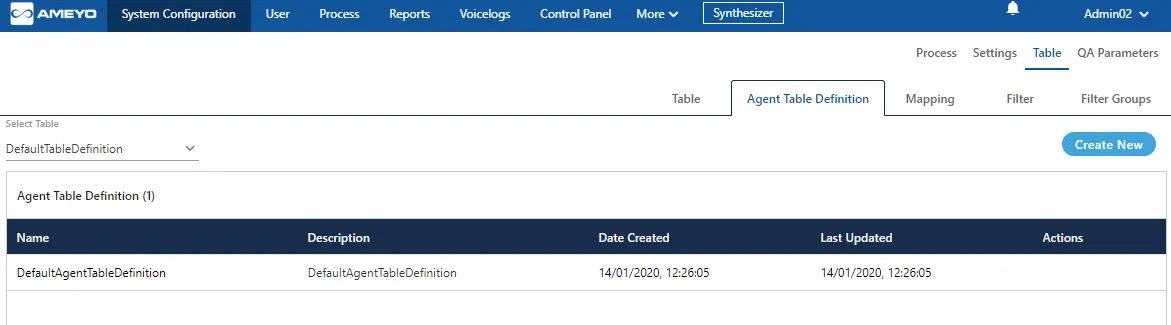
Create New Agent Table Definition
Perform the following steps to create a new Agent Table Definition.
- Click "Create New" button on the top-right corner to create a new Agent Table Definition. It shows the following page.
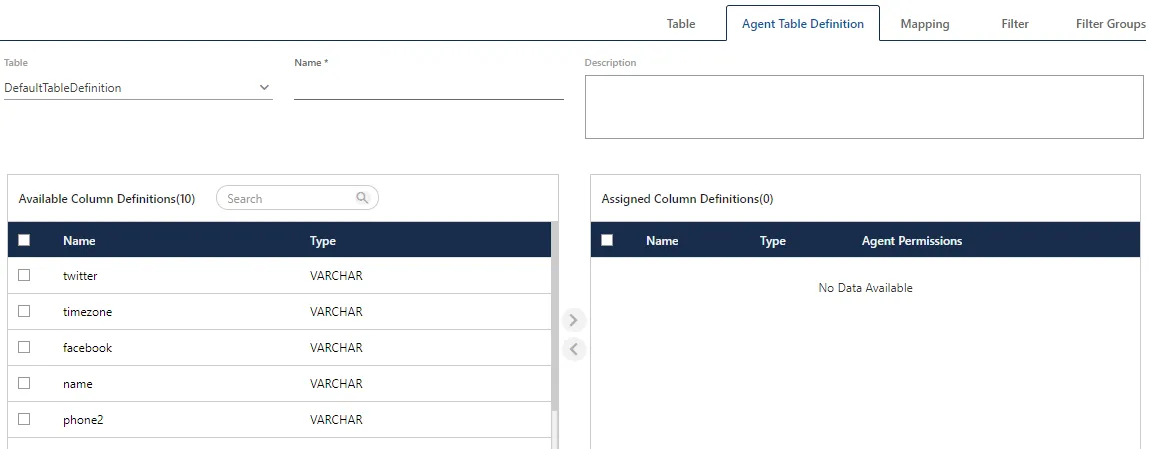
- In "Table" drop-down menu, select the Table Definition for which you want to create the Agent Table Definition. The fields of the selected table will be listed in "Available Column Definitions" section.
- Provide a name for the Agent Table Definition.
- Provide the description, if required.
- Now, select the fields in "Available Column Definitions" that you want to assign to the agents. Click forward icon to move the fields to "Assigned Column Definitions" section.
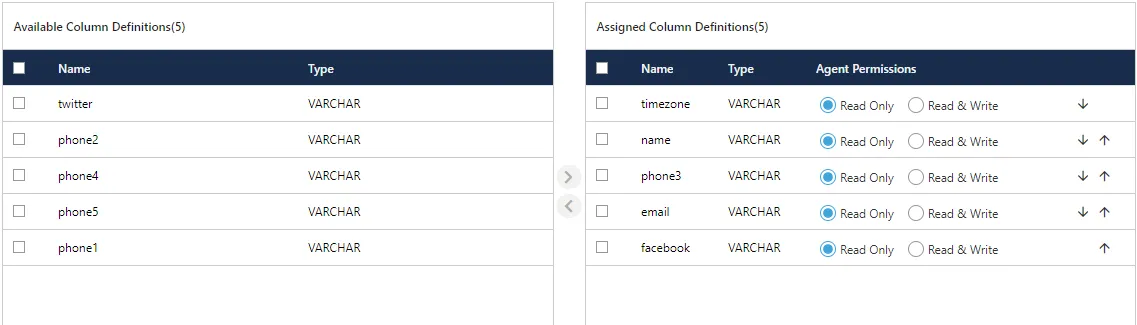
- Enable or Disable Field Modification: In "Assigned Column Definitions" section, you can select the following options for every field.
- Read Only: Select this option to allow the agents to only read the Customer Information stored in this field. The Agents cannot modify the customer information in this field.
- Read & Write: Select this option to allow the agents to read and modify the Customer Information stored in this field.
- Order of Appearance of Fields: The top to bottom positioning of the fields in "Assigned Column Definitions" section will be the order of appearance of the fields in the Customer Information. The following screenshot displays the sample order of appearance of fields.
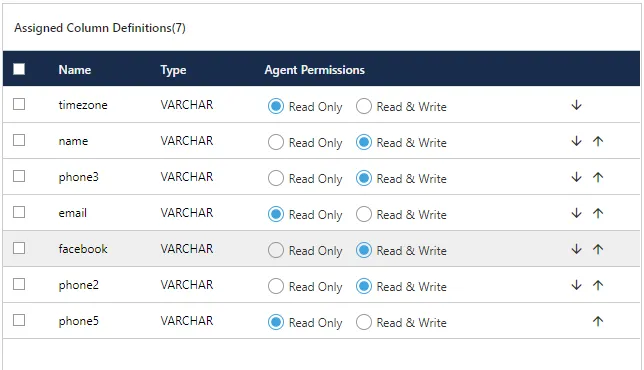
You can click "↓" icon to move the field to bottom and click "↑" to move the field up. After every click on any of these icons for a field, the positioning of that field will change.
- Click "Save" to save the Agent Table Definition. It takes you back to "Agent Table Definition" Tab, which shows the list of Agent Table Definitions including the newly created one.
You can assign or unassign the fields, make the fields editable or non-editable, and change the order of their appearance even while modifying the default or custom Agent Table Definition.
Modify an Agent Table Definition
"Agent Table Definition" tab shows the list of existing Agent Table Definitions.
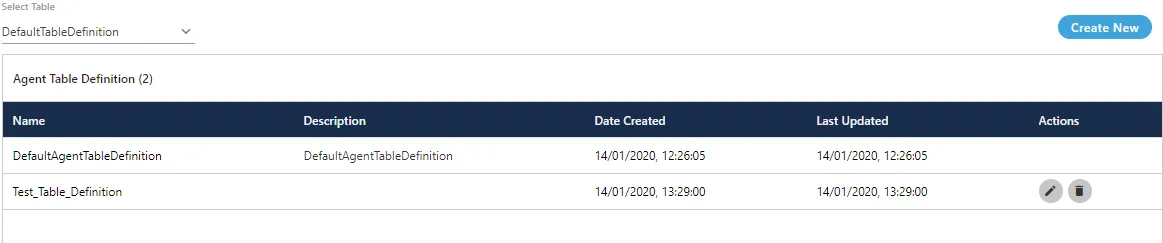
Perform the following steps to modify an existing Agent Table Definition.
- Click on edit icon for an existing Agent Table Definition to modify it using the following page.
- You can make the following changes.
- Name of Agent Table Definition
If you change the name of an existing Agent Table Definition, which has been selected and applied on a Campaign, then it may not work in that campaign.
- Description
- Assign or Unassign the Table Definition Fields
- Mark the Agent Table Definition fields as "Read Only" or "Read and Write"
- Change the order of appearance of these fields
- Click "Save" to save the changes.
Rather click "Cancel" to discard the changes.
The changes made in Agent Table Definition will be applicable in real-time. However, these changes will be displayed to the agents only when they open a new Customer page after that change.
Delete Agent Table Definition
The Deleted Agent Table Definition cannot be restored in any way. It will not be used in the Campaign and in the Agent Console. If the Agent Table Definition is assigned to a campaign and is being used by the agents, then the agent may not be able to that Agent Table Definition for the new Customer Communication until a new Agent Table Definition is assigned.
"Agent Table Definition" tab shows the list of existing Agent Table Definitions.
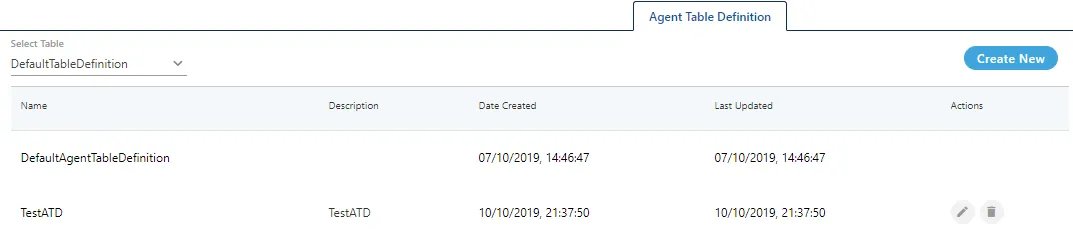
Perform the following steps to modify an existing Agent Table Definition.
- Click on delete icon to delete an existing Agent Table Definition. It shows the following warning message.

- Click "Yes" to delete the Agent Table Definition.
Rather, click "No" to not delete it.
"DefaultAgentTableDefinition" cannot be deleted. When the Administrator tries to delete it, the system shows the following error message on the screen.
