DNC Tab
DNC
If administrator wants to exclude few numbers that should not be dialed in the system, then they can be uploaded in DNC tab by adding leads. Adding numbers at the system level will apply DNC on those numbers at tenant level. They will not dial through any of the campaign or queues created under that tenant from Auto-Dial.
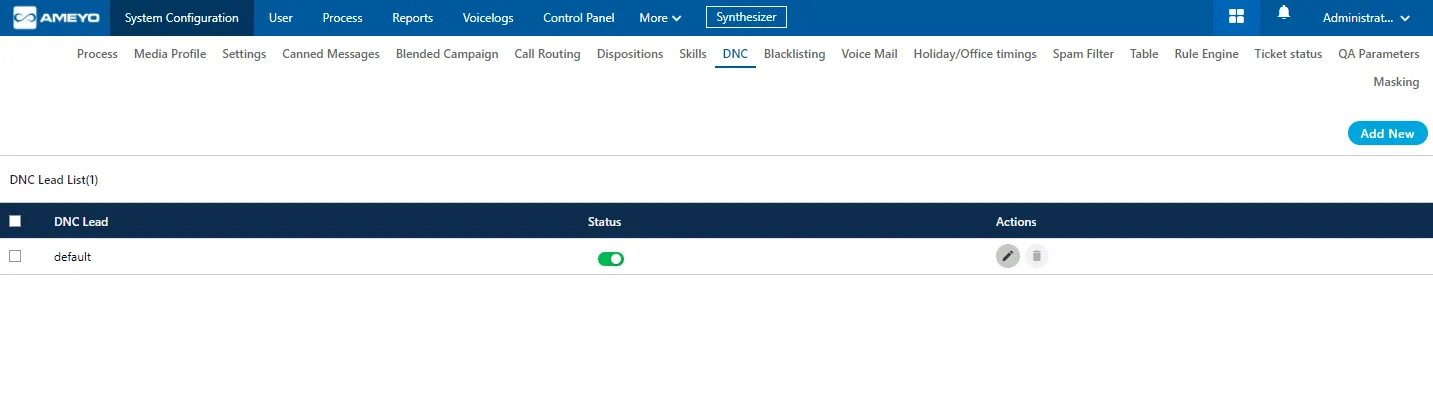
Create DNC List
Administrator can perform the following steps to create a DNC List.
- Click "Add New" button to create a new DNC lead. It shows the following modal.
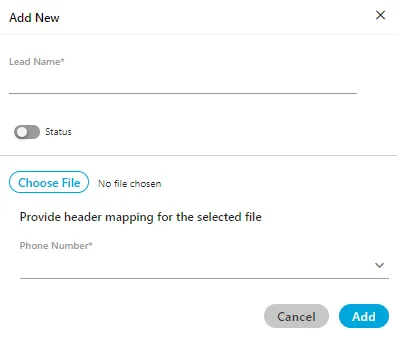
Here, you have to perform the following steps.
- In Lead Name column, enter the name of the lead.
- Toggle Status button to enable the new lead.
- Click "Choose File" to select the location and the CSV file. Click "Open" button to upload that file.
- In Header Mapping, Administrator can map the file headers of lead with phone1, phone2, phone3, phone4, phone5, timezone, and name headers as per the created headers in the system.
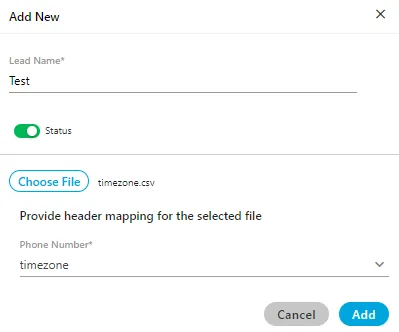
- Click "ADD" to save the changes. Rather, you can click "Cancel" to discard the changes.
- After clicking "ADD", a result modal is shown that provides the overview of the uploaded contacts through the DNC lead.
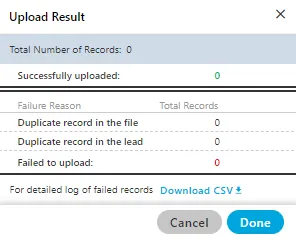
- The administrator can click "Download CSV" option to download the CSV file of the contacts that have been failed while uploading.
- The administrator can use the above steps to upload multiple DNC leads here.
Edit a DNC Lead List
Select the DNC Lead which you want to edit and click  icon. The same modal is arrived which is arrived at the time of adding the DNC. You can change the DNC lead name, file and header mapping on the opened modal. You can also enable or disable the lead from here as well.
Delete an DNC Lead List
The deleted DNC lead cannot be retrieved back.
Select the DNC Lead and click  icon to delete it. A warning message is displayed on screen. Click "Yes" to delete it else you can click "No" to not delete it.
