Logging Out
1 min
Supervisors should log out of the Ameyo application after completing their work or at the end of their shift to ensure session security and system performance.
Steps to Logout
- Click on your Supervisor Name icon located at the top-right corner of the Ameyo interface to open the Account Menu.
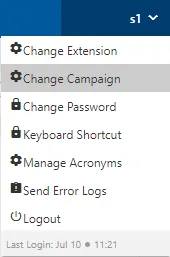
Figure: Account Menu
- From the menu, click Logout.This action will safely terminate your session and disconnect you from the Ameyo AppServer.
- Once logged out, you will be redirected to the Login Screen.
Note:
- The Logout option is temporarily disabled if the Supervisor is on an active call or chat session.
- You can only log out after all interactions (calls or chats) have been completed and properly disposed.
Have a question?
Our knowledgeable support team and an awesome community will get you an answer in a flash.
To ask a question or participate in discussions, you'll need to authenticate first.