Manage Tab Introduction
The Manage tab in the Exotel–Ameyo Admin Console enables administrators and supervisors to efficiently manage users, queues, workflows, and associated configurations from a single interface. It serves as the control hub for daily operations—allowing you to add, edit, or deactivate users, organize agent groups (queues), and define access roles and privileges to ensure streamlined contact center management.
Interface Overview
The Manage Tab is organized into key sub-sections:
Left Navigation Section: This is a fixed sidebar on the left that allows you to navigate through various processes and campaigns. If the sidebar is hidden, click the menu icon to reveal it. When it’s visible, click the "X" to close it. Within this panel, you can choose any of the assigned processes and campaigns.
Tabs: Tabs appear in the top right corner, allowing you to switch between the different selected campaigns.Manage Inbound Campaign
Manage Inbound Campaign
Supervisor can manage the inbound campaigns in which it has been assigned.
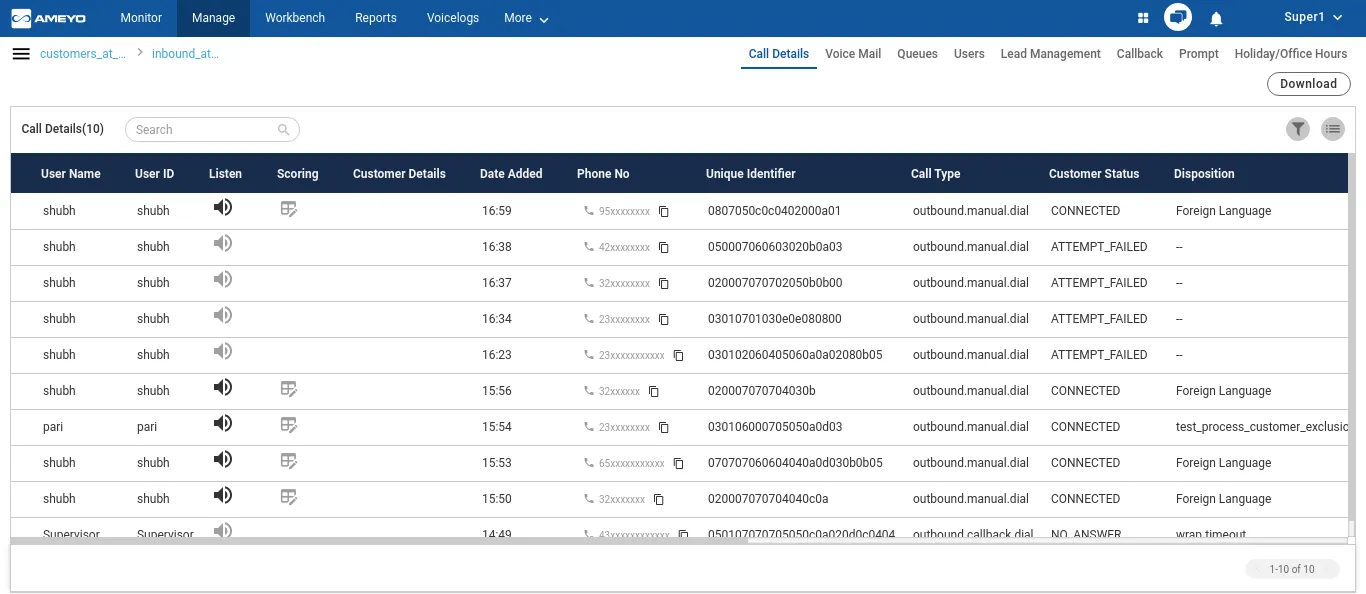
It contains the following tabs:
Section | Description |
|---|---|
Call DetailsCall Details | Here, the Supervisor can view the call details/history of calls happened in the selected inbound campaign basis mutiple search filters. |
VoiceMailVoiceMail | The Supervisor can access the Voice Mails left by the customers when the customer was not attended because of any reason |
Queue ManagementQueues | Create and configure queues for inbound and outbound routing. Organize agents into logical teams for supervision and reporting. |
Add, modify, and manage agent in campaigns | |
Lead ManagementLead Management | |
Callback ManagementCallback | The supervisor can add and manage the callbacks |
Prompts ManagementPrompt | The supervisor can manage the prompts that are played on the IVR |
Holiday/Office TimingsHoliday/Office Timings | The supervisor can manage the Holiday Configuration and Office Hour Configuration. |
Manage Onbound Campaign
Supervisor can manage the outbound campaigns in which it has been assigned.
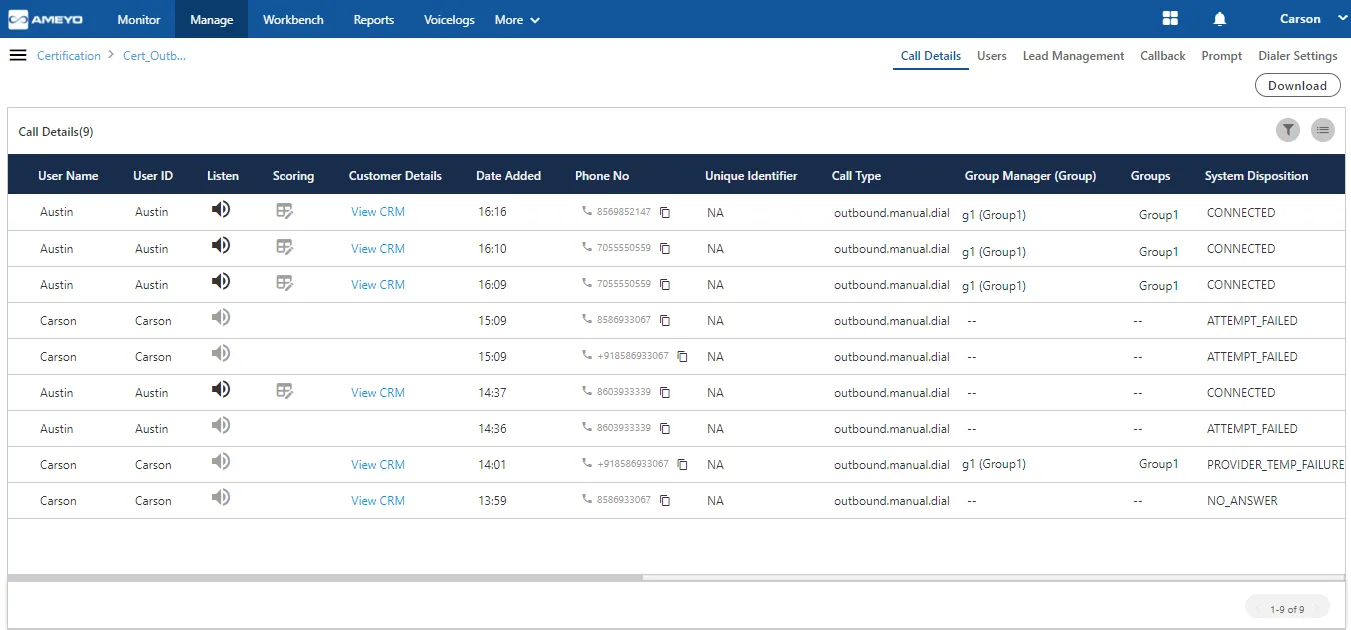
It contains the following tabs:
Section | Description |
|---|---|
Call DetailsCall Details | Here, the Supervisor can view the call details/history of calls happened in the selected inbound campaign basis mutiple search filters. |
Add, modify, and manage agent in campaigns | |
Lead ManagementLead Management | |
Callback ManagementCallback | The supervisor can add and manage the callbacks. |
Prompts ManagementPrompt | The supervisor can manage the prompts that are played on the IVR |
Dialer SettingsDialer Settings | |
Holiday/Office TimingsHoliday/Office Timings | The supervisor can manage the Holiday Configuration and Office Hour Configuration. |
Manage Call Details
- Click Manage → Users.
- Select Add User to create a new agent or supervisor.
- Enter user details such as Name, Email, Role, and Assigned Queue.
- Click Save.
Additional Actions:
- Edit user information using the Edit icon.
- Deactivate or delete users if no longer required.
- Reset passwords or regenerate login credentials as needed.
🆕 From ECC v6.x onward, users can be managed via User Management API for bulk updates and SSO synchronization.
Manage Queues
- Go to Manage → Queues.
- Click Create Queue to define a new service or campaign queue.
- Assign agents, define maximum waiting time, and configure routing (Skill-based, FIFO, LWA).
- Map queue to the appropriate Flow or IVR Node.
Key Parameters:
- Queue Type: Inbound / Outbound
- Routing Strategy: FIFO, Skill-based, or Longest Wait Agent
- Estimated Wait Time: Enable to announce EWT to callers (XPro, XTRM only)
- Callback Option: Allow customers to request a callback
Manage Roles and Permissions
- Select Manage → Roles & Permissions.
- Click Add Role to define new access profiles.
- Choose feature access such as Reports, Call Logs, Agent Monitoring, or Flow Designer.
- Assign the role to desired users or teams.
Default Roles:
- Admin: Full access including configurations
- Supervisor: Real-time monitoring, agent assignment
- Agent: Limited to assigned campaigns and queues
Manage Teams and Groups
- Navigate to Manage → Teams / Groups.
- Click Add Group and specify a name and description.
- Assign users and queues to each group.
- Use Hierarchical Monitoring to allow supervisors to manage sub-teams independently.
Tip: Hierarchical supervision enhances accountability and simplifies escalations within large contact centers.
Validation / Troubleshooting
Issue | Possible Cause | Resolution |
|---|---|---|
User unable to log in | Incorrect role or inactive status | Verify user activation and role assignment under Manage → Users |
Queue not visible in agent login | Queue not mapped to flow | Go to Call Flow Designer and link queue |
Access denied error | Role permissions misconfigured | Review Roles & Permissions settings |
Best Practices / Notes
- Regularly audit user roles and permissions for compliance.
- Use User Management API for large-scale updates in ECC environments.
- Leverage Skill-based Routing and Estimated Wait Time to improve customer experience.
- Supervisors should monitor real-time queue load using the Monitor Tab for operational efficiency.
Feature Availability
Capability | XPrime | XPro | XTRM |
|---|---|---|---|
User / Queue Management | ✔ | ✔ | ✔ |
Role-based Access Control | ✘ | ✔ | ✔ |
Hierarchical Monitoring | ✘ | ✔ | ✔ |
API-based User Management | ✘ | ✔ (Add-on) | ✔ |
✅ Applies to: XPrime, XPro, XTRM