Number Masking
Number Masking allows organizations to make customer phone numbers confidential, hiding them from agents and other users. This feature ensures compliance with IT regulatory standards and industry requirements regarding consumer data privacy. When enabled, identifiable information like phone numbers is anonymized or masked, preventing unauthorized recognition or use beyond the intended purpose.
Key Capabilities
- Role-Based Visibility: Administrators can grant specific user roles the privilege to view unmasked (actual) numbers for verification purposes.
- Process-Level Configuration: Masking can be enabled or disabled for specific processes. If enabled for a process, it applies to all campaigns within that process.
- Masking Policies: Choose between random alphanumeric strings or partial character replacement.
Configuration
Accessing the Masking Tab
- Log in to the Administrator Console.
- Navigate to System Configuration.
- Click on the Masking tab.
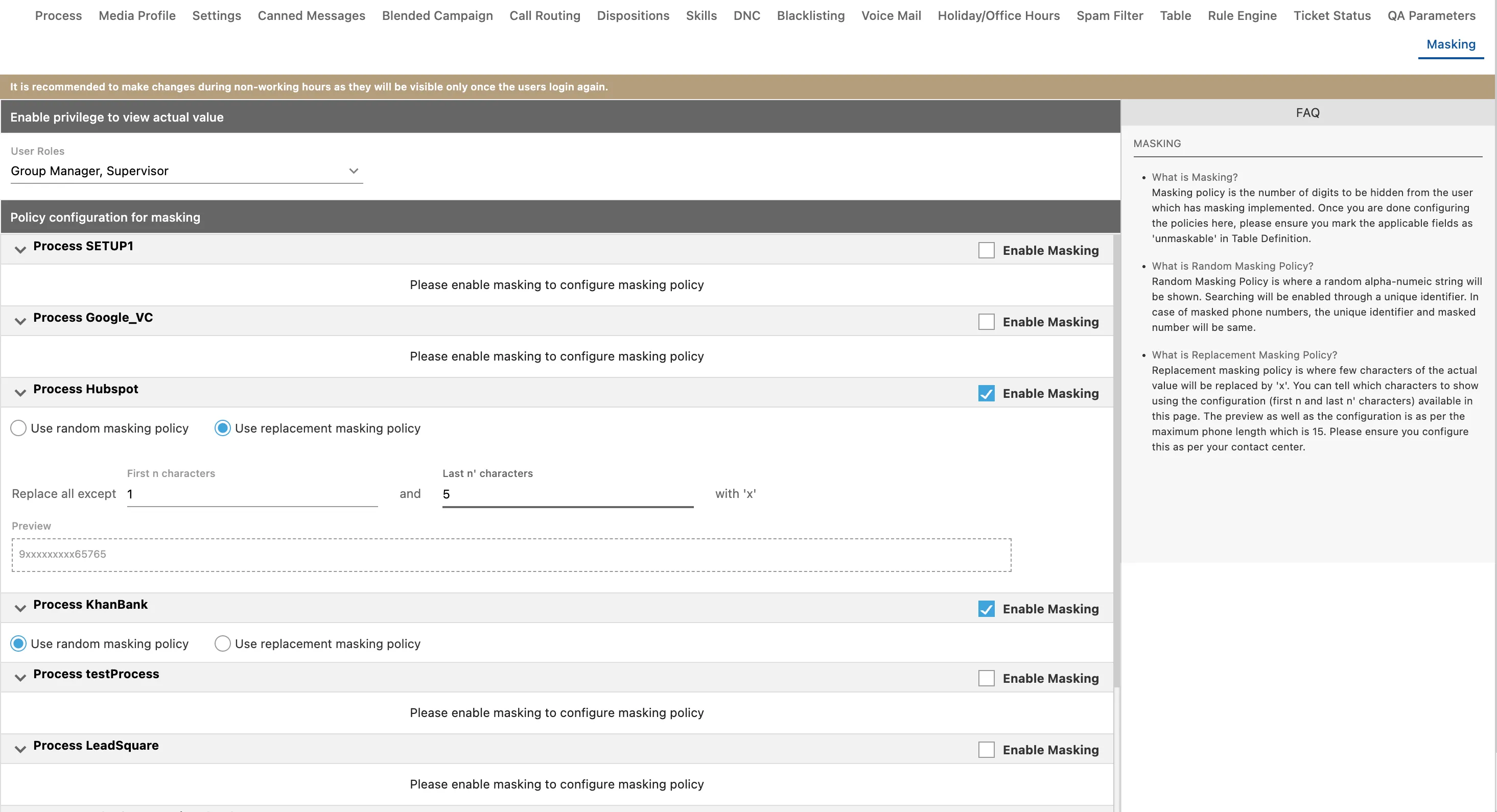
Enabling Unmasked View for Specific Roles
In certain scenarios, roles such as Supervisors or Analysts may need to verify actual phone numbers. To grant this privilege:
- In the Masking tab, locate the "Enable Privilege to view the Actual number for the User Roles" section.
- Select one or more of the following roles to allow them to view unmasked values:
- Analyst
- Executive
- Group Manager
- Professional Agent
- Supervisor
Configuring Masking Policies
Once masking is enabled for a process, you must select a masking policy:
1. Random Masking Policy
- Description: Replaces the phone number with a random alphanumeric string.
- Searching: Searching is enabled through a unique identifier. In this policy, the unique identifier and the masked number are the same.
2. Replacement Masking Policy
- Description: Replaces specific characters of the actual number with 'x'.
- Configuration: You define how many characters to show at the start (n) and at the end (n') of the number. The remaining characters in the middle are masked.
- Constraint: The preview and configuration are based on a maximum phone length of 15 digits. The sum of the first characters (n) and last characters (n') must not exceed 15. If the total exceeds 15, an inline error is displayed.
Applying Changes
- After configuring the policy and roles, click Apply.
- Important:
- Changes such as enabling, disabling, or modifying policies will only be visible to users after they log out and log in again to the Ameyo Application Server.
- It is recommended to make changes during non-working hours to avoid impacting business operations.
- Once phone numbers are masked using a Masking Policy, they cannot be unmasked.
Voice Log Filename Masking
When number masking is enabled, voice log filenames on the call server are also masked by default. Starting from version 4.13.26, the unmaskRawVoiceLogs system configuration flag can be set to true to store voice log files with the real (unmasked) filename on the call server, while the UI continues to show masked values. This is useful for integrations that match recordings by phone number.
UI Masking Consistency
Starting from version 4.13.33, number masking behaviour is aligned across all UI surfaces — including the Agent Toolbar and Supervisor console — so that masked numbers appear consistently regardless of where they are viewed.
Privilege Management Enhancements
Starting from version 4.13.48, administrators have expanded control over masking-related privileges, allowing more granular assignment of who can view unmasked data across different user roles and contexts.
Version History
Version | Enhancement | Release Notes |
|---|---|---|
4.13.26 | Configurable voice-log filename masking via unmaskRawVoiceLogs flag | 4.13.264.13.26 Release Notes |
4.13.33 | UI masking alignment across Agent Toolbar and Supervisor console | Contact Center - Patch Release Notes - Version 4.13.334.13.33 Release Notes |
4.13.48 | Expanded mask-related privilege management | Contact Center - Patch Release Notes - Version 4.13.484.13.48 Release Notes |