Make calls feel natural: background sound and silence nudges
Two small settings make your voice agent sound more like a real person on a real line. Background ambience plays a soft office or call-centre sound under the agent's voice. Conversation nudges decide what the agent does when the caller goes quiet: how long it waits, what it says, and when it ends the call.
Before you start
- Where it lives: Agents → open an agent → Edit agent → Configure → Speech, at the bottom of the page.
- Defaults: background ambience is off. Nudges are on with default settings: the agent nudges after 7 seconds of silence, up to 3 times, then ends the call.
- Changes are versioned: saving creates a new version. See Save changes safely and roll out a new version.
Add background sound
- Open your agent and click Edit agent.
- In Configure, click Speech and scroll to Background ambience.
- Choose a sound: Office, Call centre or Café. Choose Off for no sound.
- Click the play button to hear it.
- Set the Volume. Keep it low so the sound stays in the background.
- Click Save and rollout.
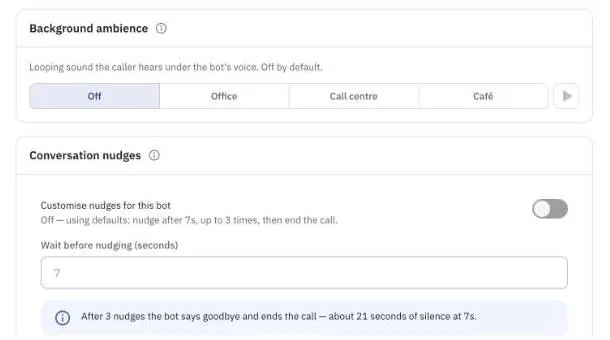
Figure 1 — Background ambience is off by default.
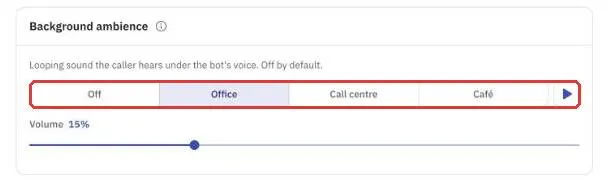
Figure 2 — Office sound selected, at 15% volume.
Tip: the sound loops for the whole call. Make a test call to the new version and listen for a full minute before you roll it out.
Decide what happens when the caller goes quiet
- In Speech, scroll to Conversation nudges.
- Turn on Customise nudges for this bot. The values you set are now used instead of the defaults.
- In Wait before nudging (seconds), enter how long the agent waits in silence before it nudges. You can use 1 to 60 seconds, including decimals such as 7.5. Use a longer wait for a calmer conversation, or a shorter one for quick lookups.
- The blue note shows how long the call lasts in silence before the agent ends it. For example, at 7 seconds the agent says goodbye after about 21 seconds of silence.
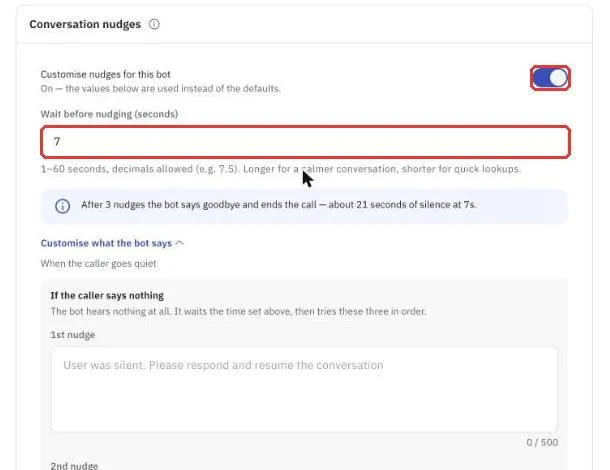
Figure 3 — Turn on custom nudges and set the wait time.
Change what the agent says
- Click Customise what the bot says.
- Under If the caller says nothing, fill in the three nudges. The agent uses them in order:
- 1st nudge — for example, ask gently if the caller is still there.
- 2nd nudge — for example, offer to help or repeat the last question.
- Final nudge — then end the call — the agent says goodbye politely and hangs up.
- Under If the caller can't be heard clearly, fill in Ask them to repeat. This is used when the caller spoke but the words didn't come through. The agent replies straight away and doesn't wait.
- Each box takes up to 500 characters. Leave a box empty to keep the default.
- Click Save and rollout.
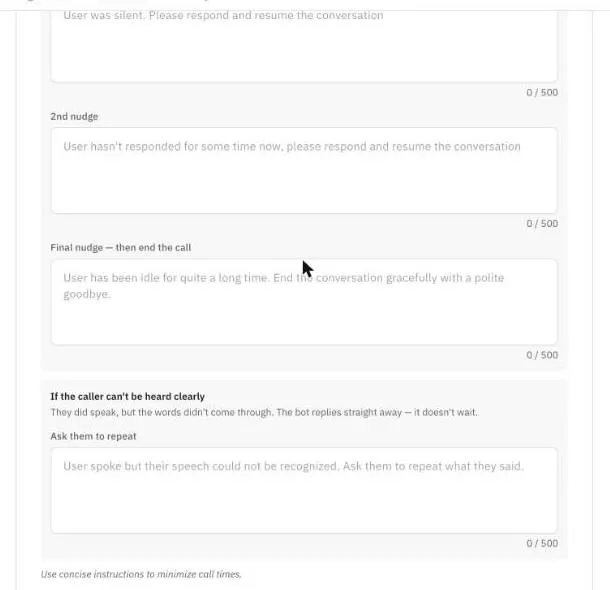
Figure 4 — Write what the agent should do at each nudge.
Note: each box is an instruction to the agent, not a fixed script. The agent turns it into what it says. Keep each instruction short so calls stay short.
FAQ
My callers need time to find a document. Will the agent hang up? Set Wait before nudging higher, for example 15 seconds, and make the first nudge say "Take your time, I'm here."
Can I turn nudges off? Turn off Customise nudges for this bot to go back to the defaults. The agent still nudges after 7 seconds of silence, up to 3 times.