Shorten a long URL and track clicks in SMS
You can use Exotel's SMS API to shorten a long URL in SMS and you can track customer's click data as well. Shortening a long URL will also reduce the number of characters in SMS and allow you to stick to the 160 characters limit for SMS. Follow steps below to set it up:
1. Get in touch with your Account Manager or drop an email to "[email protected]" to enable URL shortening services for your account
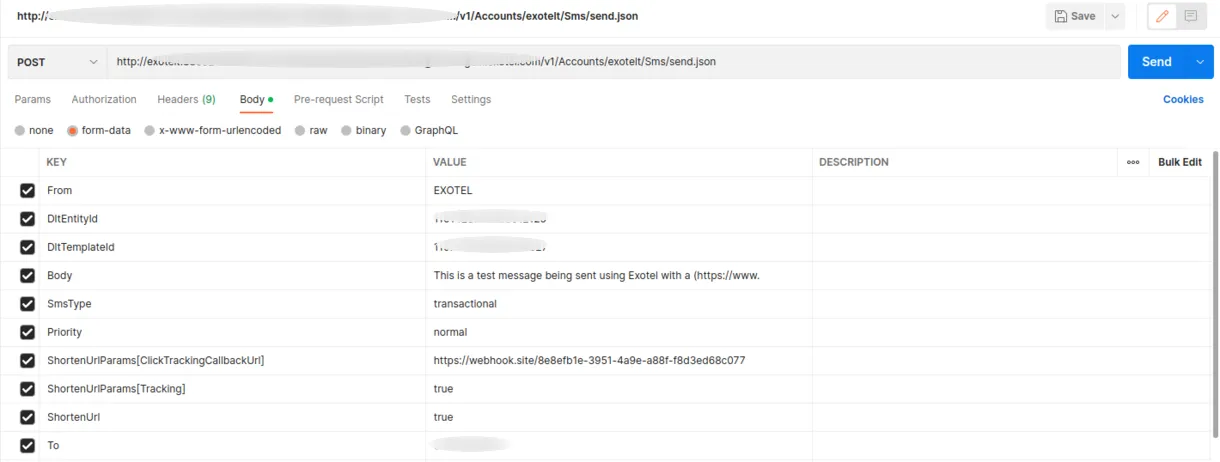
2. While making the API Request to send SMS, make below changes to your SMS request -
- Set Parameter "ShortenUrl" - 'true' if you want to shorten a URL, To provide flexibility, we allow you to set it to 'false' as well don't want to shorten any particular SMS.
- Set Parameter "ShortenUrlParams[CustomDomain] " - with the custom domain you want the short URL to start with. If custom domain is not present or empty, we will use the default domain(exo.tl), If custom domain is given in the request it will be used to form the short URL . Note : Clients will have to route the traffic on their custom domain to exo.tl domain, this is a change on your domain management system
- Set Parameter "ShortenUrlParams[Tracking] " - 'true' if you want to track data when a customer clicks on the URL. This feature is currently available to select customers.
- In Parameter "ShortenUrlParams[ClickTrackingCallbackUrl]” - enter a valid URL to receive click tracking data
You can also use sample requests available on our developer portal to use the feature and use the sample collection from Postman.
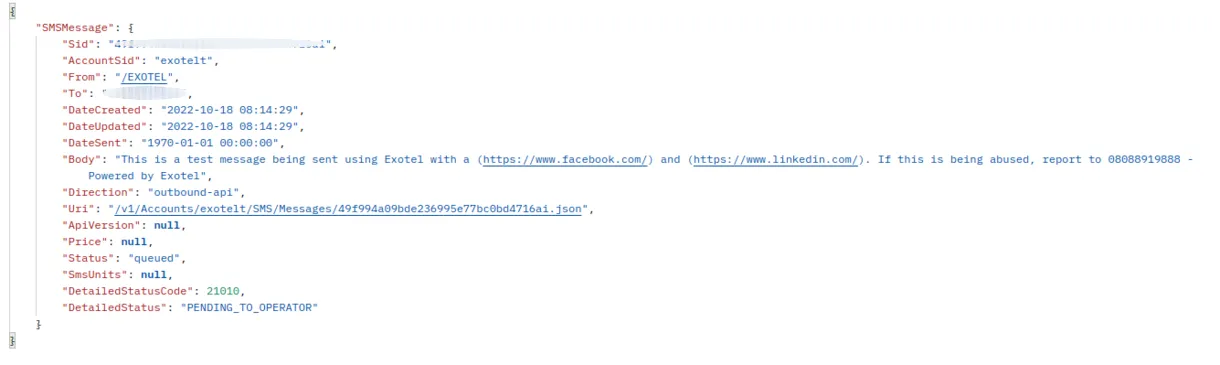
3 . Below would be the API response , SMS will be delivered with a short URL . eg - https://exo.tl/vhdpzv . The Short URL has a validity of 1 month.
4. Whenever someone clicks on the shortened URL, the following data would appear in the URL provided in "ShortenUrlParams[ClickTrackingCallbackUrl] -
- Sid - The Sid (unique id) of the shortened URL
- Short_url - The complete shortened URL
- Short_code - Key of the shortened URL
- Long_url - Original URL which is shortened
- Tracking - Whether the URL is being tracked or not
- Custom_field - custom field passed in SMS API request
- Expires_at - Date Time in ISO format when link will expire
- Created_time - Date Time in ISO format when URL is created
- Last_viewed - Date Time in ISO format when link was visited last
- Total_clicks - count of total views of short url
- Account_sid - Exotel’s unique Account SID
- Country_code - Country code of the customer who received the SMS
- Date_created - Date Time in ISO format when link was created
- Sms_sid - The Sid (unique id) of the SMS, this SID can be used to track the SMS
- To - Contact number of the customer who clicked on the URL
- city - City where the shorten URL is clicked
- Country - Country code where shorten URL is clicked
- IP - IP address where shorten URL is clicked
- Postal_code - Postal code where shorten URL is clicked
- Region - Region where shorten URL is clicked
- Accuracy_radius - Aproximate accuracy radius where shorten URL is clicked
- OS_version - OS version of the customer who clicked the shorten URL
- OS_name - OS name of the customer who clicked the shorten URL
- Device_name - Device name of the customer who clicked the shorten URL
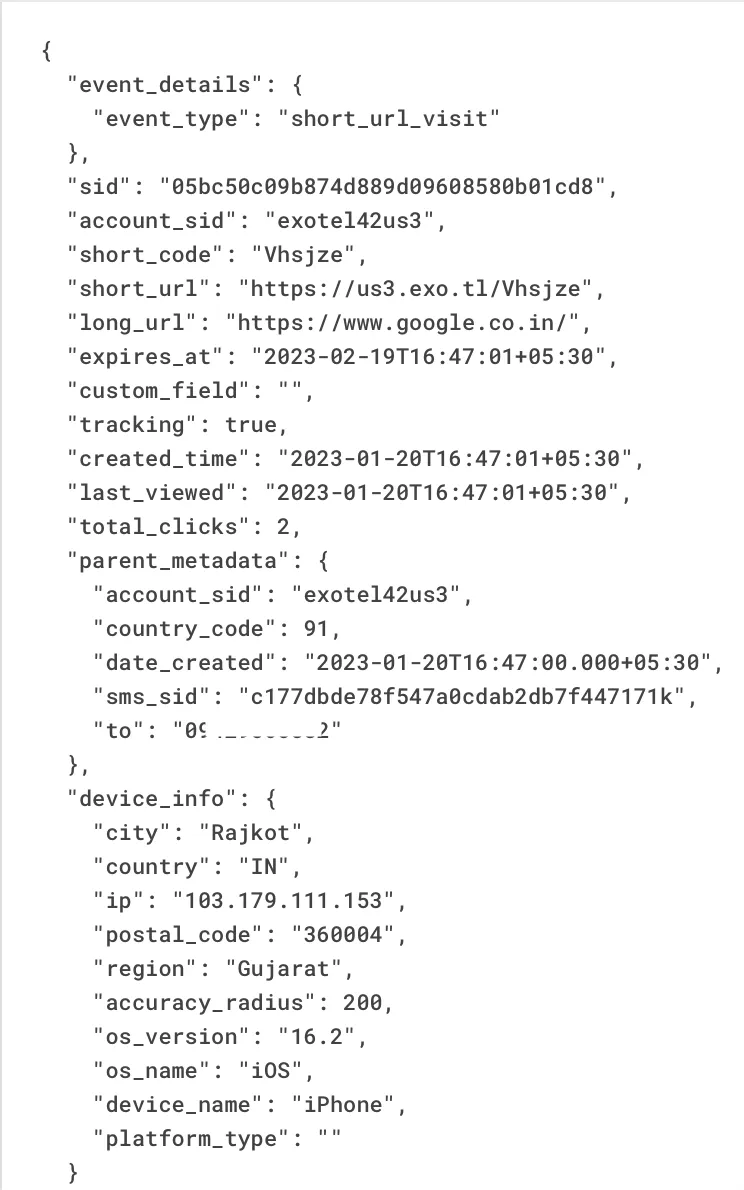
Platform_type - Platform where shorten URL is clicked
Using the standalone Compactix API
You can use Exotel's Compactix API to shorten a long URL and track customers' click data as well. Shortening a long URL will also reduce the number of characters and create your own short links in. Follow the steps below to set it up:
- Use default keys and tokens available in your account to use this API. Get in touch with your Account Manager or drop an email to "[email protected]" if you face any issues.
Request parameters
You can use the API with the following request parameters:
Parameter | Description |
|---|---|
long_url | The long URL you want to shorten. |
expire_in | The duration (seconds) after which the short URL becomes invalid. Minimum is 60 seconds and the default is 31 days. Max. value is 365 days. |
tracking | Whether to track the URLs present in the SMS. Can be: "true" or "false". "ShortenUrl" needs to be "true" for Tracking to work. |
callback_url | The URL where you want to receive the tracking details. Once someone clicks on the shortened URL, Exotel will do a POST callback to your endpoint if the URL is set as a parameter in the API. |
custom_field | A Custom Field relevant to your use case while sending a long URL. E.g. Order ID, Payment ID, Login Attempt etc. Any content / json body upto 1024 chars. |
custom_domain | The custom domain you can specify. Whether you want the short URL to start with the default domain (exo.tl) or you want to provide a custom domain of your own choice. |
Click-tracking callback schema
Whenever someone clicks on the shortened URL, the following data would appear in the URL provided in callback_url:
Field | Description |
|---|---|
sid | The Sid (unique id) of the shortened URL |
Short_url | The complete shortened URL |
Short_code | Key of the shortened URL |
Long_url | Original URL which is shortened |
Tracking | Whether the short URL is being tracked or not |
Custom_field | custom field passed in API request |
Expires_at | Date Time in ISO format when link will expire |
Created_time | Date Time in ISO format when URL is created |
Last_viewed | Date Time in ISO format when link was visited last |
Total_clicks | count of total views of short url |
Account_sid | Exotel's unique Account SID |
Date_created | Date Time in ISO format when link was created |
City | City where the shorten URL is clicked |
Country | Country code where shorten URL is clicked |
IP | IP address where shorten URL is clicked |
Postal_code | Postal code where shorten URL is clicked |
Region | Region where shorten URL is clicked |
Accuracy_radius | Approximate accuracy radius where shorten URL is clicked |
OS_version | OS version of the customer who clicked the shorten URL |
OS_name | OS name of the customer who clicked the shorten URL |
Device_name | The device name of the customer who clicked the shorten URL |
Platform_type | Platform where shorten URL is clicked |
Below is an example of a callback with the parameters:
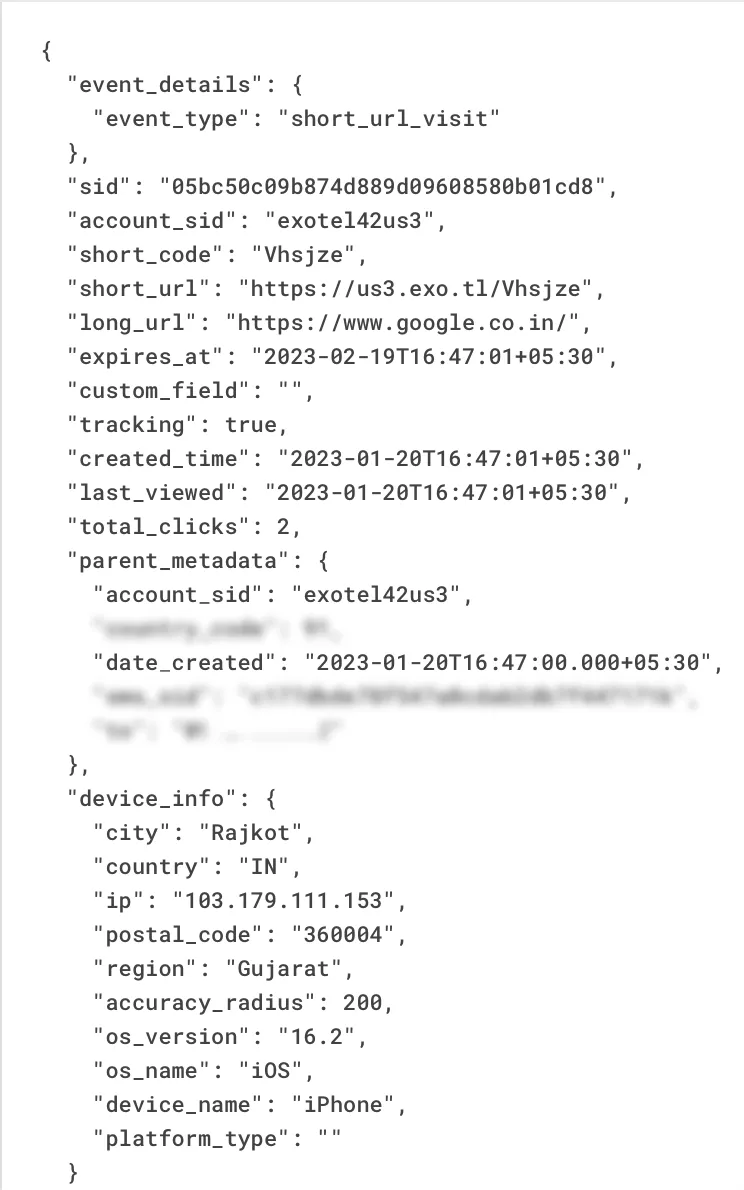
On successful execution of the API, you will be given a short URL in response that can be used by you. Read more about the API response on Exotel Developer Portal.
If you have any questions or concerns, please connect with us using the chat widget on your Exotel Dashboard or Whatsapp us on 08088919888.