Check your call capacity and database limits
The Account page shows how many calls your voice agents can handle at the same time, how many are running right now, and the limits on your database tables. Check it before a campaign or a busy day.
Before you start
- Where it lives: Manage → Account in the left menu.
- Who can see it: anyone who can sign in to your Voice Agents account.
See how many calls are running now
- Click Account in the left menu.
- Under Concurrency, Concurrent calls shows calls running now out of your limit, for example 1 / 150.
- The bar and percentage show how much of your limit is in use. The count covers all agents on your account.
- Last updated shows the time of the latest reading.
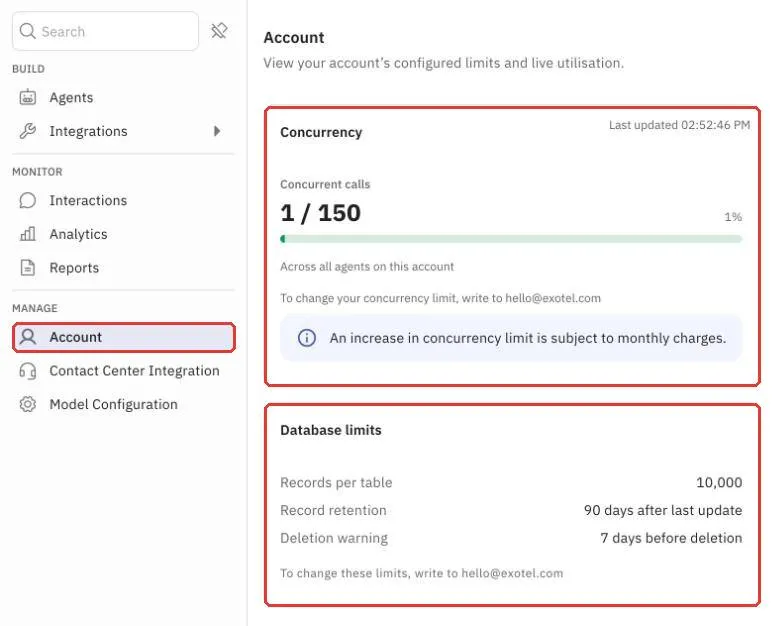
Figure 1 — The Account page: concurrency and database limits.
Tip: if your usage often gets close to the limit, ask for a higher one before a big outbound campaign.
Ask for a higher concurrency limit
Write to [email protected] with your account name and the limit you need. A higher concurrency limit is charged monthly.
Understand your database limits
If your agents use tables from Integrations → Database, these limits apply:
- Records per table: the most rows one table can hold, for example 10,000.
- Record retention: a record is deleted a set number of days after it was last updated, for example 90 days.
- Deletion warning: how many days before deletion you are warned.
When records are about to be deleted, a yellow banner on the Database page tells you which table and the date. To keep the records, update them or import them again before that date.
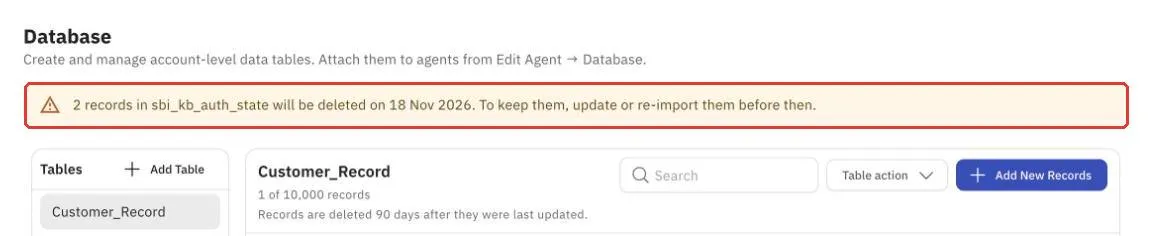
Figure 2 — A deletion warning on the Database page.
To change any of these limits, write to [email protected].
FAQ
Does the concurrency limit apply per agent? No. It is shared by all agents on your account.
Why was a record deleted from my table? It was not updated within the retention period. Update records you want to keep, or import them again.