Click to Call
The Click-to-Call, also known as click-for-talk or click-to-dial, refers to a type of digital communication in which a person clicks a button to connect with another individual in real-time, without either of them actually dialling the number.
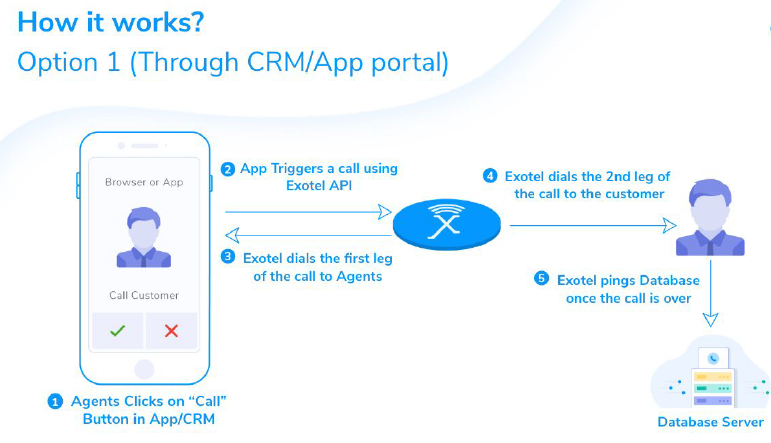
In this solution, there are two calls involved which can be termed as two call legs (Leg1 & Leg2). Both the call legs are dialled by Exotel as outbound calls
- Leg 1: Exotel to Partner / Agent / User (P/A/U)
- Leg 2: Exotel to Customer / End-user
Exotel will dial leg 2 once leg 1 answers the call. Once leg 2 also picks up the call, the call is patched to leg 1.
This solution is very reliable in terms of successful dials on both legs. As Exotel dials both the call legs, at run-time Exotel can figure out a working VN and use that for dialling.
In case the call doesn’t go through (due to a particular operator issue), Exotel will dial it via a secondary route to ensure maximum connectivity.
With regards to a click-to-call use case, the user needs to use a mobile app/Dashboard/CRM to be able to trigger the call. Also, an internet connection will be needed to initiate the API call even though the calls are connected via PSTN.
Click-To-Call API
Implementation
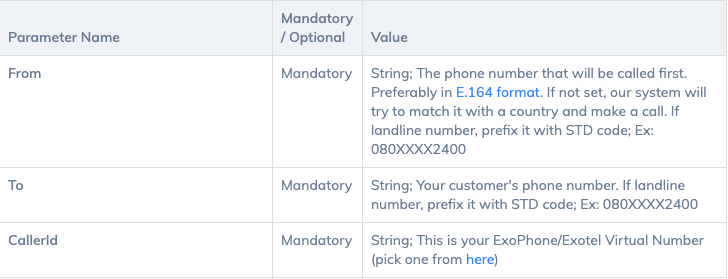
Mandatory Parameters
Check out this blog to know more about the click-to-call feature https://exotel.com/blog/simple-guide-to-click-to-call