Tax invoice and Payment reciept
A tax Invoice is generated at the beginning of each month(before 6th) determining the actual usage of services by each client. For instance, if the client has utilized services worth Rs.500/- the invoice is generated for Rs.590/- which is inclusive of 18% GST. The invoice documents are shared with the series beginning with:
For prepaid customers: DR19SINXXXX
For postpaid customers: DO19SINXXXX
Reciept Voicher
A receipt voucher gets generated whenever a client (prepaid) makes a payment. GST is always inclusive. In some cases, businesses include TDS as well. For instance, if a client has made a payment of Rs.1,180/- it essentially comprises of payment of Rs.1,000 + GST of Rs.180 (18% of the service value). The receipt voucher documents are shared with a series beginning with RD0000
Frequently asked Questions
Where can I download the tax invoice and the payment receipt from?
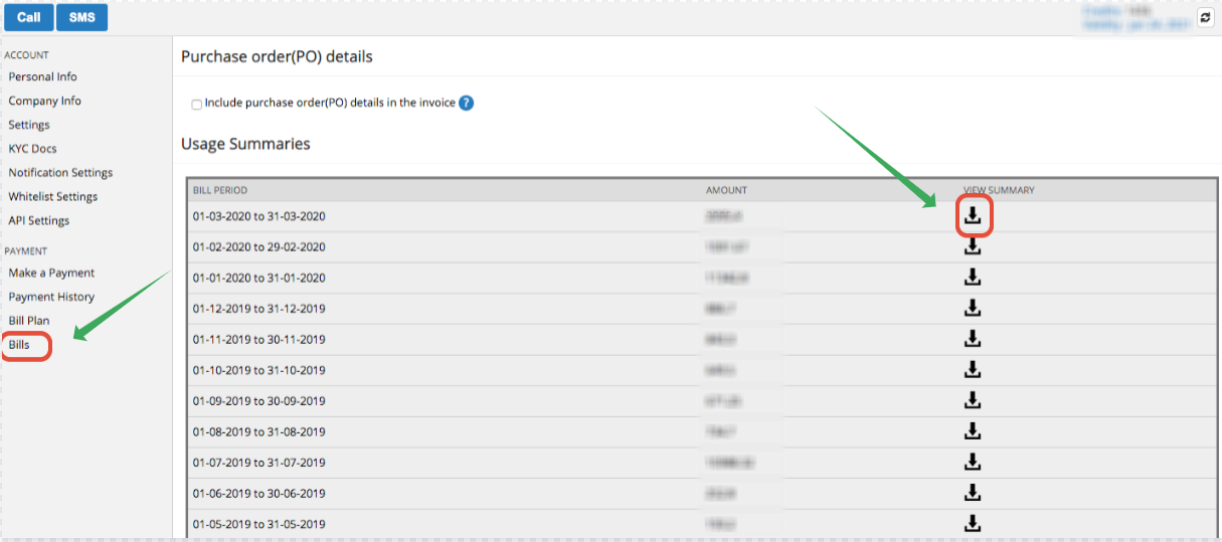
To make it simple, an Invoice is generated at the beginning of each month based on the usage for the previous month. This can be downloaded from the “Bills” section of the dashboard.
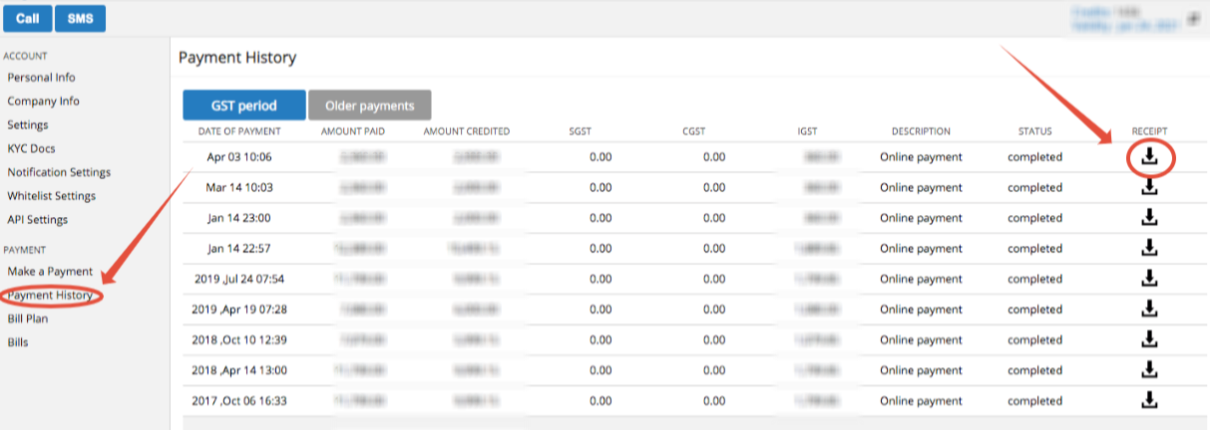
The receipt voucher is generated for the payment made ( Credits recharge, Extended validity, or an Upgrade) and is available for download from the “Payment History” section of the dashboard.
Who gets the bills in my company?
We have completely automated the billing process and simplified invoice delivery.
- No hard copies. All digitally signed invoices will be dispatched by email, post billing every month within the first week.
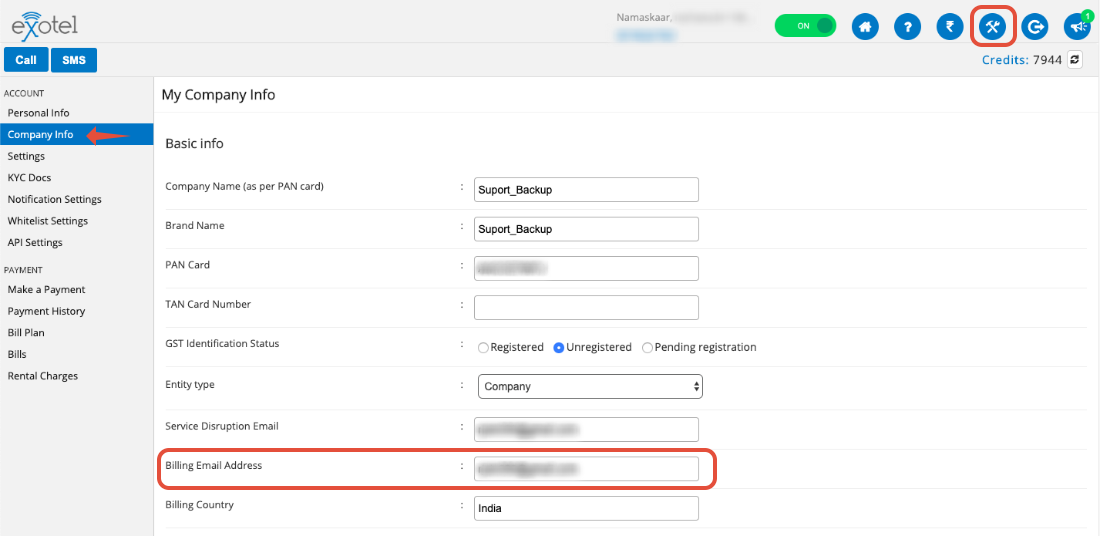
- Folks who choose to register can add their email IDs under My-Account-> My Company Info > Billing Email Address -
- All other admins in your Exotel account will receive an email with the link to the URL from where they can download the invoices.
- By chance you want to send the notifications to an email that doesn't belong to an admin, you can do so by specifying these emails in a comma-separated format here: http://my.exotel.in/Exotel/cinfo
The person who registered the account is no longer with my company. What should I do?
You can choose to remove the email ID from the billing email address. Please refer to this article for the steps. http://support.exotel.in/solution/articles/35155-how-do-i-change-the-super-admin-email
I want a hard-copy to submit to the accounting team
Considering we moved to digitally signed invoices post GST implementation in 2017 and because we think it is easier for you to just download and forward the invoice internally if needed for further approvals. Also, saving the planet!
I still want to receive the invoices by email
Ask the person who registered the account to setup email filters and forward the mails to you. The subject of our invoices in "Your Exotel bill", and you can learn more about setting up filters here: https://www.google.co.in/search?q=how+to+create+email+filters
Watch a short video
Tax invoice vs payment receipt, and where to download each
Finding your usage summary and payment history
Downloading your invoices